babel-watch-patched
Version:
Reload your babel-node app on JS source file changes. And do it *fast*.
143 lines (89 loc) • 8.59 kB
Markdown
# babel-watch
Reload your babel-node app on JS source file changes. And do it *fast*.
## Why should I use it?
If you're tired of using [`babel-node`](https://github.com/babel/babel/tree/master/packages/babel-cli) together with [`nodemon`](https://github.com/remy/nodemon), [`babel/cli`](https://babeljs.io/docs/en/babel-cli) with `--watch` option (or similar solution). The reason why the aforementioned setup performs so badly is the startup time of `babel-node` itself. `babel-watch` only starts `babel` in the "master" process where it also starts the file watcher. The transpilation is performed in that process too. On file-watcher events, it spawns a pure `node` process and passes transpiled code from the parent process together with the source maps. This allows us to avoid loading `babel` and all its deps every time we restart the JS script/app.
## Autowatch
A unique feature of `babel-watch` is capability of automatically detecting files that needs to be watched. You no longer need to specify the list of files or directories to watch for. With "autowatch" the only thing you need to do is to pass the name of your main script and `babel-watch` will start watching for the changes on files that are loaded by your node program while it is executing. (You can disable autowatch with `-D` option or exclude some directories from being watched automatically with `-x`).
## System requirements
Currently `babel-watch` is supported on Linux, OSX and Windows.
## I want it
Just install it and add to your package:
With NPM:
```bash
npm install --save-dev babel-watch
```
With Yarn:
```bash
yarn add --dev babel-watch
```
(Make sure you have `babel-core` installed as dependency in your project as `babel-watch` only defines `babel-core` as a "peerDependency")
Then use `babel-watch` in your `package.json` in scripts section like this:
```json
"scripts": {
"start": "babel-watch src/main.js"
}
```
## Options
`babel-watch` was made to be compatible with `babel-node` and `nodemon` options. Not all of them are supported yet, here is a short list of supported command line options:
```
-d, --debug [port] Start debugger on port
-B, --debug-brk Enable debug break mode
-I, --inspect Enable inspect mode
-X, --inspect-brk [address] Enable inspect break mode
-o, --only [globs] Matching files will be transpiled
-i, --ignore [globs] Matching files will not be transpiled
-e, --extensions [extensions] List of extensions to hook into [.es6,.js,.es,.jsx]
-p, --plugins [string]
-b, --presets [string]
-w, --watch [dir] Watch directory "dir" or files. Use once for each directory or file to watch
-x, --exclude [dir] Exclude matching directory/files from watcher. Use once for each directory or file.
-L, --use-polling In some filesystems watch events may not work correcly. This option enables "polling" which should mitigate this type of issues
-D, --disable-autowatch Don't automatically start watching changes in files "required" by the program
-H, --disable-ex-handler Disable source-map-enhanced uncaught exception handler. (you may want to use this option in case your app registers a custom uncaught exception handler)
-m, --message [string] Set custom message displayed on restart (default is ">>> RESTARTING <<<")
```
While the `babel-watch` process is running you may type "rs" and hit return in the terminal to force reload the app.
### Example usage:
In most of the cases you would rely on "autowatch" to monitor all the files that are required by your node application. In that case you just run:
```bash
babel-watch app.js
```
If you have your view templates (build with [pug](https://github.com/pugjs/pug), [mustache](https://github.com/janl/mustache.js) or any other templating library) in the directory called `views`, autowatch will not be able to detect changes in view template files (see [why](#user-content-application-doesnt-restart-when-i-change-one-of-the-view-templates-html-file-or-similar)) , so you need to pass in that directory name using `--watch` option:
```bash
babel-watch --watch views app.js
```
When you want your app not to restart automatically for some set of files, you can use `--exclude` option:
```bash
babel-watch --exclude templates app.js
```
Start the debugger
```bash
babel-watch app.js --debug 5858
```
## Demo
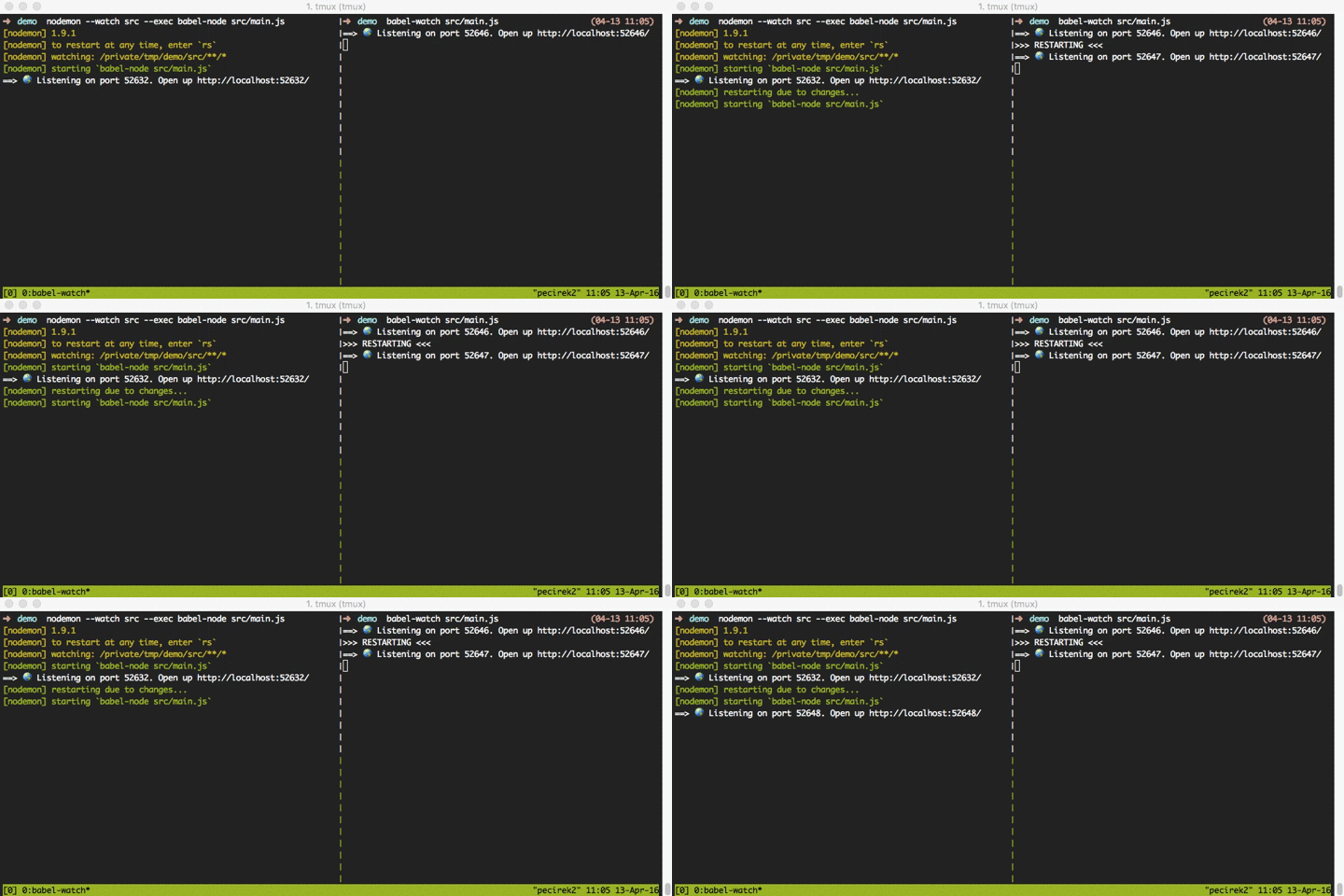
Demo of `nodemon + babel-node` (on the left) and `babel-watch` reloading simple `express` based app:
## Important information
Using `babel-node` or `babel-watch` is not recommended in production environment. For the production use it is much better practice to build your node application using `babel` and run it using just `node`.
## Babel compatibility
* `babel-watch >= 2.0.7` is compatible with `@babel/core` version `7.0.0` and above
* `babel-watch < 2.0.7 && >= 2.0.2` is compatible with `babel-core` version `6.5.1`
* `babel-watch <= 2.0.1` is compatible with `babel-core` from `6.4.x` up to `6.5.0`
*(This is due to the babel's "option manager" API change in `babel-core@6.5.1`)*
## Troubleshooting
#### Application doesn't restart automatically
There are a couple of reasons that could be causing that:
1. You filesystem configuration doesn't trigger filewatch notification (this could happen for example when you have `babel-watch` running within docker container and have filesystem mirrored). In that case try running `babel-watch` with `-L` option which will enable polling for file changes.
2. Files you're updating are blacklisted. Check the options you pass to babel-watch and verify that files you're updating are being used by your app and their name does not fall into any exclude pattern (option `-x` or `--exclude`).
#### Application doesn't restart when I change one of the view templates (html file or similar):
You perhaps are using autowatch. Apparently since view templates are not loaded using `require` command but with `fs.read` instead, therefore autowatch is not able to detect that they are being used. You can still use autowatch for all the js sources, but need to specify the directory name where you keep your view templates so that changes in these files can trigger app restart. This can be done using `--watch` option (e.g. `babel-watch --watch views app.js`).
#### I'm getting an error: *Cannot find module 'babel-core'*
`babel-watch` does not have `babel-core` listed as a direct dependency but as a "peerDependency". If you're using `babel` in your app you should already have `babel-core` installed. If not you should do `npm install --save-dev babel-core`. We decided not to make `babel-core` a direct dependency as in some cases having it defined this way would make your application pull two versions of `babel-core` from `npm` during installation and since `babel-core` is quite a huge package that's something we wanted to avoid.
#### Every time I run a script, I get a load of temporary files clogging up my project root
`babel-watch` creates a temporary file each time it runs in order to watch for changes. When running as an npm script, this can end up putting these files into your project root. This is due to an [issue in npm](https://github.com/npm/npm/issues/4531) which changes the value of `TMPDIR` to the current directory. To fix this, change your npm script from `babel-watch ./src/app.js` to `TMPDIR=/tmp babel-watch ./src/app.js`.
#### I'm getting `regeneratorRuntime is not defined` error when running with babel-watch but babel-node runs just fine
The reason why you're getting the error is because the babel regenerator plugin (that gives you support for async functions) requires a runtime library to be included with your application. You will get the same error when you build your app with `babel` first and then run with `node`. It works fine with `babel-node` because it includes `babel-polyfill` module automatically whenever it runs your app, even if you don't use features like async functions (that's one of the reason why its startup time is so long). Please see [this answer on stackoverflow](http://stackoverflow.com/a/36821986/1665044) to learn how to fix this issue
#### Still having some issues
Try searching over the issues on GitHub [here](https://github.com/kmagiera/babel-watch/issues). If you don't find anything that would help feel free to open new issue!
## Contributing
All PRs are welcome!