aya-store
Version:
106 lines (72 loc) • 2.98 kB
Markdown
# aya-store
## 一、**使用前** Before Using:
在微信小程序的根目录下,输入
```
npm init
```
让npm托管小程序根目录(如果已经被npm覆盖,则不需要)
> **⚠️ Q:为什么要这样?**
> >**A**: 因为小程序对于运行时npm有限制,需要此包必须存在于小程序根目录的node_modules下,而不能是大部分项目的src目录,所以需要先将根目录托管给npm,方便正确引入第三方npm以及完成微信开发者工具的构建工作。
## 二、**安装** Installation:
#### 1, 在小程序根目录下输入:
```
npm install aya-store --save
```
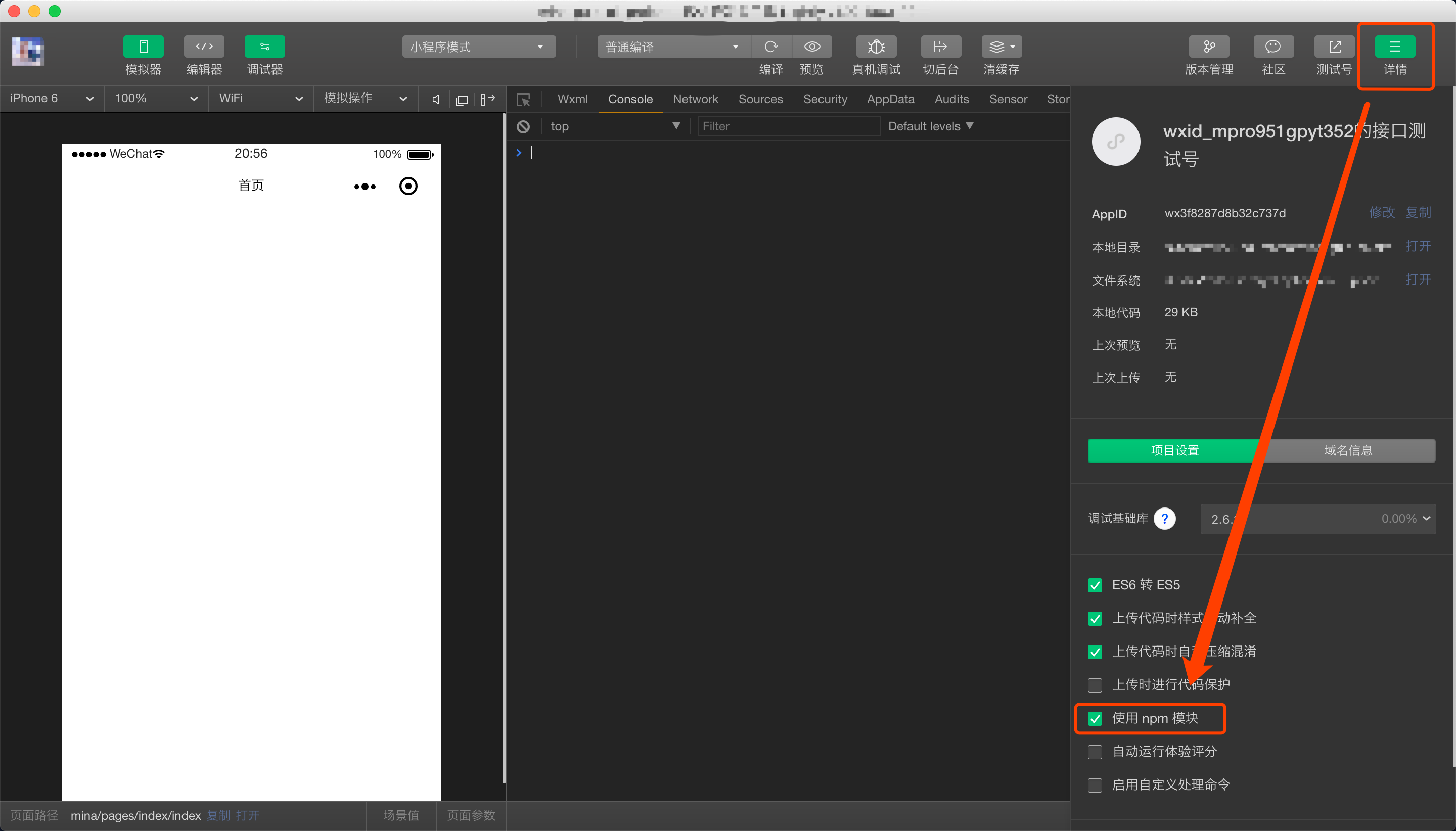
#### 2, 点击微信开发者工具右上方的【详情】-> 勾选【使用npm模块】
#### 3, 点击微信开发者工具上方任务栏中的【工具】-> 选择【构建npm】
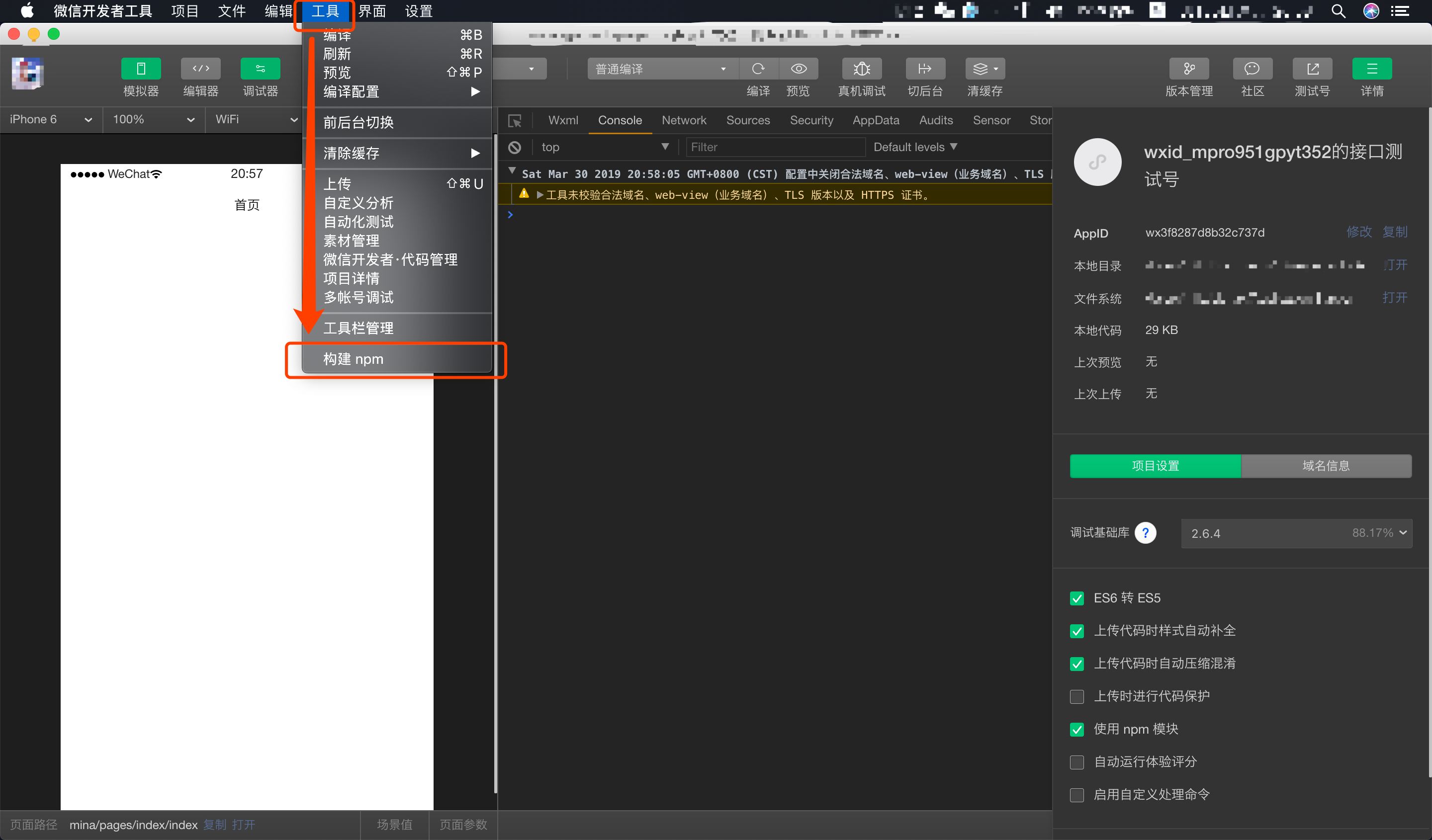
这时候小程序根目录下应有**miniprogram_npm/aya-store**和**node_modules/aya-store**两个文件夹,则表示安装成功
## 三、**使用** How to Use:
#### 1, 导入aya-store模块:
```
// app.js
import $Store from 'aya-store';
```
#### 2, 创建一个aya-store实例,绑定到getApp()上:
```
// app.js
// 🌟创建store实例
const store = new $Store();
App({
// 🌟挂载到getApp()
store: store,
// app.js自带内容
onLaunch: function () {}
})
```
#### 3, 创建store,作为每个页面/组件所要使用的目的store:
```
// 比如index.store.js
// 🌟创建对应store
export default class IndexStore {
// 关键属性values,表示将其中的值交给aya-store进行观测,也就是index页面所需要用到的状态的值。
values = {
testArr: [],
currStore: 0
}
}
```
#### 4, 在index页面,使用link()方法关联刚才创建的IndexStore状态器:
```
// index.js
// 🌟导入IndexStore
import IndexStore from './index.store';
const store = getApp().store;
// 🌟使用关键方法link()进行将页面与状态进行关联
Page(store.link(IndexStore, {
data: {},
onLoad: function () {}
// and so on...
})
```
## 四、详细文档和APIs
[文档 documents](https://github.com/milobluebell/aya-store/blob/master/document/README.md)
## 五、使用案例 example:
* 小程序脚手架:[mina-gulp-cli](https://github.com/milobluebell/mina-gulp-cli)
* 小程序:Artifactory
* waiting for more...
## 六、协议 Licenses
[](https://github.com/milobluebell/mina-gulp-cli/blob/master/LICENSE)
[-blue.svg)](https://github.com/996icu/996.ICU/blob/master/LICENSE)
[](https://996.icu)