aws-iam-policy-tool
Version:
AWS IAM role/policy management cli tool
229 lines (168 loc) • 6.58 kB
Markdown
# AWS IAM Policy tool
[![NPM Version][npm-image]][npm-url]
[](https://travis-ci.org/tilfin/aws-iam-policy-tool)
A cli tool to manage AWS IAM roles and the policies is useful to operate their definitions as JSON files.
* Supports exporting roles/policies your AWS Account has already registered, importing new roles/policies, and validating whether them on AWS to equal the definitions at local.
* Supports a **Role** with only **Managed Policies**, without **Inline policies** purposely
* Supports the feature to substitute variables (ex `ACCOUNT_ID`, `ENV`) contained within definitions by given values
* This module could also be used as a library.
## Role/Policy definition file
A definition is saved as JSON file that is like to be displayed by the editor on AWS Management Console.
Each JSON filename must be based on the name of *Role* or *Policy*.
### Role
* `Role`
* `RoleName`
* `Path`
* `AssumeRolePolicyDocument` manifests the trust relationship.
* `Description` (optional)
* `AttachedPolicies` contains attached managed policies.
#### yourapp-ec2-api-ENV.json
```json
{
"Role": {
"RoleName": "yourapp-ec2-api-ENV",
"Path": "/",
"AssumeRolePolicyDocument": {
"Version": "2012-10-17",
"Statement": [
{
"Effect": "Allow",
"Principal": {
"Service": "ec2.amazonaws.com"
},
"Action": "sts:AssumeRole"
}
]
}
},
"AttachedPolicies": [
{
"PolicyName": "yourapp-s3-storage-ENV",
"PolicyArn": "arn:aws:iam::ACCOUNT_ID:policy/yourapp-s3-storage-ENV"
}
]
}
```
### Policy
A filename minus the extension (.json) decides the policy name.
#### yourapp-s3-storage-ENV.json
```json
{
"Policy": {
"PolicyName": "yourapp-s3-storage-ENV",
"Path": "/"
},
"Document": {
"Version": "2012-10-17",
"Statement": [
{
"Effect": "Allow",
"Action": [
"s3:PutObject",
"s3:GetObject",
"s3:DeleteObject"
],
"Resource": "arn:aws:s3:::yourapp-storage-ENV/*"
}
]
}
}
```
See an [example](example) of *Role* and *Policy* definitions.
If you encounter `[WARN] policy-file.json : This policy definition is old version.` message, upgrade your policy definition files to new version.
There is [example/upgrade_policy.js](example/upgrade_policy.js) for the conversion script.
## Install
* Require Node.js 8.10 or later
```
$ npm install -g aws-iam-policy-tool
```
## Usage
```
$ awsiamtool --help
Usage: awsiamtool [options] [command]
AWS IAM export/import policy/role management tool
Options:
-V, --version output the version number
-h, --help output usage information
Commands:
export-policy <dir> <matcher> export polies to target directory
export-role <dir> <matcher> export roles to target directory
import-policy <dir> import policies from target directory
import-role <dir> import policies from target directory
validate-policy <dir> validate policies with target directory
validate-role <dir> validate roles with target directory
delete-policy <matcher> delete policies specified regular expression matches
help [cmd] display help for [cmd]
```
### Common command options
```
Options:
-j, --json output result as JSON text
-p, --plain output result as plain text
-h, --help output usage information
```
### Set substitution variables
* `-i, --account-id [aws account id]` set variable ACCOUNT_ID
* `-e, --env [environment]` set variable ENV
The above variables are substituted by given values in the name of *role* file, the name of *policy* file and all values of their JSON.
### Export roles
```
$ awsiamtool export-role /tmp/current_roles
```

### Export policies
```
$ awsiamtool export-policy /tmp/current_policies
```

### Import roles
```
$ awsiamtool import-role -i <AWS Account ID> -e <Environment> exmaple/roles
```

### Import policies
* `-f, --overwrite` overwrite new content of policies. If it isn't specified, current policies are kept and new policy that does not exist is created.
```
$ awsiamtool import-policy -i <AWS Account ID> -e <Environment> [--overwrite] exmaple/policies
```

### Validate roles
```
$ awsiamtool validate-role -i <AWS Account ID> -e <Environment> exmaple/roles
```

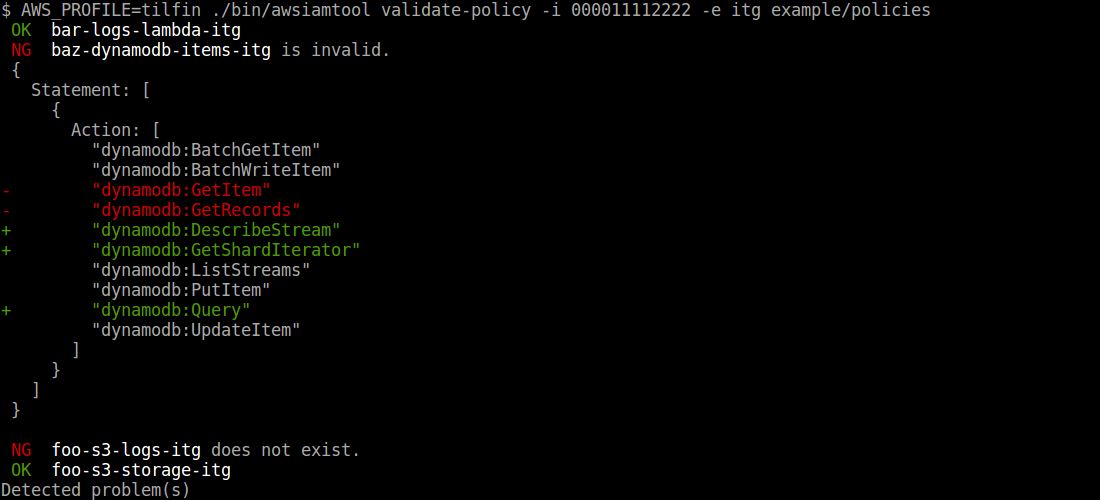
### Validate policies
```
$ awsiamtool validate-policy -i <AWS Account ID> -e <Environment> exmaple/policies
```
### Delete policies
```
$ awsiamtool delete-policy "^myservice\-"
```
## Use as a library
The name of variable to substitute within the definitions must be to match the regular expression `/^[A-Z][A-Z0-9_]+$/`.
It can also be like Shell variables (ex. `$FOO`, `${BAR_NAME}`).
```js
const awsIamPolicyLib = require('aws-iam-policy-tool');
const opts = {
json: true,
overwrite: true
};
const varSets = {
ACCOUNT_ID: '000011112222',
ENV: 'stg',
COMMON_ACCOUNT_ID: '333344445555',
COMPANY_NAME: 'awesome'
};
awsIamPolicyLib.importPolicy('./policies', varSets, opts);
.then(() => {
return awsIamPolicyLib.importRole('./roles', varSets, opts);
})
.then(() => { console.info('Importing done') })
.catch(err => { console.error(err) });
```
## License
[MIT](LICENSE)
[npm-image]: https://img.shields.io/npm/v/aws-iam-policy-tool.svg
[npm-url]: https://npmjs.org/package/aws-iam-policy-tool