aws-es-kibana
Version:
AWS ElasticSearch/Kibana Proxy
56 lines (29 loc) • 2.3 kB
Markdown
[](https://badge.fury.io/js/aws-es-kibana) 
[](https://registry.hub.docker.com/v2/repositories/santthosh/aws-es-kibana/stars/count/)
[](https://heroku.com/deploy?template=https://github.com/santthosh/aws-es-kibana)
# AWS ES/Kibana Proxy
AWS ElasticSearch/Kibana Proxy to access your [AWS ES](https://aws.amazon.com/elasticsearch-service/) cluster.
This is the solution for accessing your cluster if you have [configured access policies](http://docs.aws.amazon.com/elasticsearch-service/latest/developerguide/es-createupdatedomains.html#es-createdomain-configure-access-policies) for your ES domain
## Usage
Install the npm module
npm install -g aws-es-kibana
Set AWS credentials
export AWS_ACCESS_KEY_ID=XXXXXXXXXXXXXXXXXXX
export AWS_SECRET_ACCESS_KEY=XXXXXXXXXXXXXXXXXXX
Run the proxy (do not include the `http` or `https` from your `cluster-endpoint` or the proxy won't function)
aws-es-kibana <cluster-endpoint>
Where cluster-endpoint can be either a URL (i.e. https://search-xxxxx.us-west-2.es.amazonaws.com) or a hostname (i.e. search-xxxxx.us-west-2.es.amazonaws.com).
Alternatively, you can set the _AWS_PROFILE_ environment variable
AWS_PROFILE=myprofile aws-es-kibana <cluster-endpoint>
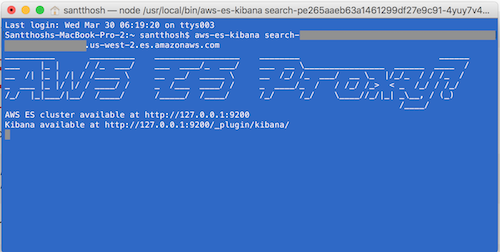
Example with hostname as cluster-endpoint:
### Run within docker container
If you are familiar with Docker, you can run `aws-es-kibana` within a Docker container
You can pull the official container for use
docker pull santthosh/aws-es-kibana:latest
(or) Build the image
docker build -t aws-es-kibana .
Run the container (do not forget to pass the required environment variables)
docker run -e AWS_ACCESS_KEY_ID -e AWS_SECRET_ACCESS_KEY -p 127.0.0.1:9200:9200 aws-es-kibana -b 0.0.0.0 <cluster-endpoint>
## Credits
Adopted from this [gist](https://gist.github.com/nakedible-p/ad95dfb1c16e75af1ad5). Thanks [@nakedible-p](https://github.com/nakedible-p)