aws-cfm-utils
Version:
AWS utils to deploy cloudformation stack/templates
352 lines (255 loc) • 19.2 kB
Markdown
# AWS CLOUDFORMATION UTILS
## NPM module to create and/or update cloudformation stacks
[](https://codecov.io/gh/marcincuber/aws-cfm-utils)
[](https://travis-ci.org/marcincuber/aws-cfm-utils)
[](https://snyk.io/test/github/marcincuber/aws-cfm-utils?targetFile=package.json)
[](https://badge.fury.io/js/aws-cfm-utils)
[](https://github.com/marcincuber/aws-cfm-utils)
[](https://david-dm.org/marcincuber/aws-cfm-utils)
[](https://david-dm.org/marcincuber/aws-cfm-utils?type=dev)
[](https://www.npmjs.com/~marcincuber)
[](https://app.fossa.io/projects/git%2Bgithub.com%2Fmarcincuber%2Faws-cfm-utils?ref=badge_shield)
# Table of Contents
* [Installation](#installation)
* [Usage](#usage)
* [CLI Options](#cli-options)
* [CLI Examples](#cli-examples)
* [Read File Support](#read-from-file)
* [Parameter Options](#parameter-options)
* [Global Parameters](#global-parameters)
* [Create Stack Parameters](#create-stack-parameters)
* [Update Stack Parameters](#update-stack-parameters)
* [Additional Stack Parameters](#additional-stack-parameters)
* [CLI's Environment Variables](#environment-variables)
* [MFA + Assume Role](#mfa)
* [AWS Credential Info](#credentials)
* [Tests](#tests)
* [Unit Tests](#unit-tests)
* [Linting](#eslint)
* [Node Modules Security](#nsp)
* [Coverage](#coverage)
* [Build Server](#build-server)
* [Software License Scanning](#license-scan)
* [Requirements and Dependencies](#requirements-dependencies)
* [Dependencies](#prod-dependencies)
* [DevDependencies](#dev-dependencies)
* [Troubleshoot](#troubleshoot)
* [Contact](#contact)
## Purpose of aws-cfm-utils cli
Deployment of Cloudformation stacks/templates through an automated pipeline requires you to face a challenge of creating a CloudFormation stack on the first run and later only update it in the following pipeline runs. AWS CLI will not let you do it with a single command! Additionally, stack status not reported at any point when you try to create-stack or update-stack using AWS CLI. `aws-cfm-utils` cli resolves all those limitations.
`aws-cfm-utils` creates or updates a CloudFormation stack without additional commands being used. If no updates are to be performed, no error is thrown. `aws-cfm-utils` behaves exactly as the AWS CLI regarding input values, output will be different. Also, improved handling of stack-status reporting during the deployment process is available.
## Installation <a name="installation"></a>
```
npm install -g aws-cfm-utils
```
## Usage <a name="usage"></a>
```
Usage: aws-cfm-utils [options]
Help: aws-cfm-utils --help
Version: aws-cfm-utils --version
```
## CLI Options <a name="cli-options"></a>
```
Options:
--stack-name [string] [required]
--template-body [string]
--stack-policy-body [string]
--accesskeyid [string]
--secretkey [string]
--sessiontoken [string]
--parameters [array]
--tags [array]
--region [string] [default: "eu-west-1"]
--capabilities [array] [choices: "CAPABILITY_NAMED_IAM", "CAPABILITY_IAM", "CAPABILITY_AUTO_EXPAND"]
--profile [string]
--role-arn [string]
--resource-types [array]
--disable-rollback [boolean]
--template-url [string]
--stack-policy-url [string]
--notification-arns [array]
--timeout-in-minutes [number]
--on-failure [string] [choices: "DO_NOTHING", "ROLLBACK", "DELETE"]
--use-previous-template [boolean]
--stack-policy-during-update-body [string]
--stack-policy-during-update-url [string]
--enable-termination-protection [boolean]
--suspend-scheduled-actions [boolean] [default: true]
--stack-events [boolean]
--refresh-rate [number] [default: 15]
-v, --version Show version number [boolean]
-h, --help Show help [boolean]
```
### CLI Examples <a name="cli-examples"></a>
```
1. aws-cfm-utils --stack-name stackname --template-body cfmtemplate --stack-policy-body stackpolicy --region eu-west-1 --enable-termination-protection true --refresh-rate 30
2. aws-cfm-utils --stack-name mynewstack --template-body file://test/fixtures/template.json --stack-policy-body file://test/fixtures/stackpolicy.json --enable-termination-protection true --region eu-west-1 --parameters file://test/fixtures/parameters.json --tags Key=TestTag,Value=TestTagValue Key=TestTag2,Value=TestTagValue2 Key=TestTag3,Value=TestTagValue4
3. aws-cfm-utils --stack-name mynewstack --template-body file://test/fixtures/template.json --stack-policy-body file://test/fixtures/stackpolicy.json --enable-termination-protection true --region eu-west-1 --parameters file://test/fixtures/parameters.json --tags file://test/fixtures/tags.json
4. aws-cfm-utils --stack-name mynewstack --template-body file://test/fixtures/template.json --stack-policy-body file://test/fixtures/stackpolicy.json --enable-termination-protection --region eu-west-1 --parameters ParameterKey=TestName,ParameterValue=TestKey ParameterKey=TestName2,ParameterValue=TestKey2
// More complicated ParameterValues in the following two examples, ensure to escape double quotes
5. aws-cfm-utils --stack-name mynewstack --template-body file://test/fixtures/template.json --stack-policy-body file://test/fixtures/stackpolicy.json --enable-termination-protection --parameters ParameterKey=TestName,ParameterValue=\"subnet1,subnet2,subnet3\" ParameterKey=TestName2,ParameterValue=TestKey2
6. aws-cfm-utils --stack-name mynewstack --template-body file://test/fixtures/template.json --stack-policy-body file://test/fixtures/stackpolicy.json --no-enable-termination-protection --parameters ParameterKey=vpc,ParameterValue=\"vpcid=12345,vpceid=12345\" ParameterKey=TestName2,ParameterValue=TestKey2
// More complicated TagValue in the following two examples, ensure to escape double quotes
7. aws-cfm-utils --stack-name mynewstack --template-body file://test/fixtures/template.json --stack-policy-body file://test/fixtures/stackpolicy.json --enable-termination-protection --parameters ParameterKey=TestName,ParameterValue=\"subnet1,subnet2,subnet3\" ParameterKey=TestName2,ParameterValue=TestKey2 --tags Key=TestTag,Value=TestTagValue Key=s3buckets,Value=\"s3://bucket_name1/....,s3://bucket_name2/....\"
8. aws-cfm-utils --stack-name mynewstack --template-body file://test/fixtures/template.json --stack-policy-body file://test/fixtures/stackpolicy.json --no-enable-termination-protection --parameters ParameterKey=vpc,ParameterValue=\"vpcid=12345,vpceid=12345\" ParameterKey=TestName2,ParameterValue=TestKey2 --tags Key=s3bucket,Value=\"S3link=s3://bucket_name/....,S3name=bucket_name\"
// Using AccessKeyID and SecretKey credentials
9. aws-cfm-utils --stack-name mynewstack --template-body file://test/fixtures/template.json --stack-policy-body file://test/fixtures/stackpolicy.json --no-enable-termination-protection --parameters file://test/fixtures/parameters.json --tags file://test/fixtures/tags.json --accesskeyid A12389sasfas123A --secretkey /+-sadasd213123,123asdPOhrP9+4xW8z7v3h --stack-events
// Using profile from your aws config
10. aws-cfm-utils --stack-name mynewstack --template-body file://test/fixtures/template.json --stack-policy-body file://test/fixtures/stackpolicy.json --no-enable-termination-protection --parameters file://test/fixtures/parameters.json --tags file://test/fixtures/tags.json --profile yourprofilname --stack-events
```
In general, please use `/"your_values/"` for `--parameters` or `--tags` to ensure your values include all the special characters.
### Read from file support <a name="read-from-file"></a>
The following CLI options support `read file from disk`:
``--tempate-body --stack-policy-body --parameters --tags``
Simply use the ``file://{DIR_FILENME}``. See section above for examples.
## Parameter Options <a name="parameter-options"></a>
### Global parameters ([AWS CLI Docs](http://docs.aws.amazon.com/cli/latest/topic/config-vars.html#general-options)): <a name="global-parameters"></a>
```
--accesskeyid
--secretkey
--profile
--region // defaults to Ireland region eu-west-1
```
Note: you can either specify `profile` value or `accesskeyid` && `secretkey`. Otherwise error is returned. More about credential in `Credential settings` section.
### Used during creation of the stack, otherwise ignored ([create-stack](http://docs.aws.amazon.com/cli/latest/reference/cloudformation/create-stack.html)): <a name="create-stack-parameters"></a>
```
--enable-termination-protection | --no-enable-termination-protection
--disable-rollback | --no-disable-rollback
--timeout-in-minutes
--on-failure
```
### Used during update of the stack, otherwise ignored ([update-stack](http://docs.aws.amazon.com/cli/latest/reference/cloudformation/update-stack.html)): <a name="update-stack-parameters"></a>
```
--use-previous-template | --no-use-previous-template
--stack-policy-during-update-body
--stack-policy-during-update-url
```
### Addional Custom options for update-stack, create-stack and delete-stack: <a name="additional-stack-parameters"></a>
In order to see all the `CloudFormation Stack Events` happening during update/create process. Use the following option;
```
--stack-events // if not specified only stack status is shown
```
Example log output when `--stack-events` is specified. It is very similar to what we see in the AWS Console:
```
Stack Events for stack: mynewstack
-----------------------------------------------------------------------------------------------------------------------------
TimeStamp ResourceStatus Type LogicalID Reason
--------------------------------------- ------------------ -------------------------- -------------------- --------------
Sun May 13 2018 03:51:17 GMT+0100 (BST) UPDATE_COMPLETE AWS::EC2::NetworkAcl PrivateNetworkAcl
Sun May 13 2018 03:51:17 GMT+0100 (BST) UPDATE_IN_PROGRESS AWS::EC2::NetworkAcl PrivateNetworkAcl
Sun May 13 2018 03:51:16 GMT+0100 (BST) UPDATE_COMPLETE AWS::EC2::Subnet PublicSubnet1
Sun May 13 2018 03:51:16 GMT+0100 (BST) UPDATE_COMPLETE AWS::EC2::Subnet PublicSubnet2
Sun May 13 2018 03:51:16 GMT+0100 (BST) UPDATE_COMPLETE AWS::EC2::Subnet PrivateSubnet2
Sun May 13 2018 03:51:15 GMT+0100 (BST) UPDATE_COMPLETE AWS::EC2::RouteTable PrivateRouteTable1
Sun May 13 2018 03:51:15 GMT+0100 (BST) UPDATE_COMPLETE AWS::EC2::Subnet PrivateSubnet1
Sun May 13 2018 03:51:15 GMT+0100 (BST) UPDATE_COMPLETE AWS::EC2::RouteTable PublicRouteTable
Sun May 13 2018 03:51:15 GMT+0100 (BST) UPDATE_COMPLETE AWS::EC2::RouteTable PrivateRouteTable2
...
```
To customise CLI's refresh rate of logging use;
```
--refresh-rate // takes value in seconds, it is optional and default value is 15 seconds
```
### CLI's Environment variables <a name="environment-variables"></a>
CLI handles the following optional variables;
```
AWS_REGION or AWS_DEFAULT_REGION
HTTPS_PROXY
AWS_ACCESS_KEY_ID, AWS_SECRET_ACCESS_KEY and/or AWS_SESSION_TOKEN
```
CLI supports easy deployments from local or CI environments and uses `.env` if available.
Create a `.env` file in the root directory of your project. Add environment-specific variables on new lines in the form of NAME=VALUE. For example:
```
AWS_PROFILE=test
AWS_REGION=eu-west-1
```
### Multi-Factor Authentication enabled for profile <a name="mfa"></a>
In case you are using temporary credentials by assuming a role you will likely want to use it with a `mfa_serial` property, then multi-factor authentication is required. You will be prompt for input of the MFA token.
```
$ aws-cfm-utils --profile role-name --stack-name myteststack --template-body file://teststack.json
? Enter MFA token for arn:aws:iam::00000000000:mfa/marcincuber@hotmail.com: ()
{}
```
To make use of assume role you can use the following configuration;
```
# ~/.aws/credentials file
[dev-role]
aws_access_key_id = asdasdasdasdasdasdasda
aws_secret_access_key = asdasdasdasdasdasdasda
[dev-role-assume-role]
role_arn = arn:aws:iam::0000000000:role/switch-role-test
source_profile = dev-role
mfa_serial = arn:aws:iam::0000000000:mfa/marcincuber@hotmail.com
# ~/.aws/config file
[profile dev-role]
region=eu-west-1
output=json
[profile dev-role-assume-role]
region = eu-west-1
```
### Credential settings, General order of execution <a name="credentials"></a>
The AWS CLI looks for credentials and configuration settings in the following order:
1. Command line options – region, output format and profile can be specified as command options to override default settings.
2. Environment variables – AWS_ACCESS_KEY_ID, AWS_SECRET_ACCESS_KEY, and AWS_SESSION_TOKEN.
3. The AWS credentials file – located at ~/.aws/credentials on Linux, macOS, or Unix, or at C:\Users\USERNAME \.aws\credentials on Windows. This file can contain multiple named profiles in addition to a default profile.
4. The CLI configuration file – typically located at ~/.aws/config on Linux, macOS, or Unix, or at C:\Users\USERNAME \.aws\config on Windows. This file can contain a default profile, named profiles, and CLI specific configuration parameters for each.
5. Container credentials – provided by Amazon Elastic Container Service on container instances when you assign a role to your task.
6. Instance profile credentials – these credentials can be used on EC2 instances with an assigned instance role, and are delivered through the Amazon EC2 metadata service.
## Tests etc. <a name="tests"></a>
### Unit Tests <a name="unit-tests"></a>
```
npm run test
```
### Eslint <a name="eslint"></a>
```
npm run lint
```
### Node Modules security <a name="nsp"></a>
We use tool called `Snyk.io` to scan node moduless. [See Snyk.io](https://snyk.io/test/github/marcincuber/aws-cfm-utils?targetFile=package.json)
### Code Coverage <a name="coverage"></a>
Locally execute:
```
npm run coverage
```
Otherwise, `Codecov` is used to publish coverage results. [See Codecov](https://codecov.io/gh/marcincuber/aws-cfm-utils).
Codecov is uploading coverage tests to PRs directly compering it against master branch.
### Build Server <a name="build-server"></a>
Travis is used to build and test the npm module. [See Travis](https://travis-ci.org/marcincuber/aws-cfm-utils).
Travis is currently building, testing and populating results of the tests. In the future it will be publishing NPM module on merge to master.
### Software License Scanning <a name="license-scan"></a>
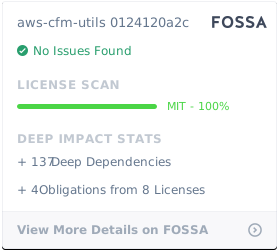
We use `FOSSA` system which helps us manage components. It is used to perform dynamic & static build analysis on code to help understand the open source components and stay compliant with software licenses. It is providing feedback on every PR so that we can say up-to-date with new issues, if any.
[See FOSSA Portal](https://app.fossa.io/projects/git%2Bgithub.com%2Fmarcincuber%2Faws-cfm-utils/refs/branch/master/bdf7145348b664c761c6a5c810dc984314a473c0)
[License Status](#license-status)
## Requirements and Dependencies <a name="requirements-dependencies"></a>
1. NODE version >= 8.10
### Dependencies <a name="prod-dependencies"></a>
1. aws-sdk
2. yargs
3. console.table
4. proxy-agent
5. dotenv
6. inquirer
[See Dependencies Status](https://david-dm.org/marcincuber/aws-cfm-utils)
### DevDependencies <a name="dev-dependencies"></a>
1. coveralls
2. eslint
3. eslint-config-standard
4. eslint-plugin-import
5. eslint-plugin-node
6. eslint-plugin-promise
7. eslint-plugin-standard
8. istanbul
9. mocha
10. sinon
[See DevDependencies Status](https://david-dm.org/marcincuber/aws-cfm-utils?type=dev)
## Troubleshoot <a name="troubleshoot"></a>
Commonly seen error is when `stack-status` is returning `undifined`. It means that your deployment `credentials are incorrectly set` or `--profile, --accesskeyid, --secretkey` were not passed.
## Generating change log <a name="trouble-troubleshoot"></a>
```
[sudo] gem install github_changelog_generator # install gem
github_changelog_generator marcincuber/aws-cfm-utils # generate for this repo
```
## Contact <a name="contact"></a>
If you have any questions, drop me an email marcincuber@hotmail.com or open an issue and leave stars! :)
## License Status <a name="license-status"></a>
[](https://app.fossa.io/projects/git%2Bgithub.com%2Fmarcincuber%2Faws-cfm-utils?ref=badge_large)