auto-resize-custom-select
Version:
Auto resize drop-down select elements to match the width of the selected option and customize it with CSS
152 lines (110 loc) • 5.45 kB
Markdown
# auto-resize-custom-select [#](https://alterebro.github.io/auto-resize-custom-select/) [](https://github.com/alterebro/auto-resize-custom-select/releases/latest)
[](https://github.com/alterebro/auto-resize-custom-select/blob/main/LICENSE) [](https://www.npmjs.com/package/auto-resize-custom-select) [](https://github.com/alterebro/auto-resize-custom-select/blob/main/dist/customSelect.min.js) [](https://twitter.com/alterebro)
> Auto-resize the width of a `select` element based on the size of the current selected `option`.
Fully customizable with CSS without the common styling limitations of a `select` element.
**customSelect**. Auto resizes drop-down `select` html elements to fit the size of the option that has been selected. It also gives you total freedom and control to style the list selector with CSS without the usual constraints on this form elements.
It creates a substitute `span` element with the `.custom-select` class, which contains two children `span` elements, with the selection value (`.selection`) and the expand figure (`.arrow`) that you can stylize as you wish.
```html
<!-- Generated markup from the <select/> element -->
<span class="custom-select">
<span class="selection">value</span>
<span class="arrow">[::after]</span>
</span>
```
## Install
```sh
$ npm i auto-resize-custom-select
```
Easiest way to install it is via **NPM** or including the minified file from the **unpkg** or **jsdelivr** CDNs.
```html
<script src="https://unpkg.com/auto-resize-custom-select"></script>
<script src="https://cdn.jsdelivr.net/gh/alterebro/auto-resize-custom-select/dist/customSelect.min.js"></script>
```
## Examples
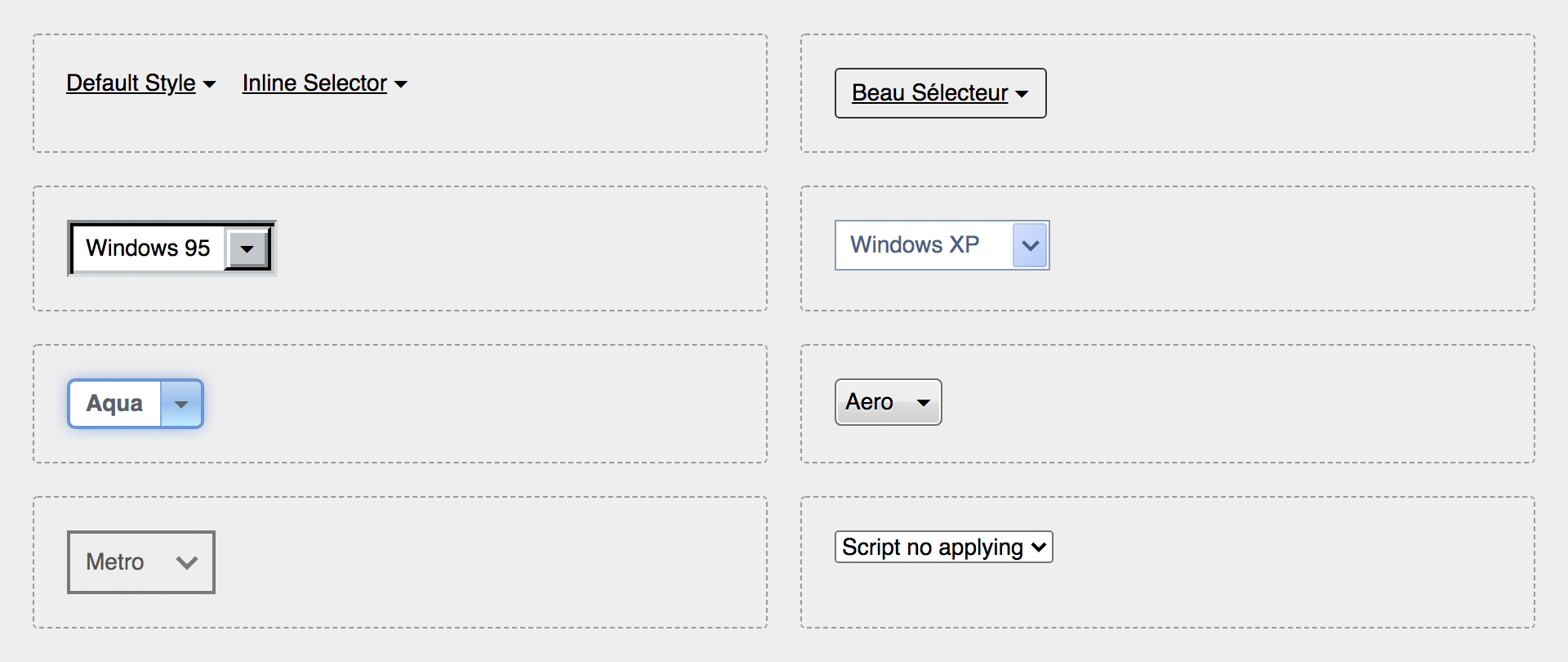
Some examples can be seen on this CodePen: https://codepen.io/alterebro/full/RwopMYp
[](https://codepen.io/alterebro/pen/RwopMYp)
## Usage
Just include it on your document and call the `customSelect` function. The script is available as ES5 minified file and as ES Module.
```html
...
<select>
<option value="1">un</option>
<option value="2">deux</option>
<option value="3">trois</option>
</select>
...
<script src="https://unpkg.com/auto-resize-custom-select"></script>
<script>
customSelect();
</script>
</body>
</html>
```
```javascript
import customSelect from 'auto-resize-custom-select';
customSelect();
```
## Options
You can set some options by passing an object as parameter to overwrite the default values:
```javascript
customSelect({
el: 'select',
className: 'custom-select',
expandChar: '\u25BE',
width: false,
injectCSS : true
});
```
### `el`
A css selector that'll pick the elements you want to be affected by the script. It defaults to **`select`** in order to take all the `<select>` elements.
### `className`
Name of the `class` that will adopt the substitute parent element. Its default name is `custom-select`. The element tree to style then result as follows:
```css
.custom-select {} /* Container Element */
.custom-select .selection {} /* span containing the selected option */
.custom-select .arrow {} /* span containing the expand element (arrow) */
.custom-select .arrow:after {} /* - it's created using the :after pseudo-element */
```
### `expandChar`
The expand character created via `content` in the `:after` pseudo-element. The default value is the CSS ISO Code `\u25BE` ( _Black down-pointing small triangle_ )
### `width`
When set to `false` (default) it will resize itself to the width of the selected option. When set to a valid css dimension value, it will have a fixed size.
### `injectCSS`
The script injects by default some CSS styles at the top of the `head` of your document in order to create a minimum acceptable design for the generated code. If you don't need it and you want to style it your way, this can be disabled by setting this property to `false`
```css
/* Default injected CSS code: */
.custom-select {
position: relative;
display: inline-flex;
align-items: center;
}
.custom-select .selection {
text-decoration: underline;
flex: 1 1 auto;
}
.custom-select .arrow:after {
content: '\u00a0\u25BE'; /* No-break Space + Expand Char */
}
.custom-select select {
all: revert;
position: absolute;
cursor: pointer;
opacity: 0;
}
```
## Development
```sh
# Source: /src/customSelect.js
# Clone the repo
$ git clone https://github.com/alterebro/auto-resize-custom-select.git
$ cd auto-resize-custom-select/
# Install dependencies
$ npm install
# Build (/dist)
$ npm run build
# Build (/docs: https://alterebro.github.io/auto-resize-custom-select/)
$ npm run docs
```
## License
[MIT](https://github.com/alterebro/auto-resize-custom-select/blob/main/LICENSE) © Jorge Moreno. [@alterebro](https://twitter.com/alterebro)