atom-user-support-helper
Version:
A helper for user support features in Atom.io
115 lines (92 loc) • 3.97 kB
Markdown
This module helps developers to create the user support features in Atom.io.
| Interactive Configuration Panel | Random Tips | Step-by-Step Tutorial|
| :------------- | :------------- | :------------- |
| 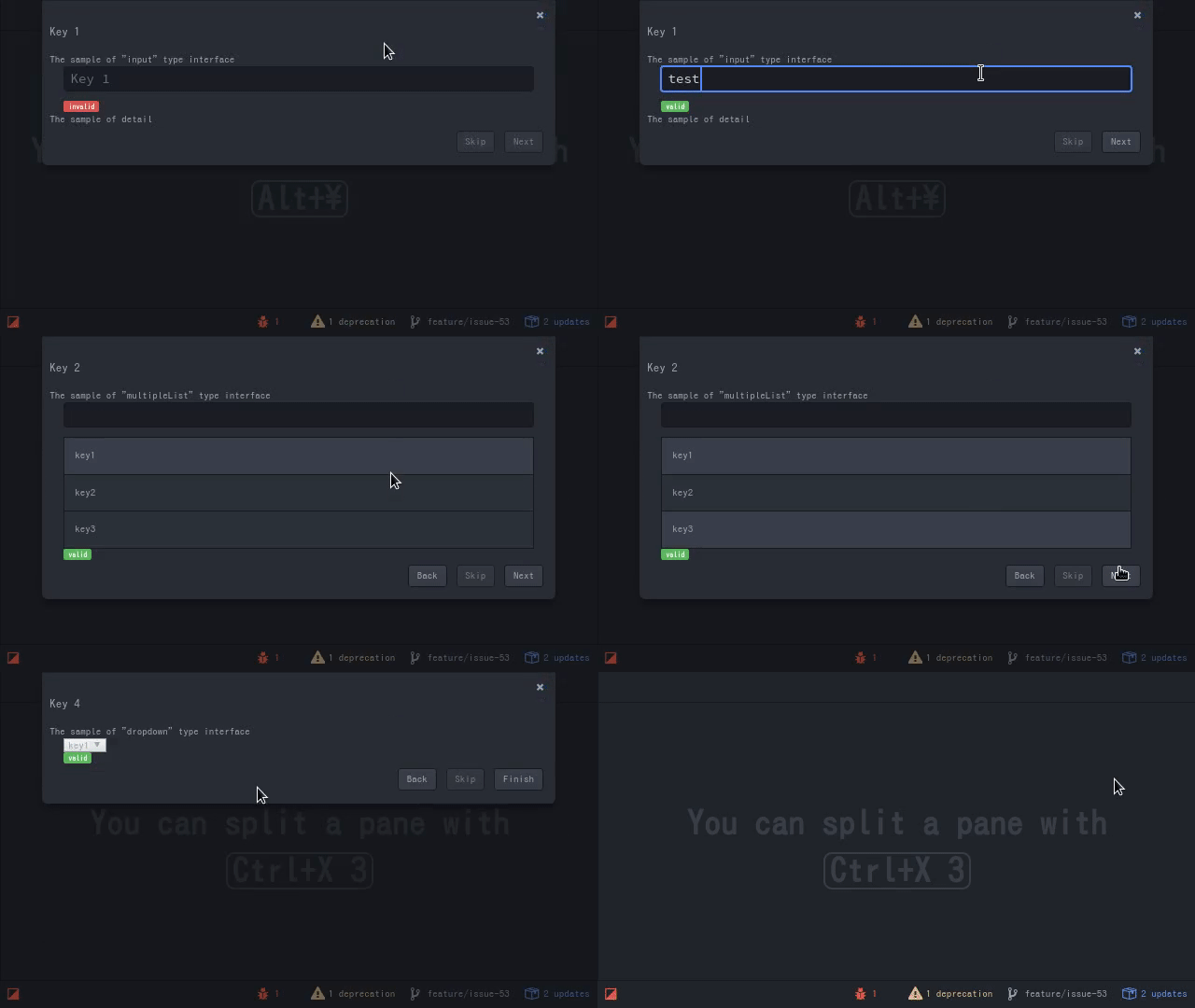 |  | WIP |
Add `atom-user-support-helper` to the `dependencies` in your `package.json` to use this module.
```json
{
"dependencies": {
'atom-user-support-helper': '>=0.0.0 <1.0.0'
}
}
```
Then, write the initialization process in your main module:
```javascript
import UserSupportHelper from 'atom-user-support-helper'
export default {
activate(state) {
const helper = new UserSupportHelper()
// Write your initialization process using `helper`
}
}
```
This feature enables users to configure the settings by using the panel.
It is useful if your package requires users to set some configurations at the beginning (e.g., the path of the command and the default value of something).
### Add Configurations
First add configuration keys to the helper:
```javascript
const helper = new UserSupportHelper()
const config = helper.getInteractiveConfigurationPanel()
config.add('atom-user-support-helper-sample.key1', {
type: 'input',
name: 'Key 1',
message: 'The sample of "input" type interface',
detail: 'The sample of "input" type interface',
default: 'key',
validate: (result) => { return (result.length !== 0) ? true: 'too short' }
})
config.add('atom-user-support-helper-sample.key2', {
type: 'multipleList',
name: 'Key 2',
message: 'The sample of "multipleList" type interface',
default: ['key1', 'key2'],
choices: ['key1', 'key2', 'key3'],
map: (result) => { return result.join(','); }
})
config.add('atom-user-support-helper-sample.key3', {
type: 'list',
name: 'Key 3',
message: 'The sample of "list" type interface',
choices: ['key1', 'key2', 'key3']
})
config.add('atom-user-support-helper-sample.key4', {
type: 'dropdown',
name: 'Key 4',
message: 'The sample of "dropdown" type interface',
default: 'key1',
choices: ['key1', 'key2', 'key3']
})
```
There are 4 types of the input interfaces, a text editor (`input`), list / multiple list (they like [the command palette](https://github.com/atom/command-palette)), and a dropdown list (`dropdown`). You can select the UI depending on a configuration.
A `validate` function checks a user's input. A `map` function converts a user's input to the configuration value.
### Show Panel
To show the panel, write:
```javascript
helper.getInteractiveConfigurationPanel().show(
['atom-user-support-helper-sample.key1', 'atom-user-support-helper-sample.key2',
'atom-user-support-helper-sample.key3', 'atom-user-support-helper-sample.key4']
).then((result) => { console.log(result) }, (err) => { console.log(err) })
```
The `show` function returns the instance of `Promise`, which contains the `Map` instance between configuration keys and these values.
This feature enables your package to show the randomly selected tips.
First add tips that you want to show:
```javascript
const helper = new UserSupportHelper()
const panel = helper.createRandomTipPanel('atom-user-support-helper-sample')
panel.add('tip1', '<h1>Tip1</h1>')
panel.add('tip2', document.createElement('div'))
```
To show the tip, write:
```javascript
panel.show()
```
[](https://github.com/HiroakiMikami/atom-user-support-helper-sample) provides the simple example of this package usage.
This software is released under the MIT License, see [LICESE.md](LICENSE.md)