arrobefr-jquery-calendar
Version:
A responsive jquery calendar scheduler built with bootstrap and moment.js
320 lines (259 loc) • 14.7 kB
Markdown
# jquery-calendar
A responsive jquery calendar scheduler built with bootstrap and moment.js
## Switch to bootstrap 4
It was released with bootstrap 4 ! [Here it is](https://github.com/ArrobeFr/jquery-calendar-bs4)
## Screenshots
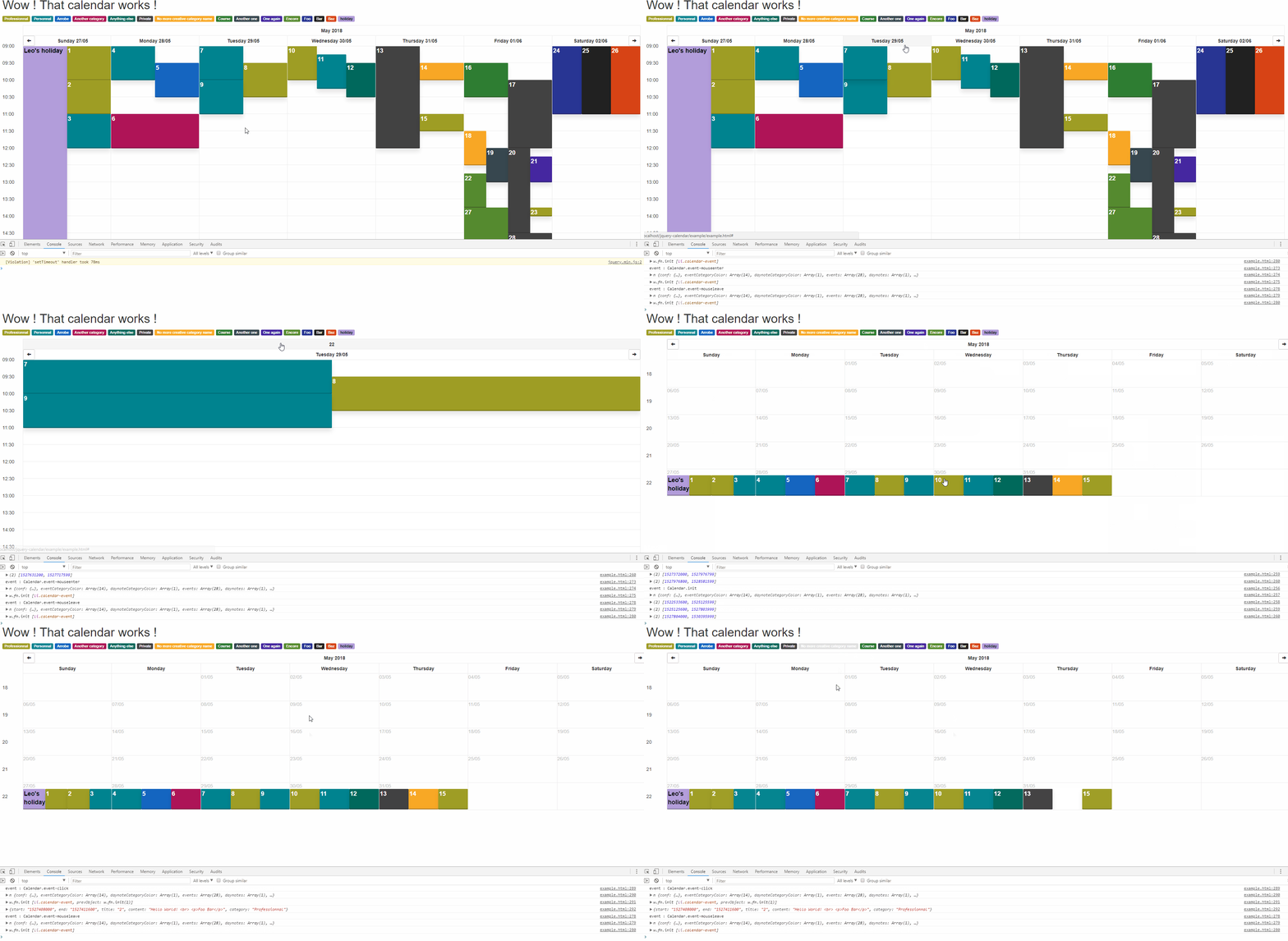
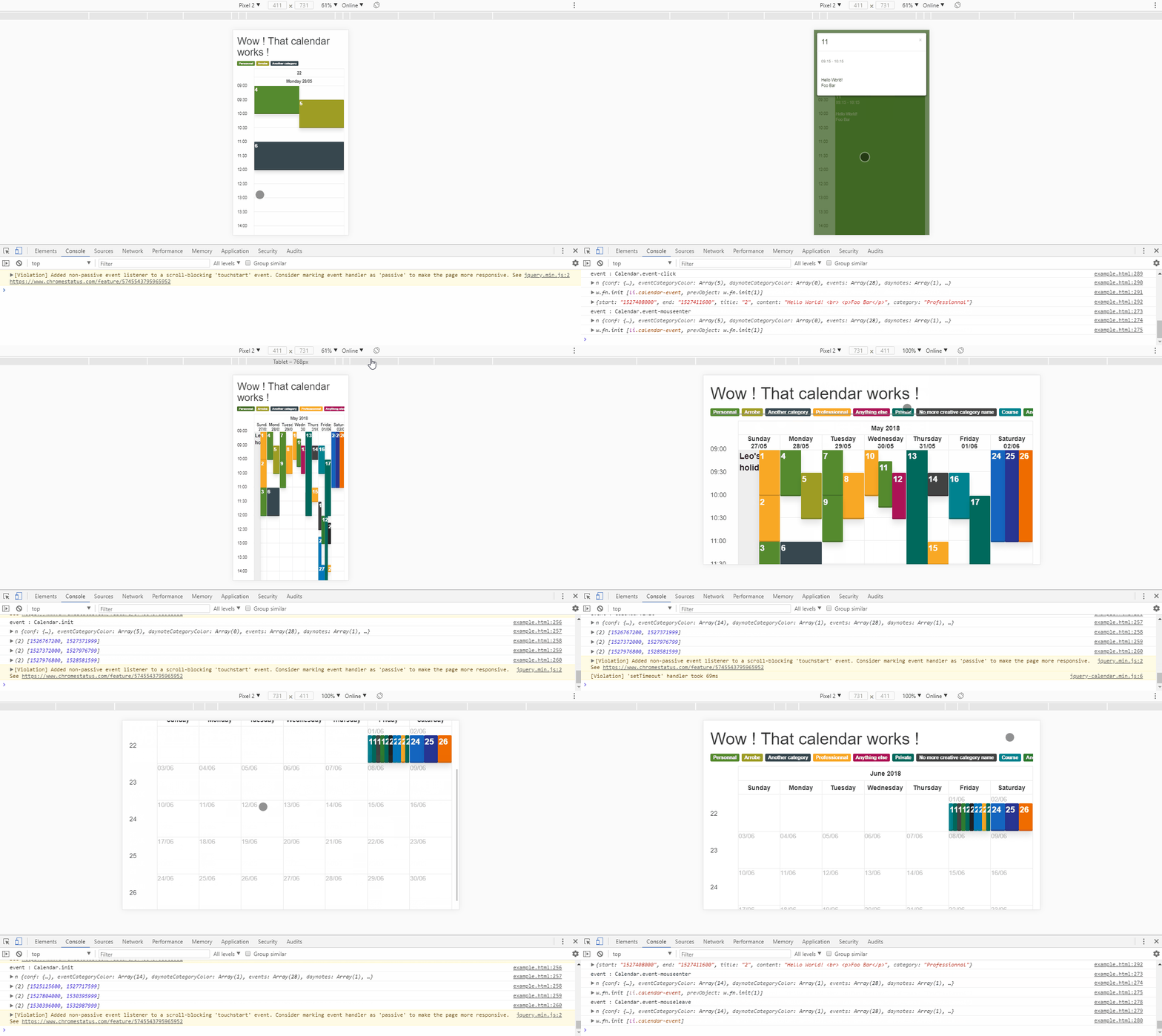
Screenshots are made using the `example/example.html`. There is events on one week only, so some parts of calendar are emtpy.
### Desktop user
### Mobile user
## Demo
[Here is a full demo](https://cdn.rawgit.com/ArrobeFr/jquery-calendar/fb7fb41a/example/demo.html)
## Installation
### Using NPM
`npm install arrobefr-jquery-calendar`
### Using a CDN
*use of the latest version on cdn.jsdelivr.net*
```html
<script src="https://cdn.jsdelivr.net/npm/arrobefr-jquery-calendar@1.0.11/dist/js/jquery-calendar.min.js"></script>
<link rel="stylesheet" href="https://cdn.jsdelivr.net/npm/arrobefr-jquery-calendar@1.0.11/dist/css/jquery-calendar.min.css">
```
## Usage
### Simple example
```html
<!DOCTYPE html>
<html lang="fr">
<head>
<meta charset="utf-8">
<meta http-equiv="X-UA-Compatible" content="IE=edge">
<meta name="viewport" content="width=device-width, initial-scale=1">
<link rel="stylesheet" href="node_modules/bootstrap/dist/css/bootstrap.min.css">
<script src="node_modules/jquery/dist/jquery.min.js"></script>
<script src="node_modules/bootstrap/dist/js/bootstrap.min.js"></script>
<script src="node_modules/moment/min/moment-with-locales.min.js"></script>
<script src="node_modules/jquery-touchswipe/jquery.touchSwipe.min.js"></script>
<script src="node_modules/arrobefr-jquery-calendar/dist/js/jquery-calendar.min.js"></script>
<link rel="stylesheet" href="node_modules/arrobefr-jquery-calendar/dist/css/jquery-calendar.min.css">
<title>Calendar</title>
</head>
<body>
<div class="container-fluid">
<div class="row">
<div class="col-xs-12">
<div id="calendar"></div>
</div>
</div>
</div>
<script>
$(document).ready(function(){
moment.locale('fr');
var now = moment();
$('#calendar').Calendar({
events: [
{ // An event on the current week on Wednesday from 10h to 12h
start: now.startOf('week').isoWeekday(3).startOf('day').add(10, 'h'),
end: now.startOf('week').isoWeekday(3).startOf('day').add(12, 'h'),
title: 'An event title !',
content: 'Hello World! <br>Foo Bar<p class="text-right">Wow this text is right aligned !</p>',
category: 'A test category name'
}
]
}).init();
});
</script>
</body>
</html>
```
## Full documentation
### HTML
Add a div somewhere that is unique, with an id for example
```html
<div id="calendar"></div>
```
### JavaScript
#### Configuration
|Argument|Type|Default value|Link / Description|
|--|--|--|--|
|`locale`|*string*|**'fr'**|[See Moment.js docs](https://momentjs.com/docs/#/i18n/changing-locale/)|
|`enableKeyboard`|*boolean*|**true**|Enables or disables the keyboard shortcuts|
|`defaultView.largeScreen`|*string*|**'week'**|Defines the default view to load for large screen, **value must be 'day', 'week', 'month'**|
|`defaultView.smallScreen`|*string*|**'day'**|Defines the default view to load for small screen, **value must be 'day', 'week', 'month'**|
|`defaultView.smallScreenThreshold`|*integer*|**1000**|Defines the threshold to consider a screen small. The value is in pixels|
|`weekday.timeline.fromHour`|*integer*|**7**|Start hour of timeline|
|`weekday.timeline.toHour`|*integer*|**20**|End hour of timeline|
|`weekday.timeline.intervalMinutes`|*integer*|**60**|The time interval of timeline ; each 5, 15, 30, 60, 120, ... minutes|
|`weekday.timeline.format`|*string*|**'HH:mm'**|The time format in timeline and modal ; [see Moment.js docs](https://momentjs.com/docs/#/parsing/string-format/)|
|`weekday.timeline.heightPx`|*integer*|**50**|The height in pixels of timeline, it must not be under the bootstrap font-size|
|`weekday.timeline.autoResize`|*boolean*|**true**|If true, it resizes the timeline if events are out of interval [fromHour;toHour]. **It will only extend time interval, it will not reduce !**|
|`weekday.dayline.weekdays`|*array*|**[1, 2, 3, 4, 5]**|The days to display ; 0 is first day of week depending of the locale ; [see Moment.js docs](https://momentjs.com/docs/#/get-set/iso-weekday/)|
|`weekday.dayline.format`|*string*|**'dddd DD/MM'**|The time format of days ; [see Moment.js docs](https://momentjs.com/docs/#/parsing/string-format/)|
|`weekday.dayline.heightPx`|*integer*|**30**|The height in pixels of dayline, it must not be under the bootstrap font-size|
|`weekday.dayline.month.format`|*string*|**'MMMM YYYY'**|The time format of month header ; [see Moment.js docs](https://momentjs.com/docs/#/parsing/string-format/)|
|`weekday.dayline.month.heightPx`|*integer*|**30**|The height in pixels of month header|
|`weekday.dayline.month.weekFormat`|*string*|**'w'**|The format of week number ; [see Moment.js docs](https://momentjs.com/docs/#/parsing/string-format/)|
|`unixTimestamp`|*integer*|**moment().format('X')**|Any timestamp in the week to display, defaults to current week|
|`event.hover.delay`|*integer*|**500**|Time to wait hover before display full event|
|`colors.events`|*array*|**[some colors from materialui]**|A set of colors used as background of events in hexadecimal format; example : `['#283593']` ; (Source colors using 800)[https://www.materialui.co/colors]|
|`colors.daynotes`|*array*|**[some colors from materialui]**|A set of colors used as background of day notes in hexadecimal format; example : `['#283593']` ; (Source colors using 200)[https://www.materialui.co/colors]|
|`colors.random`|*boolean*|**true**|Randomize the color order|
|`categories.enable`|*boolean*|**true**|Enable or disable the categories header|
|`categories.hover.delay`|*integer*|**500**|Milliseconds to wait before animation|
|`now.enable`|*boolean*|**false**|Enable or disable a `<hr>` that represents the current time (now)|
|`now.refresh`|*boolean*|**false**|Enable or disable the refresh of this `<hr>`, it follows the time|
|`now.heightPx`|*integer*|**1**|The `<hr>`'s weight|
|`now.style`|*string*|**'solid'**|The `<hr>`'s style, see [CSS border style docs](https://www.w3schools.com/cssref/pr_border-style.asp)|
|`now.color`|*string*|**'#03A9F4'**|The `<hr>`'s color|
|`events`|*array*|**[]**|An array of events object, see the docs of **Events array** below|
|`daynotes`|*array*|**[]**|An array of object, see the docs of **DayNotes array** below|
#### Events array
##### Attributes
The array of events contains objects that have these attributes :
|Attribute|Type|Description|
|--|--|--|
|`start`|*integer*|The start timestamp of event|
|`end`|*integer*|The end timestamp of event|
|`title`|*string*|Any text|
|`content`|*string*|HTML content|
|`category`|*string*|**Optionnal** if you want different colors grouped by a category or something else|
#### DayNotes array
##### Attributes
The array of events contains objects that have these attributes :
|Attribute|Type|Description|
|--|--|--|
|`time`|*integer*|Any timestamp in the day|
|`title`|*string*|Any text|
|`content`|*string*|HTML content|
|`category`|*string*|**Optionnal** if you want different colors grouped by a category or something else|
#### Functions
##### Example
```js
var calendar = $('#calendar').Calendar({...});
var result = calendar.function(); // It is just an example, replace "function" by one of the list below
```
##### Functions list
|Function|Arguments|Return|Note|
|--|--|--|--|
|`init`||*Calendar instance*|**It must be called after any modification to re-draw the calendar**|
|`getEvents`||Array of events objects|*Returns events loaded in this instance of Calendar*|
|`setEvents`|Array of events objects|*Calendar instance*|**It replaces events !**|
|`addEvents`|Array of events objects|*Calendar instance*|*It just adds events (it not replaces events)*|
|`getDaynotes`||Array of day notes objects|*Returns day notes loaded in this instance of Calendar*|
|`setDaynotes`|Array of day notes objects|*Calendar instance*|**It replaces day notes !**|
|`addDaynotes`|Array of day notes objects|*Calendar instance*|*It just adds day notes (it not replaces day notes)*|
|`getInitTime`||String : milliseconds|*It returns the time with string "ms"*|
|`getViewInterval`||Array of 2 integers (unix timestamps)|*It returns the from and to timestamp of current view*|
|`getNextViewInterval`||Array of 2 integers (unix timestamps)|*It returns the from and to timestamp of the next view (if user click or swipe to right)*|
|`getPrevViewInterval`||Array of 2 integers (unix timestamps)|*It returns the from and to timestamp of the previous view (if user click or swipe to left)*|
|`getTimestamp`||Integer : the current unix timestamp viewed||
|`setTimestamp`|Integer : a unix timestamp|*Calendar instance*|*It not affects the view, you have to call init to display the update*|
|`getView`||String : the current view|*It returns 'day', 'week' or 'month'*|
|`setView`|String : 'day' or 'week' or 'month'|*Calendar instance*|*It not affects the view, you have to call init to display the update*|
|`getEventCategoryColor`|String : any category|String : a hexadecimal color prepended by #|It affects events only. Return example : `'#C62828'`|
|`getEventCategoriesColors`||Array of objects|It affects events only. Return example : `[{category:"Personnal", color: "#FF8F00"}, {category:"Professionnal", color:"#AD1457"}]`|
|`setEventCategoriesColors`|Array of objects|*Calendar instance*|It affects events only. *See example of* `getEventCategoriesColors`|
|`getDaynoteCategoryColor`|String : any category|String : a hexadecimal color prepended by #|It affects day notes only. Return example : `'#EF9A9A'`|
|`getDaynoteCategoriesColors`||Array of objects|It affects day notes only. Return example : `[{category:"Public holiday", color: "#B39DDB"}]`|
|`setDaynoteCategoriesColors`|Array of objects|*Calendar instance*|It affects day notes only. *See example of* `getDaynoteCategoriesColors`|
|`getEventColors`||Array of strings|It affects the events only. It returns an array of hexadecimal colors prepended by a #, example : `["#FF8F00", "#9E9D24", "#EF6C00"]`|
|`setEventColors`|Array of strings|*Calendar instance*|It affects the events only. *See example of* `getEventColors`|
|`getDaynoteColors`||Array of strings|It affects the day notes only. It returns an array of hexadecimal colors prepended by a #, example : `["#FF8F00", "#9E9D24", "#EF6C00"]`|
|`setDaynoteColors`|Array of strings|*Calendar instance*|It affects the day notes only. *See example of* `getEventColors`|
#### Events
##### Example
```js
var calendar = $('#calendar').Calendar({...});
$('#calendar').on('event name', function(event, arg1, arg2, ...){...});
$('#calendar').unbind('event name').on('event name', function(event, arg1, arg2, ...){...});
```
##### Cancel default event action
Example : deactivate the click on event or day note
```js
var calendar = $('#calendar').Calendar({...});
$('#calendar').unbind('Calendar.event-click');
```
##### Events list
###### Calendar.init
- `Calendar.init`
- When
- View changes (day, week or month)
- View moves (left or right)
- Manually called by you
- Arguments
- `event`
- The jQuery event
- `instance`
- The Calendar instance
- `before`
- An array of 2 unix timestamp of the previous view (on left)
- Example on a week `[1526248800, 1526853599]`
- `current`
- An array of 2 unix timestamp of the current view
- Example on a week `[1526853600, 1527458399]`
- `after`
- An array of 2 unix timestamp of the next view (on right)
- Example on a week `[1527458400, 1528063199]`
- Example :
```js
var calendar = $('#calendar').Calendar({...});
$('#calendar').on('Calendar.init', function(event, instance, before, current, after){
console.log(event); // jQuery event
console.log(instance); // Equals to var calendar above
console.log(before); // Array of the past view interval [unixTimestampFrom, unixTimestampTo]
console.log(current); // Array of the current view interval [unixTimestampFrom, unixTimestampTo]
console.log(after); // Array of the next view interval [unixTimestampFrom, unixTimestampTo]
});
```
###### Calendar.daynote-mouseenter and Calendar.event-mouseenter
- `Calendar.daynote-mouseenter` and `Calendar.event-mouseenter`
- When
- The mouse is hover an event or a day note for a while (see `event.hover.delay` under configuration)
- Default
- Enlarge the event or day note over the others
- Arguments
- `event`
- The jQuery event
- `instance`
- The Calendar instance
- `elem`
- The jQuery element which triggered the event
- Example :
```js
var calendar = $('#calendar').Calendar({...});
$('#calendar').on('Calendar.daynote.mouseenter', function(event, instance, elem){
console.log(event); // jQuery event
console.log(instance); // Equals to var calendar above
console.log(elem); // Use elem to make an animation or somthing else
});
```
###### Calendar.daynote-mouseleave and Calendar.event-mouseleave
- `Calendar.daynote-mouseleave` and `Calendar.event-mouseleave`
- It is the same as `Calendar.daynote-mouseenter` and `Calendar.event-mouseenter` but when the mouse leave the event
- Default, restore the event or day note state before the default of `Calendar.daynote-mouseenter` and `Calendar.event-mouseenter`
###### Calendar.daynote-click and Calendar.event-click
- `Calendar.daynote-click` and `Calendar.event-click`
- When
- The user click or touch an event or a day note
- Default
- Opens a bootstrap modal to display the event
- Arguments
- `event`
- The jQuery event
- `instance`
- The Calendar instance
- `elem`
- The jQuery element which triggered the event
- `evt`
- The event object you gived which triggered the event (so you have : start, end, title, content, category, anything else if you gived more attributes)
- Example :
```js
var calendar = $('#calendar').Calendar({...});
$('#calendar').on('Calendar.daynote-click', function(event, instance, elem, evt){
console.log(event); // jQuery event
console.log(instance); // Equals to var calendar above
console.log(elem); // Use elem to make an animation or somthing else
console.log(evt); // You have all informations to display it in a modal
});
```
## Contributing
Feel free to report bugs or make a pull request ;-)