arepl
Version:
real-time python scratchpad
130 lines (83 loc) • 4.95 kB
Markdown
## AREPL: vscode edition [](https://travis-ci.org/Almenon/AREPL-vscode) [](https://marketplace.visualstudio.com/items?itemName=almenon.arepl) [](https://marketplace.visualstudio.com/items?itemName=almenon.arepl) [](https://gitter.im/arepl/lobby)
AREPL automatically evaluates python code in real-time as you type
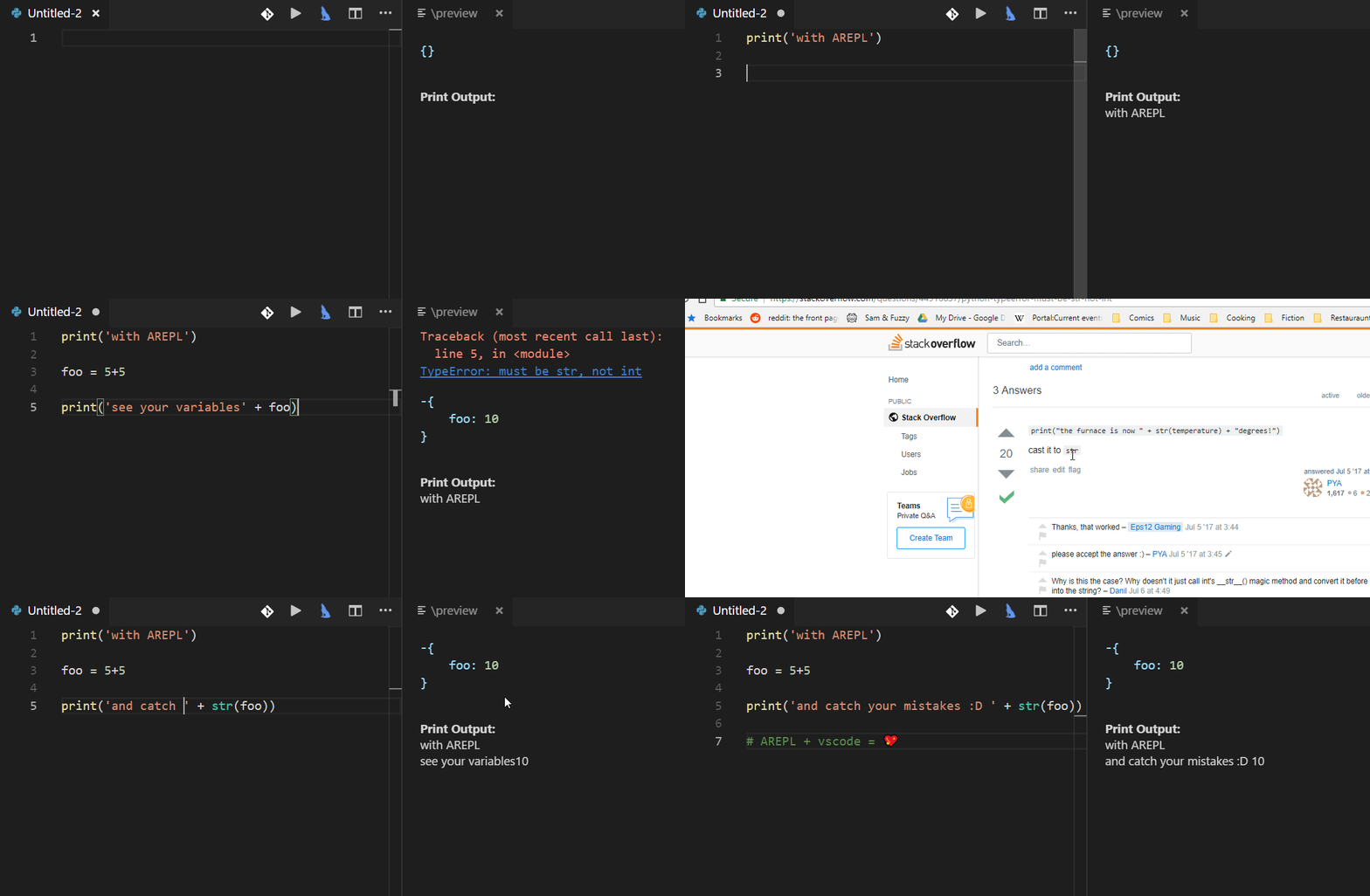
AREPL is availible from the vscode [marketplace](https://marketplace.visualstudio.com/items?itemName=almenon.arepl#overview) or as a [standalone app](https://github.com/Almenon/AREPL)
### Useage
First, make sure you have [python 3](https://www.python.org/downloads/) installed.
Open a python file and run AREPL through the command search
> control-shift-p
or use a shortcut: control-shift-a / command-shift-a
#### Features
* Real-time evaluation: no need to run - AREPL evaluates your code automatically. You can control this (or even turn it off) in the settings
* Variable display: The final state of your local variables are displayed in a collapsible JSON format
* Error display: The instant you make a mistake an error with stack trace is shown
* Settings: AREPL offers many settings to fit your user experience. Customize the look and feel, debounce time, python options, and more!
#### Misc
**dumping**
If you want to dump local variables or dump variables at a specific point in your program you can use the dump function:
```python
from arepldump import dump
def milesToKilometers(miles):
kilometers = miles*1.60934
dump() # dumps all the vars in your function
# or dump when function is called for a second time
dump(None,1)
milesToKilometers(2*2)
milesToKilometers(3*3)
for char in ['a','b','c']:
dump(char,2) # dump a var at a specific iteration
a=1
dump(a) # dump specific vars at any point in your program
a=2
```
**#$save**
If you want to avoid a section of code being executed in real-time (due to it being slow or calling external resources) you can use \#\$save. For example:
```python
def largest_prime_factor(n):
i = 2
while i * i <= n:
if n % i:
i += 1
else:
n //= i
return n
# this takes a looonnggg time to execute
result = largest_prime_factor(8008514751439999)
#$save
print("but now that i saved i am back to real-time execution")
```
```python
import random
x = random.random()
#$save
print(x) # this number will not change when editing below the #$save line
```
Please note that \#\$save [does not work](https://github.com/Almenon/AREPL-vscode/issues/53) with certain types, like generators. If #$save fails in pickling the code state [file an issue](https://github.com/Almenon/AREPL-vscode/issues) so I can look into it.
**GUIS**
You can use arepl for working with gui's like turtle or many others. Each time you edit the code the gui restarts, so to make it less annoying the typing debounce is automatically increased for a longer delay before execution. Or you can switch to execute on save. I also suggest coding it so the gui appears on the side (not blocking your view of your code), like so:
```python
import turtle
turtle.setup(width=500, height=500, startx=-1, starty=0)
turtle.forward(100)
turtle.left(90)
```
**VENV**
to use you arepl with VENV you can set the AREPL.pythonPath setting to reference the location of your venv python
**Variable Representation**
I have [overridden the display](https://github.com/Almenon/AREPL-backend/blob/master/python/customHandlers.py) of some types (like datetime) to be more readable to humans.
If you want a type to be displayed in a particular manner just [file an issue](https://github.com/Almenon/AREPL-vscode/issues)
**Imports**
Python caches imports, so even though AREPL runs with every code change the import will run only once at the start. This saves time when importing large libraries like numpy.
But you can also use this feature as a caching mechanism by moving code you only want AREPL to execute once into a different file and importing it.
If you don't want caching you can delete the library at the end of the file, like so:
```python
import library
# bla bla bla code
del sys.modules['library'] # arepl will reload import next execution
```
#### Deveveloper Setup
1. Install VSCode, python 3 and npm (if not already installed)
2. clone this repository
3. npm install
4. start debugging
see [AREPL-backend](https://github.com/Almenon/AREPL-backend) for the npm package that executes the python code