arduino-nes
Version:
A Library for connecting the serial/original nes controllers to an Arduino and node js.
179 lines (134 loc) • 4.07 kB
Markdown
# Arduino Nes
A Library for connecting the serial/original nes controllers to an Arduino and node js.
## Installation
### Node Js.
`npm install arduino-nes`
### Arduino.
Connect your arduino with an USB to your computer. Upload the code for the arduino to your arduino. See the arduino/arduino.ino
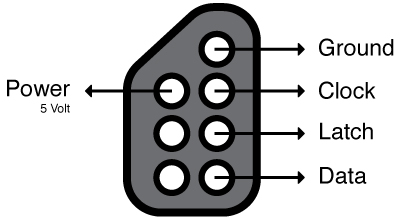
#### Schematics.
**Note: The clock, latch and data wires must be connected to a digital pin on the arduino! Not a analog one!**
## Api.
### Constructor:
* `serial` - Required.
In most cases: `dev/tty.usbmodem1d1111`
* `listen`
Start listening to the data stream from the arduino immediatly.
(default: true)
* `controllers`
An array with 1 object for every controller. The object must contain the pin for the clock, latch and the data pin.
**Example:**
`[{clock:2, latch:3, data:4}]`;
**Example with more controllers:**
```js
[
{
clock: 2,
latch: 3,
data: 4
},
{
clock: 5,
latch: 6,
data: 7
}
]
```
**Note: at this point there is no maximum number of controllers. Keep in mind that the arduino has to loop through all your controllers!**
### Functions
* `startListening`
All controllers will listening and emitting events. The event `startedListening` will be emitted.
* `stopListening`
All controllers will stop listening and emitting events. The event `stoppedListening` will be emitted.
* `isListening`
Will return a boolean. `true` if the library is listening and `false` if it doesn't.
* `disconnect`
Disconnect the library from the arduino. The arduino is after this clear to use with other programs. The event `disconnected` will be emitted when the arduino is actually disconnected.
### Events.
* `connected`
Emitted when the arduino is connected with the library.
* `disconnected`
Emitted when the arduino is disconnected from the library.
* `error(err)`
Emitted when there is an error.
* `ready`
Emitted when the controller are ready to use.
* `startedListening`
Emitted when the library has started listening for data events from the arduino. At this point the controllers can emit events.
* `stoppedListening`
Emitted when the library has stopped listening for data events from the arduino.
### Controllers
* `getStates`
Get the states of all the buttons of this controller. An object will be returned in this format:
```js
{
right: [boolean],
left: [boolean],
down: [boolean],
up: [boolean],
start: [boolean],
select: [boolean]
a: [boolean],
b: [boolean]
}
```
The boolean will be true when the button is pressed at that moment. False means that the buttons is not pressed.
#### Events.
When a button of a controller is pressed or released the controller will emit an event.
* `down`
* `downRelease`
* `up`
* `upRelease`
* `left`
* `leftRelease`
* `right`
* `rightRelease`
* `select`
* `selectRelease`
* `start`
* `startRelease`
* `a`
* `aRelease`
* `b`
* `bRelease`
**Wildcard event. Parameters: orginalEventname**
* `*` - This has the orginal event name as parameter.
### Example
```js
var Nes = require('arduino-nes');
var nes = new Nes({
serial: "/dev/tty.usbmodem1d1131", // Make sure this is set to your port!
controllers:[
{
clock: 2,
latch: 3,
data: 4
}
]
});
nes.on('error', function(){
console.log('error', arguments);
}).on('ready', function(){
console.log('ready', arguments);
}).on('connected', function(){
console.log('connected', arguments);
}).on('disconnect', function(){
console.log('disconnect', arguments);
});
// The first controller.
nes.controller[0].on('*', function(event){
console.log('controller 0:', event);
})
// When the down button is released.
Nes.controllers[0].on('down', function(){
// Do something.
});
// When the down button is released.
Nes.controllers[0].on('downReleased', function(){
// Do something.
});
// Listen for all event from the second controller.
Nes.controllers[0].on('*', function(event){
// Do something.
});
```