apprun
Version:
JavaScript library that has Elm inspired architecture, event pub-sub and components
299 lines (219 loc) • 9.62 kB
Markdown
# AppRun [![Build][travis-image]][travis-url] [![NPM version][npm-image]][npm-url] [![Downloads][downloads-image]][downloads-url] [![License][license-image]][license-url] [![twitter][twitter-badge]][twitter] [![Discord Chat][discord-image]][discord-invite]
AppRun is a JavaScript library for building reliable, high-performance web applications using the Elm inspired Architecture, events, and components.
> AppRun is an MIT-licensed open source project. Please consider [supporting the project on Patreon](https://www.patreon.com/apprun). 👍❤️🙏
## AppRun Benefits
* Write less code
* No proprietary syntax to learn
* Compiler/transpiler is optional
* State management and routing included
* Run side-by-side with jQuery, chartjs, D3, lit-html ...
Applications built with AppRun have ** fewer lines of code**, **smaller js files**, and **better performance**. See a comparison from [A Real-World Comparison of Front-End Frameworks with Benchmarks (2019 update)](https://medium.freecodecamp.org/a-realworld-comparison-of-front-end-frameworks-with-benchmarks-2019-update-4be0d3c78075). You can also see the [performance results](https://rawgit.com/krausest/js-framework-benchmark/master/webdriver-ts-results/table.html) compared to other frameworks and libraries in the [js-framework-benchmark](https://github.com/krausest/js-framework-benchmark) project.
## AppRun Book from Apress
[](https://www.amazon.com/Practical-Application-Development-AppRun-High-Performance/dp/1484240685/)
* [Order from Amazon](https://www.amazon.com/Practical-Application-Development-AppRun-High-Performance/dp/1484240685/)
## Architecture Concept
Application logic is broken down into three separate parts in the AppRun architecture.
* State (a.k.a. Model) — the state of your application
* View — a function to display the state
* Update — a collection of event handlers to update the state
AppRun ties the three parts together and drives the applications using events.
## Quick Start
AppRun is distributed on npm.
```sh
npm install apprun
```
You can also load AppRun directly from the unpkg.com CDN:
```javascript
<script src="https://unpkg.com/apprun/dist/apprun-html.js"></script>
```
Or use it as ES module from unpkg.com:
```javascript
<script type="module">
import { app, Component } from 'https://unpkg.com/apprun@next/esm/apprun-html?module';
</script>
```
## Examples
### Use AppRun in Browsers (HTML)
Below is a counter application using AppRun ([Online Demo](https://apprun.js.org/#play/6)).
```html
<html>
<head>
<meta charset="utf-8">
<title>Counter</title>
</head>
<body>
<script src="https://unpkg.com/apprun/dist/apprun-html.js"></script>
<script>
const state = 0;
const view = state => {
return `<div>
<h1>${state}</h1>
<button onclick='app.run("-1")'>-1</button>
<button onclick='app.run("+1")'>+1</button>
</div>`;
};
const update = {
'+1': state => state + 1,
'-1': state => state - 1
};
app.start(document.body, state, view, update);
</script>
</body>
</html>
```
### Web Component (lit-HTML)
Below is a counter web component using AppRun as ES module ([Online Demo](https://glitch.com/~apprun-lit-html-wc)).
```html
<html>
<head>
<meta charset="utf-8">
<title>Counter Web Component</title>
</head>
<body>
<wc-lit-html></wc-lit-html>
<script type="module">
import { app, Component, html } from 'https://unpkg.com/apprun@next/esm/apprun-html?module';
class Counter extends Component {
state = 0;
view = (state) => html`<div>
<h1>${state}</h1>
<button @click=${()=>this.run("add", -1)}>-1</button>
<button @click=${()=>this.run("add", +1)}>+1</button>
</div>`;
update =[
['add', (state, n) => state + n]
]
}
app.webComponent('wc-lit-html', Counter);
</script>
</body>
</html>
```
### TypeScript and JSX
We recommend using TypeScript and JSX. TypeScript provides [strong typing](https://medium.com/@yiyisun/strong-typing-in-apprun-78520be329c1). JSX provides more [advanced features](https://dev.to/yysun/advanced-view-features-in-apprun-17g5). For examples:
#### _ref_ function: A Map Component Using _D3.js_
```javascript
import app from 'apprun';
import * as d3 from 'd3';
import * as topojson from 'topojson';
const map = ({ datum }) => { /* D3 logic */};
const state = d3.json('world-110m.json').then(world => ({
datum: topojson.feature(world, world.objects.land)
}));
const view = state => <svg id="svg" ref={() => map(state)}></svg>;
```
#### _Embedding element_: A Chart Component Using _Chart.js_
```javascript
const view = state => {
const canvas = document.createElement('canvas');
const ctx = canvas.getContext('2d');
state.chart = new Chart(ctx, state.data);
return (
<Card header={<div>Chart JS</div>}>
<div>{canvas}</div>
</Card>
);
};
```
#### _Directive_: Animation using _animate.css_
```javascript
app.on('$', ({key, props}) => {
if (key === '$animation') {
const value = props[key];
if (typeof value === 'string') {
props.class = `animated ${value}`;
}
}
});
const view = () => <>
<img $animation={'bounce infinite'} src='logo.png' />
```
## AppRun Playground
Try the [AppRun Playground](https://apprun.js.org/#play) to see more examples.
## AppRun CLI
Use the AppRun CLI to initialize a TypeScript and webpack configured project:
```sh
npx apprun --init
npm start
```
You can also initialize a SPA project.
```sh
npx apprun --init --spa
```
To initialize a project that targets ES5, use the AppRun CLI with the --es5 flag:
```sh
npx apprun --init --spa --es5
```
## Starter Templates
Optionally, you can directly scaffold AppRun projects from the AppRun starter templates.
```sh
npx degit apprunjs/apprun-rollup my-app
npx degit apprunjs/apprun-rollup-lit-html my-app
npx degit apprunjs/apprun-webpack my-app
npx degit apprunjs/apprun-parcel my-app
npx degit apprunjs/apprun-web-components my-app
npx degit apprunjs/apprun-bootstrap my-app
npx degit apprunjs/apprun-coreui my-app
npx degit apprunjs/apprun-pwa my-app
npx degit apprunjs/apprun-pwa-workbox my-app
npx degit yysun/apprun-d3 my-app
npx degit yysun/apprun-electron my-app
npx degit yysun/apprun-electron-forge my-app
npx degit yysun/apprun-websockets my-app
npx degit yysun/apprun-websockets-sqlite my-app
```
## ES2015 by Default
In the past, the AppRun default version on npm is 1.x. The CLI creates tsconfig for es5. You can use --es6 option to create tsconfig for 2.x.
On Feb 21, 2020, the default version on npm has been changed from 1.x to 2.x. And the CLI creates tsconfig for es2015. You can use --es5 option for 1.x.
When upgrading projects to the latest version (2.x), please modify the tsconfig from targeting es5 to es2015.
Currently, the npm tags are as following:
* apprun@es5: 1.x, stable, es5
* apprun@latest: 2.x, stable, es2015, web components
* apprun@next: 3.x, dev, es2015, web components, lit-html
## Developer Tools
### CLI in Console
AppRun CLI also runs in the console.
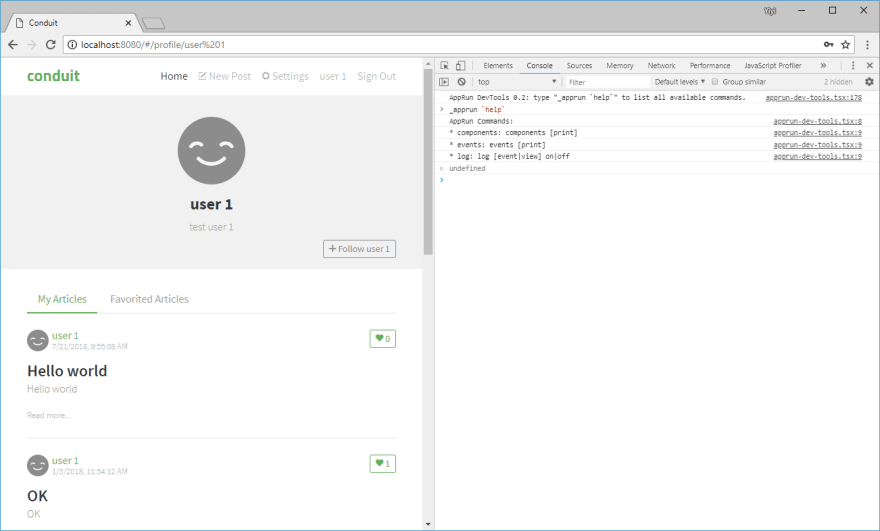
To use the AppRun dev-tools CLI, include the dev-tools script.
```JavaScript
<script src="https://unpkg.com/apprun@latest/dist/apprun-dev-tools.js"></script>
```
### Dev-Tools Extensions
AppRun supports the Redux DevTools Extension. To use the dev-tools, install the [Redux DevTools Extension](https://github.com/zalmoxisus/redux-devtools-extension). You can monitor the events and states in the devtools.

### VS Code Extension
AppRun has a code snippet extension for VS Code that you can install from the extension marketplace. It inserts the AppRun code template for application, component and event handling.

## Contribute
You can launch the webpack dev-server and the demo app from the _demo_ folder with the following npm commands:
```sh
npm install
npm start
```
You can run the unit tests from the _tests_ folder.
```sh
npm test
```
Unit tests can serve as functional specifications.
Finally, to build optimized js files to the dist folder, just run:
```sh
npm run build
```
Have fun and send pull requests.
## Contributors
[](https://github.com/yysun/apprun/graphs/contributors)
## License
MIT
Copyright (c) 2015-2020 Yiyi Sun
[travis-image]: https://travis-ci.org/yysun/apprun.svg?branch=master
[travis-url]: https://travis-ci.org/yysun/apprun
[npm-image]: https://img.shields.io/npm/v/apprun.svg
[npm-url]: https://npmjs.org/package/apprun
[license-image]: https://img.shields.io/:license-mit-blue.svg
[license-url]: LICENSE.md
[downloads-image]: http://img.shields.io/npm/dm/apprun.svg
[downloads-url]: https://npmjs.org/package/apprun
[twitter]: https://twitter.com/intent/tweet?text=Check%20out%20AppRun%20by%20%40yysun%20https%3A%2F%2Fgithub.com%2Fyysun%2Fapprun%20%F0%9F%91%8D%20%40apprunjs
[twitter-badge]: https://img.shields.io/twitter/url/https/github.com/yysun/apprun.svg?style=social
[discord-image]: https://img.shields.io/discord/476903999023480842.svg
[discord-invite]: https://discord.gg/M5EDsj