aoifetch
Version:
A simple Neofetch style system info tool in Node.js, written entirely by gundalf-cli.
116 lines (87 loc) • 4.44 kB
Markdown
# aoifetch
[](https://nodei.co/npm/aoifetch/)



[](https://github.com/aoikarasu/aoifetch/stargazers)
[](https://github.com/aoikarasu/aoifetch/issues)
[](https://github.com/aoikarasu/aoifetch/network/members)
[](./LICENSE)

[](https://www.npmjs.com/package/chalk)
A simple, colorful, and dependency-light Neofetch-style CLI system information tool written in Node.js. Prints your system specs and hardware details in an eye-catching, minimal format.
---
## Features
- User@host info
- OS type, release, platform, and kernel version
- Host/device model (supports Linux, Termux/Android, macOS, Windows)
- Robust Termux support: device model, brand, and battery via `termux-battery-status`
- Shell path and version
- Window manager/desktop (Linux: `$XDG_CURRENT_DESKTOP`, Windows: Desktop Window Manager)
- Multi-manager package/app/module count (supports dpkg, rpm, pacman, apk, Termux pkg, Homebrew, MacPorts, Chocolatey, Windows StartApps, and node modules)
- Node.js version
- CPU model, including ARM/Android info for Termux devices
- Memory usage (used/total, color-coded)
- Disk usage for (/, device-specific mounts, color-coded)
- Local IPv4 addresses (all adapters, with network mask)
- Public IP address display
- Battery percentage and charge (colorized); with graceful fallbacks and guidance
- Locale with encoding (e.g., `en_US.UTF-8`)
- Two rows of ANSI color bars
## Installation
```
npm install -g aoifetch
```
## Usage
After installation, simply run:
```
aoifetch
```
Or, if not installed globally:
```
npx aoifetch
```
You’ll see a formatted output with your system stats and color bars.
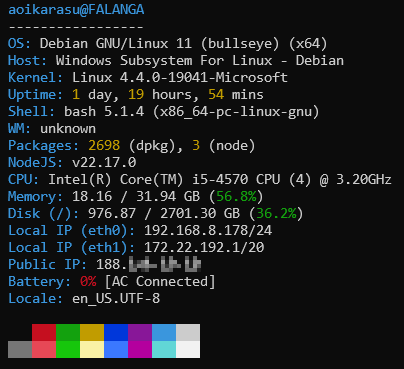
## Example output
```
johndoe@myHost
----------------
OS: Distro Linux 6 (foobar) (x64)
Host: ThinkPad X1 Carbon 7th
Kernel: Linux 6.2.0-26-generic
Uptime: 4 days, 13 hours, 18 mins
Shell: bash 5.0.17 (x86_64-pc-linux-gnu)
WM: GNOME
Packages: 152 (dpkg), 13 (node)
NodeJS: v18.17.1
CPU: Intel(R) Core(TM) i7-8665U CPU (8) @ 1.90GHz
Memory: 2.01 / 7.50 GB (26.8%)
Disk (/): 24.41 / 60.00 GB (40.7%)
Local IP (wlan0): 192.168.0.100/24
Public IP: 8.8.8.8
Battery: 84% [Charging]
Locale: en_US.UTF-8
<color bars>
```
## Requirements
- Node.js v16+
- For full functionality (e.g., battery status, system package detection), works best with standard utilities installed. (upower, termux-api, pmset, PowerShell CIM, WMIC, etc)
## Platform Notes
- **Linux/WSL:** Detects distro/model, desktop (if available), battery via `upower`, multi-manager package detection
- **macOS:** Detects Apple/Mac, battery via `pmset`, Homebrew and MacPorts packages, and .app bundles
- **Windows:** Host/model and OS info via CIM (modern PowerShell); package detection for Chocolatey and StartApps; battery via CIM (PowerShell, modern) or WMIC (legacy)
- **Termux (Android):** Robust platform detection, device/brand name, package detection, battery via termux-battery-status, user-guidance if termux-api is missing
## FAQ
- **Why doesn’t battery info work?**
- On Termux, install and permit the `termux-api` (`pkg install termux-api`).
- On Linux, you may need `upower` (`sudo apt install upower`).
- On macOS/Windows, only available if system battery supports reporting.
- **How do I extend output?**
- Add a new module to the `lib/` folder (see code; all logic is modular).
## License
MIT
---
> [](https://nodei.co/npm/aoifetch/)
>
> Made entirely with `gundalf-cli`.