annotorious-tahqiq
Version:
A custom Annotorious editor/view plugin
183 lines (131 loc) • 7.52 kB
Markdown
# annotorious-tahqiq
[](https://doi.org/10.5281/zenodo.12796544)
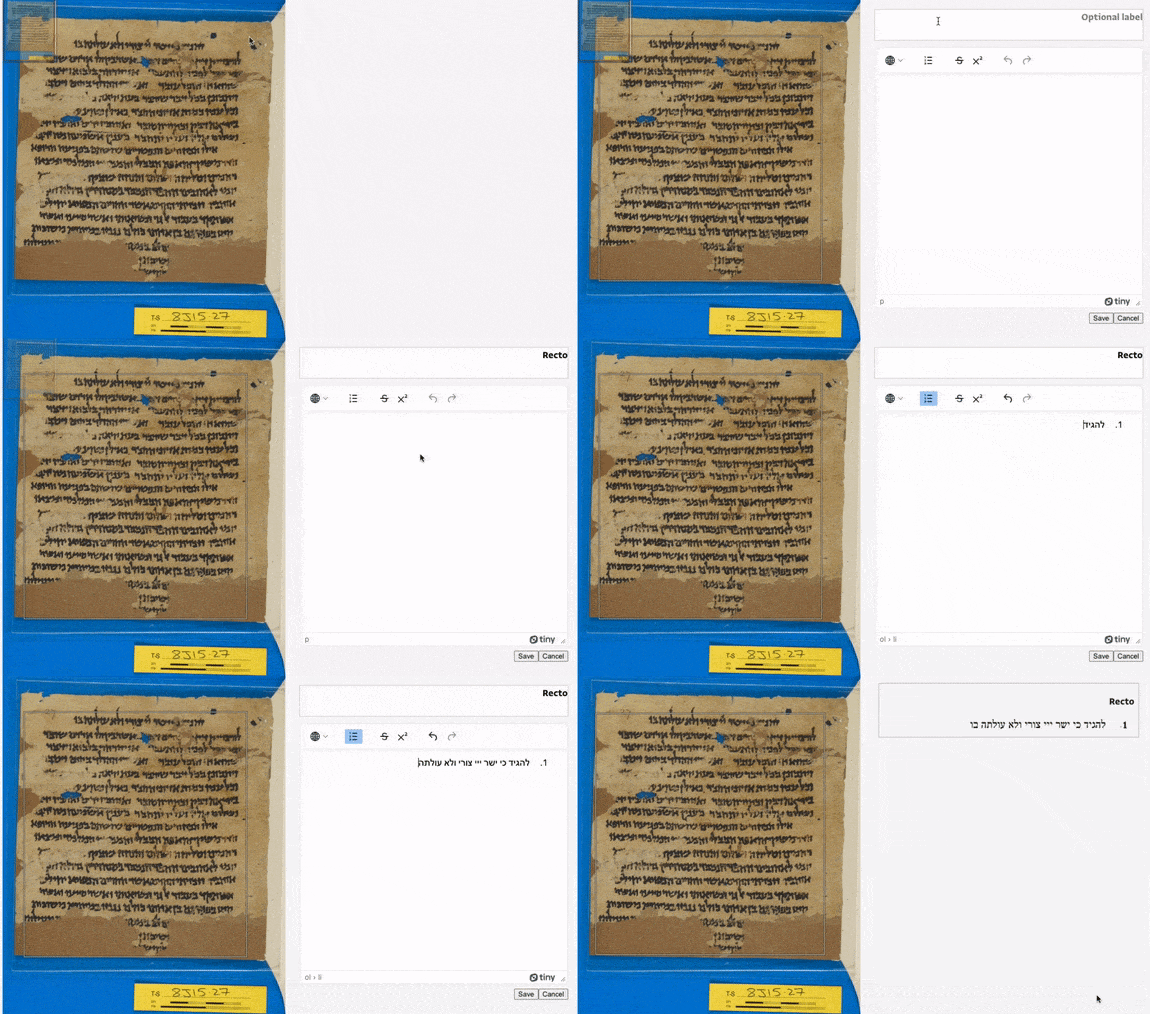
`annotorious-tahqiq` is a custom annotation editor implemented as a plugin for [Annotorious](https://recogito.github.io/annotorious/). It is being developed as part of the [Princeton Geniza Project](http://geniza.princeton.edu) (https://github.com/Princeton-CDH/geniza) to support transcription editing and management with IIIF/W3C annotation.
The name taḥqīq (tah-KEEK) comes from the Arabic for text edition.
## Requirements
- Node.JS v16.x
- NPM v8.x
- Annotorious
- An annotation store supported by an Annotorious plugin
This project uses [Volta](https://volta.sh/) to pin Node and NPM versions.
## Usage
### Installation
This plugin can be installed with NPM:
```sh
npm install --save annotorious-tahqiq
```
or to install a specific version number:
```sh
npm install --save annotorious-tahqiq@1.0.1
```
Then, to use alongside Annotorious and a storage plugin:
```js
import {
TranscriptionEditor,
AnnotationServerStorage,
} from "annotorious-tahqiq";
// Initialize Annotorious with your settings
const client = Annotorious(annotoriousSettings);
// Initialize annotorious-tahqiq storage plugin
const storageSettings = {
annotationEndpoint, // Endpoint of the annotation store
target, // Target for annotations (typically, a IIIF canvas)
manifest, // IIIF manifest that target is a part of
csrf_token, // CSRF token for communication with annotation store
secondaryMotivation, // Optional secondary motivation for annotations
// (primary is "sc:supplementing"). If supplied, will also
// attempt to filter annotation endpoint on this motivation.
sourceUri, // Optional "dc:source" URI attribute for annotations
lineMode, // Boolean to enable "line mode", which allows grouping
// and editing of line-level annotations with the
// "textGranularity" property
};
const storagePlugin = AnnotationServerStorage(client, storageSettings);
// Locate an empty HTML element that the editor will be placed into
const annotationContainer = document.getElementById("annotation");
// And an empty HTML fieldset element that toolbar tools will be placed into.
// Currently, the provided tools are rectangle and polygon image annotation drawing tools.
const toolbarContainer = document.getElementById("tahqiq-toolbar");
// Your TinyMCE editor API key (optional, can be omitted for testing purposes)
const tinyApiKey = "1234567890";
// Initalize annotorious-tahqiq editor
new TranscriptionEditor(
client,
storagePlugin,
annotationContainer,
toolbarContainer,
tinyApiKey,
textDirection, // one of the two strings "rtl" or "ltr"; sets text direction
// of the TinyMCE editor
italicEnabled, // set true to include italic formatting option
);
```
### Styling
This plugin exposes the following CSS classes that can be used to style its elements:
- Annotation blocks
- `.tahqiq-block-display`: Container `div` containing an annotation label and body
- `.tahqiq-block-editor`: Container `div` when in edit mode
- `.tahqiq-label-display`: `h3` elements for block labels
- `.tahqiq-label-editor`: Editable `h3` elements for block labels
- `.tahqiq-body-display`: `div` element displaying the content of an annotation body
- `.tahqiq-body-editor`: `div` element containing the TinyMCE editor for editing an annotation body
- `.tahqiq-line-group`: `div` element grouping multiple line-level annotations
- `.tahqiq-line-group-label`: `h3` element labeling a group of multiple line-level annotations
- Buttons and inputs
- `.tahqiq-button`: All buttons (save, delete, cancel)
- `.tahqiq-save-button`: Save button
- `.tahqiq-delete-button`: Delete button
- `.tahqiq-cancel-button`: Cancel button
- `.tahqiq-tool`: All tool `label` elements
- `.rectangle-tool`, `.polygon-tool`: Individual `label` elements for tools
- `.active-tool`: The currently active tool's `label` element
- Drag and drop
- `.tahqiq-drag-targetable`: Annotation container receives this class when the user begins dragging another annotation (i.e. this annotation container is "targetable")
- `.tahqiq-drag-target`: Annotation container receives this class when the user hovers a dragged annotation over it (i.e. this annotation container is "targeted")
- `.tahqiq-drop-zone`: When running multiple instances of Tahqiq on the same page, this `div` will appear on an instance that has no annotations when the user begins dragging an annotation from another instance
- `.tahqiq-loading`: To compensate for network request timing, this class is added to all annotation containers after a drag and drop is completed, and removed when the network requests are finished
### Events
This plugin also raises custom events to report errors and other messages.
- `tahqiq-alert`: A [`CustomEvent`](https://developer.mozilla.org/en-US/docs/Web/API/CustomEvent) with a `detail` object containing `message`, `status`, and `target`. `message` is an info, success, or error message; `status` is one of "info", "success", or "error"; and `target` is the target set in the settings for the storage plugin.
- `tahqiq-cancel`: A `CustomEvent` informing the consuming application that a cancellation has occurred.
## Development
### Getting started
To start developing on this project, first install the dependencies with NPM:
```sh
npm install
```
Then you can start editing TypeScript code. When you have made changes, you can rebuild the package by running:
```sh
npm run build
```
This will place transpiled and minified JavaScript (via webpack) into the `/dist` directory.
To use your modified code in other projects locally, after running the build script, install with NPM in your other projects by pointing it to the project root directory:
```sh
npm install --save /path/to/annotorious-tahqiq/
```
Then, follow the remaining steps in the [Usage](#usage) section.
### Organization
This project is written in TypeScript, and organized according to the following scheme:
- `/src` contains the source code of the repository
- `/src/elements` contains custom HTML elements
- `/src/types` contains type definitions used in the TypeScript code
- `/src/index.ts` is the entrypoint for the TypeScript code
- `/tests` contains Jest unit tests, and should mirror the structure of `/src`
- `/dist` contains the build outputs and should not be directly modified
- `/dist/index.js` is the entrypoint for the built JavaScipt code
### Code style and linting
This project uses ESLint to manage code style and enforce consistency.
If you are using VSCode, you will need to install the [ESLint extension](https://marketplace.visualstudio.com/items?itemName=dbaeumer.vscode-eslint). Then, your editor should pick up the settings from `.vscode/settings.json`, which specify that ESLint will auto-fix any style errors on saving a file.
You may also use the following scripts to check for and fix linter errors:
```sh
npm run lint
```
```sh
npm run lint:fix
```
### Testing
This project uses Jest for unit tests, stored in the `/tests` directory. Tests can be run with the following command:
```sh
npm test
```