anim-3d-obj
Version:
React library for creating 3D objects quickly. Also these objects can be animated
108 lines (91 loc) • 5.66 kB
Markdown
# React Typescript Cuboid Builder
This project allows a user to create Cuboids of any size simply by entering a set of parameters.
The program does the leg work with regard to calculating translationZ depth and config on the fly.
## Examples
- [6 sided Cuboid - animate X360 Y360](https://codesandbox.io/s/anim-3d-obj-all-sides-simple-bf67yg-tzr2v6)
- [3 sided Object - animate y-axis](https://codesandbox.io/s/anim-3d-obj-3-sides-wobble-y-axis-wglkms)
- [Double box spin](https://codesandbox.io/s/react-anim-3d-double-box-spin-vbdhg2)
- [Floating Ribbon](https://codesandbox.io/s/cocky-butterfly-ygwkps)
- [Parallel divs animated x and y axis in tandem](https://codesandbox.io/s/anim-3d-obj-2-sides-simple-4057y7)
- [Obj Skeleton](https://codesandbox.io/s/anim-3d-obj-skeleton-5dlk70)
`** ANIMATIONS`
- `fadeInkf`: fade object in from 0 to 1 Opacity: [demo](https://codesandbox.io/s/anim-3d-obj-fadeinkf-1fozww)
- `floatX`: float object so is not stationary: [demo](https://codesandbox.io/s/anim-3d-obj-floatx-hzeo42)
- `floatShadow`: float object + add shadow: [demo](https://codesandbox.io/s/anim-3d-obj-floatshadow-8pp5k0)
- `pulseSM`: pulse object Small: [demo](https://codesandbox.io/s/anim-3d-obj-pulsesm-k2rjb6)
- `pulseMD`: pulse object Medium: [demo](https://codesandbox.io/s/anim-3d-obj-pulsemd-sqk2of)
- `pulseLG`: pulse object Large: [demo](https://codesandbox.io/s/anim-3d-obj-pulselg-qz7x0m)
- `swing`: Swing component: [demo](https://codesandbox.io/s/anim-3d-obj-swing-snj8li)
- `swingDecay`: Swing component with decay: [demo](https://codesandbox.io/s/anim-3d-obj-swingdecay-cku0e1)
- `noAnim`: no animation place holder
`X-AXIS Animations`
- `X360`: rotate 360 degrees on the x-axis: [demo](https://codesandbox.io/s/anim-3d-obj-x360-7kiuhw)
- `wobX`: wobble on x-axis (degreesHi <-> degreesLow): [demo](https://codesandbox.io/s/anim-3d-obj-wobx-ldwek7)
- `fwdx018`: spin object on x-axis from 0 degrees to 180 degrees: [demo](https://codesandbox.io/s/anim-3d-obj-fwd180-v90xyu)
- `fwdx1836`: spin object on x-axis from 180 degrees to 360 degrees: [demo](https://codesandbox.io/s/anim-3d-obj-fwd1836-mtwuv9)
- `fwdx09`: spin object on x-axis from 0 degrees to 90 degrees: [demo](https://codesandbox.io/s/anim-3d-obj-fwd09-84vocn)
- `fwdx918`: spin object on x-axis from 90 degrees to 180 degrees: [demo](https://codesandbox.io/s/anim-3d-obj-fwd918-6039fj)
- `fwdx1827`: spin object on x-axis from 180 degrees to 270 degrees: [demo](https://codesandbox.io/s/anim-3d-obj-fwdx1827-qpqhtq)
- `fwdx2736`: spin object on x-axis from 270 degrees to 360 degrees: [demo](https://codesandbox.io/s/anim-3d-obj-fwdx2736-e6c6wg)
`Y-AXIS Animations`
- `Y360`: rotate 360 degrees on the y-axis: [demo](https://codesandbox.io/s/anim-3d-obj-y360-16lzeb)
- `wobY`: wobble on y-axis (degreesHi <-> degreesLow): [demo](https://codesandbox.io/s/anim-3d-obj-woby-tkoxms)
- `fwdy018`: spin object on y-axis from 0 degrees to 180 degrees: [demo](https://codesandbox.io/s/anim-3d-obj-fwdy180-qpqhtq)
- `fwdy1836`: spin object on y-axis from 180 degrees to 360 degrees: [demo](https://codesandbox.io/s/anim-3d-obj-fwdy1836-qpqhtq)
- `fwdy09`: spin object on y-axis from 0 degrees to 90 degrees: [demo](https://codesandbox.io/s/anim-3d-obj-fwdy09-elklgr)
- `fwdy918`: spin object on y-axis from 90 degrees to 180 degrees: [demo](https://codesandbox.io/s/anim-3d-obj-fwdy918-gnym88)
- `fwdy1827`: spin object on y-axis from 180 degrees to 270 degrees: [demo](https://codesandbox.io/s/anim-3d-obj-fwdy1827-osskgx)
- `fwdy2736`: spin object on y-axis from 270 degrees to 360 degrees: [demo](https://codesandbox.io/s/anim-3d-obj-fwdy2736-rnbs2q)
## Config
### Animations:
Animations are optional. Either or both of `anim1` or `anim2` can be applied to the component. Animations are applied to 2 wrapping divs respectively.
```typescript
const anim1 = {
border: "", // while testing reveal the animation wrapper
degreesHi: -45, // degrees if spin
degreesLow: 45, // degrees if spin
delay: 0, // start delay in seconds
direction: "normal", //normal alternating reverse
duration: 8, // seconds
fillMode: "forwards", // none forwards backwards both
iterationCount: "infinite", // number or infinte
name: "Y360", // ** ANIMATIONS (above)
timing: "ease-in-out", // linear ease ease-in-out
};
```
### Faces:
This is an array of objects containing the face used for a given component
```javascript
export interface FaceType {
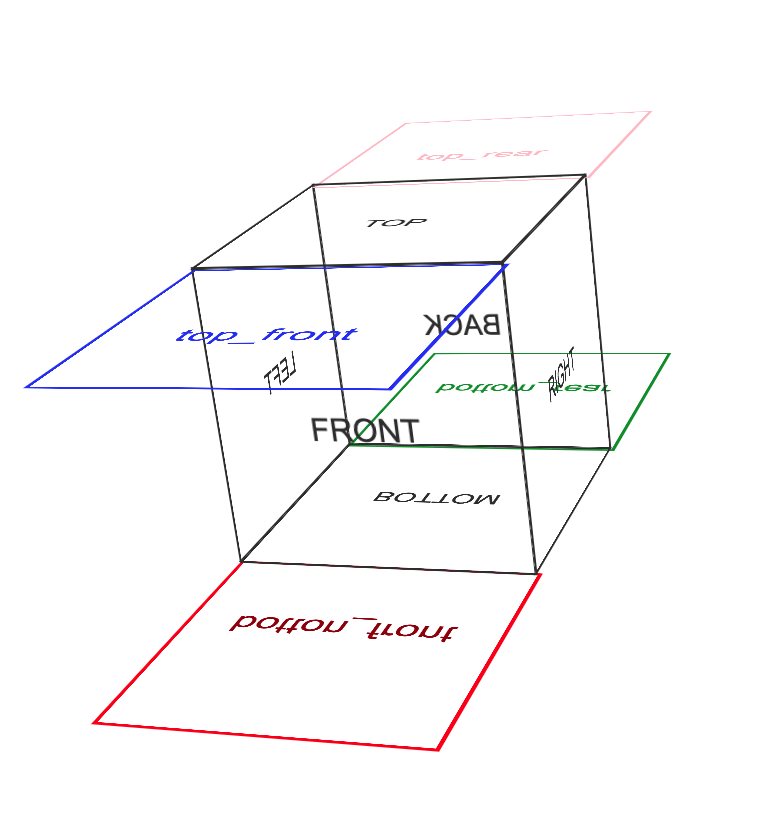
name?: string; // front,back,left,right,top,top_rear,top_front,bottom,bottom_rear,bottom_front
css?: string | undefined;
body?: any; // can be JSX Component | string | number
}
const faces: FaceType[] = [
{
name: "back",
body: "BACK",
css: `background:rgba(22,22,22,.5)`,
},
{
name: "right",
body: "RIGHT",
css: `background:rgba(220,220,220,.5);
border:1px solid #ddd`,
},
];
```
### Global (face):
If the name parameter in the faces array is indicated (ie: "front") but `css` and / or `body` are not. The `global default`(below) will satisfy those parameters.
```javascript
interface GlobalType {
css?: string;
body?: string;
}
const global: GlobalType = {
body: "BODY FOR FACE WHICH DOES NOT CONTAIN BODY",
css: 'color:red'
};
```
- https://www.npmjs.com/package/anim-3d-obj