angularjs-nvd3-directives
Version:
Angular.js directives for nvd3
163 lines (110 loc) • 9.89 kB
Markdown
<link href="http://nvd3.org/src/nv.d3.css" rel="stylesheet">
##[Angular.js](http://angularjs.org/) Directives for [nvd3.js](http://www.nvd3.org), [d3.js](http://www.d3js.org) charts
[](https://travis-ci.org/angularjs-nvd3-directives/angularjs-nvd3-directives)
[](https://david-dm.org/angularjs-nvd3-directives/angularjs-nvd3-directives#info=dependencies)
[](https://david-dm.org/angularjs-nvd3-directives/angularjs-nvd3-directives#info=devDependencies)
[](https://bitdeli.com/free "Bitdeli Badge")
[](https://waffle.io/angularjs-nvd3-directives/angularjs-nvd3-directives)
[](https://gitter.im/angularjs-nvd3-directives/angularjs-nvd3-directives)
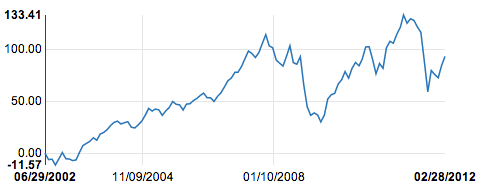
```html
<nvd3-line-chart
data="exampleData"
width="600"
height="350"
showXAxis="true"
showYAxis="true"
xAxisTickFormat="xAxisTickFormat_Date_Format()"
yAxisTickFormat="yAxisFormatFunction()">
</nvd3-line-chart>
```
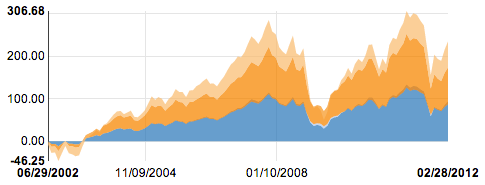
```html
<nvd3-stacked-area-chart
data="exampleData"
width="600"
height="350"
showXAxis="true"
showYAxis="true"
xAxisTickFormat="xAxisTickFormat()">
</nvd3-stacked-area-chart>
```
[More Examples](http://angularjs-nvd3-directives.github.io/angularjs-nvd3-directives)
## Basic Quick Start
### 1. Install dependencies in your application with [bower](http://bower.io/)
Install [these](http://bower.io/#installing-bower) if you don't already have it.
#### [Angular.js](http://angularjs.org/)
bower install angular --save
#### [d3.js](http://www.d3js.org)
bower install d3 --save
#### [nvd3.js](http://www.nvd3.org)
bower install nvd3 --save
#### [Angularjs-nvd3-Directives.js](http://angularjs-nvd3-directives.github.io/angularjs-nvd3-directives)
bower install angularjs-nvd3-directives --save
### 2. Create basic [Angular.js](http://angularjs.org/) application
Create a html page and start with the following code. For [d3.js](http://www.d3js.org) it is important that the page include ```<meta charset="utf-8">```, otherwise you will get error messages about special characters.
```html
<!DOCTYPE html>
<html>
<head>
<meta charset="utf-8">
```
Include the downloaded dependencies in the ```<head>``` section of the html.
```html
<script src="bower_components/angular/angular.js"></script>
<script src="bower_components/d3/d3.js"></script>
<script src="bower_components/nvd3/nv.d3.js"></script>
<script src="bower_components/angularjs-nvd3-directives/dist/angularjs-nvd3-directives.js"></script>
<link rel="stylesheet" href="bower_components/nvd3/nv.d3.css"/>
```
Create a ```<script>``` block for the angular application
```html
<script>
var app = angular.module("nvd3TestApp", ['nvd3ChartDirectives']);
function ExampleCtrl($scope){
$scope.exampleData = [
{
"key": "Series 1",
"values": [ [ 1025409600000 , 0] , [ 1028088000000 , -6.3382185140371] , [ 1030766400000 , -5.9507873460847] , [ 1033358400000 , -11.569146943813] , [ 1036040400000 , -5.4767332317425] , [ 1038632400000 , 0.50794682203014] , [ 1041310800000 , -5.5310285460542] , [ 1043989200000 , -5.7838296963382] , [ 1046408400000 , -7.3249341615649] , [ 1049086800000 , -6.7078630712489] , [ 1051675200000 , 0.44227126150934] , [ 1054353600000 , 7.2481659343222] , [ 1056945600000 , 9.2512381306992] , [ 1059624000000 , 11.341210982529] , [ 1062302400000 , 14.734820409020] , [ 1064894400000 , 12.387148007542] , [ 1067576400000 , 18.436471461827] , [ 1070168400000 , 19.830742266977] , [ 1072846800000 , 22.643205829887] , [ 1075525200000 , 26.743156781239] , [ 1078030800000 , 29.597478802228] , [ 1080709200000 , 30.831697585341] , [ 1083297600000 , 28.054068024708] , [ 1085976000000 , 29.294079423832] , [ 1088568000000 , 30.269264061274] , [ 1091246400000 , 24.934526898906] , [ 1093924800000 , 24.265982759406] , [ 1096516800000 , 27.217794897473] , [ 1099195200000 , 30.802601992077] , [ 1101790800000 , 36.331003758254] , [ 1104469200000 , 43.142498700060] , [ 1107147600000 , 40.558263931958] , [ 1109566800000 , 42.543622385800] , [ 1112245200000 , 41.683584710331] , [ 1114833600000 , 36.375367302328] , [ 1117512000000 , 40.719688980730] , [ 1120104000000 , 43.897963036919] , [ 1122782400000 , 49.797033975368] , [ 1125460800000 , 47.085993935989] , [ 1128052800000 , 46.601972859745] , [ 1130734800000 , 41.567784572762] , [ 1133326800000 , 47.296923737245] , [ 1136005200000 , 47.642969612080] , [ 1138683600000 , 50.781515820954] , [ 1141102800000 , 52.600229204305] , [ 1143781200000 , 55.599684490628] , [ 1146369600000 , 57.920388436633] , [ 1149048000000 , 53.503593218971] , [ 1151640000000 , 53.522973979964] , [ 1154318400000 , 49.846822298548] , [ 1156996800000 , 54.721341614650] , [ 1159588800000 , 58.186236223191] , [ 1162270800000 , 63.908065540997] , [ 1164862800000 , 69.767285129367] , [ 1167541200000 , 72.534013373592] , [ 1170219600000 , 77.991819436573] , [ 1172638800000 , 78.143584404990] , [ 1175313600000 , 83.702398665233] , [ 1177905600000 , 91.140859312418] , [ 1180584000000 , 98.590960607028] , [ 1183176000000 , 96.245634754228] , [ 1185854400000 , 92.326364432615] , [ 1188532800000 , 97.068765332230] , [ 1191124800000 , 105.81025556260] , [ 1193803200000 , 114.38348777791] , [ 1196398800000 , 103.59604949810] , [ 1199077200000 , 101.72488429307] , [ 1201755600000 , 89.840147735028] , [ 1204261200000 , 86.963597532664] , [ 1206936000000 , 84.075505208491] , [ 1209528000000 , 93.170105645831] , [ 1212206400000 , 103.62838083121] , [ 1214798400000 , 87.458241365091] , [ 1217476800000 , 85.808374141319] , [ 1220155200000 , 93.158054469193] , [ 1222747200000 , 65.973252382360] , [ 1225425600000 , 44.580686638224] , [ 1228021200000 , 36.418977140128] , [ 1230699600000 , 38.727678144761] , [ 1233378000000 , 36.692674173387] , [ 1235797200000 , 30.033022809480] , [ 1238472000000 , 36.707532162718] , [ 1241064000000 , 52.191457688389] , [ 1243742400000 , 56.357883979735] , [ 1246334400000 , 57.629002180305] , [ 1249012800000 , 66.650985790166] , [ 1251691200000 , 70.839243432186] , [ 1254283200000 , 78.731998491499] , [ 1256961600000 , 72.375528540349] , [ 1259557200000 , 81.738387881630] , [ 1262235600000 , 87.539792394232] , [ 1264914000000 , 84.320762662273] , [ 1267333200000 , 90.621278391889] , [ 1270008000000 , 102.47144881651] , [ 1272600000000 , 102.79320353429] , [ 1275278400000 , 90.529736050479] , [ 1277870400000 , 76.580859994531] , [ 1280548800000 , 86.548979376972] , [ 1283227200000 , 81.879653334089] , [ 1285819200000 , 101.72550015956] , [ 1288497600000 , 107.97964852260] , [ 1291093200000 , 106.16240630785] , [ 1293771600000 , 114.84268599533] , [ 1296450000000 , 121.60793322282] , [ 1298869200000 , 133.41437346605] , [ 1301544000000 , 125.46646042904] , [ 1304136000000 , 129.76784954301] , [ 1306814400000 , 128.15798861044] , [ 1309406400000 , 121.92388706072] , [ 1312084800000 , 116.70036100870] , [ 1314763200000 , 88.367701837033] , [ 1317355200000 , 59.159665765725] , [ 1320033600000 , 79.793568139753] , [ 1322629200000 , 75.903834028417] , [ 1325307600000 , 72.704218209157] , [ 1327986000000 , 84.936990804097] , [ 1330491600000 , 93.388148670744]]
}];
}
</script>
```
> For this example we are hardcoding the data to make it easer to quickly create a chart. In the wild, this would obviously not be ideal, but it is more involved than a basic quick start can accomplish.
Close out the head
```html
</head>
```
Setup the ```<body>``` and the rest of the angular application
```html
<body ng-app='nvd3TestApp'>
```
The add the ```ng-app``` attribute to the ```<body>``` element, and set the value to ```nvd3TestApp```, which is the same value used in the script block above ```angular.module('nvd3TestApp', ...)```.
Add the Directive to the body of the application
```html
<div ng-controller="ExampleCtrl">
<nvd3-line-chart
data="exampleData"
showXAxis="true"
showYAxis="true"
tooltips="true"
interactive="true">
</nvd3-line-chart>
</div>
```
The directive is wrapped inside of a ```<div>``` that has a ```ng-controller``` attribute that has the same value as the name of the function created in the ```<script>``` block above.
Close out the ```body``` and ```html``` elements.
```html
</body>
</html>
```
### 3. Test
If everything is setup correctly, you should be able to open the page and see a basic line chart.
## Developers
For those of you wanting to debug, fix, enhance angularjs-nvd3-directives, follow the steps below after cloning this repository:
npm install
grunt bower-install
You can now run the unit tests simply by typing:
grunt test
If you wish to issue a pull request, please add a unit test for the change you are making, ensure that it is shown to fail without your fix and pass with your fix.
> NOTE: we are just starting to add the foundations for unit testing here, so please chip in to help enhance the stability of this framework and be patient with us as we work towards that goal.