angularfire2-offline
Version:
Cache angularfire2 data for offline use.
187 lines (133 loc) • 8.03 kB
Markdown
# AngularFire2 Offline [](https://badge.fury.io/js/angularfire2-offline)
🔌 A simple wrapper for [AngularFire2](https://github.com/angular/angularfire2) to read and write to Firebase while offline, even after a complete refresh.
[](https://travis-ci.org/adriancarriger/angularfire2-offline)
[](https://codecov.io/gh/adriancarriger/angularfire2-offline)
[](https://david-dm.org/adriancarriger/angularfire2-offline)
[](https://david-dm.org/adriancarriger/angularfire2-offline?type=dev)
[](https://www.npmjs.com/package/angularfire2-offline)
- [Complete changelog](https://github.com/adriancarriger/angularfire2-offline/releases)
## Demos
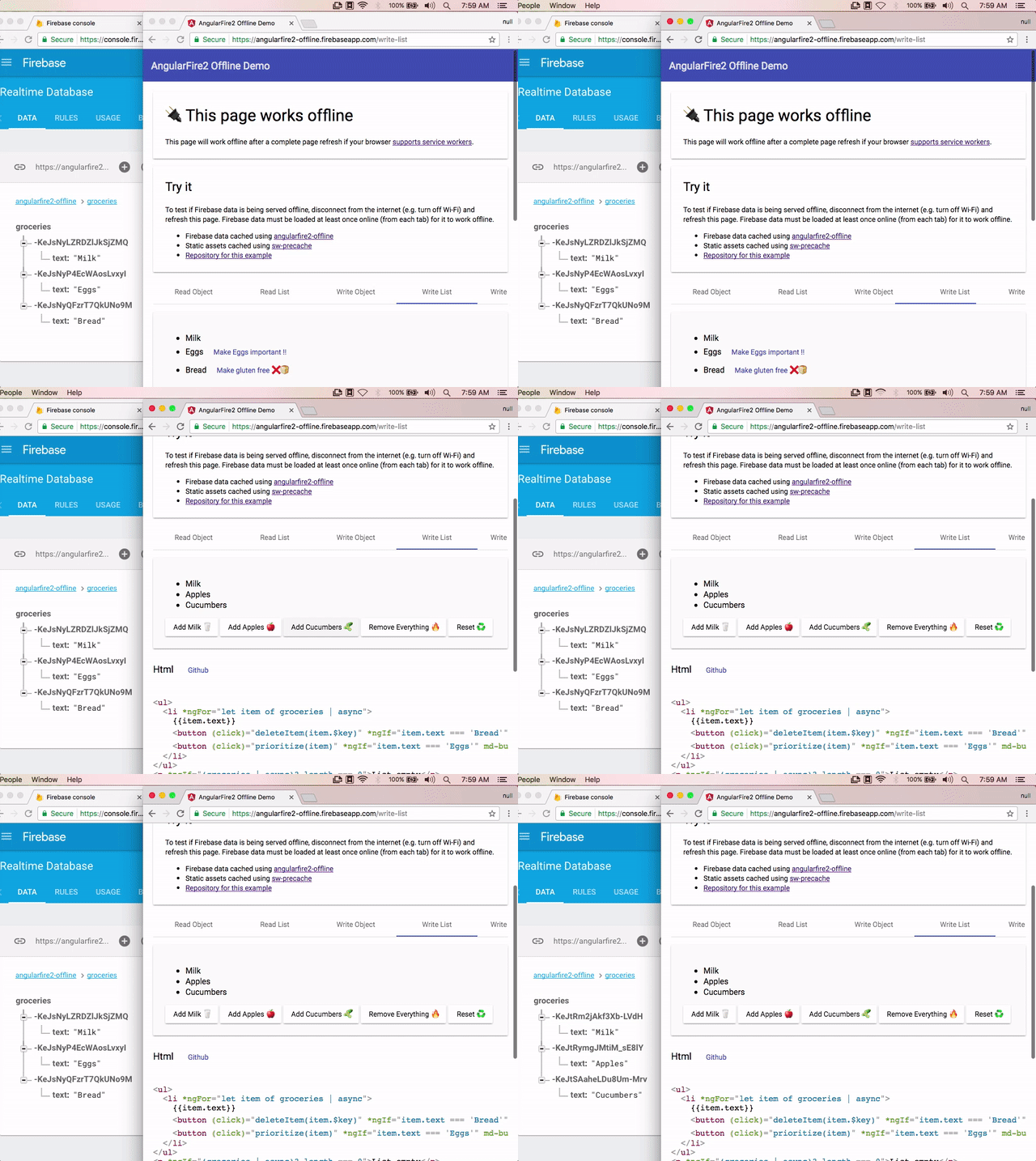
- [`Angular 2+ Demos:`](https://angularfire2-offline.firebaseapp.com/) [Read object](https://angularfire2-offline.firebaseapp.com/read-object), [Read list](https://angularfire2-offline.firebaseapp.com/read-list), [Write object](https://angularfire2-offline.firebaseapp.com/write-object), [Write list](https://angularfire2-offline.firebaseapp.com/write-list) -- [tutorial 📗](https://github.com/adriancarriger/angularfire2-offline/tree/master/examples/angular-cli#angular-cli-offline-tutorial-)
- [`Ionic 2+ Demo`](https://ionic-pwa-ad85b.firebaseapp.com) -- [tutorial 📘](https://github.com/adriancarriger/angularfire2-offline/tree/master/examples/ionic#ionic-offline-tutorial-)
[](https://angularfire2-offline.firebaseapp.com/write-list)
## Legacy Versions
- Upgrading from `2.x` to `4.x` for AngularFire2? Try the [upgrade tutorial](https://github.com/adriancarriger/angularfire2-offline/blob/master/docs/version-4-upgrade.md)
- To support **`AngularFire2 2.x`** use the [@two branch of this repo](https://github.com/adriancarriger/angularfire2-offline/tree/two) for [install instructions](https://github.com/adriancarriger/angularfire2-offline/tree/two#install) and tutorials ([Angular](https://github.com/adriancarriger/angularfire2-offline/tree/two/examples/angular-cli#angular-cli-offline-tutorial-)/[Ionic](https://github.com/adriancarriger/angularfire2-offline/tree/two/examples/ionic#ionic-offline-tutorial-)).
- This branch (master) is a wrapper for the latest version of AngularFire2 (4.x)
## Install
```bash
npm install angularfire2-offline angularfire2 firebase --save
```
## Setup @NgModule
```ts
import { NgModule } from '@angular/core';
import { BrowserModule } from '@angular/platform-browser';
import { AngularFireModule } from 'angularfire2';
import { AngularFireOfflineModule } from 'angularfire2-offline';
import { AngularFireDatabaseModule } from 'angularfire2/database';
import { AppComponent } from './app.component';
export const firebaseConfig = {
apiKey: '<your-key>',
authDomain: '<your-project-authdomain>',
databaseURL: '<your-database-URL>',
storageBucket: '<your-storage-bucket>'
};
@NgModule({
declarations: [AppComponent],
imports: [
AngularFireDatabaseModule,
AngularFireModule.initializeApp(firebaseConfig),
AngularFireOfflineModule,
BrowserModule
],
bootstrap: [AppComponent]
})
export class AppModule { }
```
## Usage
- Methods mirror AngularFire2 database methods for [`object`](https://github.com/angular/angularfire2/blob/master/docs/2-retrieving-data-as-objects.md#retrieve-data) and [`list`](https://github.com/angular/angularfire2/blob/master/docs/3-retrieving-data-as-lists.md#retrieve-data).
### Read Data Offline
- [Querying lists](https://github.com/angular/angularfire2/blob/master/docs/4-querying-lists.md) is supported
- [preserveSnapshot](https://github.com/angular/angularfire2/blob/master/docs/2-retrieving-data-as-objects.md#retrieving-the-snapshot) is not supported
```ts
import { Component } from '@angular/core';
import {
AfoListObservable,
AfoObjectObservable,
AngularFireOfflineDatabase } from 'angularfire2-offline/database';
@Component({
selector: 'project-name-app',
template: `
<h1>{{ (info | async)?.name }}</h1>
<ul>
<li *ngFor="let item of items | async">
{{ item?.name }}
</li>
</ul>
`
})
export class MyApp {
info: AfoObjectObservable<any>;
items: AfoListObservable<any[]>;
constructor(afoDatabase: AngularFireOfflineDatabase) {
this.info = afoDatabase.object('/info');
this.items = afoDatabase.list('/items');
}
}
```
### Write data offline
If writes are made offline followed by a page refresh, the writes will be sent when a connection becomes available.
- [Write object](https://angularfire2-offline.firebaseapp.com/write-object)
- [Write list](https://angularfire2-offline.firebaseapp.com/write-list)
- [Resolve write conflicts](https://angularfire2-offline.firebaseapp.com/write-conflicts/messages)
## AngularFire2 Offline specific features
In addition to wrapping most database features from [AngularFire2](https://github.com/angular/angularfire2), a minimal amount of offline specific features are provided:
### Offline promises
- **Regular promises** - Making a write to Firebase will return a promise as expected. The promise will complete after the data has been saved to Firebase.
- **Offline promises** - If you application only needs to know when the write has been saved offline (which will sync on reconnect) you can access the offline promise within the regular promise by calling `promise.offline.then()`.
#### Offline promise example
```ts
const promise = this.afoDatabase.object('car').update({maxSpeed: 100});
promise.offline.then(() => console.log('offline data saved to device storage!'));
promise.then(() => console.log('data saved to Firebase!'));
```
Also see [working with promises](https://github.com/adriancarriger/angularfire2-offline/blob/master/docs/working-with-promises.md)
### `reset` - delete offline data
The `reset` method is useful for deleting sensitive data when a user signs out of an application. This also helps prevent permission errors when using Firebase auth.
#### Use `reset` with caution
If writes are made while offline `reset` will delete them before they can reach Firebase.
#### `reset` example
```ts
onUserSignout() {
this.afoDatabase.reset()
}
```
#### Calling `reset` on specific references
You can `reset` a specific Firebase reference by passing the reference string to the `reset` method
```ts
onUserSignout() {
this.afoDatabase.reset('my/firebase/ref')
}
```
## How it works
- While online, Firebase data is stored locally (as data changes the local store is updated)
- While offline, local data is served if available, and writes are stored locally
- On reconnect, app updates with new Firebase data, and writes are sent to Firebase
- Even while online, local data is used first when available which results in a faster load
## Contributing to AngularFire2 Offline
Pull requests are welcome! If you have a suggested enhancement, please [open an issue](https://github.com/adriancarriger/angularfire2-offline/issues/new). Thanks!
Here is how you can setup a development environment:
### Clone repo
1. `git clone https://github.com/adriancarriger/angularfire2-offline.git`
1. `cd angularfire2-offline`
### Setup example
1. `cd examples/angular-cli`
1. `yarn`
1. `npm start`
### Setup development environment
1. Open a new shell/terminal
1. `cd angularfire2-offline`
1. `yarn`
1. `npm run start-dev`
## License
angularfire2-offline is licensed under the MIT Open Source license. For more information, see the [LICENSE](LICENSE) file in this repository.