angular-three-state-checkbox
Version:
Angular directive of three-state checkbox. Useful for sorting. Default template: 'Material design'
60 lines (40 loc) • 1.55 kB
Markdown
##Three-state checkbox
Angular directive of three state checkbox.
Useful for sorting.
Default template: 'Material design'
___
##[DEMO](http://anton.temchenko.com.ua/dev/three-state-checkbox/demo/)
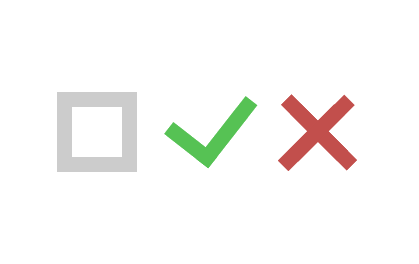
___
##Getting Started
Installing package via **NPM**<br/>
<br/>
`npm i angular-three-state-checkbox --save`
___
Installing package via **Bower** <br/><br/>
<br/><br/>
`bower install three-state-checkbox --save`
___
##How to use
* Include `three-state-checkbox.js` and `three-state-checkbox.css` to your _index.html_
* Add `threeStateCheckbox` as dependency to your angular module
* Use directive by adding `three-state-checkbox` as **attribute** to your element _(`<span>`)_
* `ng-model` **is required**
* You can use `ng-change` directive either
<!-- Pass your options as Object through options attribute-->
___
##Example
angular.module("myApp", ["threeStateCheckbox"])
.controller("myCtrl",[function(){
this.checkboxModel = null;
this.onChange = function(){
console.log("changed");
}
}]);
<!-- -->
<body ng-app="myApp" ng-controller="myCtrl as mc">
<span three-state-checkbox ng-model="mc.checkboxModel" ng-change="mc.onChange()"></span>
</body>
___
## License
[MIT](/LICENSE)