angular-location-selector
Version:

289 lines (239 loc) • 8.63 kB
Markdown
# Angular Location Selector

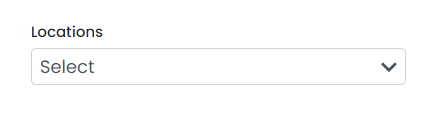
This package offers an intuitive interface that enables users to select multiple locations from a dropdown list. It includes various customization options to allow developers to tailor the location selector according to their specific needs, such as customizing labels, styling, and available options.
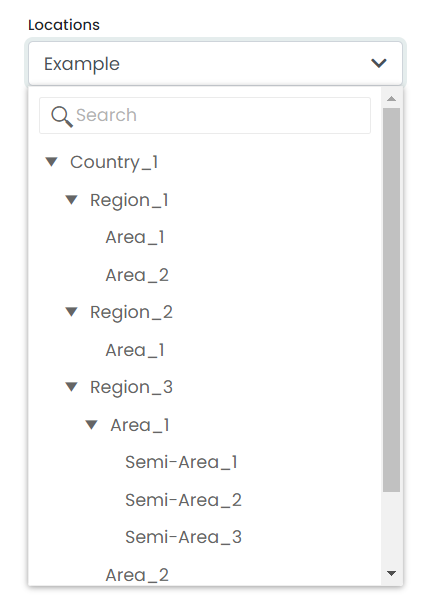
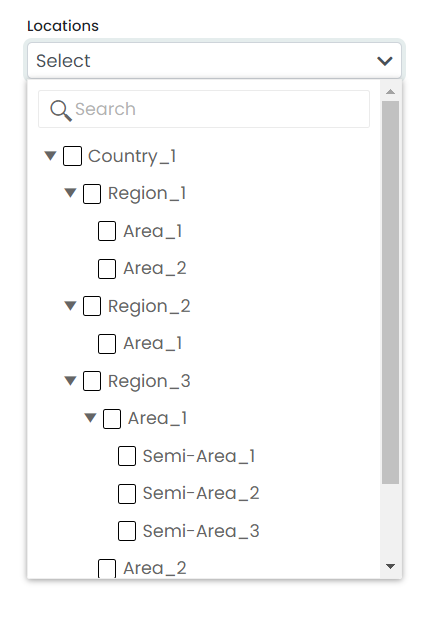
The "angular-location-selector" package is designed to simplify the location selection process for users. It features a search and filter functionality that enables users to quickly locate the desired location from a vast list of options. Additionally, this package supports the selection of nested options, which is useful when dealing with complex location hierarchies.
In conclusion, the "angular-location-selector" package is a comprehensive solution for developers looking to implement location selection functionality in their Angular applications. It provides an easy-to-use interface and various customization options, making it an ideal package for various location selection use cases.
## User Interfaces
[](https://freeimage.host/)
#### Single Location Selector
[](https://freeimage.host/)
#### Multiple Locations Selector
[](https://freeimage.host/)
## Installation
Install angular-location-selector with npm
```bash
npm i angular-location-selector
```
Finally, you need to import the related styles into your project's angular.json file. To do so, simply add the following path to your styles property.
```bash
'node_modules/angular-location-selector/src/lib/assets/styles/styles.scss'
```
If there any issue with rendering the application, just try below command as well.
```bash
ng add @angular/localize
```
## Usage/Example
As an example, you can use the module import in your corresponding Module class.
#### app.module.ts
```typescript
import { AngularLocationSelectorModule } from 'angular-location-selector';
@NgModule({
imports: [
...
AngularLocationSelectorModule
]
})
export class AppModule { }
```
The angular-location-selector package is a convenient wrapper that allows you to use the HTML selector component in any part of your Angular application. By importing the module and using the selector in your HTML templates, you can quickly and easily create location selector components that can be customized to suit your needs.
#### app.component.html
```html
<angular-location-selector type="multi" labelText="Locations" [locationHierachy]="locationHierachy"
(onChange)="updateLocationState($event)" hoverText="Select Location">
</angular-location-selector>
```
#### app.component.ts
```typescript
import { Component } from '@angular/core';
@Component({
selector: 'app-root',
templateUrl: './app.component.html',
styleUrls: ['./app.component.scss']
})
export class AppComponent {
locationHierachy : Lo;
updateLocationState(data){
console.log(data);
}
}
```
## Inputs
To customize the output of our angular-location-selector component, we can provide various inputs.
`type: string`
you can use `type="single"` for single location selector or `type="multi` for multiple location selector.
`labelText: string`
label that you are used for the field.
`hoverText: string`
text that shows when you are hovering the component.
`selectedLocationName: string`
default selected location name.
`selectedLocationId: number`
default selected location id.
`locationHierachy: LocationSelectorModel`
```typescript
interface LocationSelector {
locations: LocationSelectorItem[];
locationsFlatData: LocationSelectorItem[];
}
interface LocationSelectorItem {
locationName: string;
locationId: number;
isSelectable:boolean;
hasChild: boolean;
items?: LocationSelectorItem[];
level:number;
parentId:number;
locationTypeId:number;
utcoffsetInMinutes:number;
timeZone: string;
timeZoneId: string;
timeZoneName:string;
locationCode:string;
lastLocationAutoWraupTime:string;
}
```
Both locations and locationsFlatData need to be arrays of LocationSelectorItem. However, locations have to be in a hierarchical manner, as shown in the example below.
```typescript
locations: [
{
locationId: 1,
locationName: "New Jercy",
parentId: null,
hasChild: true,
locationTypeId: 2,
level: 0,
isSelectable: false,
items: [
{
locationId: 45,
locationName: "Atlantia",
parentId: 1,
hasChild: true,
locationTypeId: 3,
level: 1,
isSelectable: false,
items: [
{
locationId: 48,
locationName: "Tokyo",
parentId: 45,
hasChild: false,
locationTypeId: 5,
level: 2,
isSelectable: true,
items: [],
utcoffsetInMinutes: 330,
locationCode: "111Branch2",
timeZone: "IST",
timeZoneName: "Asia/Colombo",
timeZoneId: "Sri Lanka Standard Time",
lastLocationAutoWraupTime: "2023-02-26T07:30:00"
}
],
utcoffsetInMinutes: -300,
locationCode: "DEFAULT",
timeZone: "EST",
timeZoneName: "America/New_York",
timeZoneId: "Eastern Standard Time",
lastLocationAutoWraupTime: "2023-02-26T04:00:00"
}
],
locationsFlatData:[
{
locationId: 1,
locationName: "New Jercy",
parentId: null,
hasChild: true,
locationTypeId: 2,
level: 0,
isSelectable: false,
items: [
{
locationId: 45,
locationName: "Atlantia",
parentId: 1,
hasChild: true,
locationTypeId: 3,
level: 1,
isSelectable: false,
items: [
{
locationId: 48,
locationName: "Tokyo",
parentId: 45,
hasChild: false,
locationTypeId: 5,
level: 2,
isSelectable: true,
items: [],
utcoffsetInMinutes: 330,
locationCode: "111Branch2",
timeZone: "IST",
timeZoneName: "Asia/Colombo",
timeZoneId: "Sri Lanka Standard Time",
lastLocationAutoWraupTime: "2023-02-26T07:30:00"
}
],
utcoffsetInMinutes: -300,
locationCode: "DEFAULT",
timeZone: "EST",
timeZoneName: "America/New_York",
timeZoneId: "Eastern Standard Time",
lastLocationAutoWraupTime: "2023-02-26T04:00:00"
},
{
locationId: 45,
locationName: "Atlantia",
parentId: 1,
hasChild: true,
locationTypeId: 3,
level: 1,
isSelectable: false,
items: [
{
locationId: 48,
locationName: "Tokyo",
parentId: 45,
hasChild: false,
locationTypeId: 5,
level: 2,
isSelectable: true,
items: [],
utcoffsetInMinutes: 330,
locationCode: "111Branch2",
timeZone: "IST",
timeZoneName: "Asia/Colombo",
timeZoneId: "Sri Lanka Standard Time",
lastLocationAutoWraupTime: "2023-02-26T07:30:00"
}
],
utcoffsetInMinutes: -300,
locationCode: "DEFAULT",
timeZone: "EST",
timeZoneName: "America/New_York",
timeZoneId: "Eastern Standard Time",
lastLocationAutoWraupTime: "2023-02-26T04:00:00"
},
{
locationId: 48,
locationName: "Tokyo",
parentId: 45,
hasChild: false,
locationTypeId: 5,
level: 2,
isSelectable: true,
items: [],
utcoffsetInMinutes: 330,
locationCode: "111Branch2",
timeZone: "IST",
timeZoneName: "Asia/Colombo",
timeZoneId: "Sri Lanka Standard Time",
lastLocationAutoWraupTime: "2023-02-26T07:30:00"
}
]
```
`onChange: OutputEvent `
that can be use to catch the change of our component and currently selected location informations.
## Authors
- [@lakshitha](https://www.npmjs.com/~lakshithak)
- [@sirojan](https://www.npmjs.com/~sirojan)