angular-img-cropper
Version:
Client side image cropper directive for AngularJS (rectangular area, aspect ratio, multi-touch)
100 lines (73 loc) • 3.46 kB
Markdown
# angular-img-cropper
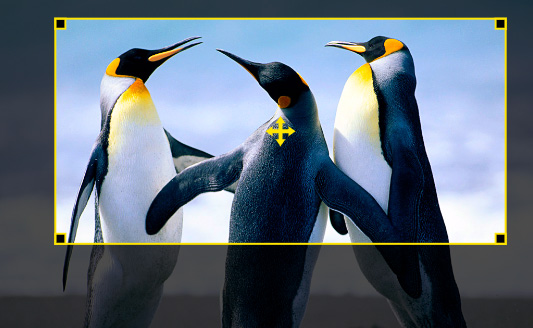
An image cropping tool for AngularJS. Features a rectangular crop area. The crop area's aspect ratio can be enforced during dragging. The crop image can either be 1:1 or scaled to fit an area.
## Screenshot
## Live demo
[Live demo on JSBin](http://jsbin.com/fukeqe/9/)
## Requirements
- Modern Browser supporting ```<canvas>```
## Installing
### Download
- [Download angular-img-cropper](https://github.com/AllanBishop/angular-img-cropper/archive/master.zip) files from GitHub.
Or
- Install with Bower
```javascript
bower install angular-img-cropper
```
### Add dependency
Add the image cropper module as a dependancy to your application module:
```javascript
angular.module('myApp', ['angular-img-cropper']);
```
## Options
| Parameter | Description |
| ------ | ----------- |
| crop-width | The width of the crop area|
| crop-height | The height of the crop area|
| image | The source image to crop|
| cropped-image (*optional*) | The cropped image|
| keep-aspect | Enforces that the aspect ratio is kept when dragging the crop area. The aspect ratio is defined by the width and height paramater. |
| touch-radius | The radius for detecting touches/clicks on the corner drag markers and the centre drag marker. |
| crop-area-bounds (*optional*) | A model that will be automatically updated with the bounds (left, right, top, bottom) of the crop area relative to the original source image.
| min-width (*optional*) | The minimum width that the crop area can be set to.
| min-height (*optional*) | The minimum height that the crop area can be set to.
| cors (*optional*) | Allows images loaded from foreign origins to be used in canvas as if they were being loaded from the current origin ([MDN](https://developer.mozilla.org/en-US/docs/Web/HTML/CORS_enabled_image)). *Default: no*
## Example usage
#### Markup example
```html
<html>
<head>
<script src="https://ajax.googleapis.com/ajax/libs/angularjs/1.3.15/angular.js"></script>
<script src="angular-img-cropper.min.js"></script>
<script>
angular.module('myApp', ['angular-img-cropper']);
angular.module('myApp').controller("ImageCropperCtrl",[ '$scope', function($scope)
{
$scope.cropper = {};
$scope.cropper.sourceImage = null;
$scope.cropper.croppedImage = null;
$scope.bounds = {};
$scope.bounds.left = 0;
$scope.bounds.right = 0;
$scope.bounds.top = 0;
$scope.bounds.bottom = 0;
}]);
</script>
<meta charset="utf-8">
<title>Example</title>
</head>
<body ng-app="myApp">
<div ng-controller="ImageCropperCtrl as ctrl">
<input type="file" img-cropper-fileread image="cropper.sourceImage" />
<div>
<canvas width="500" height="300" id="canvas" image-cropper image="cropper.sourceImage" cropped-image="cropper.croppedImage" crop-width="400" crop-height="200" keep-aspect="true" touch-radius="30" crop-area-bounds="bounds"></canvas>
</div>
<div>Cropped Image (Left: {{bounds.left}} Right: {{bounds.right}} Top: {{bounds.top}} Bottom: {{bounds.bottom}})</div>
<div ng-show="cropper.croppedImage!=null"><img ng-src="{{cropper.croppedImage}}" /></div>
</div>
</body>
</html>
```
## License
See the [LICENSE](https://github.com/AllanBishop/ImageCropper/blob/master/LICENSE.md) file.