angular-calendar-heatmap
Version:
Angular directive for d3.js calendar heatmap graph.
141 lines (103 loc) • 5.26 kB
Markdown
# Angular directive for D3.js Calendar Heatmap
This [d3.js](https://d3js.org/) heatmap representing time series data is used to visualize tracked time over the past year, showing details for each of the days on demand. Converted into an angular directive for your convenience :)
Includes a global overview of multiple years and visualizations of year, month, week and day overview with zoom for details-on-demand.
Inspired by [Github's contribution graph](https://help.github.com/articles/viewing-contributions-on-your-profile/#contributions-calendar)
Based on [Calendar View](https://bl.ocks.org/mbostock/4063318) by [Mike Bostock](https://github.com/mbostock)
Aaand [D3.js Calendar Heatmap](https://github.com/DKirwan/calendar-heatmap) by [Darragh Kirwan](https://github.com/DKirwan)
## Demo
Click <a href="https://rawgit.com/g1eb/angular-calendar-heatmap/master/" target="_blank">here</a> for a live demo.
### Global overview
[](https://rawgit.com/g1eb/angular-calendar-heatmap/master/)
### Year overview
[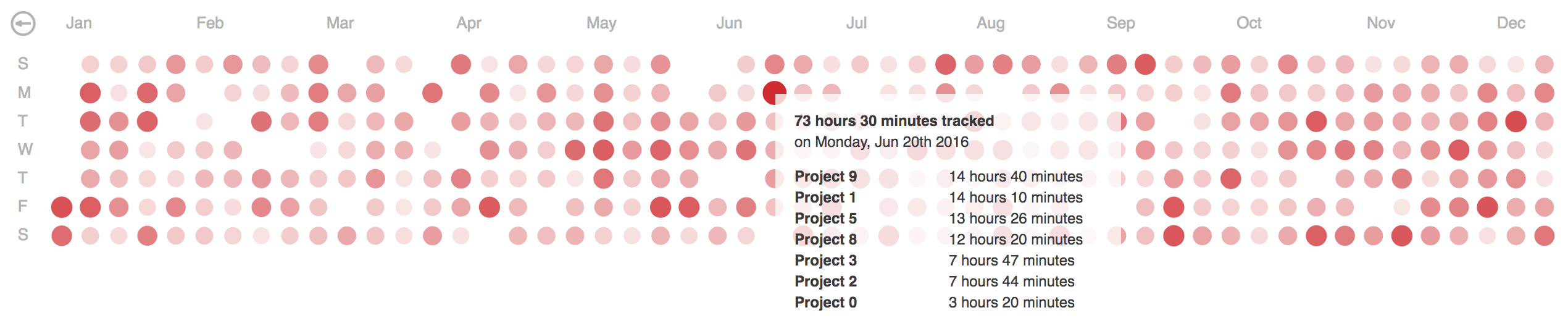](https://rawgit.com/g1eb/angular-calendar-heatmap/master/)
### Month overview
[](https://rawgit.com/g1eb/angular-calendar-heatmap/master/)
### Week overview
[](https://rawgit.com/g1eb/angular-calendar-heatmap/master/)
### Day overview
[](https://rawgit.com/g1eb/angular-calendar-heatmap/master/)
## Installation
1) Install 'angular-calendar-heatmap' with bower
```
bower install angular-calendar-heatmap
```
Or:
```
npm install angular-calendar-heatmap
```
2) Add 'g1b.calendar-heatmap' module to your app config
```javascript
angular.module('myApp', [
'g1b.calendar-heatmap',
.....
])
```
3) Use 'calendar-heatmap' directive in a view
```html
<calendar-heatmap data="example_data" color="'#ff0000'" overview="'year'" handler="print"></calendar-heatmap>
```
### Attributes
|Property | Usage | Default | Required |
|:------------- |:-------------|:-----:|:-----:|
| data | Time series data from max a year back | none | yes |
| color | Theme hex color | #45ff00 | no |
| overview | Initial overview type (choices are: year, month, day) | year | no |
| handler | Handler function is fired on click of a time entry in daily overview | none | no |
### Example data
Time series data where each day has a total time tracked (in seconds).
Details, if provided, are shown in a tooltip on mouseover in different overviews.
```
var data = [{
"date": "2016-01-01",
"total": 17164,
"details": [{
"name": "Project 1",
"date": "2016-01-01 12:30:45",
"value": 9192
}, {
"name": "Project 2",
"date": "2016-01-01 13:37:00",
"value": 6753
},
.....
{
"name": "Project N",
"date": "2016-01-01 17:52:41",
"value": 1219
}]
}]
```
### Optimization
In some cases details array could be large and in order to fit the data into the tooltip a short summary is generated with distinct projects and their total tracked time for that date.
In terms of optimization, summary data can be computed server-side and passed in using the ```summary``` attribute.
And in addition to the data structure described above this would result in a summary dictionary with distinct project names and total values of tracked time in seconds, e.g.:
```
var data = [{
"date": "2016-01-01",
"total": 17164,
"details": [.....],
"summary": [{
"name": "Project 1",
"value": 9192
}, {
"name": "Project 2",
"value": 6753
},
.....
{
"name": "Project N",
"value": 1219
}]
}]
```
See [index.html](https://github.com/g1eb/angular-calendar-heatmap/blob/master/index.html) for an example implementation with random data or click <a href="https://rawgit.com/g1eb/angular-calendar-heatmap/master/" target="_blank">here</a> for a live demo.
## Angular2 component
If you want to use this heatmap as an angular component (version 2.x), see [angular2-calendar-heatmap](https://github.com/g1eb/angular2-calendar-heatmap)
## React component
If you want to use this heatmap as a React component, see [reactjs-calendar-heatmap](https://github.com/g1eb/reactjs-calendar-heatmap)
## Non-Angular version
If you are looking for a plain vanilla javascript version of the heatmap, check out [calendar-heatmap-graph](https://github.com/g1eb/calendar-heatmap)
## Dependencies
* [AngularJS](https://angularjs.org/)
* [moment.js](https://momentjs.com/)
* [d3.js](https://d3js.org/)