almus-d3-graph
Version:
React component to build interactive and configurable graphs with d3 effortlessly
155 lines (109 loc) • 7.62 kB
Markdown
# react-d3-graph · [](https://travis-ci.org/danielcaldas/react-d3-graph)
[](https://www.npmjs.com/package/react-d3-graph) [](https://probot.github.io/) [](https://trello.com/b/KrnmFXha/react-d3-graph)
[](https://github.com/prettier/prettier)
[](https://www.npmjs.com/package/react-d3-graph)
[](https://www.npmjs.com/package/react-d3-graph)
[](https://paypal.me/DanielCaldas321)
:book: [documentation](https://danielcaldas.github.io/react-d3-graph/docs/index.html)
### _Interactive and configurable graphs with react and d3 effortlessly_
[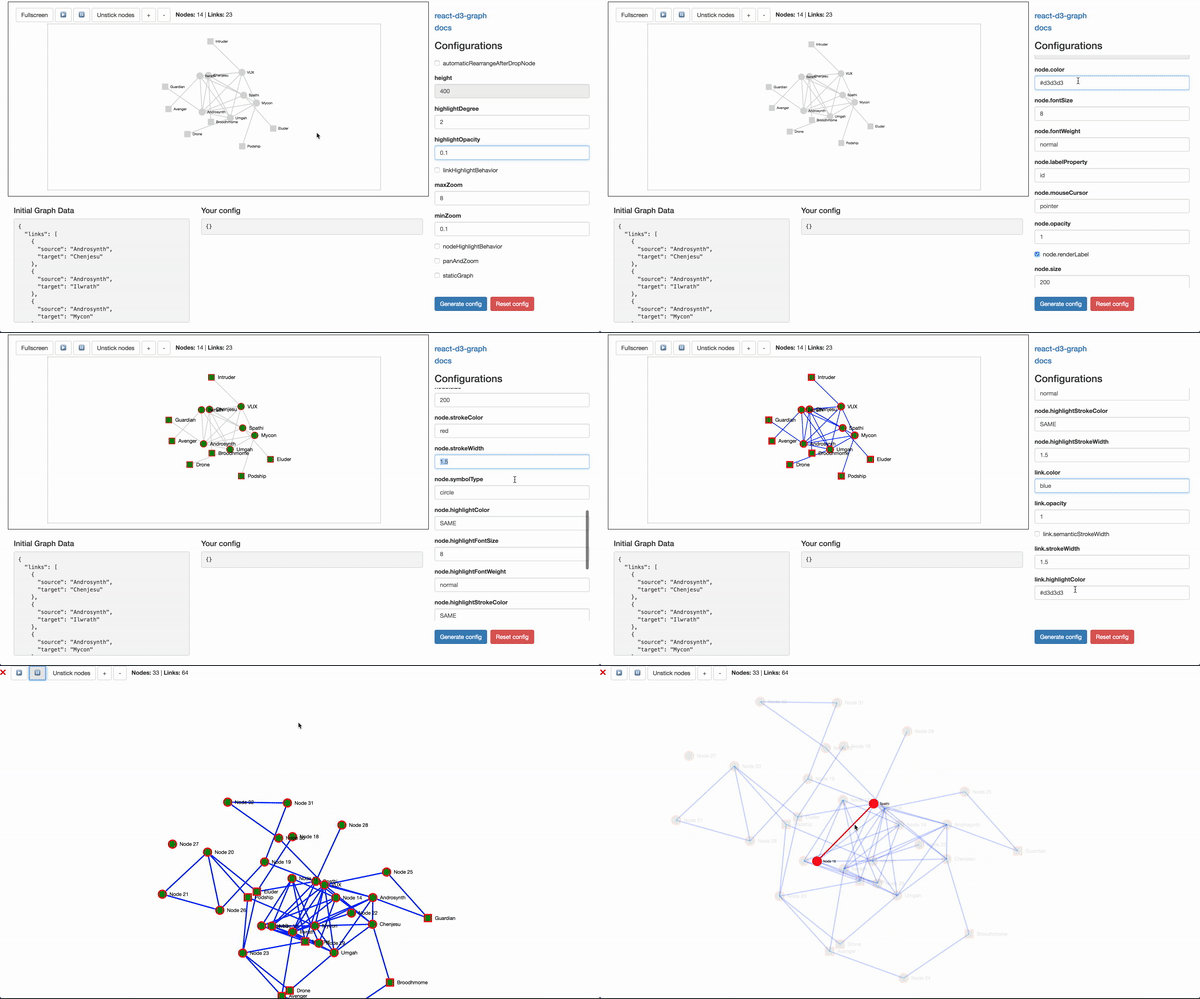](https://danielcaldas.github.io/react-d3-graph/sandbox/index.html)
## Playground
[Here a live playground](https://danielcaldas.github.io/react-d3-graph/sandbox/index.html) page where you can interactively config your own graph, and generate a ready to use configuration! :sunglasses:
You can also load different datasets and configurations via URL query parameter, here are the links:
- [small dataset](https://goodguydaniel.com/react-d3-graph/sandbox/index.html?data=small) - small example.
- [custom node dataset](https://goodguydaniel.com/react-d3-graph/sandbox/index.html?data=custom-node) - sample config with custom views.
- [marvel dataset!](https://goodguydaniel.com/react-d3-graph/sandbox/index.html?data=marvel) - sample config with directed collapsible graph and custom svg nodes.
- [static dataset!](https://goodguydaniel.com/react-d3-graph/sandbox/index.html?data=static) - small sample config statically positioned nodes.
Do you want to visualize your own data set on the live sandbox? Just submit a PR! You're welcome 😁
## Documentation :book:
Full documentation [here](https://danielcaldas.github.io/react-d3-graph/docs/index.html).
## Install
[](https://www.npmjs.com/package/react-d3-graph)
```bash
npm install d3@^5.5.0 # if you don't have d3 already
npm install react@^16.4.1 # if you don't have react already
npm install react-d3-graph
```
#### About react and d3 peer dependencies
**Note** that `react` and `d3` are [peer-dependencies](https://nodejs.org/en/blog/npm/peer-dependencies/), this means that the responsability to install them is delegated to the client. This will give you a bigger flexibility on what versions of `d3` and `react` you want to consume, you just need to make sure that you are compliant with the range of versions that `react-d3-graph` is compatible with. If you install `react-d3-graph` without first installing `d3` and `react` you might be propmt the following warnings:
> npm WARN react-d3-graph@2.0.1 requires a peer of d3@^5.5.0 but none is installed. You must install peer dependencies yourself.
> npm WARN react-d3-graph@2.0.1 requires a peer of react@^16.4.1 but none is installed. You must install peer dependencies yourself.
## Usage sample
Graph component is the main component for react-d3-graph components, its interface allows its user to build the graph once the user provides the data, configuration (optional) and callback interactions (also optional).
The code for the [live example](https://danielcaldas.github.io/react-d3-graph/sandbox/index.html) can be consulted [here](https://github.com/danielcaldas/react-d3-graph/blob/master/sandbox/Sandbox.jsx).
```javascript
import { Graph } from "react-d3-graph";
// graph payload (with minimalist structure)
const data = {
nodes: [{ id: "Harry" }, { id: "Sally" }, { id: "Alice" }],
links: [{ source: "Harry", target: "Sally" }, { source: "Harry", target: "Alice" }],
};
// the graph configuration, you only need to pass down properties
// that you want to override, otherwise default ones will be used
const myConfig = {
nodeHighlightBehavior: true,
node: {
color: "lightgreen",
size: 120,
highlightStrokeColor: "blue",
},
link: {
highlightColor: "lightblue",
},
};
// graph event callbacks
const onClickGraph = function() {
window.alert(`Clicked the graph background`);
};
const onClickNode = function(nodeId) {
window.alert(`Clicked node ${nodeId}`);
};
const onDoubleClickNode = function(nodeId) {
window.alert(`Double clicked node ${nodeId}`);
};
const onRightClickNode = function(event, nodeId) {
window.alert(`Right clicked node ${nodeId}`);
};
const onMouseOverNode = function(nodeId) {
window.alert(`Mouse over node ${nodeId}`);
};
const onMouseOutNode = function(nodeId) {
window.alert(`Mouse out node ${nodeId}`);
};
const onClickLink = function(source, target) {
window.alert(`Clicked link between ${source} and ${target}`);
};
const onRightClickLink = function(event, source, target) {
window.alert(`Right clicked link between ${source} and ${target}`);
};
const onMouseOverLink = function(source, target) {
window.alert(`Mouse over in link between ${source} and ${target}`);
};
const onMouseOutLink = function(source, target) {
window.alert(`Mouse out link between ${source} and ${target}`);
};
<Graph
id="graph-id" // id is mandatory, if no id is defined rd3g will throw an error
data={data}
config={myConfig}
onClickNode={onClickNode}
onRightClickNode={onRightClickNode}
onClickGraph={onClickGraph}
onClickLink={onClickLink}
onRightClickLink={onRightClickLink}
onMouseOverNode={onMouseOverNode}
onMouseOutNode={onMouseOutNode}
onMouseOverLink={onMouseOverLink}
onMouseOutLink={onMouseOutLink}
/>;
```
## Roadmap :railway_track:
Want to know what's ahead for react-d3-graph? Or simply curious on what comes next and stuff that is under development?
Check [this trello board](https://trello.com/b/KrnmFXha/react-d3-graph) where everything related to react-d3-graph is managed.
## Contributions
Contributions are welcome fell free to submit new ideas/features, just open an issue or send me an email or something. If you are more a _hands on_ person, just submit a pull request.
## Donation
Using _react-d3-graph_ and want to help the project grow with new features or simply want to say thank you? You can always buy me a cup of coffee ☕☕☕
[](https://paypal.me/DanielCaldas321)
## Alternatives (Not what you where looking for?)
Well if you scrolled this far maybe _react-d3-graph_ does not fulfill all your requirements 😭, but don't worry I got you covered! There are a lot of different and good alternatives out there, [here is a list with a few alternatives](http://anvaka.github.io/graph-drawing-libraries/#!/all#%2Fall). Btw, not in the previous list but also a valid alternative built by uber [uber/react-vis-force](https://github.com/uber/react-vis-force).