alisa.db
Version:
A powerful and customizable local JSON database module for Node.js projects with event system, caching, and full TypeScript support.
235 lines (173 loc) • 5.97 kB
Markdown
[](https://www.npmjs.com/package/alisa.db/)
[](https://www.npmjs.com/package/alisa.db/)
[](https://www.npmjs.com/package/alisa.db/)
[](https://www.npmjs.com/package/alisa.db/)
[](https://www.npmjs.com/package/alisa.db/)
- [alisa.db](https://github.com/pordarman/alisa.db)
<br>
- [Ali (Fearless Crazy)](https://github.com/pordarman)
<br>
- Ali: [Instagram](https://www.instagram.com/ali.celk/) - [Discord](https://discord.com/users/488839097537003521) - [Spotify](https://open.spotify.com/user/215jixxk4morzgq5mpzsmwwqa?si=41e0583b36f9449b)
<br>
- First we create a [node.js](https://nodejs.org/en/) file (If you have not downloaded [node.js](https://nodejs.org/en/) to computer before, you can download node.js by [clicking here](https://nodejs.org/en/))
- Then we open the PowerShell terminal by "shift + right click" on the folder of the file you created.
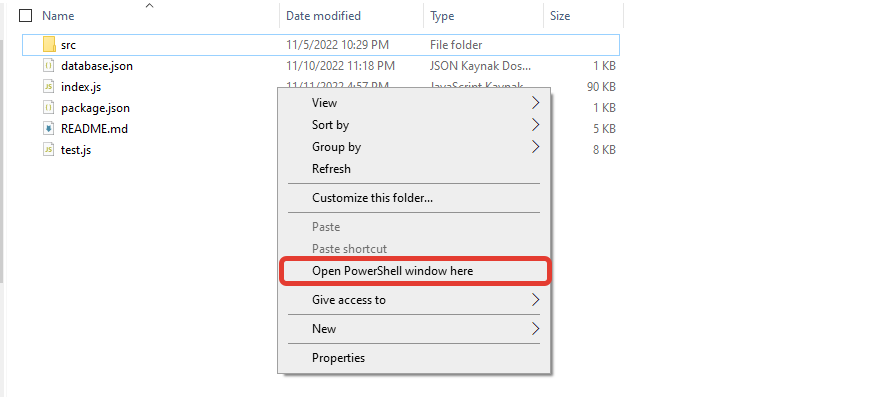
- Then we write **npm i alisa.db** and press enter.

- And now we have downloaded the **alisa.db** module, congratulations 🎉🎉
<br>
A blazing-fast, feature-rich and fully customizable local JSON database module for Node.js projects.
```bash
npm install alisa.db
```
- Type-safe, event-driven architecture
- Built-in cache support for better performance
- Auto write functionality (or manual save via `.writeAll()`)
- Full support for multiple files
- Rich utility methods: CRUD, math ops, array ops, filter/search, etc.
- Built-in event system: `.on()`, `.off()`, `.emit()`
- TypeScript & ESM support (types included)
---
## 🚀 Getting Started
### Initialization
```js
const AlisaDB = require("alisa.db");
// Using string
const db = new AlisaDB("database.json");
// Using config object
const db = new AlisaDB("data.json", {
autoWrite: true,
cache: true,
spaces: 2
});
```
```js
db.set("username", "Fearless");
db.get("username"); // "Fearless"
db.has("username"); // true
db.delete("username");
db.get("username", "Anonymous"); // default fallback
```
```js
db.setMany({ x: 1, y: 2, z: 3 });
db.getMany(["x", "z"]); // { x: 1, z: 3 }
db.deleteMany(["x", "y"]);
db.deleteAll();
```
```js
db.push("roles", "admin");
db.pushAll("roles", ["mod", "dev"]);
db.pop("roles");
db.unshift("roles", "founder");
db.shift("roles", 2);
```
```js
db.set("coins", 100);
db.add("coins", 50);
db.substr("coins", 30);
db.multi("coins", 2);
db.division("coins", 4);
```
```js
db.find((key, value) => value === "admin");
db.filter((key, value) => typeof value === "number");
db.findAndDelete((k, v) => v === 0);
db.filterAndDelete((k, v) => k.startsWith("temp"), 3);
```
```js
db.toJSON(); // Full object
db.toArray(); // Object.entries()
db.keys(); // All keys
db.values(); // All values
db.typeof("roles"); // "array"
```
```js
db.clone("backup.json");
db.reset();
db.destroy();
db.create("newfile.json", { hello: "world" }, true);
```
---
AlisaDB provides a fully extensible event system. Every change, read, write, or delete operation can trigger a custom listener.
You can track nearly everything:
```js
db.on("get", ({ key, value }) => console.log("Accessed", key, value));
db.on("delete", ({ key }) => console.warn("Deleted:", key));
```
This is very useful for:
- Debugging database activity
- Logging or auditing file changes
- Reacting to specific state changes (e.g. auto-backup on set)
All listener callbacks receive an object with contextual information. For example:
```js
{
fileName: "db.json",
file: { /* The file */ }
key: "userId",
value: "Storme",
isFound: true,
rawData: "Storme"
}
```
You can listen to any change happening in the database:
```js
db.on("set", ({ key, value }) => {
console.log(`Set ${key} =`, value);
});
db.set("user", "Ali"); // triggers the above listener
```
Remove listeners with:
```js
const fn = console.log;
db.on("delete", fn);
db.off("delete", fn);
```
Supported events: `set`, `get`, `delete`, `push`, `add`, `writeFile`, `writeCache`, `reset`, `destroy`, `clone`, `create`, etc.
---
```js
const db = new AlisaDB("database.json", { autoWrite: true, cache: true });
// Or manually save changes to disk:
db.writeAll();
```
---
```js
db.set("greeting", "hello", "english.json");
db.set("greeting", "merhaba", "turkish.json");
```
You can manage unlimited JSON files via `fileName` parameters.
---
```js
db.has("key");
db.hasAny(["k1", "k2"]);
db.hasAll(["k1", "k2"]);
db.getMany(["k1", "k2"]);
db.getFromValue("Ali");
db.filter((k, v) => typeof v === "number");
```
---
<br>
- If you want to support this module, if you request me on [github](https://github.com/pordarman), I will be happy to help you.
- Thank you for reading this far, i love you 💗
- See you in my next modules!
<br>