albion-guildbot
Version:
A discord bot that posts interesting events for a guild.
64 lines (48 loc) • 2.56 kB
Markdown
# Albion Guildbot
A Bot that posts interesting events about a guild to Discord.
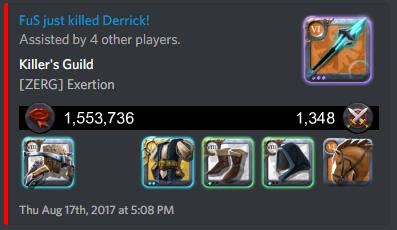
### Individual Kill
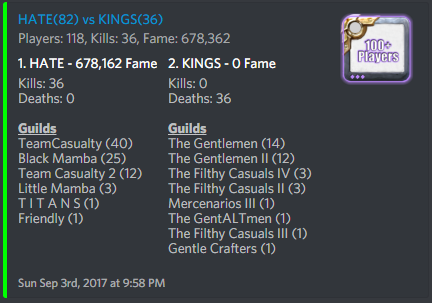
### Battle
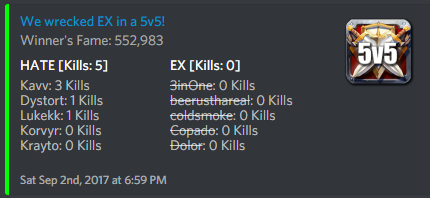
### 5v5
## Requirements
- git
- nodejs
## Instructions
The Albion Guildbot can be set up with either environment variables or directly
modifying `config.js`. The bot was developed against a Heroku environment,
where environment variables are preferred.
### Step 1 - Create a Discord bot
Using the Discord dev console, set up a Discord bot and add it to your
server. You will need the bot's token (found on discord dev console) and
the channelID of the channel you want it to post to (found by right clicking
the channel in Discord after enabling developer mode in Discord settings). Add
these settings either to your `config.js` directly, or set the appropriate
env vars in your environment according to `config.js`.
### Step 2 - Configure to your guild
Copy or rename `config.js.dist` to `config.js`. Set your alliance and guild name(s) in `config.js` or the corresponding
environment variables. If set by Environment variable, guilds should be
set as a comma-separated string. For example, `ALBION_GUILDS="TeamCasualty,Team Casualty 2"`
### Step 3 - Push to your environment or run locally
#### 3a. Environment example: Heroku
Using heroku, you should already have a Heroku project set up (it will need to
be paid if you plan to run the bot 24/7). You should have your heroku repository
set as a git source (eg `git remote add heroku https://your.heroku.repo`).
After setting your environment variables in the Heroku dashboard or via the
Heroku CLI, the project can be pushed to heroku via git, eg `git push heroku master`.
If using heroku, make sure to also set the environment variable HEROKU to true. If you
don't, heroku will shut down after not being bound to a port for 60 seconds.
#### 3b. Running locally
To run locally, first you'll need to install the dependencies via npm
```
npm install
```
And call the `start` script to run the bot
```
npm start
```
## Contributing
To contribute, fork this repository and make your changes as a branch of the fork. After the changes are functional and ready to merge back in, submit a Pull Request.
### Discord
If I haven't responded to your PR in a while, if you have any questions, want to chat or just want to see the bot in action, you can join my testing server at https://discord.gg/PeypCBv.