aichat-core
Version:
AI 流式聊天业务核心TS模型封装及业务实现模块
436 lines (403 loc) • 18.2 kB
Markdown
# aichat-core
* 博文地址:[aichat-core简化 LLM 与 MCP 集成的前端核心库(TypeScript)](https://blog.csdn.net/Appleyk/article/details/149234650?spm=1001.2014.3001.5501)
* 视频地址:[仿CherryStudio做一个Web端全能AI助手(全网第一个公开做NPM包和脚手架的UP)](https://www.bilibili.com/video/BV1QNuwzFEqq?spm_id_from=333.788.player.switch&vd_source=345c38cf38be5ae1ed7c98ffccfa0eb3&p=2)
## 1. 介绍
**简化 LLM 与 MCP 集成的前端核心库(TypeScript)**
`aichat-core` 是一个前端核心库,旨在**显著降低**在项目中集成 OpenAI 和 MCP 服务的复杂度。它封装了 `openai-sdk` 和 `mcp-sdk`,提供了:
1. **核心业务模型与流程抽象**:预定义了关键业务模型,并实现了结合 MCP 协议的**流式聊天**核心逻辑。
2. **开箱即用的 UI 组件**:封装了常用交互组件,包括:
* HTML 代码的**实时编辑与预览**
* Markdown 内容的**优雅渲染**
* 支持**多轮对话展示**的消息项组件
**核心价值**:开发者只需专注于**后端业务逻辑实现**和**前端 UI 定制**,而无需深入处理 LLM 与 MCP 之间复杂的交互细节。`aichat-core` 为您处理了底层的复杂性,让您更快地构建基于 LLM 和 MCP 的智能对话应用!
## 2. 更新
### 2025年8月10日 20:49:41
* 版本名称:1.0.15
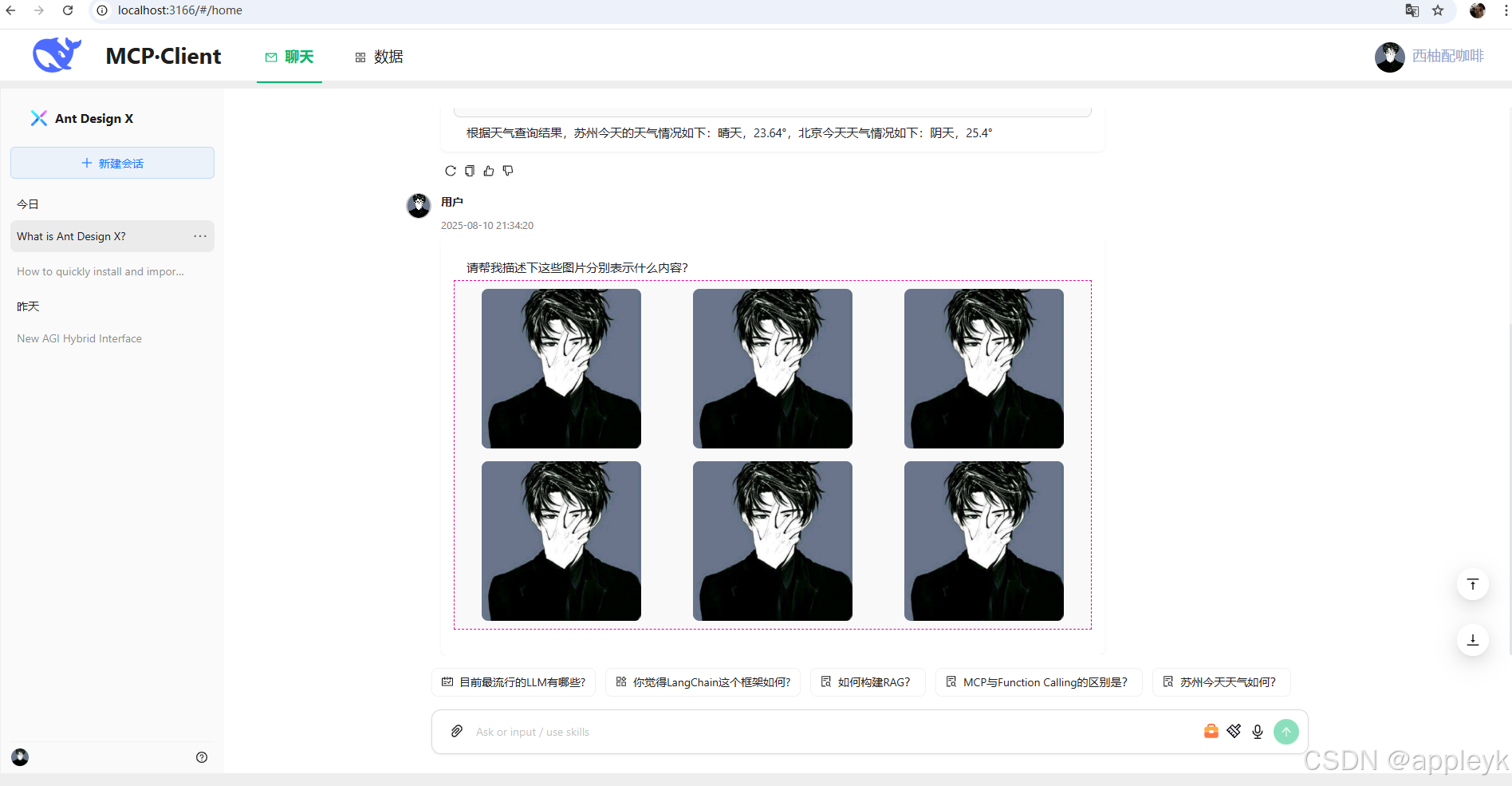
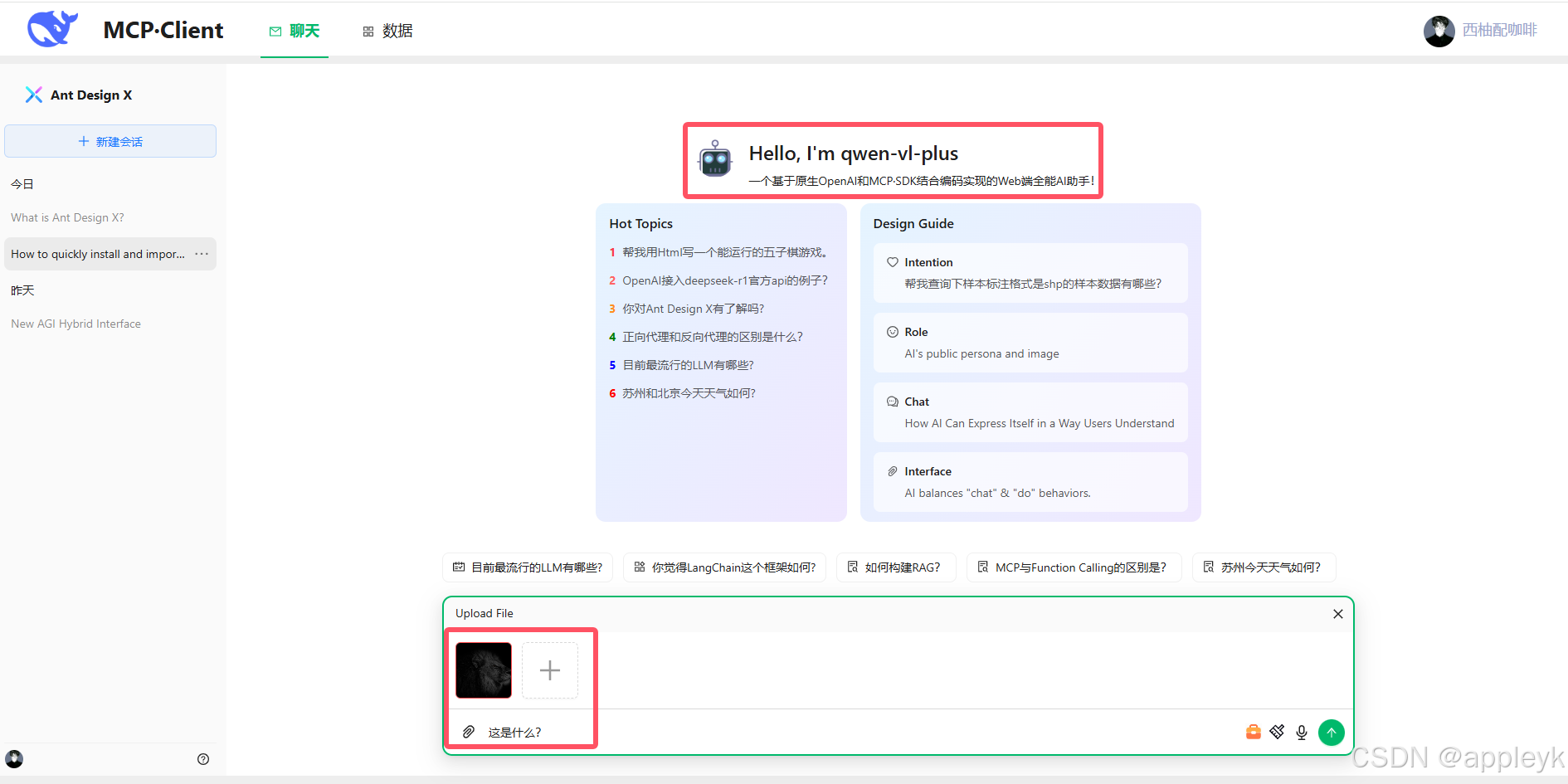
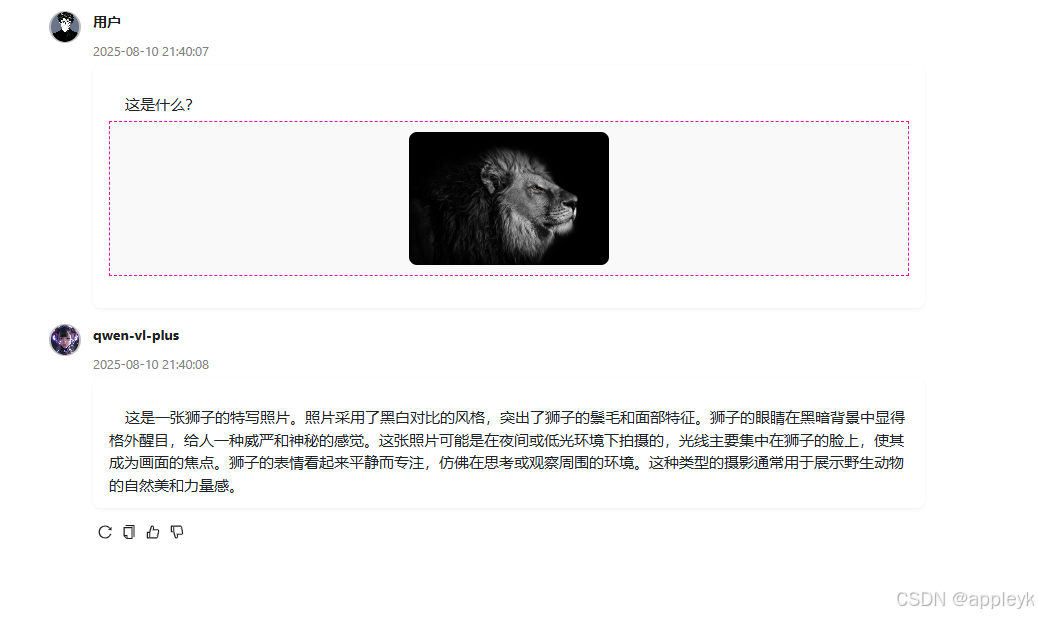
* 主要新增:基于阿里云百炼视觉模型qwen-vl-plus进行图片附件的模拟上传及base64转换后构建对应的context,即content即可以是string类型也可以是数组类型,格式如下:
```javascript
content: [
{
type: "text",
text: "请帮我描述下这张图片?"
},
{
type: "image_url",
image_url: { url: LLMUtil.getBase64Data(imageBase64, "image/png") }
}
]
```
* 实现效果:
## 3. 使用
### 3.1 依赖项
install该模块,请注意安装以下对应版本的npm包
```json
"@modelcontextprotocol/sdk": "^1.15.0",
"codemirror": "5",
"github-markdown-css": "^5.8.1",
"openai": "^5.3.0",
"react-codemirror2": "^8.0.1",
"react-json-view": "^1.21.3",
"react-markdown": "^9.1.0",
"react-syntax-highlighter": "^15.6.1",
"rehype-katex": "^7.0.1",
"rehype-raw": "^7.0.0",
"remark-gfm": "^4.0.1",
"remark-math": "^6.0.0"
```
暴露出来的核心功能:
```typescript
/** TS类型及核心业务实现客户端类封装 */
import LLMCallBackMessage from "./core/response/LLMCallBackMessage";
import LLMCallBackMessageChoice from "./core/response/LLMCallBackMessageChoice";
import LLMCallBackToolMessage from "./core/response/LLMCallBackToolMessage";
import LLMStreamChoiceDeltaTooCall from "./core/response/LLMStreamChoiceDeltaTooCall"
import LLMUsage from "./core/response/LLMUsage";
import LLMThinkUsage from "./core/response/LLMThinkUsage";
import LLMClient from "./core/LLMClient";
import McpClient from "./core/McpClient";
import McpTool from "./core/McpTool";
import LLMUtil from "./core/LLMUtil";
import ChatMarkDown from "./ui/chat-markdown";
import CodeEditorPreview from "./ui/code-editor-preview";
import ChatBubbleItem from "./ui/chat-bubble-item";
import ChatContent from "./ui/chat-content";
import ChatAttachments from "./ui/chat-attachements";
export {
LLMCallBackMessage,
LLMCallBackMessageChoice,
LLMCallBackToolMessage,
LLMStreamChoiceDeltaTooCall,
LLMThinkUsage,
LLMUsage,
LLMClient,
McpClient,
McpTool,
LLMUtil,
ChatMarkDown,
CodeEditorPreview,
ChatBubbleItem,
ChatContent,
ChatAttachments,
};
```
### 3.2 安装
```
npm install aichat-core or yarn add aichat-core
```
### 3.3 核心业务模型
LLMCallBackMessage.ts
```typescript
/** AI响应消息回调对象 */
export default interface LLMCallBackMessage {
/** 消息ID,一定是有的 */
id: string | number;
/** 消息创建时间,一定有的,只不过初始化的时候无,UI回显需要, 案例:1750923621 */
timed?: number;
/** 使用的llm模型,一定是有的 */
model: string;
/** 消息角色(system、assistant、user、tool)*/
role: string;
/** 集成antd design x Bubble的typing属性,true表示设置聊天内容打字动画,false则不使用 */
typing?: boolean;
/** 集成antd design x Bubble的loading属性,true表示聊天内容加载,false表示不加载 */
loading?: boolean;
/** 消息组,一次LLM响应可能包含多组消息,初始化的时候可空 */
choices?: LLMCallBackMessageChoice[];
/** 结束原因:如果是正常结束,值为stop,如果为工具调用,值为tool_calls...etc */
finishReason?:string;
}
```
LLMCallBackToolMessage
```typescript
/** 回调消息选择对象 */
export default interface LLMCallBackMessageChoice {
/** 消息索引,从1开始(多轮对话,index是累加的) */
index: number;
/** 正常响应内容,一定有,就算LLM择取工具时,content也是有值的,只不过是空串 */
content: string;
/** 推理内容,不一定有,要看LLM是否具备 */
reasoning_content?: string;
/**
* -1 或 undefined :不带推理
* 1:思考中
* 2:思考结束
*/
thinking?: number;
/** 工具回调消息(主要作为一个缓冲,在UI层进行展示) */
toolsCallDes?:string;
/** 回调工具消息数组(最后执行完了才有值) */
tools?: LLMCallBackToolMessage[];
/** 消耗的token统计,有些模型没有这个*/
usage?: LLMMessageUsage;
}
```
LLMCallBackToolMessage
```typescript
/** 工具调用消息回调对象 */
export default interface LLMCallBackToolMessage {
/** 调用id */
id:string;
/** 函数的索引 */
index: number;
/** 函数的名称 */
name: string;
/** 函数的参数,这个选填,如果能弄过来更好,便于后续错误调试 */
arguments?: any;
/** 函数调用的结果内容 */
content?: string;
}
```
LLMClient.ts
```typescript
/**
* @description 用于与 OpenAI 和 MCP 服务进行交互,支持流式聊天和工具调用。
* @author appleyk<yukun24@126.com>
* @github https://github.com/kobeyk
* @date 2025年7月9日21:44:02
*/
export default class LLMClient {
// 定义常量类型(防止魔法值)
public static readonly CONTENT_THINKING = "thinking";
public static readonly TYPE_FUNCTION = "function";
public static readonly TYPE_STRING = "string";
public static readonly REASON_STOP = "stop";
public static readonly REASON_TOO_CALLS = "tool_calls";
public static readonly ROLE_AI = "assistant";
public static readonly ROLE_SYSTEM = "system";
public static readonly ROLE_USER = "user";
public static readonly ROLE_TOOL = "tool";
public static readonly THINGKING_START_TAG = "<think>";
public static readonly THINGKING_END_TAG = "</think>";
private static readonly TOOLS_CALLING_DESC = "工具正在调用的路上,请稍等...";
private static readonly TOOLS_CALLED_DESC = "工具调用已完成,结果如下:";
// llm大模型对象
llm: OpenAI;
// mcp客户端对象(二次封装),不一定有,一旦有,必须初始化和进行"三次握手"后才可以正常使用mcp服务端提供的能力
mcpClient?: McpClient;
// 模型名称
modelName: string;
// mcpServer服务器连接地址
mcpServer = "";
// mcp工具列表
tools: McpTool[] = [];
// 初始化mcp的状态,默认false,如果开启llm流式聊天前,这个状态为false,则报错
initMcpState = false;
// 思考状态(每一次消息问答结束后,thinkState要回归false)
thinkState = false;
// 流式调用是否开启console.log模式,主要输出每一步的chukn对象
private logDebug = false;
/**
* 工具选择,none:不使用任何 | auto:LLM自动选择 | required:必须要调用1个或多个工具 | 或者指定只使用哪个工具
* Controls which (if any) tool is called by the model. `none` means the model will
* not call any tool and instead generates a message. `auto` means the model can
* pick between generating a message or calling one or more tools. `required` means
* the model must call one or more tools. Specifying a particular tool via
* `{"type": "function", "function": {"name": "my_function"}}` forces the model to
* call that tool.
*
* `none` is the default when no tools are present. `auto` is the default if tools
* are present.
*/
private toolChoice:
| "none"
| "auto"
| "required"
| ChatCompletionNamedToolChoice;
/**
* 构造器
* @param mcpServer mcp服务器连接地址(目前仅支持streamable http,后续再放开stdio和sse),如果空的话,则表示外部不使用mcp
* @param mcpClientName mcpClient名称
* @param apiKey llm访问接口对应的key,如果没有,填写"EMPTY",默认值走系统配置,如需要指定外部传进来
* @param baseUrl llm访问接口的地址,目前走的是openai标准,大部分llm都支持,除了少数,后续可能要支持下(再说),默认值走系统配置,如需要指定外部传进来
* @param modelName llm模型的名称,这个需要发起llm聊天的时候指定,默认值走系统配置,如需要指定外部传进来
*/
constructor(
mcpServer = "",
mcpClientName = "",
apiKey: string,
baseUrl: string,
modelName: string
) {
// 使用llm,必须要实例化OpenAI实例对象
this.llm = new OpenAI({
apiKey: apiKey,
baseURL: baseUrl,
dangerouslyAllowBrowser: true, // web端直接调用openai是不安全的,这个要开启
});
// 使用llm,必须要指定模型的名称
this.modelName = modelName;
this.toolChoice = "auto";
// 表示使用mcp来为llm提供外部工具调用参考
if (mcpServer !== "") {
this.mcpServer = mcpServer;
this.mcpClient = new McpClient(mcpClientName);
}
}
/**
* 流式聊天升级版(支持多轮对话)
* @param messages 消息上下文(多轮多话要把上一轮对话的结果加进去)
* @param onContentCallBack 文本内容回调函数
* @param onCallToolsCallBack 工具回调函数,如果传入空列表,则表示一轮工具调用结束
* @param onCallToolResultCallBack 工具调用执行结果回调函数,name->result键值对
* @param callBackMessage 回调消息大对象(包含的信息相当全)
* @param controllerRef 请求中断控制器
* @param loop 对话轮数
*/
async chatStreamLLMV2(
messages: ChatCompletionMessageParam[],
onContentCallBack: (callBackMessage: LLMCallBackMessage) => void,
onCallToolsCallBack: (_toolCalls: LLMStreamChoiceDeltaTooCall[]) => void,
onCallToolResultCallBack: (name: string, result: any) => void,
callBackMessage: LLMCallBackMessage,
controllerRef: AbortController | null,
loop: number = 1 // 轮数
) {
const stream = await this.genLLMStream(messages, controllerRef);
if (stream && typeof stream[Symbol.asyncIterator] === LLMClient.TYPE_FUNCTION) {
let _toolCalls: LLMStreamChoiceDeltaTooCall[] = [];
for await (const chunk of stream) {
/** 如果usage包含且内容不等于null,则说明本次结束 */
callBackMessage.timed = chunk.created;
callBackMessage.model = chunk.model;
let usage = chunk.usage;
if (usage) {
let _choices = callBackMessage.choices
if (_choices && _choices.length > 0) {
let _choiceMessage = this.filterChoiceMessage(callBackMessage, loop);
_choiceMessage.index = loop;
_choiceMessage.thinking = 2;
_choiceMessage.reasoning_content = "";
_choiceMessage.content = "";
_choiceMessage.usage = {
completion_tokens: usage.completion_tokens,
prompt_tokens: usage.prompt_tokens,
total_tokens: usage.total_tokens
}
let newCallBackMessage = JSON.parse(JSON.stringify(callBackMessage))
onContentCallBack(newCallBackMessage);
}
break;
}
/** 判断chunk.choices[0]是否有finish_reason字段,如果有赋值 */
let finishReason = chunk.choices[0].finish_reason ?? "";
if (finishReason !== "") {
await this.dealFinishReason(
finishReason,
_toolCalls,
messages,
onContentCallBack,
onCallToolsCallBack,
onCallToolResultCallBack,
callBackMessage,
controllerRef,
loop
);
}
let toolCalls = chunk.choices[0].delta.tool_calls;
/** 如果工具有值,则构建工具列表 */
if (toolCalls && toolCalls.length > 0) {
this.dealToolCalls(toolCalls, _toolCalls);
} else {
/** 否则流式展示消息内容 */
const { choices } = chunk;
await this.dealTextContent(choices, onContentCallBack, callBackMessage, loop);
}
}
} else {
console.error("Stream is not async iterable.");
}
}
}
```
### 3.4 aichat-core使用案例
核心集成代码片段如下:
```typescript
// 存储会话列表(默认default-0)
const [conversations, setConversations] = useState(
DEFAULT_CONVERSATIONS_ITEMS
);
// 历史消息,一个对话对应一组历史消息
const [messageHistory, setMessageHistory] = useState<Record<string, any>>(useMockData > 0 ? mockHistoryMessages : []);
...
// 实例化llmClient及初始化mcp服务(如果有mcp server 服务支撑的话)
llmClient = new LLMClient(mcpServer, "demo", apiKey, baseUrl, modelName);
await llmClient.initMcpServer();
...
/** 消息回调 (callBackMessage对象已经经过深拷贝)*/
const onMessageContentCallBack = (callBackMessage: LLMCallBackMessage) => {
const _currentConversation = curConversation.current;
let _llmChoices = callBackMessage.choices;
let _messageId = callBackMessage.id;
if (!_llmChoices || _llmChoices.length == 0) {
return [];
}
setMessageHistory((sPrev) => ({
...sPrev,
[_currentConversation]: sPrev[_currentConversation].map((message: LLMCallBackMessage) => {
if (_messageId != message.id) {
return message;
}
let _message: LLMCallBackMessage = {
id: _messageId,
timed: callBackMessage.timed,
model: callBackMessage.model,
role: callBackMessage.role,
typing: true,
loading: false,
}
/** 拿到原来的 */
let preMessageChoices = message.choices ?? [];
_llmChoices.forEach((updateChoice: LLMCallBackMessageChoice) => {
let _targets = preMessageChoices.filter((preChoice: any) => updateChoice.index == preChoice.index) ?? []
// 有值就动态修改值
if (_targets.length > 0) {
let _target = _targets[0];
let _reason_content = _target.reasoning_content ?? "";
let _content = _target.content ?? "";
_target.thinking = updateChoice.thinking;
if (updateChoice.reasoning_content && updateChoice.reasoning_content != "") {
_target.reasoning_content = _reason_content + updateChoice.reasoning_content;
}
if (updateChoice.content && updateChoice.content != "") {
_target.content = _content + updateChoice.content;
}
_target.tools = updateChoice.tools;
_target.usage = updateChoice.usage;
} else {
// 否则的话就添加一个
preMessageChoices.push(updateChoice)
}
})
// 最后别忘了给值(这个地方要用深拷贝)
_message.choices = JSON.parse(JSON.stringify(preMessageChoices));
return _message;
}),
}));
};
...
// 发起流式聊天
await llmClient.current.chatStreamLLMV2(
messages,
onMessageContentCallBack,
onCallToolCallBack,
onCallToolResultCallBack,
onInitCallBackMessage(messageId),
abortControllerRef
);
...
```
## 4. 最终效果图


