aframe-speech-command-component
Version:
Speech Command component for A-Frame.
158 lines (100 loc) • 6.3 kB
Markdown
## aframe-speech-command-component
A speech command component for [A-Frame](https://aframe.io).
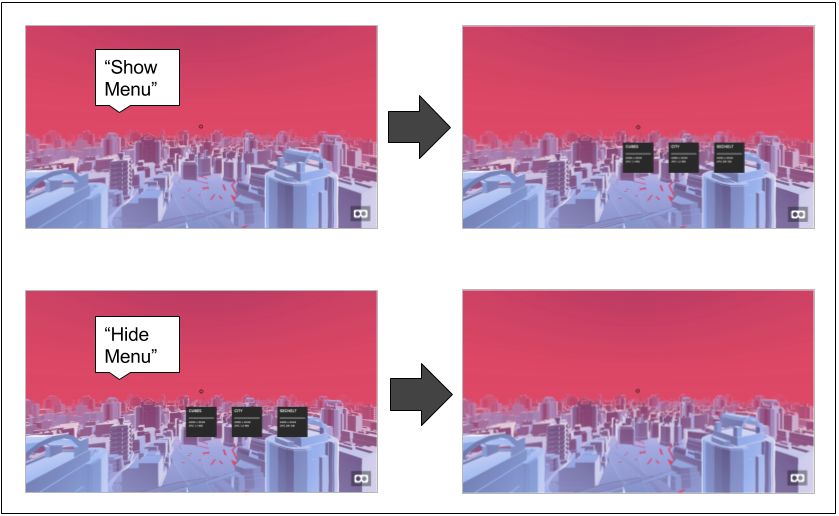
The `aframe-speech-command-component` components provide speech commands that you can easily integrate into an aframe scene.
The speech command can set an attribute of a target element, or can also execute a function on a target Component.
The `dist/aframe-speech-command-component.js` file defines 2 components:
* A `speech-command` component that can be added to any entity to define an action to take based on a speech command
* An `annyang-speech-recognition` component that provides the speech recognition implementation based on the annyang Speech Recognition library: [https://github.com/TalAter/annyang](https://github.com/TalAter/annyang)
Although this implementation uses annyang for speech recognition, any speech recognition javascript library can be integrated using the same pattern as `annyang-speech-recognition`
### API
| Property | Description | Default Value |
| -------- | ----------- | ------------- |
| **command** | the text of the speech command | |
| **type** | "attribute" to change an attribute or "function" to execute a function | |
| **targetElement** | the component to execute the function on. | |
| **targetComponent** | the element that contains the attribute to change or contains the component to execute the function on. This is optional since by default the target will be entity that the component belongs to. | |
| **function** | the name of the function. For now the function must take no parameters. | |
| **attribute** |the attribute to change | |
| **value** | "the value to change the attribute to | |
| **keyCode** | n optional numeric ASCII code to use as a shortcut (useful for development when quiet is a necessity) | |
#### Example: setting an attribute on target element
```xml
<a-entity speech-command="command: city; type: attribute; targetElement: #image-360; attribute: src; value: #city;"></a-entity>
```
#### Example: executing a function on target Component
```xml
<a-entity speech-command="command: go; type: function; targetElement: #cursor; targetComponent: teleporter; function: teleport; keyCode: 13"></a-entity>
```
### Installation
#### Browser
Install and use by directly including the [browser files](dist):
To integrate aframe-speech-command-component to an aframe scene, the following must be added:
* The `annyang` speech recognition script and the aframe-speech-command-component.js script (found in the dist folder)
```html
<script src="//cdnjs.cloudflare.com/ajax/libs/annyang/2.5.0/annyang.min.js"></script>
<script src="aframe-speech-command-component.js"></script>
```
* An entity with the `annyang-speech-recognition` component
```html
<a-entity id="annyang" annyang-speech-recognition></a-entity>
```
* One or more entities with the `speech-command` component
```html
<a-entity id="menu"
speech-command__show="command: show menu; type: attribute; attribute: visible; value: true;"
speech-command__hide="command: hide menu; type: attribute; attribute: visible; value: false;">
...
...
</a-entity>
```
Note that multiple instances of the `speech-command` component are allowed on the same entity as shown above.
###### Browser Compatibility
This implementation is currently only compatible with the Google Chrome browser since it is based on that browser's Speech Recognition API.
The following are verified compatibility tests and results:
| Browser | OS | Works? |
| -------- | ----------- | ------------- |
| Chrome 55 | Mac OS 10.12 | Yes |
| Chrome 55 | Android 6.0.1 | Yes |
| Chrome 55 | iOS 10 | No |
Other versions of Chrome should also work, such as Chrome on Windows 10.
Firefox also has experimental support the Speech Recogntion API in versions Gecko 44+,
so the aframe-speech-command-component may be compatible with those browsers as well. More information can be found here:
[https://developer.mozilla.org/en-US/docs/Web/API/Web_Speech_API/Using_the_Web_Speech_API](https://developer.mozilla.org/en-US/docs/Web/API/Web_Speech_API/Using_the_Web_Speech_API)
#### npm
Install via npm:
```bash
npm install
```
Then require and use.
```js
require('aframe');
require('aframe-speech-command-component');
```
## Public Demo
Demos are available publicly at:
[https://lmalave.github.io/aframe-speech-command-component/examples/index.html](https://lmalave.github.io/aframe-speech-command-component/examples/index.html)
#### Image gallery demo
Say "show menu" to bring up menu
Say "go to cubes", "go to city", or "go to lake" to show any of the 3 images
Say "hide menu" to hide menu
This scene is based on the Image Gallery aframe.io demo: [https://github.com/aframevr/360-image-gallery-boilerplate](https://github.com/aframevr/360-image-gallery-boilerplate)
#### Teleporter demo
Say "start move" to activate raycaster
Say "go to" to teleport to location of marker (with raycaster activated)
Say "cancel move" to deactivate raycaster
This scene is based on the Hello Metaverse aframe.io demo: [https://aframe.io/examples/showcase/hello-metaverse/](https://aframe.io/examples/showcase/hello-metaverse/)
### Running demos locally
A node.js app is provided here with the Image Gallery and Teleport demos described above.
To run, first execute: `npm install`
Then execute: `npm start`
The application will then be running on http://localhost:8000 and your default browser should automatically open on this page
## Troubleshooting
#### speech commands not working
If the speech commands are not working, first verify that the page has access to the
microphone.
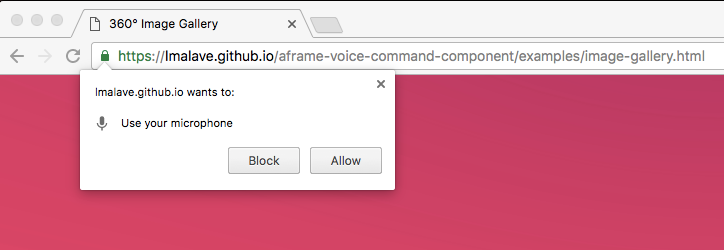
When you first load a page with speech commands in the browser, you should see the following prompt
to grant access to the microphone:
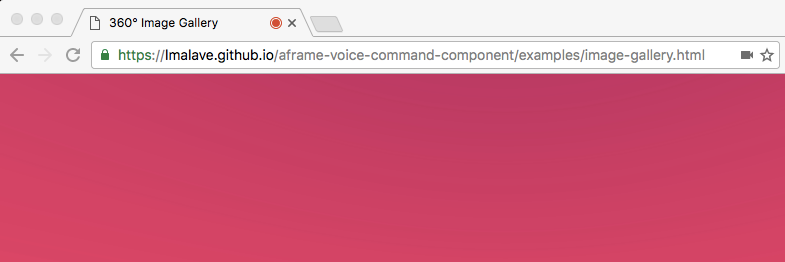
If the page has already been granted access to the microphone, you should see a red dot on the tab and a camera icon in the URL bar, as shown below: