adm-trv
Version:
Pure AngularJs TreeView
231 lines (215 loc) • 7.46 kB
Markdown
# ADM-treeView


*Pure AngularJs TreeView by [ADM | Amirkabir Data Miners](https://adm-co.net)*
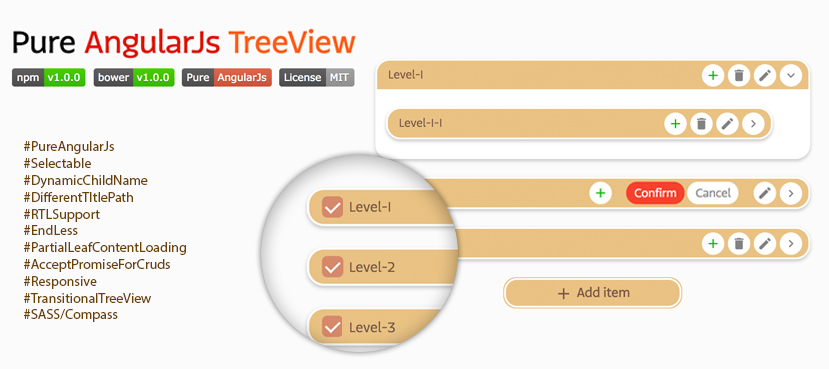
### Updates in V1.2.0
* Nothing changed since V1.0.1, the version upgrade is just because of npm bug.
### Demo
See ADMtrv live [HERE](https://amirkabirdataminers.github.io/ADM-treeView).
### Implementation steps
#### Step 1: Install ADM-treeView
````javascript
npm install adm-trv
bower install adm-trv
````
#### Step 2: Include the files in your app
```html
<!doctype html>
<html ng-app="myApp">
<head>
<link rel="stylesheet" href="css/ADM-treeView.min.css" />
<script src="js/angular.min.js"></script>
<script src="js/ADM-treeView.min.js"></script>
...
</head>
<body>
...
</body>
</html>
```
#### Step 3: Inject the ADM-treeView module
```javascript
var app = angular.module('myApp', ['ADM-treeView']);
```
#### Step 4: Add the adm-trv directive to a DOM element
```html
<adm-trv ng-model="model"></adm-trv>
```
### Options
#### Set options for entire of app
```javascript
app.config(['ADMtrvProvider', function(ADMtrv) {
ADMtrv.setConfigs({
childName: 'kids',
title: '$item.mainDS.title',
trackBy: '$item.mainDS.id',
dictionary: {
noItem: ' :( '
},
...
});
}]);
```
#### Set options for each directive
```html
<!-- pass options from controller -->
<adm-trv ng-model="ctrl.model1" configs="tree1Options"></adm-trv>
<!-- or write them inline -->
<adm-trv ng-model="ctrl.model1" configs="{childName: 'levels', readOnly: true}"></adm-trv>
```
#### Quick look
Name | Type | Default | Description
------------- | ------------- | ------------- | -------------
childName | String | childs | Set the name of childs wrapper. (e.g. 'childs', 'categories', ...)
title | String | $item.title | Set path to 'title'. '$item' can be ignore and path can be nested. (e.g. '$item.titleHolder1.titleHolder2.title')
singleRoot | Boolean | False | When it's true only one main root can be add.
readOnly | Boolean | False | This option disable add, edit and delete methods.
selectable | Boolean | False | Add checkbox before title to enable multi selecting.
trackBy | String | -- | For selectable mode, can be useful for finding items. '$item' can be ignore and path can be nested. (e.g. '$item.mainDS.id')
maxDepth | Number | -- | Set maxDepth for treeView.
direction | String | ltr | Change treeView direction. (e.g. 'ltr', 'rtl')
dictionary | Object | (EN) | Change buttons and placeholders name upon your language. Check the Docs below.
onKidOpen | Function | -- | Pass HTML content to show it on leaf clicking. accept both 'string' and 'promise' to fill the content.
onAdd | Function | -- | Event on adding item to tree. Can return promise to wait for server response and add server 'id' to object.
onEdit | Function | -- | Event on editing item. Can return promise to wait for server response.
onDelete | Function | -- | Event on deleting item. Can return promise to wait for server response.
### onKidOpen event
In readOnly mode 'onKidOpen' event fire whenever the tree leafs clicked! You can return HTML content directly or by promise to show under leaf.
```javascript
// return string
$scope.tree2_2Options = {
childName: 'categories',
readOnly: true,
onKidOpen: function(node) {
return 'The Node title is: "' + node.title + '"';
}
}
// return promise
$scope.tree2_2Options = {
childName: 'categories',
readOnly: true,
onKidOpen: function(node) {
var deferred = $q.defer();
setTimeout(function() {
deferred.resolve('The Node title is: "' + node.title + '"');
}, 2000);
return deferred.promise;
}
}
```
---
### onAdd event
The 'onAdd' event fire on adding item to tree.
In case you want to post each node to server on add event, you can return promise to adm-trv to add node after server response.
Return value can be 'Object' or 'Boolean'.
* **Boolean:** adm-trv continue adding node to tree by catching 'true' value.
* **Object:** In case server add 'Id' to your object after inserting to DB, that might be need for further editing or deleting, adm-trv will extend client object with your returned object. Return false to avoid adding node to tree.
```javascript
// return Booelan
$scope.tree3_1Options = {
childName: 'organizations',
dictionary: {
titlePlaceholder: 'A-Z only ...'
},
onAdd: function(parentNode, newNode, titleOnly) {
return !/[^a-zA-Z]/.test(titleOnly);
}
}
//return promise
$scope.tree3_2Options = {
childName: 'organizations',
onAdd: function(parentNode, newNode, titleOnly) {
var deferred = $q.defer();
setTimeout(function() {
deferred.resolve({
id: Math.floor(Math.random() * 1000)
});
}, 500);
return deferred.promise;
}
}
```
### onEdit & onDelete events
```javascript
// return Booelan
$scope.tree4_1Options = {
onEdit: function (currentNode, parentNode) {
return true; // or False
},
onDelete: function (currentNode, parentNode) {
return true; // or False
}
}
//return promise
$scope.tree4_2Options = {
onEdit: function (currentNode, parentNode) {
var deferred = $q.defer();
setTimeout(function() {
deferred.resolve(true); // or False
}, 500);
return deferred.promise;
},
onDelete: function (currentNode, parentNode) {
var deferred = $q.defer();
setTimeout(function() {
deferred.resolve(true); // or False
}, 500);
return deferred.promise;
}
}
```
### Selectable
```html
<adm-trv ng-model="ctrl.model4_1" selected="ctrl.model4_1Selected" configs="tree4_1Options"></adm-trv>
<adm-trv ng-model="ctrl.model4_2" selected="ctrl.model4_2Selected" configs="tree4_2Options"></adm-trv>
```
```javascript
$scope.ctrl.model4_1Selected = [];
$scope.tree4_1Options = {
childName: 'bAghAlies',
selectable: true
}
$scope.ctrl.model4_2Selected = [];
$scope.tree4_2Options = {
childName: 'bAghAlies',
title: '$item.mainBAghAliDS.title',
trackBy: '$item.mainBAghAliDS.id',
selectable: true
}
```
### Dictionary
```javascript
$scope.tree5_1Options = {
childName: 'golAbies',
dictionary: {
noItem: 'No golAbi! :(',
titlePlaceholder: 'Type ...',
rootAddBtn: 'Add main golAbi',
confirmBtn: 'YES',
cancelBtn: 'NO'
}
}
$scope.tree5_2Options = {
childName: 'golAbies',
direction: 'rtl',
dictionary: {
noItem: 'موردی وجود ندارد!',
titlePlaceholder: 'عنوان ...',
rootAddBtn: 'افزودن',
confirmBtn: 'تایید',
cancelBtn: 'انصراف'
}
}
```