adm-dtp
Version:
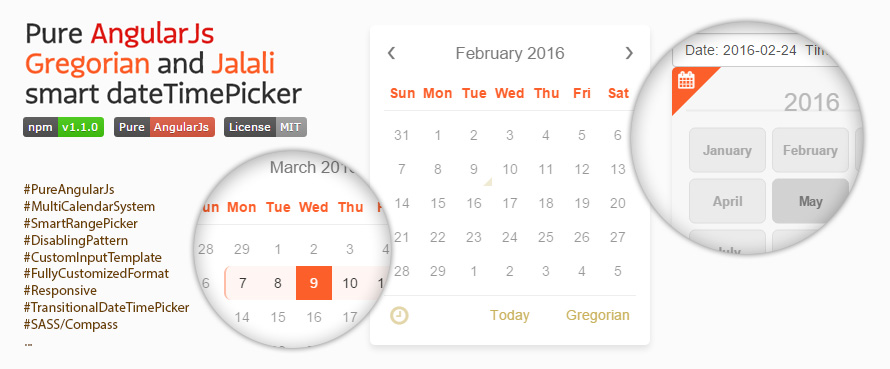
Pure AngularJs Gregorian and Jalali smart dateTimePicker
264 lines (245 loc) • 9.56 kB
Markdown
# ADM-dateTimePicker


*Pure AngularJs Gregorian and Jalali smart dateTimePicker by [ADM | Amirkabir Data Miners](https://adm-co.net)*
### Updates in V1.2.0
* Now popup is appending to body instead of main element to fix some overflow & z-index issues
* Add translate option. so days & months names are no more constants
* Add option to watch options for changes
* Add option to set start day of week. (setting Monday instead of Sunday for some calendars in Europe)
* Add option to set minutes step
* Now popup will close by hitting tab
* Add ng-required support
* Fix the bug that causes high cpu usage on Safari
* Fix removeIcon bug
### Updates in V1.1.9
* Rediuce stylesheet size by 70%
* Fix unused font dependency
### Updates in V1.1.6
* Fix bug for converting Gregorian dates after 2017/1/1
* Prevent today button from posting form
* Fix datePicker input stucking by pasting date
### Updates in V1.1.0
* Remove all other dependencies. (Bootstrap, Glyphicon, Fonts)
* Add month and year quick select.
* Date format is now fully customize with any combination of YYYY, YY, MM, DD, hh, mm.
* Add custom input template option inside directive.
* Add option to freeze input to prevent user from changing text.
* Add option to hide time from dateTimePicker.
* Add option to auto select current day, by puting 'today' in default parameter.
* Fix bugs on IE9.
---
### Demo
See ADMdtp live [HERE](https://amirkabirdataminers.github.io/ADM-dateTimePicker).
---
### Implementation steps
#### Step 1: Install ADM-dateTimePicker
````javascript
npm install adm-dtp
bower install adm-dtp
````
#### Step 2: Include the files in your app
```html
<html ng-app="myApp">
<head>
<link rel="stylesheet" href="css/ADM-dateTimePicker.css" />
<script src="js/angular.min.js"></script>
<script src="js/ADM-dateTimePicker.min.js"></script>
...
</head>
<body>
...
</body>
</html>
```
#### Step 3: Inject the ADM-dateTimePicker module
```javascript
var app = angular.module('myApp', ['ADM-dateTimePicker']);
```
#### Step 4: Add the adm-dtp directive to a DOM element
```html
<adm-dtp ng-model='date'></adm-dtp>
```
---
### Options
#### Set options for entire of app
```javascript
app.config(['ADMdtpProvider', function(ADMdtp) {
ADMdtp.setOptions({
calType: 'gregorian',
format: 'YYYY/MM/DD hh:mm',
default: 'today',
...
});
}]);
```
#### Set options for each directive
```html
<!-- pass options from controller -->
<adm-dtp ng-model='date1' options='date1_options'></adm-dtp>
<!-- or write them inline -->
<adm-dtp ng-model='date2' options='{calType: "jalali", format: "YYYY/MM/DD", default: 1450197600000}'></adm-dtp>
```
#### Quick look
Name | Type | Default | Description
------------- | ------------- | ------------- | -------------
watchingOptions | Boolean | false | Whether watch options for changes or not"
calType | String | 'gregorian' | 'gregorian' & 'jalali' are available
dtpType | String | 'date&time' | 'date&time' & 'date' are available. (expect 'time' in next version)
default | Number, String, Date | -- | Initial date can be Number(UNIX), String or Date and also word 'today' for auto set current date
disabled | Array | -- | Disable specific days with format of String, Date and UNIX, or days with pattern of 'i+[NUM]' and '[NUM]d+[NUM]
freezeInput | Boolean | false | Freeze input to prevent user changing text
smartDisabling | Boolean | true | Whether change Sunday from Gregorian calendar to Friday in Jalali calendar by switching calendar type or not
format | String | 'YYYY/MM/DD hh:mm' | Any combination of YYYY, YY, MM, DD, hh, mm. (e.g. YY/MM/DD, MM-DD (hh:mm))
multiple | Boolean | true | Whether user can change calendar type or not
autoClose | Boolean | false | Closing ADMdtp on selecting a day
transition | Boolean | true | Transition on loading days
gregorianStartDay | Number | 0 | 0 for Sunday, 1 for Monday, ...
minuteStep | Number | 1 | Each step for increasing or decreasing minutes
gregorianDic | Object | __ see on examples __ | Changing title, monthsNames, daysNames and todayBtn for Gregorian Calendar
jalaliDic | Object | __ see on examples __ | Changing title, monthsNames, daysNames and todayBtn for Jalali Calendar
---
### Custom input template
You can put custom input template inside `<adm-dtp></adm-dtp>` but with unwanted limits.
```html
<!-- all optional actions -->
<adm-dtp ng-model='date' full-data='date_details'>
<!-- fully access to 'date' and 'date_details' parameters -->
<!-- input is optional too, but must use in this format -->
<input type='text' ng-model='date' dtp-input />
<!-- attributes name are important, not tags name -->
<button dtp-open > Open calendar </button>
<button dtp-close > Close calendar </button>
<button dtp-toggle > Toggle calendar </button>
<button dtp-destroy > Destroy calendar </button>
</adm-dtp>
```
---
### Disabling days
#### Disable specific days
```html
<!-- it accept both unix and string date -->
<adm-dtp ng-model="date" options="disabled:['2016/1/20', 1453408200000]"></adm-dtp>
```
#### Disable with pattern
Currently two types of patterns are availble:
* Days in a week: `i+[NUM]`
* `i` -> will disable all Sundays in Gregorain calendar or Saturdays in Jalali calendars
* `i+6` -> will disable all Saturdays in Gregorain calendar or Fridays in Jalali calendars
* ...
* Days in a month: `[NUM]d+[NUM]`
* `d+1` -> will disable the second day of all months
* `2d` -> will disable the even days of all months
* `2d+1` -> will disable the odd days of all months
* ...
##### Inverse disabling:
putting **Exclamation mark (!)** at the begining of the pattern will inverse disabling pattern:
* `!i+6` -> just Saturdays in Gregorain calendar or Fridays in Jalali calendars are available
* `!2d+1` -> it's exactly like `2d`
##### Combine patterns:
patterns of the same type can be combine with **Ampersand (&)**.
mention that `['2d+1', '7d']` and `['2d+1&7d']` are equal, but `['!2d+1', '!7d']` and `['!2d+1&7d']` are completely differents.
##### Smart disabling:
`i` in Gregorian calendar will disable Sundays (weekend) that is equal to Fridays (weekend) in Jalali calendar.
option `smartDisabling: true` change Sunday from Gregorian calendar to Friday in Jalali calendar by switching calendar type,
but `smartDisabling: false` makes no different.
```html
<adm-dtp ng-model='date' options="disabled:['2016/1/20', '!i&i+1', '15d+2']"></adm-dtp>
```
---
### Full data
Beside ngModel you can access to date full details throw `full-data` attribute.
```html
<adm-dtp ng-model="date" full-data="date_details"></adm-dtp>
```
`date_details` contains following parameters:
```javascript
{
formated: "2015/12/15",
gDate: 2015-12-15T16:40:00.000Z,
//gDate is Date format of selected date in Gregorian calendar
unix: 1450197600000,
year: 2015,
month: 12,
day: 15,
hour: 20,
minute: 10,
minDate: null,
maxDate: null,
calType: "gregorian",
format: "YYYY/MM/DD"
}
```
---
### Smart range picker
#### Static limitation
```html
<!-- mindate & maxdate accept both unix and string date -->
<adm-dtp ng-model="date" options="{default:'2015/12/15'}" mindate="1449866902553" maxdate="'2015/12/18'"></adm-dtp>
```
#### Dynamic limitation
No need to destroy datepickers anymore!
```html
<adm-dtp ng-model="date1" full-data="date1_detail" maxdate="{{date2_detail.unix}}"></adm-dtp>
<adm-dtp ng-model="date2" full-data="date2_detail" mindate="{{date1_detail.unix}}"></adm-dtp>
<adm-dtp ng-model="date3" mindate="{{date1_detail.unix}}" maxdate="{{date2_detail.unix}}"></adm-dtp>
```
---
### Disabling ADMdtp
```html
<!-- disable permanently -->
<adm-dtp ng-model='date' disable='true'></adm-dtp>
<!-- disable dynamicly -->
<adm-dtp ng-model='date1' ></adm-dtp>
<adm-dtp ng-model='date2' disable='{{!date1}}'></adm-dtp>
```
---
### Dictionary
```javascript
{
calType:'gregorian',
multiple:false,
gregorianDic: {
title: 'Grégorien',
monthsNames: ['Janvier', 'Février', 'Mars', 'Avril', 'Mai', 'Juin', 'Juillet', 'Août', 'Septembre', 'Octobre', 'Novembre', 'Décembre'],
daysNames: ['Dim', 'Lun', 'Mar', 'Mer', 'Jeu', 'Ven', 'Sam'],
todayBtn: "Aujourd'hui"
}
}
```
---
### Gregorian Start Day
```html
<!--
0 -> Sunday
1 -> Monday
...
6 -> Satudary
-->
<adm-dtp ng-model='date' options='{gregorianStartDay: 1}'></adm-dtp>
```
---
### Events
#### Show / Hide
```html
<adm-dtp ng-model="date" on-open="open()"></adm-dtp>
<adm-dtp ng-model="date" on-close="close()"></adm-dtp>
```
#### Change / Select
```html
<!-- Note 1: you can access to the selected date full details in below functions -->
<!-- Note 2: functions names are optional but input name must be 'date' -->
<!-- event on any change occurs on input -->
<adm-dtp ng-model="date" on-change="change(date)"></adm-dtp>
<!-- event on selecting a day -->
<adm-dtp ng-model="date" on-datechange="dateChanged(date)"></adm-dtp>
<!-- event on changing the time -->
<adm-dtp ng-model="date" on-datechange="timeChanged(date)"></adm-dtp>
```