@zoranwong/acc-engine.js
Version:
A javascript framework to accelerate your applicatin developement
344 lines (273 loc) • 12.1 kB
Markdown
# acc-engine.js
### acc-engine.js is a js framework for web development. It provides a container for our application to organize the objects in the application.
## What
acc-engine.js is a js framework for web development. It provides a container for our application to organize the objects in the application.And also acc-engine.js is a tool box.It provides http client, websocket client, worker pool, config manager, event bus , command interface and so on.
## Why
acc-engine.js can help you to make your code more expandable and readable, and organize objects in your projects easier.For example, you can intercept http by middleware( which you can write you logic code before or after send request to server).
## How
- ### provider
When you run the acc-engine.js, the framework will put some system's providers into your app.
- System's providers
- WorkerServiceProvider // provider worker service
- HttpServiceProvider, // provider http service
- CommandServiceProvider, // provider command serive
- EventServiceProvider, // provider event bus service
- ModelServiceProvider // provider global model state service
```javascript
// implement ServiceProvider interface
import {ServiceProvider} from "@zoranwong/acc-engine.js";
import VuexServiceProvider from "VuexServiceProvider";// vuex state service for acc-engine.js
class ConfigServiceProvider extends ServiceProvider {
constructor(app) {
super(app);
}
register(){
this.app.config.app = {
providers: [VuexServiceProvider]// you can config the providers
};// set config
}
}
// in the entry script add ConfigServiceProvider to app
// main.js (vue)
import App from './App.vue'
import Application from "@zoranwong/acc-engine.js";
/**@var {Application} app*/
const app = Application.getInstance();
app.registerProvider(ConfigServiceProvider);
app.rootComponent = App;
app.run();
```
- ## http service
+ Adapter class // http based Adapter class, you can implement it to adapt you http client sdk.
+ XMLHttpAdapter // XMLHttpRequest Adapter class, set http Adapter to http client to send request.
+ Client class // http client class
+ Request class // you will implement this class to define a new request class which contains http method, uri,
_headers = {}; // http headers
_data = {}; // http request data or params
_uri = ''; // http request uri
```javascript
//_uri is http request uri
class OderRequest extends Request {
_uri = '/orders/{id}'
_data = {
id: '',// replace {id} in _uri
status: '', // put in post or put http body or concat params on http queryStr
}
}
```
_method = '';// http method
_middleware = []; // http interceptors array, you can put some common logic in middleware
_responseClass = Response // http response class, you can extend the Response for your request
requestMiddleware () // you can append some to the _middleware and also not overwrite the parent's data
static async send(...params) // static method to send http request, you can call this method through the request child class which you extend
constructor(HttpRequestOption options)
```javascript
class HttpRequestOption {
headers = null;
data = null;
uri = null;
method = HttpMethod.GET;
middleware = null;
responseClass = Response
}
//You can send data using the object of HttpRequestOption's struct
Request.send(new HttpRequestOption({headers, data, uri, method, middleware, responseClass}));
Request.send({headers, data, uri, method, middleware, responseClass});
```
setHeader(name, value)
getHeader(name)
rules() define an array of validation rules for request data in the return data.
messages() define an array of validation error messages for request data in the return data.
errors() return the validation errors
passed() determine whether the verification is passed
get data()
get headers()
get uri()
get middleware()
get method()
get responseClass()
+ Response class
+ Middleware class
+ HttpMethod http method dictionary
```javascript
{
GET: 'GET',
POST: 'POST',
PUT: 'PUT',
DELETE: 'DELETE',
}
```
```javascript
// define login response
import {Response, HttpMethod} from "@zoranwong/acc-engine.js";
class LoginResponse extends Response{
token = null;
ttl = null;
refreshTtl = null;
constructor(status, httpStatus, body, headers = {}){
super(status, httpStatus, body, headers);
let data = this.body['data'];
this.token = data['token'];
this.ttl = data['ttl'];
this.refreshTtl = data['refresh_ttl'];
}
}
// define a middleware to intercept http
import {Middleware} from '@zoranwong/acc-engine.js';
// password will be hashed before request send to server
class PasswordHashMiddleware extends Middleware{
async handle(request, next) {
let password = request.data['password'];
request.data['password'] = hash(password);
// before send
let res = await next(request);
// after send
return res;
}
}
//define login request
import {Request} from "@zoranwong/acc-engine.js";
class LoginRequest extends Request {
_data = {
user_name: null,
password: null
};
_method = HttpMethod.GET;
_uri = '/login';
_responseClass = LoginResponse;
constructor(userName, password) {
super();
this._data['user_name'] = userName;
this._data['password'] = password;
}
get middleware(){
return [...super.middleware, PasswordHashMiddleware];
}
}
// set http gateway
import {Applocation} from '@zoranwong/acc-engine.js';
let app = Applocation.getInstance();
app.config.http = {
gateway: 'http://test.dev',
headers: {},
middleware: []
};// you can set the http config in you config provider
async function login() {
let response = await app.http.send(new LoginRequest('xxxx', 'yyyyyy'));
// or let response = await app.http.send(new LoginRequest('xx','xx'), LoginResponse);
let b = await LoginRequest.send('xxx', 'xxxx');
}
// You can define a login command
import {Command} from '@zoranwong/acc-engine.js';
class LoginCommand extends Command{
async handle(userName, password){
let res = await LoginRequest.send(userName, password);
}
}
// register command to container
app.registerCommand('login', LoginCommand);
let userName = 'xx';
let password = 'xxx';
// execute command to login
app.command('login', userName, password);
```
- ### command service
Command service is the practice of command design pattern.We abstract the behavior surrounding data into interactive commands one by one.So the framework lets you can use the command-based interactive mode to initiate the behavior you want to complete.
```javascript
// You can define a login command
import {Command} from '@zoranwong/acc-engine.js';
import LoginRequest from 'LoginRequest';
class LoginCommand extends Command{
async handle(userName, password){
let res = await LoginRequest.send(userName, password);
}
}
// register command to container
app.registerCommand('login', LoginCommand);
// you can create a command provider to manage and provider commands for application
let userName = 'xx';
let password = 'xxx';
// execute command to login
app.command('login', userName, password);
```
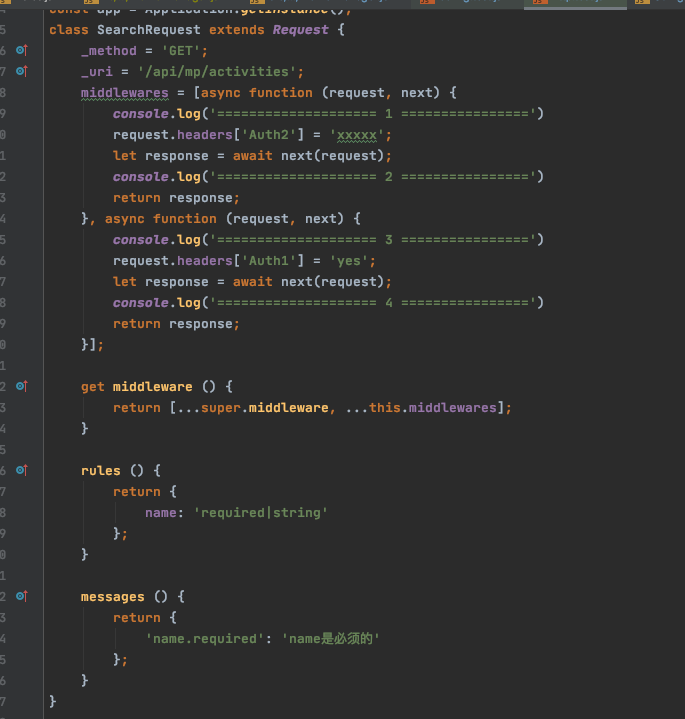
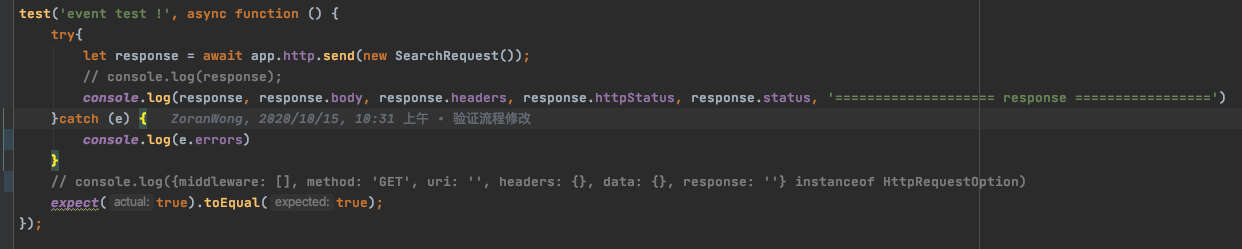
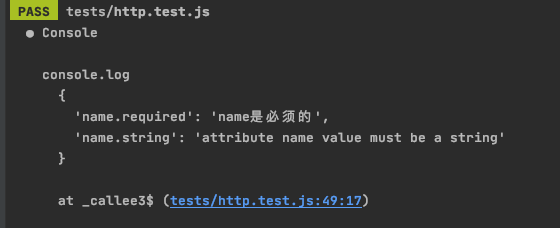
- ### validate request
You only need to implement the rules() and messages() method which in the abstract of Request, the application will auto to validate the data which you send to the server.
In our system it provides a set of rules for programming.
| Key | Syntax | description |
| ----------- | ----------- | ----------- |
| between | between:10,100 | 10 <= a < 100 |
| email | email | the value must be a valid email address |
| float | float | the value must be a valid float |
| in | in:2,5,7,9 | the value must be in 2,5,7,9 |
| integer | integer | the value must be an integer |
| max | max:1000 | the value must smaller than 1000 (a < 1000) |
| min |min:10 | the value must be greater than 10 (a >= 10) |
| not_in | not_in:1,7,8,10 | the value must be not in 1,7,8,10 |
| not_null | not_null | the value mustn`t be null |
| number | number | the value must be a number |
| required | required | the value is required |
| size | size:16 | the value`s size must smaller than 16 |
| string | string | the value must be a valid string|
| not_empty | not_empty | the value mustn`t be null, empty string and undefined |
```javascript
//define login request
import {Request} from "@zoranwong/acc-engine.js";
class LoginRequest extends Request {
_data = {
user_name: null,
password: null
};
_method = 'POST';
_uri = '/login';
_responseClass = LoginResponse;
constructor(userName, password) {
super();
this._data['user_name'] = userName;
this._data['password'] = password;
}
get middleware(){
return [...super.middleware, PasswordHashMiddleware];
}
rules(){
return {
user_name: 'required|string|size:32',//['required', 'string', 'size:32']
password: ['required', 'string', 'size:1024']
};
}
messages(){
return {
'user_name.required': 'user_name is must attribute!',
'user_name.string': 'user_name`s value must be a string',
'user_name.size': 'user_name`s value length must smaller then 32'
};
}
}
LoginRequest.send('Mike Jackson', 'xxxxxxxx')
```
- ### model service
- setModel(data) this method can reset the property of model which you defined,and it can case snake's key to camel's key which you defined in model.
- cacheAttributes which attributes will be cached in.
```javascript
class User extends Model {
username = null;
headImage = null;
constructor(options) {
super(options);
this.initial(options);//initial the model
}
}
// User.instance(app, 'model');
let user = new User({username: 'Jack',head_image: '--------------'});
```
- ### websocket service
- ### worker service
- ### create a config provider to contain your project's config objects
## Using acc-engine.js in Vue project
- ### use vuex
- ### use vue-router
- ### use command
### Using acc-engine.js in uniapp project
### Using acc-engine.js in react project