@yworks/react-yfiles-company-ownership
Version:
yFiles React Company Ownership Component - A powerful and versatile React component based on the yFiles library, allows you to seamlessly incorporate dynamic and interactive company ownership diagrams into your applications.
209 lines (153 loc) • 8.45 kB
Markdown
# yFiles React Company Ownership Component
[](https://www.npmjs.org/package/@yworks/react-yfiles-company-ownership)
[](https://docs.yworks.com/react-yfiles-company-ownership)
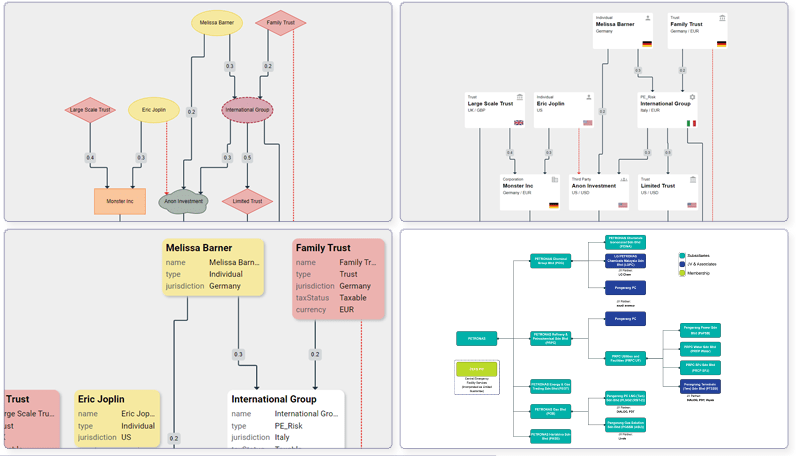
Welcome to the *yFiles React Company Ownership* component, a powerful and versatile React component based
on the [yFiles](https://www.yworks.com/yfiles-overview) library. This component enables seamless integration
for displaying company ownership charts in your React applications.
## Getting Started
### Prerequisites
To use the Company Ownership component, [yFiles for HTML](https://www.yworks.com/products/yfiles-for-html) is required.
You can evaluate yFiles for 60 days free of charge on [my.yworks.com](https://my.yworks.com/signup?product=YFILES_HTML_EVAL).
See [Licensing](https://docs.yworks.com/react-yfiles-company-ownership/introduction/licensing) for more information on this topic.
You can learn how to work with the yFiles npm module in our [Developer’s Guide](https://docs.yworks.com/yfileshtml/#/dguide/yfiles_npm_module). A convenient way of getting access to yFiles is to use the [yFiles Dev Suite](https://www.npmjs.com/package/yfiles-dev-suite).
### Project Setup
1. **Installation**
In addition to yFiles, the Company Ownership component requires React to be installed in your project.
If you want to start your project from scratch, we recommend using vite:
```
npm create vite@6.1.1 my-company-ownership-app -- --template react-ts
```
Add the yFiles dependency:
```
npm install <yFiles package path>/lib/yfiles-30.0.0+dev.tgz
```
<details>
<summary>Sample <code>package.json</code> dependencies</summary>
The resulting package.json dependencies should resemble the following:
```json
"dependencies": {
"react": "^18.2.0",
"react-dom": "^18.2.0",
"@yfiles/yfiles": "./lib/yfiles-30.0.0+dev.tgz"
}
```
</details>
Now, the component itself can be installed:
```bash
npm install @yworks/react-yfiles-company-ownership
```
2. **License**
Be sure to invoke the `registerLicense` function before using the Company Ownership React component.
When evaluating yFiles, the license JSON file is found in the `lib/` folder of the yFiles for HTML evaluation package.
For licensed users, the license data is provided separately.
<details>
<summary>License registration</summary>
Import or paste your license data and register the license, e.g. in `App.tsx`:
```js
import yFilesLicense from './license.json'
registerLicense(yFilesLicense)
```
</details>
3. **Stylesheet**
Make sure to import the CSS stylesheet as well:
```js
import '@yworks/react-yfiles-company-ownership/dist/index.css'
```
4. **Usage**
You are now all set to utilize the Company Ownership component with your data!
See a basic example `App.tsx` below:
```tsx
import {
CompanyOwnership,
CompanyOwnershipData,
Entity,
Ownership,
registerLicense
} from '@yworks/react-yfiles-company-ownership'
import '@yworks/react-yfiles-company-ownership/dist/index.css'
import yFilesLicense from './license.json'
registerLicense(yFilesLicense)
const data: CompanyOwnershipData<Entity, Ownership> = {
companies: [
{
id: 1,
name: 'Monster Inc',
type: 'Corporation'
},
{
id: 2,
name: 'Connect Partner',
type: 'RCTB'
},
{
id: 3,
name: 'Large Scale Trust',
type: 'Trust'
}
],
connections: [
{
type: 'Ownership',
ownership: 0.4,
sourceId: 1,
targetId: 2
},
{
type: 'Ownership',
ownership: 0.2,
sourceId: 1,
targetId: 3
}
]
}
function App() {
return <CompanyOwnership data={data}></CompanyOwnership>
}
export default App
```
> **Note:** By default, the `CompanyOwnership` component adjusts its size to match the size of its parent element. Therefore, it is necessary to set the dimensions of the containing element or apply styling directly to the `CompanyOwnership` component. This can be achieved by defining a CSS class or applying inline styles.
## Documentation
Find the full documentation, API and many code examples in our [documentation](https://docs.yworks.com/react-yfiles-company-ownership).
## Live Playground
[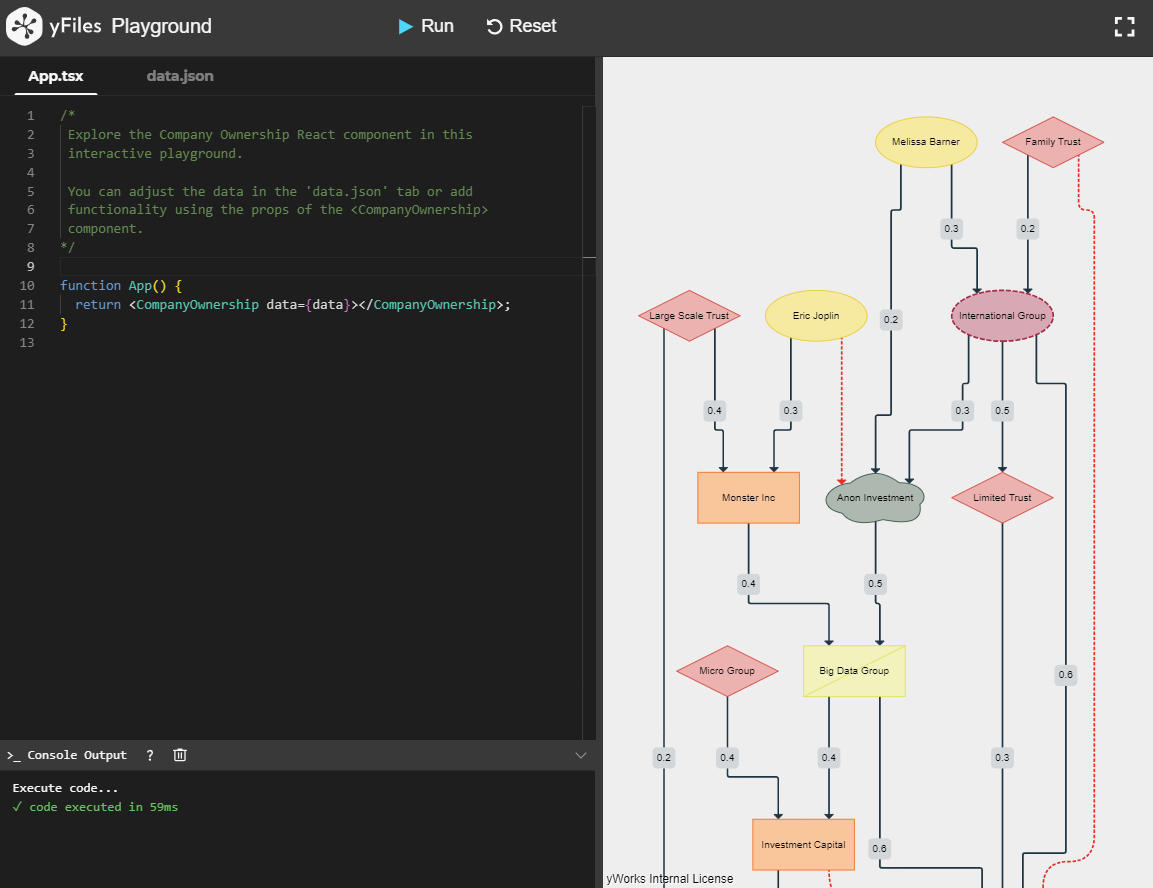](https://docs.yworks.com/react-yfiles-company-ownership/introduction/welcome)
Try the yFiles React Company Ownership component directly in your browser with our [playground](https://docs.yworks.com/react-yfiles-company-ownership/introduction/welcome).
## Features
The component provides versatile features out of the box that can be further tailored to specific use cases.
<table>
<tr>
<td>
<a href="https://docs.yworks.com/react-yfiles-company-ownership/introduction/welcome"><img src="https://raw.githubusercontent.com/yWorks/react-yfiles-company-ownership/main/assets/default-shapes.png" title="Default Shapes" alt="Default Shapes"></a><br>
<a href="https://docs.yworks.com/react-yfiles-company-ownership/introduction/welcome">Default Shapes</a>
</td>
<td>
<a href="https://docs.yworks.com/react-yfiles-company-ownership/features/custom-items"><img src="https://raw.githubusercontent.com/yWorks/react-yfiles-company-ownership/main/assets/custom-visualization.png" title="Custom visualization" alt="Custom visualization"></a><br>
<a href="https://docs.yworks.com/react-yfiles-company-ownership/features/custom-items">Custom visualization</a>
</td>
</tr>
<tr>
<td>
<a href="https://docs.yworks.com/react-yfiles-company-ownership/introduction/welcome"><img src="https://raw.githubusercontent.com/yWorks/react-yfiles-company-ownership/main/assets/level-of-detail.png" title="Level of detail visualization" alt="Level of detail visualization"></a><br>
<a href="https://docs.yworks.com/react-yfiles-company-ownership/introduction/welcome">Level of detail visualization</a>
</td>
<td>
<a href="https://docs.yworks.com/react-yfiles-company-ownership/features/search"><img src="https://raw.githubusercontent.com/yWorks/react-yfiles-company-ownership/main/assets/search.png" title="Search" alt="Search"></a><br>
<a href="https://docs.yworks.com/react-yfiles-company-ownership/features/search">Search</a>
</td>
</tr>
</table>
Find all features in the [documentation](https://docs.yworks.com/react-yfiles-company-ownership) and try them directly in the
browser with our integrated code playground.
## Licensing
All owners of a valid software license for [yFiles for HTML](https://www.yworks.com/products/yfiles-for-html)
are allowed to use these sources as the basis for their own [yFiles for HTML](https://www.yworks.com/products/yfiles-for-html)
powered applications.
Use of such programs is governed by the rights and conditions as set out in the
[yFiles for HTML license agreement](https://www.yworks.com/products/yfiles-for-html/sla).
You can evaluate yFiles for 60 days free of charge on [my.yworks.com](https://my.yworks.com/signup?product=YFILES_HTML_EVAL).
For more information, see the `LICENSE` file.
## Learn More
Explore the possibilities of visualizing large ownership hierarchies with the yFiles Company Ownership Component.
For further information about [yFiles for HTML](https://www.yworks.com/products/yfiles-for-html) and our company, please visit [yWorks.com](https://www.yworks.com).
If you are exploring a different use case and require another React component,
please take a look at the available [React components](https://www.yworks.com/yfiles-react-components) powered by yFiles!
For support or feedback, please reach out to [our support team](https://www.yworks.com/contact) or open an [issue on GitHub](https://github.com/yWorks/react-yfiles-company-ownership/issues). Happy diagramming!