@yourgpt/widget-web-sdk
Version:
Official YourGPT SDK for JavaScript/TypeScript and React applications
537 lines (416 loc) • 14.8 kB
Markdown
# YourGPT SDK

[](https://www.typescriptlang.org/)
[](https://opensource.org/licenses/MIT)
[]()
[]()
Official YourGPT SDK for JavaScript/TypeScript and React applications. Integrate YourGPT's powerful chatbot widget into your web applications with modern, type-safe APIs.
[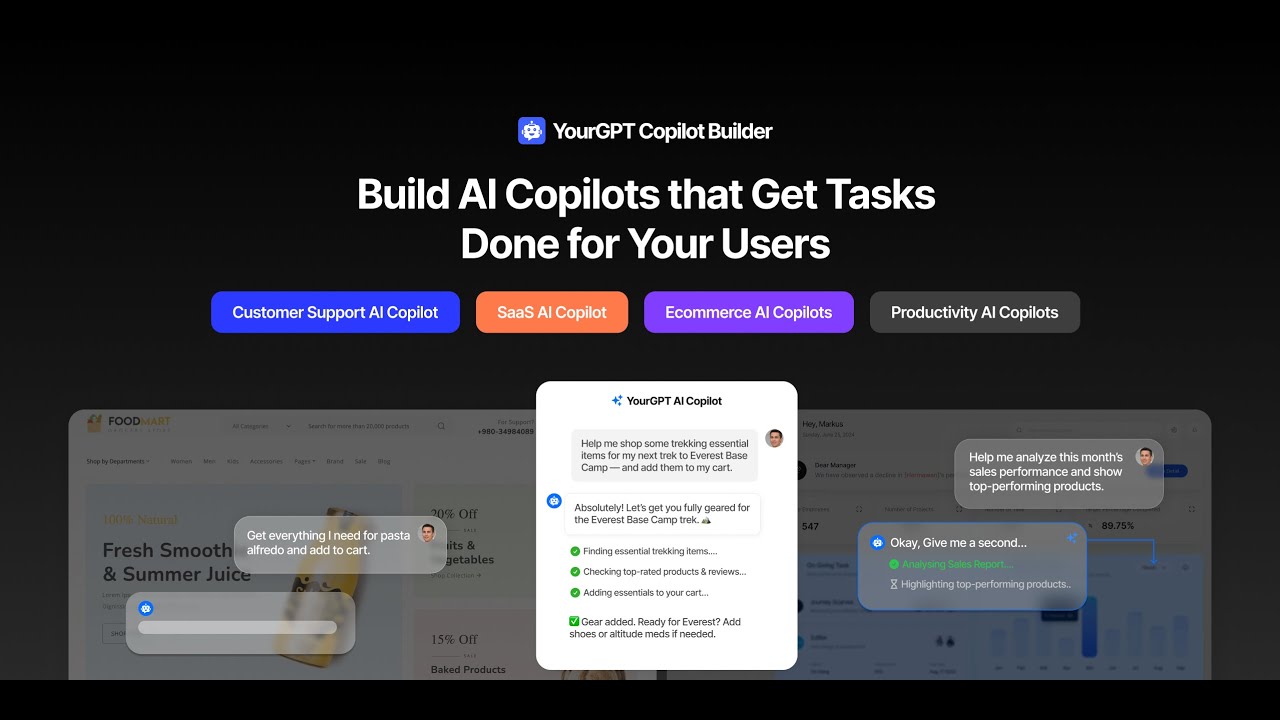](https://youtu.be/aHHeeJIVEl0)
### [Watch this video on YouTube](https://youtu.be/aHHeeJIVEl0)
## 🚀 Features
- **🔄 Dual Package**: Both vanilla JS/TS (`@yourgpt/widget-web-sdk`) and React-specific (`@yourgpt/widget-web-sdk/react`) implementations
- **📦 Tree-shakable**: Import only what you need for optimal bundle size
- **💪 TypeScript**: Full type safety, IntelliSense support, and comprehensive type definitions
- **🎣 React Hooks**: Modern React integration with `useYourGPTChatbot()` and `useAIActions()`
- **🎮 AI Actions**: Register custom AI-powered actions with confirmation dialogs
- **🎯 Event System**: Comprehensive event handling for real-time updates
- **🔧 Configurable**: Flexible configuration with SSR support
- **📱 Cross-platform**: Works in all modern browsers and frameworks
- **🧪 Well-tested**: Comprehensive test suite with 90%+ coverage
- **📚 Documented**: Complete documentation with examples
## 📦 Installation
```bash
npm install @yourgpt/widget-web-sdk
```
## ⚡ Quick Start
### Vanilla JavaScript/TypeScript Setup
```typescript
import { YourGPT } from "@yourgpt/widget-web-sdk";
// Initialize the SDK
await YourGPT.init({
widgetId: "your-widget-id",
});
// Get the SDK instance
const sdk = YourGPT.getInstance();
// Control the widget
sdk.open();
sdk.sendMessage("Hello!");
// Listen for events
sdk.onMessageReceived((data) => {
console.log("Message received:", data);
});
```
### React Setup
```tsx
import { YourGPT, useYourGPTChatbot, useAIActions } from "@yourgpt/widget-web-sdk/react";
// Initialize in your main app file (main.tsx or App.tsx)
YourGPT.init({
widgetId: "your-widget-id",
});
// Use in components
function ChatButton() {
const chatbot = useYourGPTChatbot();
const aiActions = useAIActions();
// Register AI actions
useEffect(() => {
aiActions.registerAction("get_location", async (data, helpers) => {
const confirmed = await helpers.confirm({
title: "Location Access",
description: "Allow location access?",
});
if (confirmed) {
// Get location and respond
helpers.respond("Location: 40.7128, -74.0060");
}
});
}, [aiActions]);
return (
<div>
<button onClick={chatbot.open}>Open Chat</button>
<p>Status: {chatbot.isConnected ? "Connected" : "Disconnected"}</p>
</div>
);
}
```
## 📖 Complete Documentation
### 🤖 AI Actions System
Register custom AI-powered actions that your chatbot can trigger:
```typescript
// Register an AI action with confirmation dialog
sdk.registerAIAction("delete_file", async (data, helpers) => {
const { filename } = JSON.parse(data.action[0].function.arguments);
// Show confirmation dialog to user
const confirmed = await helpers.confirm({
title: "Delete File",
description: `Are you sure you want to delete "${filename}"?`,
acceptLabel: "Delete",
rejectLabel: "Cancel",
});
if (confirmed) {
try {
await deleteFile(filename);
helpers.respond(`File "${filename}" deleted successfully`);
} catch (error) {
helpers.respond(`Error deleting file: ${error.message}`);
}
} else {
helpers.respond("File deletion cancelled");
}
});
// Register system information action
sdk.registerAIAction("get_system_info", async (data, helpers) => {
const systemInfo = {
userAgent: navigator.userAgent,
language: navigator.language,
platform: navigator.platform,
url: window.location.href,
timestamp: new Date().toISOString(),
};
helpers.respond(`System Info:\n${JSON.stringify(systemInfo, null, 2)}`);
});
// Unregister when no longer needed
sdk.unregisterAIAction("delete_file");
```
### 🪝 Hooks
#### `useAIActions()` - AI Actions Management
```typescript
function AIActionsComponent() {
const aiActions = useAIActions();
useEffect(() => {
// Register multiple actions at once
aiActions.registerActions({
get_time: async (data, helpers) => {
helpers.respond(`Current time: ${new Date().toLocaleString()}`);
},
get_page_url: async (data, helpers) => {
helpers.respond(`Current URL: ${window.location.href}`);
},
take_screenshot: async (data, helpers) => {
const confirmed = await helpers.confirm({
title: "Screenshot",
description: "Take a screenshot of the current page?",
});
if (confirmed) {
// Screenshot logic using html2canvas or similar
helpers.respond("Screenshot taken successfully");
}
},
});
// Cleanup on unmount
return () => {
aiActions.unregisterAction("get_time");
aiActions.unregisterAction("get_page_url");
aiActions.unregisterAction("take_screenshot");
};
}, [aiActions]);
return (
<div>
<h3>Registered AI Actions</h3>
<p>Count: {aiActions.registeredActions.length}</p>
<ul>
{aiActions.registeredActions.map((action) => (
<li key={action}>{action}</li>
))}
</ul>
</div>
);
}
```
### Components
#### `YourGPTProvider` - Wrapper
```tsx
// app/layout.tsx
import { Provider } from "./provider";
export default function RootLayout({ children }: { children: React.ReactNode }) {
return (
<html lang="en">
<body className={`${geistSans.variable} ${geistMono.variable} antialiased`}>
<Provider>{children}</Provider>
</body>
</html>
);
}
// app/provider.tsx
import { YourGPTProvider } from "@yourgpt/widget-web-sdk/react";
export function Provider({ children }: { children: React.ReactNode }) {
return (
<YourGPTProvider
config={{
widgetId: "your-widget-id",
mode: "embedded",
}}
onError={(error) => {
console.error("Widget Error:", error);
}}
>
{children}
</YourGPTProvider>
);
}
```
### Custom Confirmation Dialogs
```typescript
// Advanced AI action with custom confirmation
aiActions.registerAction("delete_user_data", async (data, helpers) => {
const { userId, dataType } = JSON.parse(data.action[0].function.arguments);
const confirmed = await helpers.confirm({
title: "⚠️ Delete User Data",
description: `This will permanently delete all ${dataType} data for user ${userId}. This action cannot be undone.`,
acceptLabel: "Delete Permanently",
rejectLabel: "Keep Data",
});
if (confirmed) {
try {
await deleteUserData(userId, dataType);
helpers.respond(`✅ ${dataType} data deleted for user ${userId}`);
} catch (error) {
helpers.respond(`❌ Failed to delete data: ${error.message}`);
}
} else {
helpers.respond("Data deletion cancelled - no changes made");
}
});
```
## 🏗️ Project Structure
```
@yourgpt/widget-web-sdk/
├── 📁 src/
│ ├── 📁 core/ # Core SDK (vanilla JS/TS)
│ │ └── YourGPT.ts # Main SDK implementation
│ ├── 📁 react/ # React-specific code
│ │ ├── 📁 hooks/ # React hooks
│ │ │ ├── useYourGPT.ts
│ │ │ ├── useYourGPTChatbot.ts
│ │ │ └── useAIActions.ts
│ │ ├── 📁 components/ # React components
│ │ │ ├── YourGPTProvider.tsx
│ │ │ └── YourGPTWidget.tsx
│ │ │ └── index.ts # React exports
│ ├── 📁 types/ # TypeScript definitions
│ ├── 📁 utils/ # Utility functions
│ └── index.ts # Main exports
├── 📁 tests/ # Test suite
├── 📁 docs/ # Documentation
└── 📄 README.md # This file
```
## Next Steps
Here is the setup guide for YourGPT dashboard.
### Integration with YourGPT Dashboard
Create custom AI actions in YourGPT dashboard
https://github.com/user-attachments/assets/733e6cee-6124-46f1-8f85-4f616b9cc945
### Choose your best suited model for your application
Choose the best model from a wide variety of models
<img width="1957" height="1014" alt="Choose a model" src="https://github.com/user-attachments/assets/f340006c-32af-43e0-921a-35898f4e185b" />
## 🧪 Testing
Run the test suite:
```bash
npm test # Run all tests
npm run test:watch # Run tests in watch mode
npm run test:coverage # Run tests with coverage report
```
The SDK includes comprehensive tests for:
- Core SDK functionality
- React hooks integration
- AI Actions system
- Error handling
- TypeScript type checking
## 🔨 Development
### Setup
```bash
git clone https://github.com/YourGPT/web-sdk
cd web-sdk
npm install
npm run build
```
### Available Scripts
```bash
npm run build # Build both core and React packages
npm run build:core # Build core SDK only
npm run build:react # Build React package only
npm run dev # Development mode with watch
npm run dev:examples # Build and serve examples
npm run serve # Serve examples on port 3000
npm run type-check # TypeScript type checking
npm run lint # ESLint code linting
npm run lint:fix # Fix ESLint issues
npm test # Run test suite
npm run clean # Clean build artifacts
```
### Build Output
```
dist/
├── index.js # CommonJS build
├── index.mjs # ES modules build
├── index.d.ts # TypeScript definitions
└── react/
├── index.js # React CommonJS build
├── index.mjs # React ES modules build
└── index.d.ts # React TypeScript definitions
```
## 📋 API Reference
### Core SDK Class
- **`YourGPTSDK`**: Main SDK class
### React Hook
- **`useAIActions()`**: AI actions management
### Types
```typescript
import type {
YourGPTConfig, // Configuration interface
WidgetState, // Widget state interface
MessageData, // Message data structure
EscalationData, // Human escalation data
AIActionData, // AI action payload
AIActionHelpers, // AI action helper functions
ChatbotAPI, // Complete chatbot API
AIActionsAPI, // AI actions API
} from "@yourgpt/widget-web-sdk";
```
### Utilities
```typescript
import {
isBrowser, // Check if in browser environment
isDevelopment, // Check if in development mode
validateWidgetId, // Validate widget ID format
validateUrl, // Validate URL format
debounce, // Debounce function calls
throttle, // Throttle function calls
withRetry, // Retry failed operations
EventEmitter, // Custom event emitter
} from "@yourgpt/widget-web-sdk";
```
## 🌐 Browser Support
- **Chrome**: 80+
- **Firefox**: 75+
- **Safari**: 13+
- **Edge**: 80+
- **IE**: Not supported
## 📱 Framework Compatibility
- ✅ **React**: 16.8+ (hooks support required)
- ✅ **Next.js**: 12+ (with SSR support)
- ✅ **Vite**: All versions
- ✅ **Create React App**: All versions
- ✅ **Vanilla JS/TS**: All modern environments
- ✅ **Vue.js**: Via vanilla SDK
- ✅ **Angular**: Via vanilla SDK
- ✅ **Svelte**: Via vanilla SDK
## 🔄 Migration Guide
### From Script-based Integration
**Before (Old Script Integration):**
```html
<script src="/script.js" id="yourgpt-chatbot" widget="your-widget-id"></script>
<script>
window.$yourgptChatbot.execute("widget:open");
window.$yourgptChatbot.on("message:received", handleMessage);
</script>
```
**After (New SDK Integration):**
```typescript
import { YourGPT } from "@yourgpt/widget-web-sdk";
await YourGPT.init({ widgetId: "your-widget-id" });
const sdk = YourGPT.getInstance();
sdk.open();
sdk.onMessageReceived(handleMessage);
```
### From React Class Components to Hooks
**Before:**
```jsx
class ChatComponent extends React.Component {
componentDidMount() {
window.$yourgptChatbot.execute("widget:open");
}
render() {
return <div>Chat Component</div>;
}
}
```
**After:**
```tsx
function ChatComponent() {
const chatbot = useYourGPTChatbot();
useEffect(() => {
chatbot.open();
}, [chatbot]);
return <div>Chat Component</div>;
}
```
## ❓ FAQ
**Q: Can I use this SDK with Next.js?**
A: Yes! The SDK fully supports SSR. Use the `isBrowser()` utility to check environment.
**Q: How do I handle widget initialization errors?**
A: Use try/catch with `YourGPTError` for specific error handling.
**Q: Can I customize the confirmation dialogs?**
A: Yes! Use the `helpers.confirm()` method in AI actions with custom options.
**Q: Is the SDK tree-shakable?**
A: Yes! Import only what you need: `import { YourGPT } from '@yourgpt/widget-web-sdk'`
**Q: How do I register multiple AI actions at once?**
A: Use `aiActions.registerActions()` with an object of action handlers.
## 🤝 Contributing
We welcome contributions! Please see our [Contributing Guide](CONTRIBUTING.md) for details.
### Development Setup
1. Fork the repository
2. Clone your fork: `git clone https://github.com/your-username/sdk.git`
3. Install dependencies: `npm install`
4. Create a feature branch: `git checkout -b feature/your-feature`
5. Make your changes and add tests
6. Run tests: `npm test`
7. Submit a pull request
### Code Standards
- **TypeScript**: Strict typing required
- **ESLint**: All rules must pass
- **Testing**: New features require tests
- **Documentation**: Public APIs must be documented
## 📄 License
MIT License - see [LICENSE](LICENSE) file for details.
## 🆘 Support
- 📧 **Email**: support@yourgpt.ai
- 🐛 **Issues**: [GitHub Issues](https://github.com/YourGPT/web-sdk/issues)
- 📖 **Documentation**: [docs.yourgpt.ai](https://docs.yourgpt.ai)
- 💬 **Discord**: [Join our community](https://discord.com/invite/57C9uTkD6g)
## 🔗 Links
- **Website**: [YourGPT](https://github.com/YourGPT)
- **GitHub**: [YourGPT/web-sdk](https://github.com/YourGPT/web-sdk)
- **NPM Package**: [@yourgpt/widget-web-sdk](https://www.npmjs.com/package/@yourgpt/widget-web-sdk)
- **Documentation**: [docs.yourgpt.ai/sdk](https://docs.yourgpt.ai/sdk)
- **Twitter/X**: [YourGPT AI](https://x.com/YourGPTAI)
---
Made with ❤️ by the [YourGPT Team](https://github.com/YourGPT)