@xeokit/xeokit-convert
Version:
JavaScript utilities to create .XKT files
876 lines (676 loc) • 33.2 kB
Markdown
# xeokit-convert
[](https://twitter.com/xeolabs)
[](https://badge.fury.io/js/%40xeokit%2Fxeokit-convert)
Use **xeokit-convert** to:
* Convert BIM and AEC models directly into XKT files for super fast loading into [xeokit](https://xeokit.io)
* Generate XKT files with JavaScript
> xeokit-convert replaces [xeokit-gltf-to-xkt](https://github.com/xeokit/xeokit-gltf-to-xkt) and [xeokit-xkt-utils](https://github.com/xeokit/xeokit-xkt-utils), which are deprecated.
> CAUTION: Direct IFC conversion is an alpha status feature, since it depends on [web-ifc](https://github.com/tomvandig/web-ifc), a 3rd-party library, which is also alpha at this time. As such, some IFC models may not convert properly and not property sets are supported. This is why, please consider using our [standard conversion setup](https://xeokit.notion.site/Converting-IFC-to-XKT-using-ifc2gltfcxconverter-a2e0005d00dc4f22b648f1237bc3245d) using the [cxConverter](https://github.com/Creoox/creoox-ifc2gltfcxconverter/releases) to convert IFC to binary glTF (GLB). The compiled C++ CLI application is available including PDF docu via [this link](https://github.com/Creoox/creoox-ifc2gltfcxconverter/releases). Coming soon: direct IFC conversion with the [WASM version of the cxConverter](https://github.com/xeokit/xeokit-sdk/pull/1799)!
---
If you are interested in a **ready-to-use 3D/BIM Viewing Ecosystem for Your Own Solution**, be sure to also check out:
* [xeoServices](https://docs.xeo.vision/) - full conversion (IFC-GLB-XKT-JSON) & validation (IDS, IFC) pipeline which can be easily deployed on your infrastructure. Request your access token now at [contact@creoox.com](mailto:contact@creoox.com)
* [xeoVision](https://xeo.vision/) - view (and debug with logs) your models now!
---
# Contents
- [Introduction](#introduction)
- [Acknowledgements](#acknowledgements)
- [Resources](#resources)
- [Features](#features)
- [Installing](#installing)
- [Components](#components)
- [Using ````convert2xkt````](#using-----convert2xkt----)
+ [Converting an IFC file into an XKT file on the command line](#converting-an-ifc-file-into-an-xkt-file-on-the-command-line)
+ [Viewing the XKT file with xeokit](#viewing-the-xkt-file-with-xeokit)
+ [Querying the XKT version in Node.js](#querying-the-xkt-version-in-nodejs)
+ [Converting an IFC file into an XKT file in Node.js](#converting-an-ifc-file-into-an-xkt-file-in-nodejs)
+ [Converting IFC file data into XKT data in Node.js](#converting-ifc-file-data-into-xkt-data-in-nodejs)
- [Converting Split Files Output from ````cxconverter````](#converting-split-files-output-from-cxconverter)
- [Using ````XKTModel````](#using-----xktmodel----)
+ [Programmatically Building an XKT File](#programmatically-building-an-xkt-file)
+ [Serializing the XKTModel to an ArrayBuffer](#serializing-the-xktmodel-to-an-arraybuffer)
+ [Loading the ArrayBuffer into a Viewer](#loading-the-arraybuffer-into-a-viewer)
+ [Loading IFC into an XKTModel](#loading-ifc-into-an-xktmodel)
+ [Loading LAS into an XKTModel](#loading-las-into-an-xktmodel)
+ [Loading GLB into an XKTModel](#loading-glb-into-an-xktmodel)
+ [Loading STL into an XKTModel](#loading-stl-into-an-xktmodel)
- [Building](#building)
+ [Building Binaries](#building-binaries)
---
# Introduction
[````xeokit-convert````](https://github.com/xeokit/xeokit-convert) provides the means to convert 3D BIM and AEC models
into XKT files for super fast loading into [xeokit](https://xeokit.io), along with programming tools to generate XKT
files with JavaScript on Node.js.
The [XKT format](https://github.com/xeokit/xeokit-convert/tree/master/specs) compresses large double-precision models to
a compact payload that loads quickly over the Web into a xeokit viewer running in the browser. We can use xeokit-convert
to convert several source formats into XKT, such as IFC, GLB and CityJSON.
# Acknowledgements
Our thanks to the authors of these open source libraries, which we use internally within ````xeokit-convert````:
* [loaders.gl](https://loaders.gl) - Copyright (C) 2015 Uber Technologies,
Inc. ([MIT License](http://www.opensource.org/licenses/mit-license.php))
* [Basis Universal](https://github.com/BinomialLLC/basis_universal) - Binomal
LLC, ([Apache 2 License](http://www.apache.org/licenses/LICENSE-2.0))
* [Pako](https://github.com/nodeca/pako) - Copyright (C) 2014-2017 by Vitaly Puzrin and Andrei
Tuputcyn ([MIT License](http://www.opensource.org/licenses/mit-license.php))
* [earcut](https://github.com/mapbox/earcut) - Copyright (C) 2016,
Mapbox ([ISC License](https://opensource.org/licenses/ISC))
* [web-ifc](https://github.com/tomvandig/web-ifc) - Copyright (C) 2020-2021 web-ifc
contributors ([Mozilla Public License Version 2.0](https://www.mozilla.org/en-US/MPL/2.0/))
# Resources
* [npm](https://www.npmjs.com/package/@xeokit/xeokit-convert)
* [API Docs](https://xeokit.github.io/xeokit-convert/docs)
* [Source Code](https://github.com/xeokit/xeokit-convert)
* [Releases / Changelog](https://github.com/xeokit/xeokit-convert/releases)
* [XKT Specifications](https://xeokit.github.io/xeokit-convert/specs/)
# Features
* A Node-based CLI tool to convert various 3D model formats to XKT files.
* A JavaScript toolkit of components for loading, generating and saving XKT files.
# Installing
Listed below are different ways for installing and using `xeokit-convert`.
## Node.js Installation
When using on Node.js, you have the following options:
### Prerequisites
`NodeJS`, at least `v18.x`
## Install via NPM globally
```
npm install -g @xeokit/xeokit-convert
```
Then you can run:
```
xeokit-convert -h
```
## Install from source
Make sure you have first installed
`git` and that your version of `NodeJS` is at least `v16.10.0.`
```bash
git clone https://github.com/xeokit/xeokit-convert.git
cd xeokit-convert/
npm install
```
Then you can run it using node.js
```
node convert2xkt.js -h
```
## Install as your NPM project level dependency
```
npm install @xeokit/xeokit-convert
```
In this case you can import it directly to your codebase or run it
```
node node_modules/@xeokit/xeokit-convert/convert2xkt.js -h
```
If you get ````RuntimeError: memory access out of bounds```` while converting IFC, then you'll need to compile the
3rd-party web-ifc WASM module for your system - see [Building Binaries](#building-binaries).
# Components
The table below lists the components provided by ````xeokit-convert````.
At the center of the toolkit, we've got the converter tool, provided as both a Node.js function and CLI executable.
Bundled with the converter, we've got the XKT document model, a bunch of loaders for different formats, and a function
to serialize the document model to a BLOB. We use these components within the converter tool, and also provide them as
part of the public API for extensibility.
| Component | Description |
| --- |-------------------------------------------------------------------------------------------------------------------------------------------------------------------------------------------------------------------------------------------|
| [convert2xkt](https://xeokit.github.io/xeokit-convert/docs/function/index.html#static-function-convert2xkt) (function)<br> [convert2xkt](https://github.com/xeokit/xeokit-convert/blob/master/convert2xkt.js) (Node script)| A Node-based JavaScript function and CLI tool that converts various AEC model formats into xeokit's native, super-fast-loading XKT format. |
| [XKTModel](https://xeokit.github.io/xeokit-convert/docs/class/src/XKTModel/XKTModel.js~XKTModel.html) | A JavaScript document model that represents the contents of an XKT file in memory. Using this, we can programmatically build a document model in JavaScript, adding geometries, materials, objects etc, then serialize it to an XKT file. |
| [parseIFCIntoXKTModel](https://xeokit.github.io/xeokit-convert/docs/function/index.html#static-function-parseIFCIntoXKTModel) | Parses IFC data into an ````XKTModel````. This is an alpha-status feature. |
| [parseGLTFIntoXKTModel](https://xeokit.github.io/xeokit-convert/docs/function/index.html#static-function-parseGLTFIntoXKTModel) | Parses GLB into an ````XKTModel````. Supports textures. |
| [parseCityJSONIntoXKTModel](https://xeokit.github.io/xeokit-convert/docs/function/index.html#static-function-parseJSONIntoXKTModel) | Parses CityJSON into an ````XKTModel```` |
| [parseLASIntoXKTModel](https://xeokit.github.io/xeokit-convert/docs/function/index.html#static-function-parseLASIntoXKTModel) | Parses LAS and LAZ into an ````XKTModel```` |
| [parseSTLIntoXKTModel](https://xeokit.github.io/xeokit-convert/docs/function/index.html#static-function-parseSTLIntoXKTModel) | Parses STL into an ````XKTModel```` |
| [writeXKTModelToArrayBuffer](https://xeokit.github.io/xeokit-convert/docs/function/index.html#static-function-writeXKTModelToArrayBuffer) | Serializes an ````XKTModel```` to an XKT file |
# Using ````convert2xkt````
The ````convert2xkt```` tool converts various model formats into xeokit's native XKT format, which is designed to load
super fast over the Web into a xeokit viewer. We provide this tool as both a [CLI script]() and as
a [function](https://xeokit.github.io/xeokit-convert/docs/function/index.html#static-function-convert2xkt) to use within
our own Node scripts.
````bash
node convert2xkt.js -h
Usage: convert2xkt [options]
Options:
-v, --version output the version number
-s, --source [file] path to source file
-a, --sourcemanifest [file] path to source manifest file (for converting split file output from ifcgltf -s)
-f, --format [string] source file format (optional); supported formats are glb, ifc, laz, las, pcd, ply, stl and cityjson
-m, --metamodel [file] path to source metamodel JSON file (optional)
-i, --include [types] only convert these types (optional)
-x, --exclude [types] never convert these types (optional)
-r, --rotatex rotate model 90 degrees about X axis (for las and cityjson)
-g, --disablegeoreuse disable geometry reuse (optional)
-z, --mintilesize [number] minimum diagonal tile size (optional, default 500)
-t, --disabletextures ignore textures (optional)
-n, --disablenormals ignore normals (optional)
-e, --maxIndicesForEdge [number] max number of indices in a mesh (effectively triangles), above edges are not calculated (optional, default 100000)
-o, --output [file] path to target .xkt file when -s option given, or JSON manifest for multiple .xkt files when source manifest file given with -a; creates directories on path automatically if not existing
-l, --log enable logging (optional)
-h, --help display help for command
XKT version: 12
````
### Converting an IFC file into an XKT file on the command line
Let's use the [convert2xkt](https://github.com/xeokit/xeokit-convert/blob/master/convert2xkt.js) Node script to convert
an IFC file to XKT on the command line.
````bash
node convert2xkt.js -s rme_advanced_sample_project.ifc -o rme_advanced_sample_project.ifc.xkt -l
[convert2xkt] Reading input file: rme_advanced_sample_project.ifc
[convert2xkt] Input file size: 35309.94 kB
[convert2xkt] Geometry reuse is enabled
[convert2xkt] Converting...
[convert2xkt] Converted to: XKT v9
[convert2xkt] XKT size: 1632.98 kB
[convert2xkt] Compression ratio: 21.62
[convert2xkt] Conversion time: 54.41 s
[convert2xkt] Converted metaobjects: 0
[convert2xkt] Converted property sets: 0
[convert2xkt] Converted drawable objects: 1986
[convert2xkt] Converted geometries: 3897
[convert2xkt] Converted triangles: 286076
[convert2xkt] Converted vertices: 547740
[convert2xkt] reuseGeometries: false
[convert2xkt] minTileSize: 10000
[convert2xkt] Writing XKT file: rme_advanced_sample_project.ifc.xkt
````
### Viewing the XKT file with xeokit
Now that we've got an XKT file, we can now view it in the browser using a
xeokit [Viewer](https://xeokit.github.io/xeokit-sdk/docs/class/src/viewer/Viewer.js~Viewer.html) configured with
an [XKTLoaderPlugin](https://xeokit.github.io/xeokit-sdk/docs/class/src/plugins/XKTLoaderPlugin/XKTLoaderPlugin.js~XKTLoaderPlugin.html)
.
````javascript
import {Viewer, XKTLoaderPlugin} from
"https://cdn.jsdelivr.net/npm/@xeokit/xeokit-sdk@1/dist/xeokit-sdk.es.min.js";
const viewer = new Viewer({
canvasId: "myCanvas"
});
const xktLoader = new XKTLoaderPlugin(viewer);
const modelNode = xktLoader.load({
id: "myModel",
src: "./rme_sample_project.ifc.xkt"
});
````
### Querying the XKT version in Node.js
> [!NOTE]
> In this case, best install xeokit-convert into your project using np,
From with a Node script, we can query which XKT version ````xeokit-convert```` currently generates:
Here's a complete example from `./examples/sample-project/xkt-version.js` that shows how to query the XKT version:
````javascript
import { XKT_INFO } from '@xeokit/xeokit-convert';
const xktVersion = XKT_INFO.xktVersion; // Unsigned integer
console.log(`XKT version: ${xktVersion}`);
````
### Converting an IFC file into an XKT file in Node.js
We can use
the [convert2xkt](https://xeokit.github.io/xeokit-convert/docs/function/index.html#static-function-convert2xkt)
function from within our Nodejs scripts to programmatically convert files to XKT.
````javascript
import { convert2xkt } from '@xeokit/xeokit-convert';
import WebIFC from "web-ifc/web-ifc-api-node.js";
// For IFC files, we need to explicitly pass the WebIFC library
convert2xkt({
WebIFC, // Required for IFC conversion
source: "./assets/Duplex.ifc",
output: "./assets/Duplex.ifc.xkt",
log: (msg) => {
console.log(msg)
}
}).then(() => {
console.log("Converted.");
}, (errMsg) => {
console.error("Conversion failed: " + errMsg)
});
````
### Converting IFC file data into XKT data in Node.js
When using
the [convert2xkt](https://xeokit.github.io/xeokit-convert/docs/function/index.html#static-function-convert2xkt)
function in our Node scripts, we can manage all file data in memory.
This is great for when we want more control over where we read and write the files.
````javascript
import { convert2xkt } from '@xeokit/xeokit-convert';
import WebIFC from "web-ifc/web-ifc-api-node.js";
import fs from 'fs';
// For IFC files, explicitly pass WebIFC
convert2xkt({
WebIFC, // Required for IFC conversion
sourceData: fs.readFileSync("./assets/Duplex.ifc"),
sourceFormat: "ifc",
outputXKT: (xtkArrayBuffer) => {
fs.writeFileSync("./assets/Duplex.ifc.xkt", xtkArrayBuffer);
}
}).then(() => {
console.log("Converted.");
}, (errMsg) => {
console.error("Conversion failed: " + errMsg)
});
````
When using
the [convert2xkt](https://xeokit.github.io/xeokit-convert/docs/function/index.html#static-function-convert2xkt)
function in our Node scripts, we can manage all file data in memory.
This is great for when we want more control over where we read and write the files.
# Converting Split Files Output from ````cxconverter````
The [cxconverter](https://github.com/Creoox/creoox-ifc2gltfcxconverter) tool has the option to convert IFC files into multiple GLB and JSON metadata files. We can then use ````convert2xkt```` to convert each of these
files individually. This allows us to convert a huge IFC files into several, smaller XKT files, then load
those XKT files individually into a xeokit Viewer.
## Usage
Run ````cxconverter```` with the ````-s```` option, to convert an IFC file into a set of multiple ````glb```` geometry and ````json```` metadata files:
````
cxconverter -i model.ifc -o myGLBFiles/model.glb -m myGLBFiles/model.json -s 100
````
The ````cxconverter```` ````-s 100```` option causes ````cxconverter```` to split the output into these multiple files, each no bigger than 100MBytes.
The contents of the ````myGLBFiles```` directory then looks like this:
````
myGLBFiles
├── model.glb
├── model.json
├── model_1.glb
├── model_1.json
├── model_2.glb
├── model_2.json
├── model_3.glb
├── model_3.json
└── model.glb.manifest.json
````
Now run ````convert2xkt```` with the ````-a```` option, pointing to the ````myGLBFiles/model.glb.manifest.json```` file:
````bash
node convert2xkt.js -a myGLBFiles/model.glb.manifest.json -o myXKTFiles -l
````
The contents of ````myXKTFiles```` now look like this:
````
myXKTFiles
├── model.xkt
├── model_1.xkt
├── model_2.xkt
├── model_3.xkt
└── model.xkt.manifest.json
````
The ````model.xkt.manifest```` file looks like this:
````json
{
"inputFile": "/absolute/path/myGLBFiles/model.glb.manifest.json",
"converterApplication": "convert2xkt",
"converterApplicationVersion": "v1.1.8",
"conversionDate": "09-08-2023- 23-53-30",
"outputDir": "/absolute/path/myXKTFiles",
"xktFiles": [
"model.xkt",
"model_1.xkt",
"model_2.xkt",
"model_3.xkt"
]
}
````
We can then load those XKT files into a xeokit Viewer, and the Viewer will automaticlly combine their geometry and metadata into the same scene.
# Using ````XKTModel````
````XKTModel```` is a JavaScript class that represents the contents of an XKT file in memory.
It's a sort of *XKT document model*, with methods to build 3D objects within it, functions to import various model
formats, and a function to serialize it to an XKT file.
We can use these tools to:
* programmatically XKT files,
* combine multiple models into an XKT file, from different formats,
* develop custom XKT converters, and
* extend ````convert2xkt```` to support more formats.
### Programmatically Building an XKT File
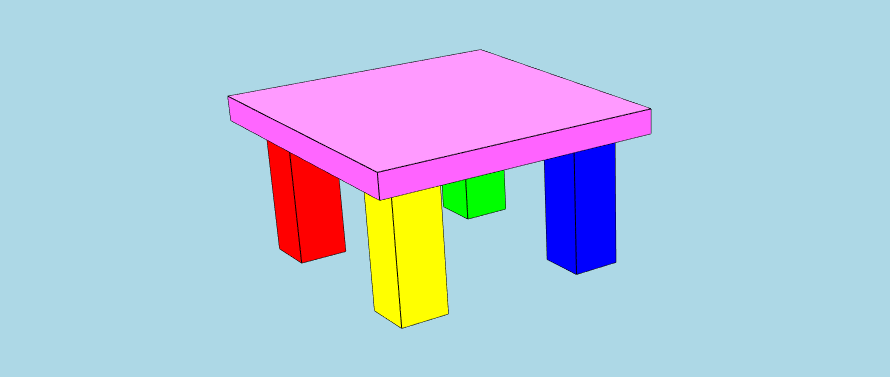
To demonstrate the API, let's
use [````XKTModel````](https://xeokit.github.io/xeokit-convert/docs/class/src/XKTModel/XKTModel.js~XKTModel.html) 's
builder methods to programmatically build a model that resembles the screenshot below. Then we'll serialize
the ````XKTModel```` to an
````ArrayBuffer````, which we'll finally load that into a
xeokit [````Viewer````](https://xeokit.github.io/xeokit-sdk/docs/class/src/viewer/Viewer.js~Viewer.html)
using [````XKTLoaderPlugin````](https://xeokit.github.io/xeokit-sdk/docs/class/src/plugins/XKTLoaderPlugin/XKTLoaderPlugin.js~XKTLoaderPlugin.html)
.
````javascript
import { XKTModel, writeXKTModelToArrayBuffer } from '@xeokit/xeokit-convert';
import fs from 'fs';
const xktModel = new XKTModel();
// Create metamodel - this part is optional
// Create property sets to hold info about the model
xktModel.createPropertySet({
propertySetId: "tableTopPropSet",
propertySetType: "Default",
propertySetName: "Table Top",
properties: [
{
id: "tableTopMaterial",
type: "Default",
name: "Table top material",
value: "Marble"
},
{
id: "tableTopDimensions",
type: "Default",
name: "Table top dimensions",
value: "90x90x3 cm"
}
]
});
xktModel.createPropertySet({
propertySetId: "tableLegPropSet",
propertySetType: "Default",
propertySetName: "Table Leg",
properties: [
{
id: "tableLegMaterial",
type: "Default",
name: "Table leg material",
value: "Pine"
},
{
id: "tableLegDimensions",
type: "Default",
name: "Table leg dimensions",
value: "5x5x50 cm"
}
]
});
// Create a hierarchy of metaobjects to describe the structure of the model
xktModel.createMetaObject({ // Root XKTMetaObject, has no XKTEntity
metaObjectId: "table",
metaObjectName: "The Table",
metaObjectType: "furniture"
});
xktModel.createMetaObject({
metaObjectId: "redLeg",
metaObjectName: "Red Table Leg",
metaObjectType: "furniturePart",
parentMetaObjectId: "table",
propertySetIds: ["tableLegPropSet"]
});
xktModel.createMetaObject({
metaObjectId: "greenLeg",
metaObjectName: "Green Table Leg",
metaObjectType: "furniturePart",
parentMetaObjectId: "table",
propertySetIds: ["tableLegPropSet"]
});
xktModel.createMetaObject({
metaObjectId: "blueLeg",
metaObjectName: "Blue Table Leg",
metaObjectType: "furniturePart",
parentMetaObjectId: "table",
propertySetIds: ["tableLegPropSet"]
});
xktModel.createMetaObject({
metaObjectId: "yellowLeg",
metaObjectName: "Yellow Table Leg",
metaObjectType: "furniturePart",
parentMetaObjectId: "table",
propertySetIds: ["tableLegPropSet"]
});
xktModel.createMetaObject({
metaObjectId: "pinkTop",
metaObjectName: "The Pink Table Top",
metaObjectType: "furniturePart",
parentMetaObjectId: "table",
propertySetIds: ["tableTopPropSet"]
});
// Create an XKTGeometry that defines a box shape, as a triangle mesh
xktModel.createGeometry({
geometryId: "boxGeometry",
primitiveType: "triangles", // Also "lines" and "points"
positions: [
1, 1, 1, -1, 1, 1, -1, -1, 1, 1, -1, 1, 1, 1, 1, 1, -1, 1, 1, -1, -1, 1, 1, -1, 1, 1, 1, 1, 1, -1, -1, 1,
-1, -1, 1, 1, -1, 1, 1, -1, 1, -1, -1, -1, -1, -1, -1, 1, -1, -1, -1, 1, -1, -1, 1, -1, 1, -1, -1, 1, 1, -1,
-1, -1, -1, -1, -1, 1, -1, 1, 1, -1
],
normals: [ // Only for "triangles"
0, 0, 1, 0, 0, 1, 0, 0, 1, 0, 0, 1, 1, 0, 0, 1, 0, 0, 1, 0, 0, 1, 0, 0, 0, 1, 0, 0, 1, 0, 0, 1, 0, 0, 1, 0,
-1, 0, 0, -1, 0, 0, -1, 0, 0, -1, 0, 0, 0, -1, 0, 0, -1, 0, 0, -1, 0, 0, -1, 0, 0, 0, -1, 0, 0, -1, 0, 0,
-1, 0, 0, -1
],
indices: [
0, 1, 2, 0, 2, 3, 4, 5, 6, 4, 6, 7, 8, 9, 10, 8, 10, 11, 12, 13, 14, 12, 14, 15, 16, 17, 18, 16, 18, 19,
20, 21, 22, 20, 22, 23
]
});
// Create five XKTMeshes, which represent the table top and legs.
// Each XKTMesh has its own color, position, orientation and size,
// and uses the XKTGeometry to define its shape.
// An XKTGeometry can be used by multiple XKTMeshes.
xktModel.createMesh({
meshId: "redLegMesh",
geometryId: "boxGeometry",
position: [-4, -6, -4],
scale: [1, 3, 1],
rotation: [0, 0, 0],
color: [1, 0, 0],
opacity: 1
});
xktModel.createMesh({
meshId: "greenLegMesh",
geometryId: "boxGeometry",
position: [4, -6, -4],
scale: [1, 3, 1],
rotation: [0, 0, 0],
color: [0, 1, 0],
opacity: 1
});
xktModel.createMesh({
meshId: "blueLegMesh",
geometryId: "boxGeometry",
position: [4, -6, 4],
scale: [1, 3, 1],
rotation: [0, 0, 0],
color: [0, 0, 1],
opacity: 1
});
xktModel.createMesh({
meshId: "yellowLegMesh",
geometryId: "boxGeometry",
position: [-4, -6, 4],
scale: [1, 3, 1],
rotation: [0, 0, 0],
color: [1, 1, 0],
opacity: 1
});
xktModel.createMesh({
meshId: "pinkTopMesh",
geometryId: "boxGeometry",
position: [0, -3, 0],
scale: [6, 0.5, 6],
rotation: [0, 0, 0],
color: [1, 0, 1],
opacity: 1
});
// Create five XKTEntities, which represent abstract, named objects in the model.
// Each XKTEntity has an XKTMesh.
// An XKTEntity can have multiple XKTMeshes.
// An XKTMesh can only belong to one XKTEntity.
xktModel.createEntity({
entityId: "redLeg",
meshIds: ["redLegMesh"]
});
xktModel.createEntity({
entityId: "greenLeg",
meshIds: ["greenLegMesh"]
});
xktModel.createEntity({
entityId: "blueLeg",
meshIds: ["blueLegMesh"]
});
xktModel.createEntity({
entityId: "yellowLeg",
meshIds: ["yellowLegMesh"]
});
xktModel.createEntity({
entityId: "pinkTop",
meshIds: ["pinkTopMesh"]
});
````
Once we've built
our [````XKTModel````](https://xeokit.github.io/xeokit-convert/docs/class/src/XKTModel/XKTModel.js~XKTModel.html), we
need to finalize it. Then it's ready to use. Note that finalizing is an asynhronous operation, so we await its
completion before continuing.
````javascript
await xktModel.finalize();
````
### Serializing the XKTModel to an ArrayBuffer
Next, we'll
use [````writeXKTModelToArrayBuffer````](https://xeokit.github.io/xeokit-convert/docs/function/index.html#static-function-writeXKTModelToArrayBuffer)
to serialize
our [````XKTModel````](https://xeokit.github.io/xeokit-convert/docs/class/src/XKTModel/XKTModel.js~XKTModel.html) to
an ````ArrayBuffer````.
````javascript
const xktArrayBuffer = writeXKTModelToArrayBuffer(xktModel, "", {}, {zip: false});
const buffer = Buffer.from(xktArrayBuffer);
fs.writeFileSync("./myModel.xkt", buffer);
````
### Loading the ArrayBuffer into a Viewer
Let's now create a [````Viewer````](https://xeokit.github.io/xeokit-sdk/docs/class/src/viewer/Viewer.js~Viewer.html),
then load the ````ArrayBuffer```` into it using
an [````XKTLoaderPlugin````](https://xeokit.github.io/xeokit-sdk/docs/class/src/plugins/XKTLoaderPlugin/XKTLoaderPlugin.js~XKTLoaderPlugin.html)
.
````javascript
const viewer = new Viewer({
canvasId: "myCanvas"
});
const xktLoader = new XKTLoaderPlugin(viewer);
const model = xktLoader.load({
id: "myModel",
src: "./myModel.xkt"
});
````
Finally, when the model has loaded, let's fit it in view.
````javascript
model.on("loaded", () => {
viewer.cameraFlight.flyTo(model);
});
````
### Loading IFC into an XKTModel
Let's
use [````parseIFCIntoXKTModel````](https://xeokit.github.io/xeokit-convert/docs/function/index.html#static-function-parseIFCIntoXKTModel)
to import IFC into
an [````XKTModel````](https://xeokit.github.io/xeokit-convert/docs/class/src/XKTModel/XKTModel.js~XKTModel.html).
As before, we'll also use the classes and functions introduced in the previous examples to serialize
the [````XKTModel````](https://xeokit.github.io/xeokit-convert/docs/class/src/XKTModel/XKTModel.js~XKTModel.html) to
an ````ArrayBuffer````, then load it into
a [````Viewer````](https://xeokit.github.io/xeokit-sdk/docs/class/src/viewer/Viewer.js~Viewer.html).
````javascript
const viewer = new Viewer({
canvasId: "myCanvas"
});
const xktLoader = new XKTLoaderPlugin(viewer);
utils.loadArraybuffer("./assets/models/ifc/rac_advanced_sample_project.ifc", async (data) => {
const xktModel = new XKTModel();
parseIFCIntoXKTModel({data, xktModel, wasmPath: "../dist/"}).then(() => {
xktModel.finalize().then(() => {
const xktArrayBuffer = writeXKTModelToArrayBuffer(xktModel);
xktLoader.load({
id: "myModel",
xkt: xktArrayBuffer,
edges: true
});
viewer.cameraFlight.flyTo(viewer.scene);
});
});
},
(errMsg) => {
});
````
### Loading LAS into an XKTModel
Let's
use [````parseLASIntoXKTModel````](https://xeokit.github.io/xeokit-convert/docs/function/index.html#static-function-parseLASIntoXKTModel)
to import LAS into
an [````XKTModel````](https://xeokit.github.io/xeokit-convert/docs/class/src/XKTModel/XKTModel.js~XKTModel.html).
As before, we'll also use the classes and functions introduced in the previous examples to serialize
the [````XKTModel````](https://xeokit.github.io/xeokit-convert/docs/class/src/XKTModel/XKTModel.js~XKTModel.html) to
an ````ArrayBuffer````, then load it into
a [````Viewer````](https://xeokit.github.io/xeokit-sdk/docs/class/src/viewer/Viewer.js~Viewer.html).
````javascript
const viewer = new Viewer({
canvasId: "myCanvas"
});
const xktLoader = new XKTLoaderPlugin(viewer);
utils.loadArraybuffer("./assets/models/laz/indoor.0.1.laz", async (data) => {
const xktModel = new XKTModel();
parseLASIntoXKTModel({data, xktModel, rotateX: true}).then(() => {
xktModel.finalize().then(() => {
const xktArrayBuffer = writeXKTModelToArrayBuffer(xktModel);
xktLoader.load({
id: "myModel",
xkt: xktArrayBuffer,
edges: true
});
viewer.cameraFlight.flyTo(viewer.scene);
});
});
},
(errMsg) => {
});
````
### Loading GLB into an XKTModel
Let's
use [````parseGLTFIntoXKTModel````](https://xeokit.github.io/xeokit-convert/docs/function/index.html#static-function-parseGLTFIntoXKTModel)
to import binary glTF into
an [````XKTModel````](https://xeokit.github.io/xeokit-convert/docs/class/src/XKTModel/XKTModel.js~XKTModel.html).
We'll also use the classes and functions introduced in the previous examples to serialize
the [````XKTModel````](https://xeokit.github.io/xeokit-convert/docs/class/src/XKTModel/XKTModel.js~XKTModel.html) to
an ````ArrayBuffer````, then validate the ````ArrayBuffer```` and load it into
a [````Viewer````](https://xeokit.github.io/xeokit-sdk/docs/class/src/viewer/Viewer.js~Viewer.html).
````javascript
const viewer = new Viewer({
canvasId: "myCanvas"
});
const xktLoader = new XKTLoaderPlugin(viewer);
utils.loadArraybuffer("./assets/models/glb/MAP/MAP.glb", (glb) => {
const xktModel = new XKTModel();
parseGLTFIntoXKTModel({data: glb, xktModel: xktModel}).then(() => {
xktModel.finalize().then(() => {
const xktArrayBuffer = writeXKTModelToArrayBuffer(xktModel);
xktLoader.load({
id: "myModel",
xkt: xktArrayBuffer
});
viewer.cameraFlight.flyTo(viewer.scene);
});
});
},
(errMsg) => {
});
````
### Loading STL into an XKTModel
Let's
use [````parseSTLIntoXKTModel````](https://xeokit.github.io/xeokit-convert/docs/function/index.html#static-function-parseSTLIntoXKTModel)
to import STL into
an [````XKTModel````](https://xeokit.github.io/xeokit-convert/docs/class/src/XKTModel/XKTModel.js~XKTModel.html).
As before, we'll also use the classes and functions introduced in the previous examples to serialize
the [````XKTModel````](https://xeokit.github.io/xeokit-convert/docs/class/src/XKTModel/XKTModel.js~XKTModel.html) to
an ````ArrayBuffer````, then load it into
a [````Viewer````](https://xeokit.github.io/xeokit-sdk/docs/class/src/viewer/Viewer.js~Viewer.html).
````javascript
const viewer = new Viewer({
canvasId: "myCanvas"
});
const xktLoader = new XKTLoaderPlugin(viewer);
utils.loadArraybuffer("./assets/models/stl/binary/spurGear.stl", (json) => {
const xktModel = new XKTModel();
parseSTLIntoXKTModel({stlData: json, xktModel: xktModel}).then(() => {
xktModel.finalize().then(() => {
const xktArrayBuffer = writeXKTModelToArrayBuffer(xktModel);
xktLoader.load({
id: "myModel",
xkt: xktArrayBuffer
});
viewer.cameraFlight.flyTo(viewer.scene);
});
});
},
(errMsg) => {
});
````
# Building
### Building Binaries
At the moment we do not bundle the code. It means no special build process.
Just install NPM dependencies
````
npm install
npm run build
````
### RuntimeError: memory access out of bounds
With luck, the WASM module already be compiled appropriately for your target x86 system.
However, if you get this error:
````bash
RuntimeError: memory access out of bounds
````
then you will need to compile that WASM module for your target system. Please follow the instructions for that on the
[web-ifc](https://github.com/tomvandig/web-ifc) project page, then replace [./dist/web-ifc.wasm](./dist/web-ifc.wasm)
with your compiled binary.
### TypeError: fetch failed
This error is possible in in nodejs version 17+. As fix you will have to add the --no-experimental-fetch flag to the command.
````bash
node --no-experimental-fetch convert2xkt.js ...
````