@wolffo/three-fire
Version:
Modern TypeScript volumetric fire effect for Three.js and React Three Fiber
229 lines (168 loc) • 5.98 kB
Markdown
# Three fire
[](https://github.com/typeWolffo/THREE.Fire/actions)
[](https://github.com/typeWolffo/THREE.Fire/actions)
[](https://github.com/typeWolffo/THREE.Fire)
[](https://www.npmjs.com/package/@wolffo/three-fire)
[](https://www.npmjs.com/package/@wolffo/three-fire)
Modern TypeScript volumetric fire effect for Three.js and React Three Fiber.
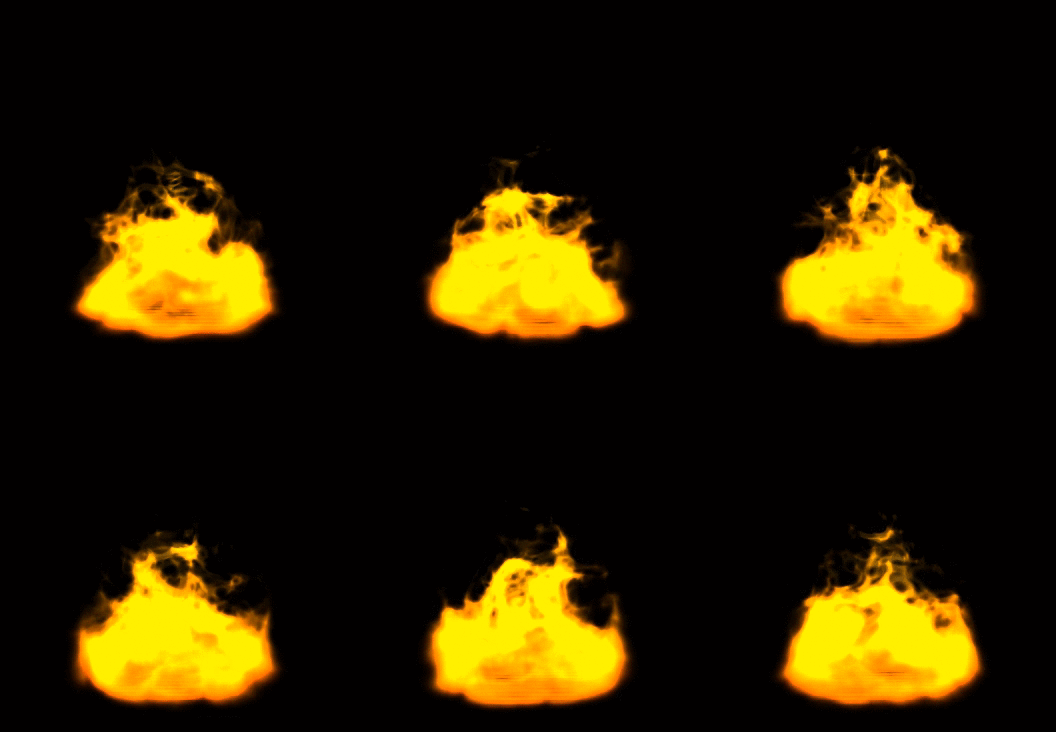
[Live Demo](https://threefire.netlify.app/)
## Features
- 🔥 Volumetric fire effect using ray marching
- 📦 TypeScript support with full type definitions
- ⚛️ React Three Fiber component
- 🎛️ Configurable parameters (iterations, octaves, noise scale, etc.)
- 🚀 Modern Three.js compatibility (r150+)
- 📱 Optimized for performance
## Installation
```bash
npm install @wolffo/three-fire
```
## Entry Points Summary
This package provides separate entry points to optimize bundle size and avoid unnecessary dependencies:
| Entry Point | Use Case | Bundle Size | Dependencies |
|-------------|----------|-------------|--------------|
| `@wolffo/three-fire/vanilla` | Vanilla Three.js projects | Smallest | Only Three.js |
| `@wolffo/three-fire/react` | React Three Fiber projects | Medium | React + Three.js |
| `@wolffo/three-fire` | Legacy/mixed usage | Largest | All dependencies |
**⚠️ Migration Notice**: For better performance, migrate from the main entry point to specific entry points:
- Vanilla Three.js users → use `/vanilla`
- React Three Fiber users → use `/react`
## Usage
### React Three Fiber (Recommended)
```tsx
import { Canvas } from '@react-three/fiber'
import { Fire } from '@wolffo/three-fire/react'
function App() {
return (
<Canvas>
<Fire
texture="/fire-texture.png"
color={0xff4400}
scale={[2, 3, 2]}
position={[0, 0, 0]}
/>
</Canvas>
)
}
```
### With custom parameters
```tsx
import { Fire, useFire } from '@wolffo/three-fire/react'
function CustomFire() {
const fireRef = useFire()
return (
<Fire
ref={fireRef.ref}
texture="/fire-texture.png"
color={0xff6600}
magnitude={1.5}
lacunarity={2.5}
gain={0.7}
iterations={25}
octaves={4}
onUpdate={(fire, time) => {
// Custom update logic
fire.fireColor.setHSL((time * 0.1) % 1, 1, 0.5)
}}
/>
)
}
```
### Vanilla Three.js
```ts
import { FireMesh } from '@wolffo/three-fire/vanilla'
import { Scene, TextureLoader } from 'three'
const scene = new Scene()
const textureLoader = new TextureLoader()
// Load fire texture
const fireTexture = textureLoader.load('/fire-texture.png')
// Create fire effect
const fire = new FireMesh({
fireTex: fireTexture,
color: 0xff4400,
magnitude: 1.3,
iterations: 20,
octaves: 3
})
scene.add(fire)
// Animation loop
function animate() {
requestAnimationFrame(animate)
fire.update(performance.now() / 1000)
renderer.render(scene, camera)
}
animate()
```
### Legacy Usage (Backward Compatibility)
⚠️ **Not recommended for new projects** - use specific entry points above for better performance.
```ts
// Legacy import - includes all dependencies
import { FireMesh, Fire } from '@wolffo/three-fire'
```
## API Reference
### FireComponent Props
| Prop | Type | Default | Description |
|------|------|---------|-------------|
| `texture` | `string \| Texture` | - | Fire texture URL or Three.js Texture object |
| `color` | `Color \| string \| number` | `0xeeeeee` | Fire color |
| `iterations` | `number` | `20` | Ray marching iterations (higher = better quality, lower performance) |
| `octaves` | `number` | `3` | Noise octaves for turbulence |
| `noiseScale` | `[number, number, number, number]` | `[1, 2, 1, 0.3]` | Noise scaling factors |
| `magnitude` | `number` | `1.3` | Fire shape intensity |
| `lacunarity` | `number` | `2.0` | Noise lacunarity |
| `gain` | `number` | `0.5` | Noise gain |
| `autoUpdate` | `boolean` | `true` | Auto-update time from useFrame |
| `onUpdate` | `(fire, time) => void` | - | Custom update callback |
### FireMesh Class
```ts
class FireMesh extends Mesh {
constructor(props: FireMeshProps)
// Methods
update(time?: number): void
// Properties
time: number
fireColor: Color
magnitude: number
lacunarity: number
gain: number
}
```
## Fire Texture
You need to provide a fire texture similar to the one shown below:

The texture should be a grayscale gradient that defines the fire's density distribution.
## Performance Tips
- Lower `iterations` for better performance (try 10-15 for mobile)
- Reduce `octaves` to 2 for simpler noise
- Use texture compression for the fire texture
- Consider using LOD (Level of Detail) for distant fires
## Development
```bash
# Install dependencies
npm install
# Build the package
npm run build
# Type checking
npm run typecheck
# Run tests
npm test
# Test in watch mode
npm run test:watch
# Visual test UI
npm run test:ui
# Coverage report
npm run test:coverage
```
### Testing
- **Unit tests** for Fire class and FireShader
- **Integration tests** for React components
- **Mock environment** for Three.js and React Three Fiber
Test files are located in `test/` and use Vitest with Testing Library.
## Credits
Based on the original THREE.Fire by [mattatz](https://github.com/mattatz/THREE.Fire)
- Real-Time procedural volumetric fire - http://dl.acm.org/citation.cfm?id=1230131
- webgl-noise - https://github.com/ashima/webgl-noise
- Three.js - https://threejs.org/
## License
MIT