@webspellchecker/wproofreader-ckeditor5
Version:
Multilingual spelling and grammar checking plugin for CKEditor 5
139 lines (98 loc) • 5.64 kB
Markdown
WProofreader plugin for CKEditor 5
===================================
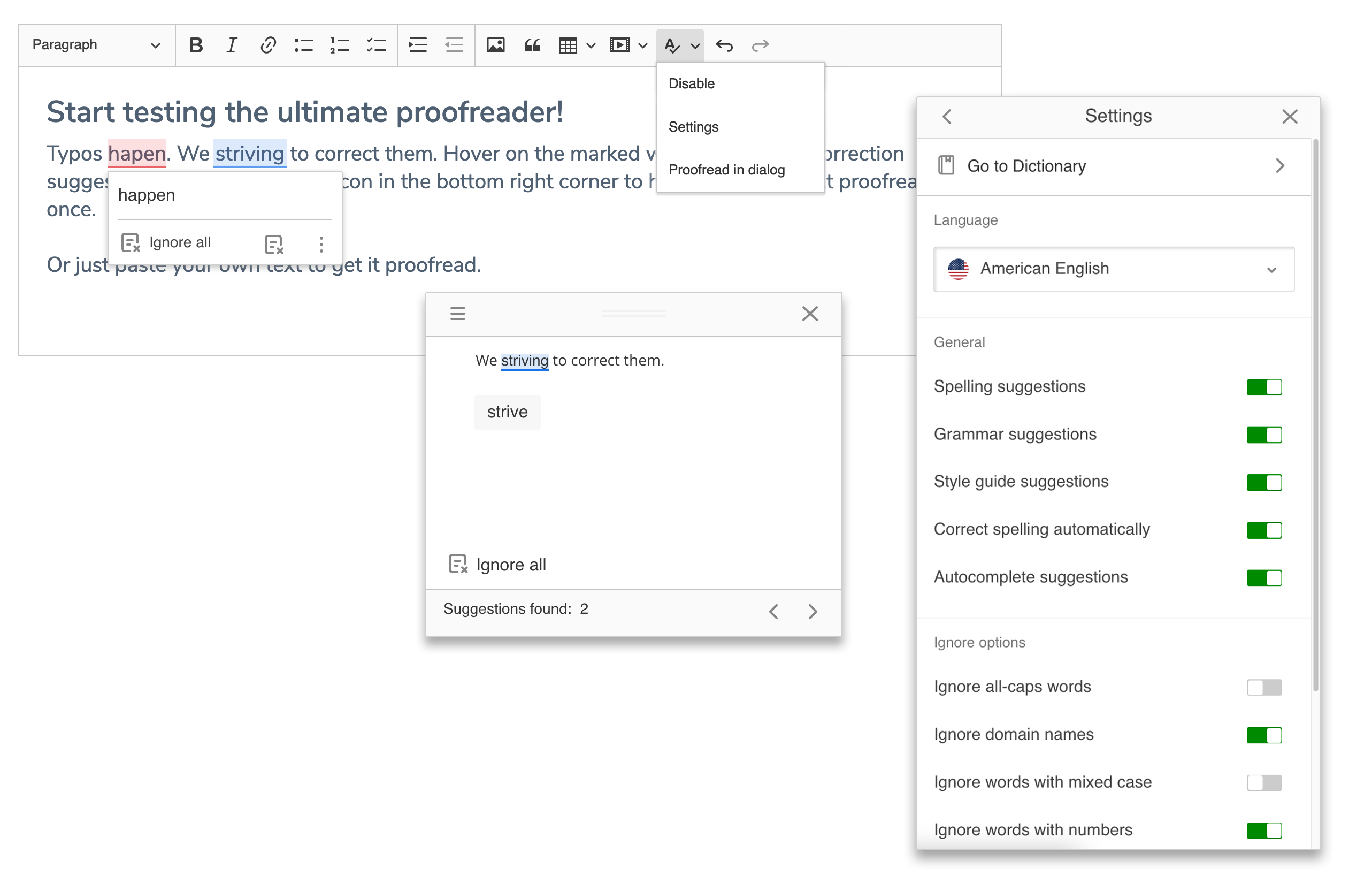
The multilingual spelling and grammar checking solution for CKEditor 5. It provides both instant and in dialog proofreading modes in a convenient UI.
Starting with version 3.1.0, the WProofreader plugin for CKEditor 5 offers basic TypeScript support. The package contains a [type definition file](https://github.com/WebSpellChecker/wproofreader-ckeditor5/blob/master/src/wproofreader.d.ts) (.d.ts), enabling integration and customization of the functionality using [WProofreader options](https://webspellchecker.com/docs/api/wscbundle/Options.html) in TypeScript projects.
WProofreader plugin for CKEditor 5 inherits all functionality of the WProofreader component with slight adaptation to the view and features of the editor. For more details, visit the [WProofreader repo](https://github.com/WebSpellChecker/wproofreader) or [official web page](https://webspellchecker.com/wsc-proofreader/).
## Table of contents
* [Install instructions](#install-instructions)
* [Documentation](#documentation)
* [Reporting issues](#reporting-issues)
* [Technical support or questions](#technical-support-or-questions)
* [License](#license)
## Install instructions
1. Install the plugin.
You can integrate the plugin using one of these methods:
- [Using npm](#using-npm): Recommended for projects utilizing a JavaScript bundler.
- [Using CDN](#using-cdn): Suitable for environments where no build process is involved.
### Using npm
To install the plugin via npm, run the following command:
```
npm install @webspellchecker/wproofreader-ckeditor5
```
Import the WProofreader plugin into the project and configure it. Then, add it to the `create()` method configuration and include it as a toolbar item.
```js
import { ClassicEditor } from 'ckeditor5';
import { WProofreader } from '@webspellchecker/wproofreader-ckeditor5';
...
ClassicEditor
.create( editorElement, {
plugins: [ ..., WProofreader ],
toolbar: [ ..., 'wproofreader' ],
wproofreader: {
/* config of WProofreader */
}
} )
```
### Using CDN
To load the script, utilize the browser's [import map](https://developer.mozilla.org/en-US/docs/Web/HTML/Element/script/type/importmap) feature. This allows you to map a simple specifier to the full CDN URL, making it easier to reference the necessary files.
```html
<script type="importmap">
{
"imports": {
"ckeditor5": "https://cdn.ckeditor.com/ckeditor5/43.0.0/ckeditor5.js",
"@webspellchecker/wproofreader-ckeditor5": "https://cdn.jsdelivr.net/npm/@webspellchecker/wproofreader-ckeditor5@3.1.1/dist/browser/index.js"
}
}
</script>
```
In the following script tag, import the WProofreader plugin, add it to the `plugins` array, and include it as a toolbar item.
```html
<script type="module">
import { ClassicEditor } from 'ckeditor5';
import { WProofreader } from '@webspellchecker/wproofreader-ckeditor5';
ClassicEditor
.create( editorElement, {
plugins: [ ..., WProofreader ],
toolbar: [ ..., 'wproofreader' ],
wproofreader: {
/* config of WProofreader */
}
} )
</script>
```
2. Configure the plugin
After installing the plugin, you need to configure it in the CKEditor 5 setup. The configuration is added to the `wproofreader` field. For a detailed list of available customization options, refer to the [documentation](https://webspellchecker.com/docs/api/wscbundle/Options.html).
For the **Cloud-based** version of WProofreader:
```js
wproofreader: {
lang: 'en_US', // sets the default language
serviceId: 'your-service-ID', // required for the Cloud version only
srcUrl: 'https://svc.webspellchecker.net/spellcheck31/wscbundle/wscbundle.js'
}
```
`serviceId` is a mandatory parameter for activating and using the plugin pointed to the Cloud-based version of WProofreader.
For the **Server-based** version of WProofreader:
```js
wproofreader: {
lang: 'en_US', // sets the default language
serviceProtocol: 'https',
serviceHost: 'localhost',
servicePort: '443',
servicePath: 'virtual_directory/api', // by default the virtual_directory is wscservice
srcUrl: 'https://host_name/virtual_directory/wscbundle/wscbundle.js'
}
```
Unlike the Cloud-based version, the `serviceId` parameter is not used here. Instead, it is required to specify the path to the backend entry point hosted on the client’s infrastructure.
## Documentation
To find out more, refer the following documentation:
* [WProofreader API documentation](https://webspellchecker.com/docs/api/wscbundle/Options.html)
* [CKEditor 5 Framework documentation](https://ckeditor.com/docs/ckeditor5/latest/framework/index.html)
## Reporting issues
We use GitHub Issues as the official public bug tracker for WProofreader plugin for CKEditor 5. Here are some recommendations to take into account when reporting an issue:
* Provide steps which help us to reproduce an issue. A sample page or JSFiddle is always welcomed.
* Some issues may be browser and integration-specific. So, please specify what browser and integration you encountered the issue.
## Technical support or questions
Holders of an active subscription to the services or a commercial license have access to professional technical assistance directly from the support team. [Contact us here](https://webspellchecker.com/contact-us/).
## License
Licensed under the terms of MIT license. For full details about the license, please check the `LICENSE.md` file.