@webhare/moodle-webservice
Version:
Moodle Web Service API client with intellisense and typechecking
277 lines (208 loc) • 9.72 kB
Markdown
# About this fork
We have forked this project from https://github.com/IHAVENOARMS/moodle-webservice.
# TypeScript Moodle API client for Node.js
A simple and developer friendly TypeScript module to perform Web Service (API) calls to the Moodle site.
## Getting started
Install the module
```bash
npm install /moodle-webservice
```
Get site info (using Promised callbacks)
```ts
import { MoodleApi } from "@webhare/moodle-webservice";
const moodle = MoodleApi({
baseUrl: "https://moodle.example.com", //<-- Put your Moodle URL here
token: "exppsBdQwLvNwYRoAuaiBO5j0aWTzxU6", //<-- Put your token here
});
moodle.core.webservice //<-- with intellisense and type checking
.getSiteInfo()
.then((res) => console.log(res)) //<-- Response of type IMoodleSiteInfo
.catch((err) => console.error(err.message));
```
Get course contents (using async-await approach)
```ts
import { MoodleApi } from '@webhare/moodle-webservice';
const moodle = MoodleApi({ ... });
async function main() {
try {
const sections =
await moodle.core.course.getContents({courseid: 1234});//<-- returns IMoodleCourseSection[]
//Response data
console.log(sections[0].name);
/*
Introduction
*/
}
catch (err) {
console.log(err);
}
}
main();
```
if a `token` param is provided, it will override the token supplied when instantiating the api
```ts
import { MoodleApi } from "@webhare/moodle-webservice";
const moodle = MoodleApi({
baseUrl: "https://moodle.example.com",
token: "exppsBdQwLvNwYRoAuaiBO5j0aWTzxU6",
});
moodle.core.webservice
.getSiteInfo({ token: "37512512c24112b1235cc123f821bd27cd" }) //<-- This token will be used instead
.then((res) => console.log(res))
.catch((err) => console.error(err.message));
moodle.config.token = "37512512c24112b1235cc123f821bd27cd"; //<-- You can also do this.
//..many function calls with the same token above.
```
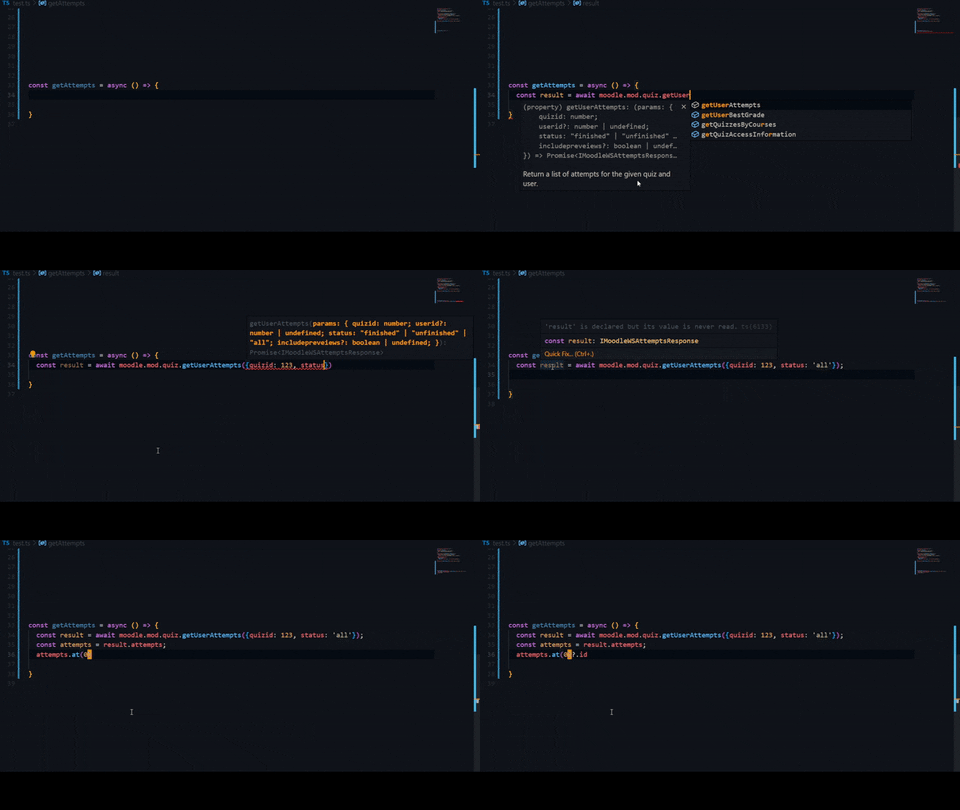
## Intellisense + Typechecking
## Getting your api token.
if you don't immediately have your token to pass to the api you can import MoodleClient directly
and use the authenticate method to get one.
```ts
import { MoodleApi, MoodleClient } from "@webhare/moodle-webservice";
const YOUR_WEBSITE_URL = "https://moodle.example.com";
//No token provided beforehand
const moodle = MoodleApi({
baseUrl: YOUR_WEBSITE_URL, //<-- Put your Moodle URL here
});
async function main() {
try {
//result type of IMoodleWSAuthResponse
const { token } = await MoodleClient.authenticate({
baseUrl: YOUR_WEBSITE_URL,
credentials: { username: "AwesomeJohn", password: "SmartPa33word" },
});
moodle.config.token = token;
const { fullname: firstName } = await moodle.core.webservice.getSiteInfo();
/*
logs:
John Smith
*/
} catch (err) {
console.log(err);
}
}
main();
```
## Helper classes
The moodle webservice has some caveats here and there such as how when getting an attempt
moodle doesn't send you all the raw question data, instead some is raw data while other is
the rendered HTML question element.
`moodle-webservice` aims to solve that by providing a number of helper classes such as `MoodleAttempt` , these are abstract classes that have a number of functions that aim to solve
these issues.
```ts
import { MoodleApi, MoodleAttempt } from "@webhare/moodle-webservice";
const moodle = MoodleApi({
baseUrl: "https://moodle.example.com",
token: "375208h132h1222h20h202b823b227cd",
});
moodle.mod.quiz.getAttemptReview({ attemptid: 3665103 }).then((res) => {
const questions = res.questions; //<-- of type IMoodleQuestion[].
//IMoodleQuestion does not contain the actual question text or choices.
questions[0].text; //<-- Error no such property on questions
const parsedReview = MoodleAttempt.parse(res);
const parsedQuestions = parsedReview.questions; //<-- of type IMoodleParsedQuestion[].
//IMoodleParsedQuestion contains additional data such as the name, instance number, and choices
console.log(parsedQuestions[0].text);
//Output: "The muscles of facial expression are supplied by the ____ nerve."
});
```
or parse a single question
```ts
import { MoodleApi, MoodleQuestion } from "@webhare/moodle-webservice";
const moodle = MoodleApi({
baseUrl: "https://moodle.example.com",
token: "375208h132h1222h20h202b823b227cd",
});
moodle.mod.quiz.getAttemptReview({ attemptid: 3665103 }).then((res) => {
const questions = res.questions; //<-- of type IMoodleQuestion[].
//IMoodleQuestion does not contain the actual question text or choices.
questions[0].text; //<-- Error no such property on questions
//IMoodleParsedQuestion contains additional data such as the name, instance number and choices
const parsedQuestion = MoodleQuestion.parse(questions[0]); //<-- of type IMoodleParsedQuestion.
console.log(parsedQuestion.text);
//Output: "The muscles of facial expression are supplied by the ____ nerve."
});
```
## JSON to form data
Moodle has a peculiar way of specifying request parameters.
Parameters can either be sent in URL query string or POST form body.
Thus a JSON object needs to be converted to form data
```json
{
"users": [
{
"firstname": "Foo",
"lastname": "Bar",
"username": "foo",
"password": "FooBar123!",
"email": "foo@example.com"
}
]
}
```
As `Content-Type: application/x-www-form-urlencoded`
```
users[0][firstname]=Foo&users[0][lastname]=Bar&users[0][username]=foo&users[0][password]=FooBar123%21&users[0][email]=foo%40email.com
```
To perform the conversion in the code invoke the `flatten` function
```ts
import { MoodleClient } from "@webhare/moodle-webservice";
const form = MoodleClient.flatten({
users: [
{
firstname: "Foo",
lastname: "Bar",
username: "foo",
password: "FooBar123!",
email: "foo@example.com",
},
],
});
console.log(form); //users[0][firstname]=Foo&users[0][lastname]=Bar...
```
However, there is no need to invoke the function outside the code as anything passed as `data` parameter to api functions is automatically flattened and formatted in the right way.
## List of functions
Offical list of functions can be found at [Web service API functions](https://docs.moodle.org/dev/Web_service_API_functions)
The following table represents mapping between JavaScript function names and Moodle Web Service function names.
| JS function | API function | Description |
| ----------------------------------------------------------------------------------- | ------------------------------ | -------------------------------------------------------------- |
| auth.email.getSignupSettings(data) | auth_email_get_signup_settings | Get the signup required settings and profile fields. |
| auth.email.signupUser(data) | auth_email_signup_user | Adds a new user (pendingto be confirmed) in the site. |
| core.user.createUsers(data) | core_user_create_users | Create users - admin function |
| core.webservice.getSiteInfo(data) | core_webservice_get_site_info | Return some site info / user info / list web service functions |
| [Read more...](https://github.com/papnkukn/node-moodle/blob/main/wiki/functions.md) | | |
Note that the `data` argument is not always required and can be omitted.
## Note regarding types
Due to poor moodle webservice function documentation not all functions have definite parameter types
and instead have `IMoodleWSParams` as its parameter type and `any` as its return type.
I've added types for the most important functions first, and I'll keep adding more as I go,
contact me if you want to add types for a function that you know about.
## Running your own moodle
For development/testing against a Moodle consider using the docker containers defined in `my-moodle`:
```bash
cd my-moodle/
docker-compose up
# now: open http://127.0.0.1:8051/
```
See https://hub.docker.com/r/bitnami/moodle for details about these containers
After starting, login at http://127.0.0.1:8051/ using: user/bitnami
### Enabling the API
- http://127.0.0.1:8051/admin/settings.php?section=optionalsubsystems
- Enable webservices
- http://127.0.0.1:8051/admin/settings.php?section=webserviceprotocols
- Enable REST
- Enable documentation
- http://127.0.0.1:8051/admin/settings.php?section=webservicesoverview helps you enroll the service - shows the steps and links
- http://127.0.0.1:8051/admin/settings.php?section=externalservices
- Add service. Configure as needed, don't forget to enable the functions you need
- This is also where you need to go back to add more functions later
- http://127.0.0.1:8051/admin/webservice/tokens.php?action=create
- Get the token. You'll need it for MODULE_TOKEN below
To test the module:
```bash
export MOODLE_BASEURL=http://127.0.0.1:8051
export MOODLE_TOKEN=XXX
tsrun
to add more functions
- http://127.0.0.1:8051/admin/webservice/service_functions.php?id=2