@webdevtoday/claude-agents
Version:
AI-powered development shop with 15 specialized agents for Claude Code. Features concurrent execution, shared memory, context-forge integration, and web dashboard for 80% faster development.
680 lines (514 loc) • 18.1 kB
Markdown
# Claude Sub-Agents Manager - AI-Powered Development Assistants for Claude Code
<div align="center">

[](https://www.npmjs.com/package/@webdevtoday/claude-agents)
[](https://www.npmjs.com/package/@webdevtoday/claude-agents)
[](https://opensource.org/licenses/MIT)
[](https://github.com/webdevtodayjason/sub-agents/releases)
[](http://makeapullrequest.com)
[](https://github.com/webdevtodayjason)
**🚀 Supercharge Claude Code with Specialized AI Sub-Agents for Code Review, Testing, Debugging & More**
**Transform your development workflow with intelligent AI assistants that excel at specific programming tasks**
[Installation](#-installation) • [Quick Start](#-quick-start) • [Available Agents](#-available-sub-agents) • [Documentation](#-documentation) • [Contributing](#-contributing)
</div>
---
## 🎯 What is Claude Sub-Agents Manager?
Claude Sub-Agents Manager is a powerful CLI tool that enhances Claude Code with specialized AI assistants designed for specific development tasks. Each sub-agent is an expert in its domain - from automated code reviews and test fixing to intelligent debugging and documentation generation. Install production-ready agents instantly or create custom agents tailored to your unique workflow needs.
### ✨ Why Claude Sub-Agents?
- **🧠 Specialized Intelligence**: Each agent is an expert in its domain
- **⚡ Zero Configuration**: Pre-built agents work out of the box
- **🎨 Fully Customizable**: Create agents that match your workflow
- **🔄 Smart Context Management**: Agents operate in isolated contexts
- **🛠️ Developer First**: Built by developers, for developers
- **🔗 Context-Forge Integration**: Seamlessly works with context-forge projects and PRPs
## 🚀 Installation
### NPM (Recommended)
```bash
npm install -g @webdevtoday/claude-agents
```
### Yarn
```bash
yarn global add @webdevtoday/claude-agents
```
### From Source
```bash
git clone https://github.com/webdevtodayjason/sub-agents.git
cd sub-agents
npm install
npm link
```
## ⚡ Quick Start
```bash
# Initialize in your project (recommended)
claude-agents init
# Or install agents globally
claude-agents install --all
# List available agents
claude-agents list
# Use an agent via slash command
# In Claude Code:
> /review
> /test
> /debug TypeError in production
# Works seamlessly with context-forge projects
# Agents automatically detect and use PRPs:
claude-agents run api-developer --task "implement auth endpoints"
```
## 📋 Available Sub-Agents
| Agent Name | Description | Slash Command |
|------------|-------------|---------------|
| **code-reviewer** | Expert code review specialist for quality, security, and maintainability | `/review` |
| **test-runner** | Automated test execution specialist that runs tests and fixes failures | `/test [pattern]` |
| **debugger** | Expert debugging specialist for analyzing errors, stack traces, and fixing issues | `/debug [error]` |
| **refactor** | Code refactoring specialist for improving code structure, patterns, and maintainability | `/refactor [target]` |
| **doc-writer** | Documentation specialist for creating and updating technical documentation, API docs, and README files | `/document [type]` |
| **security-scanner** | Security vulnerability scanner that detects common security issues and suggests fixes | `/security-scan [path]` |
| **shadcn-ui-builder** | UI/UX specialist for designing and implementing interfaces using ShadCN UI components | `/ui` or `/shadcn` |
| **project-planner** | Strategic planning specialist for project decomposition and workflow management | `/plan [project]` |
| **api-developer** | Backend API development specialist for REST, GraphQL, and microservices | `/api [spec]` |
| **frontend-developer** | Frontend development specialist for modern web applications | `/frontend [feature]` |
| **tdd-specialist** | Test-Driven Development specialist for comprehensive testing strategies | `/tdd [component]` |
| **api-documenter** | API documentation specialist for OpenAPI, Swagger, and technical docs | `/apidoc [endpoint]` |
| **devops-engineer** | DevOps specialist for CI/CD, infrastructure automation, and deployment | `/devops [task]` |
| **product-manager** | Product management specialist for requirements, roadmaps, and user stories | `/product [feature]` |
| **marketing-writer** | Marketing content specialist for technical marketing and product messaging | `/marketing [content]` |
## 🤖 Detailed Agent Descriptions
### 🔍 Code Reviewer
*Your personal code quality guardian*
- Comprehensive security analysis
- Best practices enforcement
- Performance optimization suggestions
- Clean code principles
```bash
# Install
claude-agents install code-reviewer
# Use
> /review
```
### 🧪 Test Runner
*Intelligent test automation specialist*
- Auto-detects test frameworks
- Fixes failing tests automatically
- Improves test coverage
- Supports all major languages
```bash
# Install
claude-agents install test-runner
# Use
> /test
> /test src/**/*.test.js
```
### 🐛 Debugger
*Expert problem solver and bug hunter*
- Root cause analysis
- Stack trace interpretation
- Performance profiling
- Memory leak detection
```bash
# Install
claude-agents install debugger
# Use
> /debug Cannot read property 'map' of undefined
```
### 🔧 Refactor Assistant
*Code transformation specialist*
- Apply design patterns
- Modernize legacy code
- Improve code structure
- Maintain functionality
```bash
# Install
claude-agents install refactor
# Use
> /refactor improve performance
> /refactor apply SOLID principles
```
### 📝 Documentation Writer
*Technical writing expert*
- API documentation
- README generation
- Architecture docs
- Code comments
```bash
# Install
claude-agents install doc-writer
# Use
> /document API
> /document architecture
```
### 🔒 Security Scanner
*Vulnerability detection specialist*
- Secret detection
- OWASP compliance
- Dependency auditing
- Security best practices
```bash
# Install
claude-agents install security-scanner
# Use
> /security-scan
> /security-scan src/api/
```
### 🎨 ShadCN UI Builder
*Your expert UI/UX implementation specialist*
- Modern component-based UI development
- Accessibility-first design approach
- Responsive interface implementation
- ShadCN component ecosystem expertise
- Design system compliance
```bash
# Install
claude-agents install shadcn-ui-builder
# Use
> /ui create a login page
> /shadcn implement dashboard with sidebar
```
### 📋 Project Planner
*Strategic planning and task decomposition expert*
- Project architecture design
- Task breakdown and prioritization
- Dependency mapping
- Timeline estimation
- Risk assessment
```bash
# Install
claude-agents install project-planner
# Use
> /plan e-commerce platform
> /plan microservices migration
```
### 🔌 API Developer
*Backend development specialist*
- RESTful API design
- GraphQL implementation
- Microservices architecture
- Database schema design
- API security best practices
```bash
# Install
claude-agents install api-developer
# Use
> /api user authentication endpoints
> /api payment processing service
```
### 💻 Frontend Developer
*Modern web interface specialist*
- React/Vue/Angular expertise
- Responsive design implementation
- State management
- Performance optimization
- Accessibility compliance
```bash
# Install
claude-agents install frontend-developer
# Use
> /frontend user dashboard
> /frontend shopping cart component
```
### 🧪 TDD Specialist
*Test-driven development expert*
- Unit test creation
- Integration testing
- E2E test scenarios
- Test coverage analysis
- Mock and stub implementation
```bash
# Install
claude-agents install tdd-specialist
# Use
> /tdd UserService class
> /tdd API integration tests
```
### 📚 API Documenter
*Technical documentation specialist*
- OpenAPI/Swagger specs
- API endpoint documentation
- Integration guides
- SDK documentation
- Example code generation
```bash
# Install
claude-agents install api-documenter
# Use
> /apidoc REST endpoints
> /apidoc GraphQL schema
```
### 🚀 DevOps Engineer
*Infrastructure and deployment expert*
- CI/CD pipeline setup
- Docker containerization
- Kubernetes orchestration
- Infrastructure as Code
- Monitoring and logging
```bash
# Install
claude-agents install devops-engineer
# Use
> /devops GitHub Actions workflow
> /devops Kubernetes deployment
```
### 📊 Product Manager
*Product strategy and planning specialist*
- User story creation
- Feature specification
- Roadmap planning
- Requirements documentation
- Stakeholder communication
```bash
# Install
claude-agents install product-manager
# Use
> /product user onboarding flow
> /product feature prioritization
```
### ✍️ Marketing Writer
*Technical marketing content expert*
- Product launch materials
- Technical blog posts
- Feature announcements
- Documentation marketing
- Developer advocacy content
```bash
# Install
claude-agents install marketing-writer
# Use
> /marketing product launch post
> /marketing API feature announcement
## 📖 Documentation
### Command Reference
| Command | Description | Example |
|---------|-------------|---------|
| `init` | Initialize agents in project | `claude-agents init` |
| `init --respect-context-forge` | Init preserving context-forge | `claude-agents init --respect-context-forge` |
| `install` | Install agents interactively | `claude-agents install` |
| `install --all` | Install all available agents | `claude-agents install --all` |
| `install --project` | Install to project directory | `claude-agents install --project` |
| `list` | Show all agents | `claude-agents list` |
| `list --installed` | Show only installed agents | `claude-agents list --installed` |
| `enable <agent>` | Enable a disabled agent | `claude-agents enable code-reviewer` |
| `disable <agent>` | Disable an agent | `claude-agents disable test-runner` |
| `remove <agent>` | Remove specific agent | `claude-agents remove debugger` |
| `uninstall` | Bulk uninstall with options | `claude-agents uninstall --all --clean` |
| `info <agent>` | Show agent details | `claude-agents info debugger` |
| `create` | Create a custom agent | `claude-agents create` |
| `run <agent>` | Run agent independently | `claude-agents run marketing-writer --task "write launch post"` |
| `dashboard` | Launch web dashboard | `claude-agents dashboard` |
### Independent Agent Execution
Run agents outside of Claude Code for automation and scripting:
```bash
# Run with inline task
claude-agents run marketing-writer --task "Write launch announcement for v2.0"
# Run with task file
claude-agents run api-developer --file api-spec.md
# Interactive mode
claude-agents run tdd-specialist --interactive
```
### Web Dashboard
Monitor and manage your agents through the web interface:
```bash
# Start dashboard on port 7842
claude-agents dashboard
# Custom port
claude-agents dashboard --port 8080
```
Dashboard features:
- Real-time agent status
- Task execution history
- Memory system viewer
- Performance metrics
- Quick agent actions
### Creating Custom Agents
#### Interactive Creation
```bash
claude-agents create
```
#### Manual Creation
Create `~/.claude/agents/my-agent.md`:
```markdown
---
name: my-agent
description: What this agent does and when to use it
tools: Read, Edit, Grep, Bash
---
You are an expert in [DOMAIN]. Your role is to [PURPOSE].
When invoked, you will:
1. [STEP 1]
2. [STEP 2]
3. [STEP 3]
Always ensure [KEY PRINCIPLE].
```
### Installation Scopes
**User Scope** (`~/.claude/agents/`)
- Available in all projects
- Personal agents
- Default installation location
**Project Scope** (`.claude/agents/`)
- Project-specific agents
- Shared with team via version control
- Use `--project` flag
### Advanced Configuration
#### State Management
Agent states are tracked in `.claude-agents.json`:
```json
{
"installedAgents": {
"code-reviewer": {
"version": "1.0.0",
"scope": "user",
"installedAt": "2024-01-20T10:00:00Z"
}
},
"enabledAgents": ["code-reviewer"],
"disabledAgents": []
}
```
### Hooks System
The hooks system enables automated workflows and agent coordination. Each agent can define hooks that trigger on specific events.
#### Hook Types
| Hook Type | Description | Trigger |
|-----------|-------------|---------|
| `PostToolUse:Edit` | After file edits | Any file modification |
| `PostToolUse:Write` | After file creation | New file written |
| `PostToolUse:Bash` | After command execution | Bash commands run |
| `PreToolUse` | Before any tool use | Tool about to run |
| `TaskComplete` | After task completion | Agent finishes task |
| `Stop` | On conversation end | Session terminating |
#### Hook Actions
```json
{
"PostToolUse:Edit": {
"condition": "file.endsWith('.js')",
"commands": ["npm run lint", "npm test"]
},
"TaskComplete": {
"notify": "Task {{task_name}} completed",
"store": "agent:{{agent_name}}:last_task"
}
}
```
#### Example: Auto-Review Hook
Create hooks for automatic code review after edits:
```json
{
"hooks": {
"PostToolUse:Edit": [{
"matcher": "\\.(js|ts|py)$",
"hooks": [{
"type": "command",
"command": "echo 'Consider running /review' >&2"
}]
}]
}
}
```
#### Example: Test Runner Hook
Automatically run tests after code changes:
```json
{
"PostToolUse:Edit": {
"condition": "file.includes('src/')",
"commands": ["npm test -- --watch=false"]
}
}
```
## 🌟 Our Ecosystem
Check out our other tools for Claude Code:
### 🪝 [Claude Hooks Manager](https://github.com/webdevtodayjason/claude-hooks)
Powerful hook management system for Claude Code automation
### 🔨 [Context Forge](https://github.com/webdevtodayjason/context-forge)
Our flagship tool for intelligent context generation and management
## 🤝 Contributing
We love contributions! Here's how you can help:
1. **Fork** the repository
2. **Create** your feature branch (`git checkout -b feature/amazing-agent`)
3. **Commit** your changes (`git commit -m 'Add amazing agent'`)
4. **Push** to the branch (`git push origin feature/amazing-agent`)
5. **Open** a Pull Request
### Adding New Agents
1. Create agent structure:
```
agents/
└── your-agent/
├── agent.md # Agent definition
├── metadata.json # Agent metadata
└── hooks.json # Optional hooks
```
2. Add slash command:
```
commands/
└── your-command.md
```
3. Submit PR with description
## 🐛 Troubleshooting
### Agent Not Found After Global Install?
```bash
# Enable debug mode to see where agents are being searched
DEBUG=claude-agents claude-agents run project-planner --task "test"
# Check npm global installation path
npm list -g @webdevtoday/claude-agents
# Verify agents are included in the package
ls -la $(npm root -g)/@webdevtoday/claude-agents/agents/
```
### Agent Not Working?
```bash
# Check installation
claude-agents list
# Verify agent status
claude-agents info <agent-name>
# Re-enable if disabled
claude-agents enable <agent-name>
```
### Debug Mode
```bash
# Run Claude with debug output
claude --debug
# Run claude-agents with debug output
DEBUG=claude-agents claude-agents run <agent> --task "test"
```
### Common Issues
- **Permission denied**: Use `sudo` for global install
- **Agent not found**: Check spelling and installation
- **Command not working**: Ensure Claude Code is updated
- **"Agent not found" error**: Enable debug mode to see search paths
## 📊 Release Notes
### Version 1.0.0 (Latest)
- 🎉 Initial release
- 6 production-ready agents
- Interactive CLI interface
- Custom agent creation
- Project/user scope support
- Comprehensive documentation
## 📄 License
MIT License - see [LICENSE](LICENSE) file for details
## 🙏 Acknowledgments
- Claude Code team at Anthropic
- Our amazing community of developers
- All contributors and testers
## 📬 Connect
- 🐛 [Report Issues](https://github.com/webdevtodayjason/sub-agents/issues)
- 💡 [Request Features](https://github.com/webdevtodayjason/sub-agents/discussions)
- 🐦 [Follow Updates](https://twitter.com/webdevtodayjason)
- ⭐ [Star on GitHub](https://github.com/webdevtodayjason/sub-agents)
## 🔍 SEO Keywords & Use Cases
### Perfect for developers who want to:
- **Automate code reviews** with AI-powered analysis
- **Fix failing tests automatically** using intelligent test runners
- **Debug complex issues** with expert error analysis
- **Generate documentation** from existing code
- **Scan for security vulnerabilities** proactively
- **Refactor legacy code** with modern patterns
- **Enhance Claude Code** with specialized capabilities
- **Create custom AI agents** for specific workflows
### Technologies & Integrations:
- Works with **Claude Code** by Anthropic
- Supports all major programming languages
- Integrates with existing development workflows
- Compatible with Git, npm, yarn, and more
- Extensible through custom agent creation
---
<div align="center">
**Made with ❤️ by [WebDev Today Jason](https://github.com/webdevtodayjason)**
*Building AI-powered developer tools to enhance productivity and code quality*
**Claude Sub-Agents Manager** - Your AI-Powered Development Team in Claude Code
[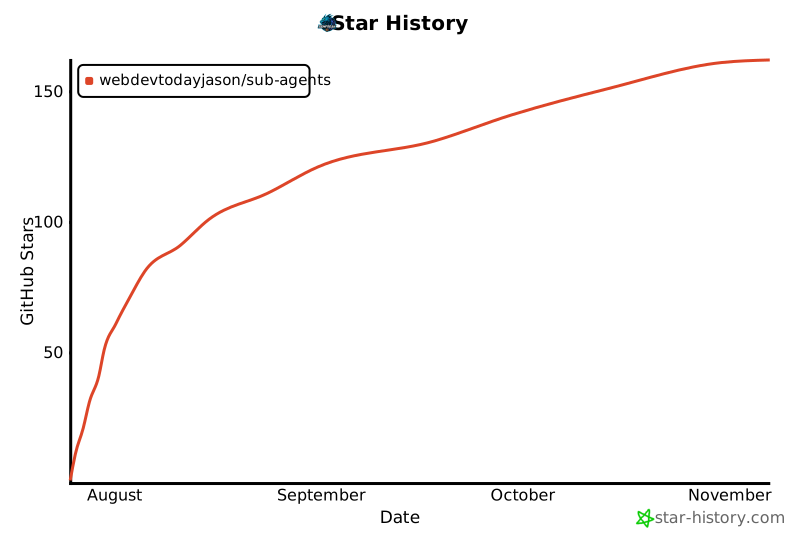](https://star-history.com/#webdevtodayjason/sub-agents&Date)
</div>