@vegajs/vortex-devtools
Version:
Vortex devtools
86 lines (54 loc) • 3.01 kB
Markdown
<h1 align="center">Vortex 🌀🛠</h1>
<p align="center">
<a href="https://www.npmjs.com/package/@vegajs/vortex-devtools"><img src="https://img.shields.io/npm/v/@vegajs/vortex-devtools?style=flat&colorB=ffd547" alt="Latest version" height="20"/></a>
<a href="https://www.npmjs.com/package/@vegajs/vortex-devtools"><img src="https://img.shields.io/npm/dt/@vegajs/vortex-devtools.svg" alt="Downloads" height="20"/></a>
</p>
<p align="center">
<img src="https://raw.githubusercontent.com/vega-js/vortex/main/packages/vortex/docs/static/preview.svg" alt="Vortex Preview"/>
</p>
---
**Vortex Devtools** is a developer toolset designed to enhance your experience with the Vortex state management library. It provides insightful state debugging, tracking, and other development utilities to help you understand the internal workings of your application.
To install Vortex Devtools, use the following command:
```bash
npm add @vegajs/vortex-devtools
```
```bash
yarn add @vegajs/vortex-devtools
```
```bash
pnpm add @vegajs/vortex-devtools
```
After installation, you need to initialize the devtools in your application:
```typescript jsx
import { initDevtools } from '@vegajs/vortex';
import { initDevtools } from '@vegajs/vortex-devtools';
initDevtools();
```
Make sure to call `initDevtools()` during the setup phase of your application to ensure it properly hooks into your stores and provides full state visibility.
Below is an example of setting up a simple store with Vortex and using Devtools for state management:
```typescript jsx
import { defineStore } from '@vegajs/vortex';
import { initDevtools } from '@vegajs/vortex-devtools';
initDevtools();
const counterStore = defineStore(({ reactive }) => {
const count = reactive(0);
const increment = () => count.set(prev => prev + 1);
return { count, increment };
}, { name: 'store_name' }); // For correct tracking in Devtools, add the store name.
```
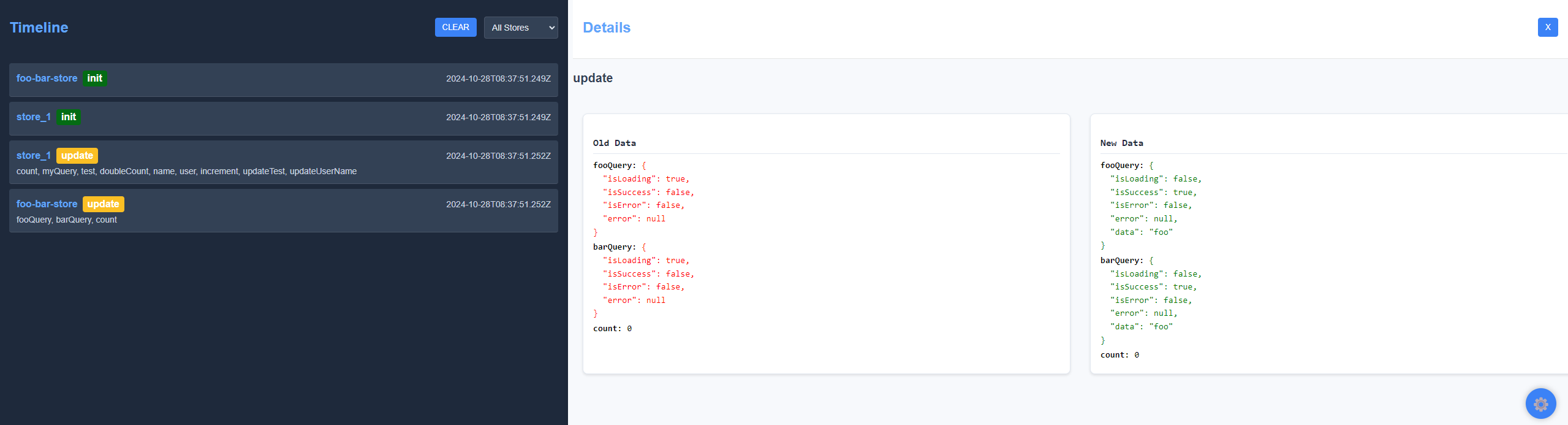
In this example:
- The `counterStore` is defined using `defineStore`, with a reactive `count` state and an `increment` action.
- The `initDevtools()` function is called to initialize the devtools, which will then track changes to the store.
- Make sure to provide a name (`store_name` in this case) for your store to correctly identify it in the Devtools.
## Features
- **State Inspection**: View and inspect the state of each Vortex store in real-time.
- **Action Tracking**: Track the actions performed on each store, making debugging easier.
- **State Snapshots**: Capture snapshots of the state for debugging and time travel.
## Devtools UI
The Vortex Devtools UI provides an easy-to-use interface to help you inspect and debug your application state. Use the Devtools panel to monitor state changes, track actions, and understand the flow of data within your application.
## License
MIT