@vasoyaprince14/sql-analyzer
Version:
🚀 Enhanced SQL database analyzer with AI-powered insights, comprehensive security analysis, RLS policy auditing, and beautiful HTML reports
749 lines (588 loc) • 22.1 kB
Markdown
# 🚀 Enhanced SQL Database Analyzer
[](https://www.npmjs.com/package/@vasoyaprince14/sql-analyzer)
[](https://www.npmjs.com/package/@vasoyaprince14/sql-analyzer)
[](https://opensource.org/licenses/MIT)
[](http://www.typescriptlang.org/)
[](https://nodejs.org/)
> **A comprehensive, enterprise-grade SQL database analyzer that provides detailed health audits, security analysis, performance optimization recommendations, and beautiful HTML reports. Perfect for database administrators, developers, and DevOps teams.**
## ✨ Key Features
### 🔍 **Comprehensive Database Analysis**
- **Schema Health Assessment**: Table structure, normalization, relationships, and naming conventions
- **Index Analysis**: Unused, missing, duplicate, and oversized indexes with performance impact
- **Security Audit**: Row-Level Security (RLS) policies, permissions, vulnerabilities, and access controls
- **Performance Analysis**: Query performance, table bloat detection, trigger analysis, and connection monitoring
- **Configuration Review**: Database settings optimization and best practices validation
### 🎯 **Advanced Reporting**
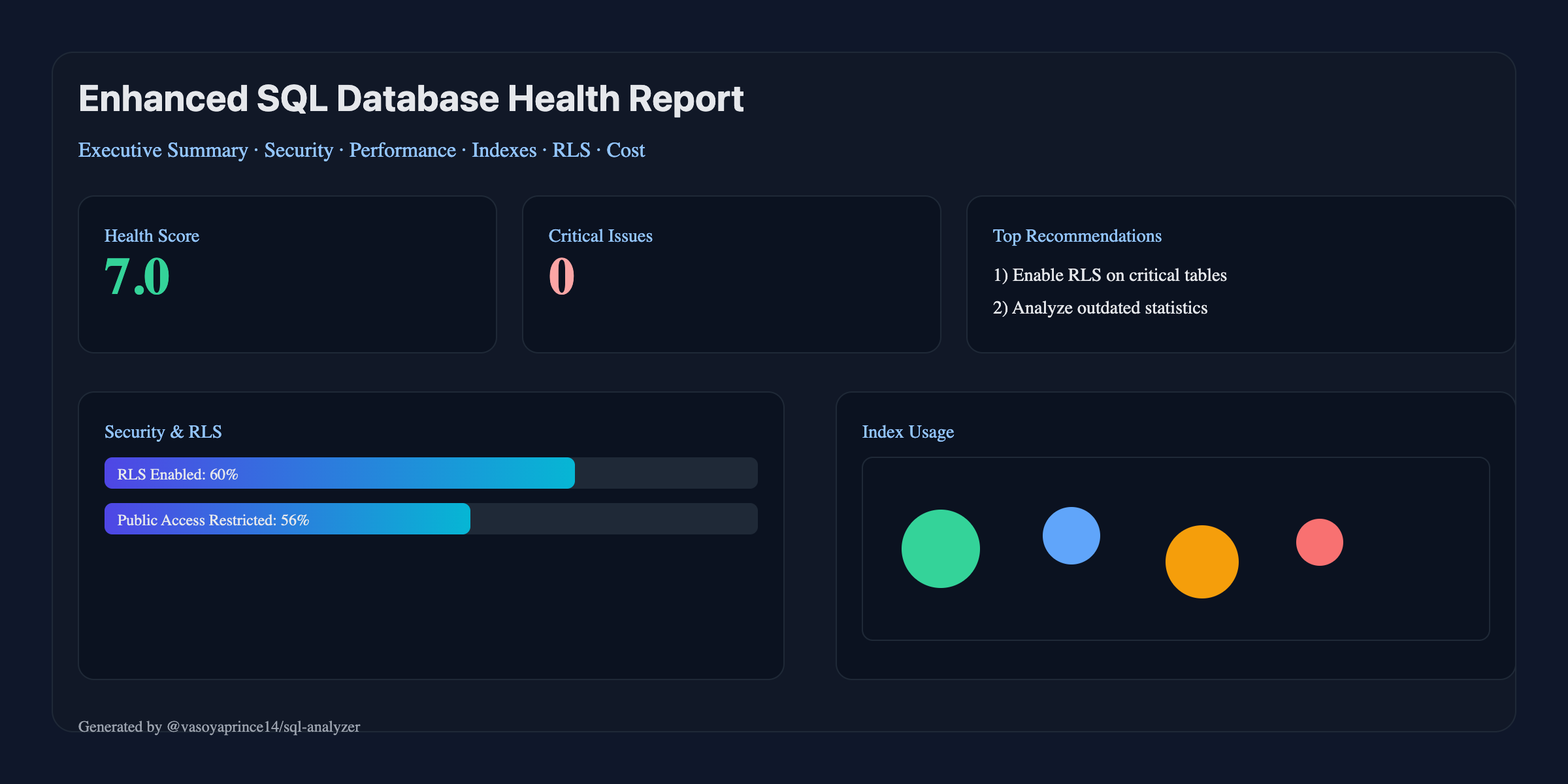
- **Interactive HTML Reports**: Modern, responsive design with charts, graphs, and detailed insights
- **Executive Dashboards**: High-level metrics and KPIs for stakeholders
- **Before/After Comparisons**: Show expected improvements from optimizations
- **Detailed Recommendations**: Step-by-step implementation guides with SQL commands
- **Multiple Formats**: HTML, CLI, and JSON outputs for different use cases
### 🔒 **Security-First Approach**
- **Row-Level Security Analysis**: Comprehensive RLS policy evaluation
- **Permission Auditing**: Over-privilege detection and access control review
- **Vulnerability Scanning**: SQL injection risks and security best practices
- **Compliance Reporting**: Generate reports for security audits and compliance
### ⚡ **Performance Optimization**
- **Query Performance Analysis**: Identify slow queries and optimization opportunities
- **Index Optimization**: Smart index recommendations with impact analysis
- **Table Maintenance**: Bloat detection and cleanup recommendations
- **Configuration Tuning**: Memory, connection, and performance parameter optimization
### 🤖 **AI-Powered Insights** (Optional)
- **OpenAI Integration**: Intelligent analysis and recommendations
- **Smart Prioritization**: AI-driven risk assessment and optimization roadmaps
- **Cost Analysis**: Predict savings and performance improvements
- **Implementation Planning**: AI-generated step-by-step optimization plans
## 🚀 Quick Start
### Installation
```bash
# Install globally for CLI usage
npm install -g @vasoyaprince14/sql-analyzer
# Or install as a project dependency
npm install @vasoyaprince14/sql-analyzer
```
### Interactive Wizard (recommended)
```bash
# Runs a guided setup: pick analysis type, format, DB URL, AI key and model
# Note: running without arguments auto-launches the setup wizard
sql-analyzer # same as: sql-analyzer setup
```
### Basic Usage
```bash
# Zero-install (recommended to try)
npx --yes @vasoyaprince14/sql-analyzer sql-analyzer health -c "postgresql://user:pass@localhost:5432/mydb" --format html -o ./reports
# Generate comprehensive HTML report
sql-analyzer health -c "postgresql://user:pass@localhost:5432/mydb" --format html -o ./reports
# Quick CLI analysis
sql-analyzer health -c "postgresql://user:pass@localhost:5432/mydb" --format cli
# JSON output for automation
sql-analyzer health -c "postgresql://user:pass@localhost:5432/mydb" --format json
```
## 🔥 What’s new (v1.2.0)
- **Readability & Accessibility**: increased contrast, clearer headings, dark mode, larger metric fonts
- **Offline Charts**: inline bar charts (no external libs) for schema scores
- **Actionable Fixes**: SQL grouped into **Copy Safe SQL** vs **Copy Destructive SQL** (with warning)
- **De-duplicated Security**: RLS fixes grouped into a single recommendation
- **Severity-first Top Fixes**: critical/high items surface first
- **AI Executive Summary**: hides empty sections; robust JSON parsing (no raw JSON leak)
- **Trends**: TL;DR shows deltas vs last run (stored in `reports/last-summary.json`)
- **Interactive Wizard**: no-arg run prompts for DB URL, format, AI key, and model (gpt-4o etc.)
### Programmatic Usage
```typescript
import { EnhancedSQLAnalyzer } from '@vasoyaprince14/sql-analyzer';
// Quick analysis
const summary = await EnhancedSQLAnalyzer.quickAnalysis(
'postgresql://user:pass@localhost:5432/mydb',
{
format: 'html',
includeAI: true,
outputPath: './reports'
}
);
console.log(`Health Score: ${summary.overallScore}/10`);
console.log(`Issues Found: ${summary.totalIssues}`);
```
## 📊 Report Features
### Executive Dashboard
- **Health Score**: Overall database health rating (0-10)
- **Security Status**: Vulnerability count and risk assessment
- **Performance Metrics**: Connection usage, query performance, index efficiency
- **Cost Analysis**: Storage usage, optimization savings potential
### Detailed Sections
#### 🔍 **Schema Health Analysis**
- Table structure validation
- Normalization assessment
- Foreign key integrity checks
- Data type optimization
- Naming convention analysis
#### 🛡️ **Security Analysis**
- Row-Level Security (RLS) policy review
- User permissions audit
- Public access detection
- SQL injection risk assessment
- Security best practices validation
#### ⚡ **Performance Analysis**
- Query performance evaluation
- Index usage and optimization
- Table bloat detection
- Connection pool analysis
- Memory configuration review
#### 🔧 **Configuration Analysis**
- Database parameter optimization
- Memory settings review
- Security configuration audit
- Performance tuning recommendations
#### 📅 **Maintenance Scheduling**
- Automated maintenance scripts
- VACUUM and ANALYZE scheduling
- Index maintenance recommendations
- Backup verification procedures
#### 📈 **Trends & Insights**
- Growth projections
- Performance trends
- Optimization roadmap
- Implementation timeline
## 🎯 Use Cases
### For Database Administrators
- **Health Monitoring**: Regular database health assessments
- **Performance Tuning**: Identify and resolve performance bottlenecks
- **Security Auditing**: Ensure compliance with security policies
- **Capacity Planning**: Predict growth and resource requirements
### For Development Teams
- **Code Reviews**: Analyze database changes before deployment
- **Performance Testing**: Identify performance regressions early
- **Security Compliance**: Validate security best practices
- **Documentation**: Generate reports for compliance and auditing
### For DevOps/CI-CD
- **Automated Testing**: Integrate into CI/CD pipelines
- **Quality Gates**: Fail builds on critical issues
- **Monitoring**: Track database health over time
- **Alerting**: Get notified of performance or security issues
## 🔧 CLI Commands
### Health Analysis
```bash
# Basic health audit
sql-analyzer health -c "postgresql://user:pass@host:port/db"
# With progress indicator
sql-analyzer health -c "postgresql://user:pass@host:port/db" --progress
# Custom output directory
sql-analyzer health -c "postgresql://user:pass@host:port/db" -o ./my-reports
# With AI insights (requires OpenAI API key)
OPENAI_API_KEY=your-key sql-analyzer health -c "postgresql://user:pass@host:port/db" --ai
# Choose format (html|cli|json)
sql-analyzer health -c "$DATABASE_URL" --format json
# Fail CI if critical issues found
sql-analyzer health -c "$DATABASE_URL" --fail-on-critical
# Require minimum health score
sql-analyzer health -c "$DATABASE_URL" --min-score 8.0
```
### Configuration Management
```bash
# Interactive setup wizard
sql-analyzer setup
# Initialize configuration file
sql-analyzer config --init
# Validate configuration
sql-analyzer config --validate
# Show current configuration
sql-analyzer config --show
```
### Other Commands
```bash
# Show examples
sql-analyzer examples
# Schema/performance placeholders (future)
sql-analyzer schema --help
sql-analyzer performance --help
```
### Quality Gates (CI/CD)
```bash
# Fail on critical issues
sql-analyzer health -c "$DATABASE_URL" --fail-on-critical
# Minimum health score requirement
sql-analyzer health -c "$DATABASE_URL" --min-score 8.0
# JSON output for automation
sql-analyzer health -c "$DATABASE_URL" --format json
# Markdown report for wikis/readmes
sql-analyzer health -c "$DATABASE_URL" --format md
# Compare against a baseline JSON report and fail on regressions
sql-analyzer health -c "$DATABASE_URL" --baseline ./artifacts/previous.json --fail-on-regression
```
### Trends Between Runs
```bash
# Show deltas vs last run in CLI output
sql-analyzer health -c "$DATABASE_URL" --format cli --trend
# Notes:
# - The tool stores a lightweight summary at `reports/last-summary.json`.
# - Deltas shown include health score, security issues, missing indexes, and bloated tables.
```
### Export SQL Fix Scripts
```bash
# Write two files into the output folder:
# - copy-safe.sql: non-destructive fixes (create indexes, analyze, revoke, etc.)
# - copy-destructive.sql: potentially disruptive operations (drop index, vacuum full, reindex)
sql-analyzer health -c "$DATABASE_URL" --export-sql
```
## ⚙️ Configuration
### Environment Variables
```bash
# Database connection
DATABASE_URL=postgresql://user:pass@localhost:5432/mydb
# AI Integration (optional)
OPENAI_API_KEY=your-openai-api-key
OPENAI_MODEL=gpt-4
# Analysis settings
SECURITY_LEVEL=strict
ENABLE_AI_INSIGHTS=true
REPORT_FORMAT=html
OUTPUT_PATH=./reports
```
### Configuration File
Create a `sql-analyzer.config.json`:
```json
{
"database": {
"host": "localhost",
"port": 5432,
"database": "mydb",
"user": "postgres",
"password": "password",
"ssl": false
},
"ai": {
"enabled": true,
"provider": "openai",
"apiKey": "your-api-key",
"model": "gpt-4"
},
"analysis": {
"includeSchema": true,
"includeTriggers": true,
"includeProcedures": true,
"includeRLS": true,
"securityLevel": "strict"
},
"reporting": {
"format": "html",
"includeCharts": true,
"includeBeforeAfter": true,
"customBranding": {
"companyName": "Your Company"
}
}
}
```
### Configuration Presets
- `development`: Verbose output, no caching
- `production`: Optimized for production use
- `ci`: JSON output, optimized for CI/CD
- `comprehensive`: Full analysis with AI insights
## 🧭 Report Details for Developers
- Schema health findings reference your actual tables/columns (PK/FK checks, naming, data type suggestions).
- Index analysis leverages pg_stat views to suggest missing/unused/duplicate/oversized indexes.
- Performance issues include lock contention and outdated statistics based on live pg_stat data.
- Security audit enumerates RLS policies and PUBLIC-granted tables.
- Cost section estimates storage usage and potential savings; all numbers are derived from system catalogs.
To keep reports offline-friendly, the HTML avoids external CDNs; charts are summarized via metric cards.
## 🤖 AI Integration
### OpenAI Integration
```bash
# Enable AI insights
OPENAI_API_KEY=your-key sql-analyzer health -c "$DATABASE_URL" --ai
# Note: model selection is not exposed via CLI; a default suitable model is used.
```
### AI Features
- **Intelligent Analysis**: Context-aware recommendations
- **Risk Assessment**: AI-powered security and performance risk evaluation
- **Cost Optimization**: Smart cost-saving suggestions
- **Implementation Planning**: Step-by-step optimization roadmaps
## 📈 API Reference
### Main Classes
#### `EnhancedSQLAnalyzer`
```typescript
// Create analyzer instance
const analyzer = new EnhancedSQLAnalyzer(connectionConfig, options);
// Perform analysis
const report = await analyzer.analyze();
// Generate summary
const summary = analyzer.generateSummary(report);
// Quick analysis (static method)
const result = await EnhancedSQLAnalyzer.quickAnalysis(connectionString, options);
// CI/CD analysis (static method)
const ciResult = await EnhancedSQLAnalyzer.ciAnalysis(connectionString);
```
#### `ConfigManager`
```typescript
// Create from environment
const config = ConfigManager.fromEnvironment();
// Load from file
const config = await ConfigManager.fromFile('./config.json');
// Validate configuration
const validation = config.validateConfig();
// Update configuration
config.updateConfig({ ai: { enabled: true } });
```
### Types & Interfaces
```typescript
interface AnalysisSummary {
overallScore: number;
totalIssues: number;
criticalIssues: number;
securityRisk: 'low' | 'medium' | 'high' | 'critical';
performanceRisk: 'low' | 'medium' | 'high' | 'critical';
costSavingsPotential: number;
topRecommendations: string[];
estimatedImplementationTime: string;
riskLevel: 'low' | 'medium' | 'high' | 'critical';
}
interface AnalysisOptions {
format?: 'cli' | 'html' | 'json';
outputPath?: string;
includeAI?: boolean;
preset?: 'development' | 'production' | 'ci' | 'comprehensive';
customConfig?: Partial<SqlAnalyzerConfig>;
}
```
## 🧪 Testing
### Unit Tests
```bash
# Run all tests
npm test
# Run with coverage
npm run test:coverage
# Watch mode
npm run test:watch
```
## 📦 Publishing to npm (Maintainers)
> Requires npm account with 2FA enabled and publish rights to `@vasoyaprince14` scope.
1) Prepare release
```bash
npm ci
npm run type-check
npm run build
npm test
```
2) Update version and changelog
```bash
# choose one
npm version patch # 1.0.1
# npm version minor # 1.1.0
# npm version major # 2.0.0
git push && git push --tags
```
3) Publish
```bash
# public scoped package (2FA OTP will be prompted if enabled)
npm publish --access public
```
You can also use the shortcuts in `package.json`:
```bash
npm run release # patch
npm run release:minor # minor
npm run release:major # major
```
Notes:
- The `prepublishOnly` hook enforces tests, lint, and type-check before publish.
- Only `dist`, docs, examples, and core files are shipped via the `files` whitelist.
### Integration Testing
```bash
# Test with Docker PostgreSQL
docker run -d --name test-pg -p 5432:5432 -e POSTGRES_PASSWORD=test postgres:15
# Run health analysis
sql-analyzer health -c "postgresql://postgres:test@localhost:5432/postgres"
```
### CI/CD Integration
#### GitHub Actions
```yaml
name: Database Health Check
on: [push, pull_request]
jobs:
database-health:
runs-on: ubuntu-latest
services:
postgres:
image: postgres:15
env:
POSTGRES_PASSWORD: postgres
options: >-
--health-cmd pg_isready
--health-interval 10s
--health-timeout 5s
--health-retries 5
steps:
- uses: actions/checkout@v3
- uses: actions/setup-node@v3
with:
node-version: '18'
- name: Run Database Analysis
run: |
npx --yes -p @vasoyaprince14/sql-analyzer sql-analyzer health \
-c "postgresql://postgres:postgres@localhost:5432/postgres" \
--format json \
--fail-on-critical
env:
OPENAI_API_KEY: ${{ secrets.OPENAI_API_KEY }}
```
### Quality Gates
```bash
# Fail build on critical issues
sql-analyzer health -c "$DB_URL" --fail-on-critical
# Require minimum health score
sql-analyzer health -c "$DB_URL" --min-score 8.0
# Generate artifact reports
sql-analyzer health -c "$DB_URL" --format html --output ./artifacts/
```
## 🔌 Database Support
### Currently Supported
- ✅ **PostgreSQL** (9.6+) - Full support
- Schema analysis
- Index optimization
- RLS policy auditing
- Performance analysis
- Security scanning
### Planned Support
- 🔄 **MySQL** (8.0+) - In development
- 🔄 **SQL Server** (2017+) - Planned
- 🔄 **Oracle** (12c+) - Planned
- 🔄 **SQLite** - Planned
## 🛡️ Security & Privacy
### Data Privacy
- **No Data Storage**: Analysis is performed locally, no data sent to external services
- **Optional AI**: AI features are opt-in and only use metadata, not actual data
- **Secure Connections**: All database connections use secure protocols
### Security Best Practices
- **Least Privilege**: Run with minimal required database permissions
- **Audit Logging**: All operations are logged for security auditing
- **Configuration Validation**: Secure configuration validation and recommendations
### Protecting Your GitHub (Maintainers)
- Enable 2FA for your GitHub and npm accounts
- Add branch protection on `main`: required PR reviews, required status checks (CI), block force-pushes and deletions
- Require signed commits and verified authors (optional but recommended)
- Limit GitHub Actions permissions (read-all by default) and use environment protection for publish
- Store secrets in GitHub Secrets only; rotate npm tokens regularly; use organization SSO if available
- Enable Dependabot alerts and security updates; enable CodeQL code scanning
- Add CODEOWNERS to enforce reviews from maintainers
## 🚀 Performance
### Benchmarks
- **Small Databases** (< 1GB): ~30 seconds
- **Medium Databases** (1-10GB): ~2-5 minutes
- **Large Databases** (10GB+): ~10-20 minutes
### Optimization
- **Concurrent Analysis**: Multiple checks run in parallel
- **Smart Sampling**: Large tables are sampled for performance
- **Caching**: Results can be cached for faster subsequent runs
## 📚 Examples
### Basic Usage
```typescript
import { EnhancedSQLAnalyzer } from '@vasoyaprince14/sql-analyzer';
// Simple health check
const summary = await EnhancedSQLAnalyzer.quickAnalysis(
'postgresql://user:pass@localhost/db'
);
if (summary.criticalIssues > 0) {
console.log(`⚠️ Found ${summary.criticalIssues} critical issues!`);
}
```
### Advanced Configuration
```typescript
import { EnhancedSQLAnalyzer, ConfigManager } from '@vasoyaprince14/sql-analyzer';
// Custom configuration
const analyzer = new EnhancedSQLAnalyzer(
{ connectionString: process.env.DATABASE_URL },
{
preset: 'comprehensive',
customConfig: {
ai: {
enabled: true,
apiKey: process.env.OPENAI_API_KEY
},
analysis: {
securityLevel: 'strict',
includeAIInsights: true
},
reporting: {
format: 'html',
customBranding: {
companyName: 'Acme Corp',
colors: {
primary: '#007bff',
secondary: '#6c757d'
}
}
}
}
}
);
// Perform analysis with progress monitoring
const result = await analyzer.analyzeAndReport({
returnReport: true,
onProgress: (step, progress) => {
console.log(`${step}: ${progress}%`);
}
});
console.log('Analysis complete!', result.summary);
```
### CI/CD Integration
```typescript
import { EnhancedSQLAnalyzer } from '@vasoyaprince14/sql-analyzer';
// CI/CD quality gate
async function checkDatabaseHealth() {
try {
const result = await EnhancedSQLAnalyzer.ciAnalysis(
process.env.DATABASE_URL
);
if (!result.passed) {
console.error(`❌ Database health check failed:`);
console.error(`- Health Score: ${result.score}/10`);
console.error(`- Critical Issues: ${result.criticalIssues}`);
process.exit(1);
}
console.log(`✅ Database health check passed!`);
console.log(`- Health Score: ${result.score}/10`);
console.log(`- Report: ${result.reportPath}`);
} catch (error) {
console.error('Database health check failed:', error.message);
process.exit(1);
}
}
checkDatabaseHealth();
```
## 🤝 Contributing
We welcome contributions! Please see our [Contributing Guide](./CONTRIBUTING.md) for details.
### Development Setup
```bash
# Clone repository
git clone https://github.com/vasoyaprince14/sql-optimizer.git
cd sql-optimizer
# Install dependencies
npm install
# Run in development mode
npm run dev
# Run tests
npm test
# Build for production
npm run build
```
### Adding Database Support
```typescript
// Implement DatabaseClient interface
class MySQLClient implements DatabaseClient {
async connect(): Promise<void> { /* ... */ }
async disconnect(): Promise<void> { /* ... */ }
async query(sql: string): Promise<any> { /* ... */ }
}
// Register with analyzer
analyzer.registerDatabaseClient('mysql', MySQLClient);
```
## 📜 License
This project is licensed under the MIT License - see the [LICENSE](LICENSE) file for details.
## 🙏 Acknowledgments
- PostgreSQL community for excellent documentation
- OpenAI for providing powerful AI capabilities
- Chart.js for beautiful data visualizations
- All contributors who help improve this tool
## 📞 Support
- 🐛 [Report Issues](https://github.com/vasoyaprince14/sql-optimizer/issues)
- 💬 [Discussions](https://github.com/vasoyaprince14/sql-optimizer/discussions)
- 📧 [Email Support](mailto:support@sql-analyzer.dev)
## 🎯 Roadmap
### Version 1.1.0
- [ ] MySQL support
- [ ] Query execution plan analysis
- [ ] Historical trend analysis
- [ ] Custom alerting rules
### Version 1.2.0
- [ ] SQL Server support
- [ ] Real-time monitoring
- [ ] Slack/Teams integration
- [ ] Advanced cost modeling
### Version 1.3.0
- [ ] Oracle support
- [ ] Multi-database analysis
- [ ] API rate limiting
- [ ] Enterprise SSO integration
---
**⭐ Star this repository if you find it helpful!**
Made with ❤️ by [Prince Vasoya](https://github.com/vasoyaprince14), [Shreya Chauhan](https://github.com/shreyaChauhan300903)
[Get Started](#-quick-start) | [Documentation](#-cli-commands) | [Examples](#-examples) | [Contributing](#-contributing)