@usherlabs/ccxt
Version:
A JavaScript cryptocurrency trading library with support for 100+ exchanges. Verifiable data powered by Verity.
273 lines (195 loc) • 9.54 kB
Markdown
# CCXT – CryptoCurrency eXchange Trading Library
[](https://www.npmjs.com/package/ccxt) [](https://npmjs.com/package/ccxt) [](https://discord.gg/ccxt) [](https://github.com/ccxt/ccxt/wiki/Exchange-Markets) [](https://x.com/ccxt_official)
A **JavaScript** / **TypeScript** library for cryptocurrency trading and e-commerce with support for many bitcoin/ether/altcoin exchange markets and merchant APIs.
### [Install](#install) · [Usage](#usage) · [Manual](https://github.com/ccxt/ccxt/wiki) · [FAQ](https://github.com/ccxt/ccxt/wiki/FAQ) · [Examples](https://github.com/ccxt/ccxt/tree/master/examples) · [Contributing](https://github.com/ccxt/ccxt/blob/master/CONTRIBUTING.md) · [Disclaimer](#disclaimer) · [Social](#social)
The **CCXT** library is used to connect and trade with cryptocurrency exchanges and payment processing services worldwide. It provides quick access to market data for storage, analysis, visualization, indicator development, algorithmic trading, strategy backtesting, bot programming, and related software engineering.
It is intended to be used by **coders, developers, technically-skilled traders, data-scientists and financial analysts** for building trading algorithms.
## Key Features
- **100+ Supported Exchanges** - Comprehensive coverage of major cryptocurrency exchanges
- **Unified API** - Consistent interface across all supported exchanges
- **Full TypeScript Support** - Complete type definitions and IntelliSense support
- **Public & Private APIs** - Market data, trading, account management, and more
- **WebSocket Support** - Real-time data streaming capabilities
- **Rate Limiting** - Built-in request throttling and rate limit handling
- **Error Handling** - Robust error management and recovery mechanisms
- **Cross-Platform** - Works in Node.js and modern web browsers
- **MIT License** - Free for commercial and open-source use
## Supported Exchanges
CCXT currently supports **105+ cryptocurrency exchanges** including:
| Exchange | Type | Status | Pro |
|----------|------|--------|-----|
| Binance | CEX | ✅ Certified | ✅ |
| Coinbase | CEX | ✅ | ✅ |
| Kraken | CEX | ✅ | ✅ |
| OKX | CEX | ✅ Certified | ✅ |
| Bybit | CEX | ✅ Certified | ✅ |
| KuCoin | CEX | ✅ Certified | ✅ |
| Gate.io | CEX | ✅ Certified | ✅ |
| HTX | CEX | ✅ Certified | ✅ |
| MEXC | CEX | ✅ Certified | ✅ |
| Bitget | CEX | ✅ Certified | ✅ |
*For a complete list of all supported exchanges, see the [Exchange Markets](https://github.com/ccxt/ccxt/wiki/Exchange-Markets) page.*
## Install
### NPM (Recommended)
```bash
npm install @usherlabs/ccxt
```
### Yarn
```bash
yarn add @usherlabs/ccxt
```
## Quick Start
### Basic Usage
```javascript
const ccxt = require('@usherlabs/ccxt');
// Create exchange instance
const exchange = new ccxt.binance({
apiKey: 'YOUR_API_KEY',
secret: 'YOUR_SECRET',
sandbox: true, // Use testnet
enableRateLimit: true
});
// Fetch market data
async function getMarketData() {
try {
// Load markets
await exchange.loadMarkets();
// Get ticker
const ticker = await exchange.fetchTicker('BTC/USDT');
console.log('BTC/USDT Price:', ticker.last);
// Get order book
const orderbook = await exchange.fetchOrderBook('BTC/USDT');
console.log('Best bid:', orderbook.bids[0]);
console.log('Best ask:', orderbook.asks[0]);
} catch (error) {
console.error('Error:', error.message);
}
}
getMarketData();
```
### TypeScript Example
```typescript
import { binance } from '@usherlabs/ccxt';
const exchange = new binance({
apiKey: process.env.BINANCE_API_KEY,
secret: process.env.BINANCE_SECRET,
enableRateLimit: true
});
async function fetchBalance() {
try {
const balance = await exchange.fetchBalance();
console.log('USDT Balance:', balance.USDT?.free || 0);
} catch (error) {
console.error('Error fetching balance:', error);
}
}
```
### Trading Example
```javascript
const ccxt = require('@usherlabs/ccxt');
const exchange = new ccxt.binance({
apiKey: 'YOUR_API_KEY',
secret: 'YOUR_SECRET',
enableRateLimit: true
});
async function placeOrder() {
try {
// Place a limit buy order
const order = await exchange.createLimitBuyOrder(
'BTC/USDT', // symbol
0.001, // amount
50000 // price
);
console.log('Order placed:', order.id);
// Check order status
const orderStatus = await exchange.fetchOrder(order.id, 'BTC/USDT');
console.log('Order status:', orderStatus.status);
} catch (error) {
console.error('Trading error:', error.message);
}
}
```
### Using Verity Features
This fork includes enhanced capabilities powered by Verity. To enable Verity features, you can configure the exchange instance with additional parameters:
```javascript
const exchange = new ccxt.binance({
apiKey: 'YOUR_API_KEY',
secret: 'YOUR_SECRET',
enableRateLimit: true,
defaultType: 'spot',
useVerity: true, // Enable Verity features
verityProxyUrl: 'YOUR_PROXY_URL', // Verity proxy URL
timeout: 150 * 1000,
options: {
adjustForTimeDifference: true,
recvWindow: 60000
}
});
```
**Verity Configuration Options:**
- `useVerity`: Boolean flag to enable/disable Verity features
- `verityProxyUrl`: URL endpoint for the Verity proxy service
- Enhanced error handling and performance optimizations when Verity is enabled
## API Overview
### Public APIs (No Authentication Required)
- **Market Data**: Tickers, order books, trades
- **Trading Pairs**: Available symbols and markets
- **OHLCV Data**: Historical price data for charts
- **Exchange Info**: Trading rules, fees, limits
### Private APIs (Authentication Required)
- **Account Management**: Balances, positions
- **Trading**: Place, cancel, and query orders
- **History**: Order history, trade history, ledger
- **Deposits/Withdrawals**: Fund management
## CLI Tool
CCXT provides a command-line interface for quick operations:
## Examples
Check out the [examples directory](https://github.com/ccxt/ccxt/tree/master/examples) for comprehensive code samples:
- [Basic Usage](https://github.com/ccxt/ccxt/tree/master/examples/js)
- [TypeScript Examples](https://github.com/ccxt/ccxt/tree/master/examples/ts)
- [WebSocket Examples](https://github.com/ccxt/ccxt/tree/master/examples/js/websocket)
- [Trading Bots](https://github.com/ccxt/ccxt/tree/master/examples/js/trading)
## Documentation
- **[Manual](https://github.com/ccxt/ccxt/wiki)**: Comprehensive documentation
- **[API Reference](https://github.com/ccxt/ccxt/wiki/Manual)**: Complete API documentation
- **[FAQ](https://github.com/ccxt/ccxt/wiki/FAQ)**: Frequently asked questions
- **[Exchange-Specific Notes](https://github.com/ccxt/ccxt/wiki/Manual#exchange-specific-notes)**: Exchange-specific implementation details
## Contributing
We welcome contributions! Please read our [Contributing Guide](https://github.com/ccxt/ccxt/blob/master/CONTRIBUTING.md) before submitting pull requests.
### Development Setup
```bash
# Clone the repository
git clone https://github.com/usherlabs/ccxt.git
cd @usherlabs/ccxt
# Install dependencies
npm install
# Run tests
npm test
# Build the library
npm run build
```
## Support
### Community Support
- **[Discord](https://discord.gg/ccxt)**: Join our community chat
- **[GitHub Issues](https://github.com/ccxt/ccxt/issues)**: Report bugs and request features
- **[Stack Overflow](https://stackoverflow.com/questions/tagged/ccxt)**: Search for answers
### Professional Support
- **[CCXT Pro](https://ccxt.pro)**: Professional version with additional features
- **[Enterprise Support](https://ccxt.pro)**: Custom solutions and consulting
## Sponsors
Support CCXT development by becoming a sponsor:
[](https://opencollective.com/ccxt#sponsor)
## Social
- [](https://twitter.com/ccxt_official) Follow us on Twitter
- [](https://discord.gg/ccxt) Join our Discord
- [](https://t.me/ccxt_announcements) Telegram Channel
## License
This library is licensed under the **MIT License**. See the [LICENSE](https://github.com/ccxt/ccxt/blob/master/LICENSE.txt) file for details.
## Disclaimer
**CCXT is a free open source non-custodian API broker software under MIT license.**
- **Non-custodian**: CCXT does not hold your funds or act as an intermediary
- **MIT License**: Free to use for any purpose, but use at your own risk
- **No Warranties**: Provided "as is" without any warranties
- **API Broker**: Funded through exchange API broker programs
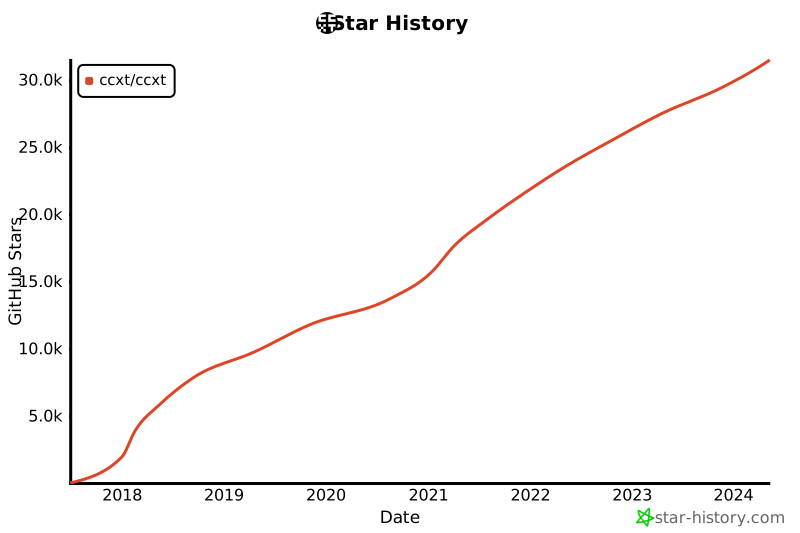
## Star History
[](https://star-history.com/#ccxt/ccxt&Date)