@typecad/typecad-gitdiff
Version:
See differences between two KiCAD PCB files
35 lines (21 loc) • 1.01 kB
Markdown
# typeCAD-gitdiff
> See the differences between KiCAD PCB files
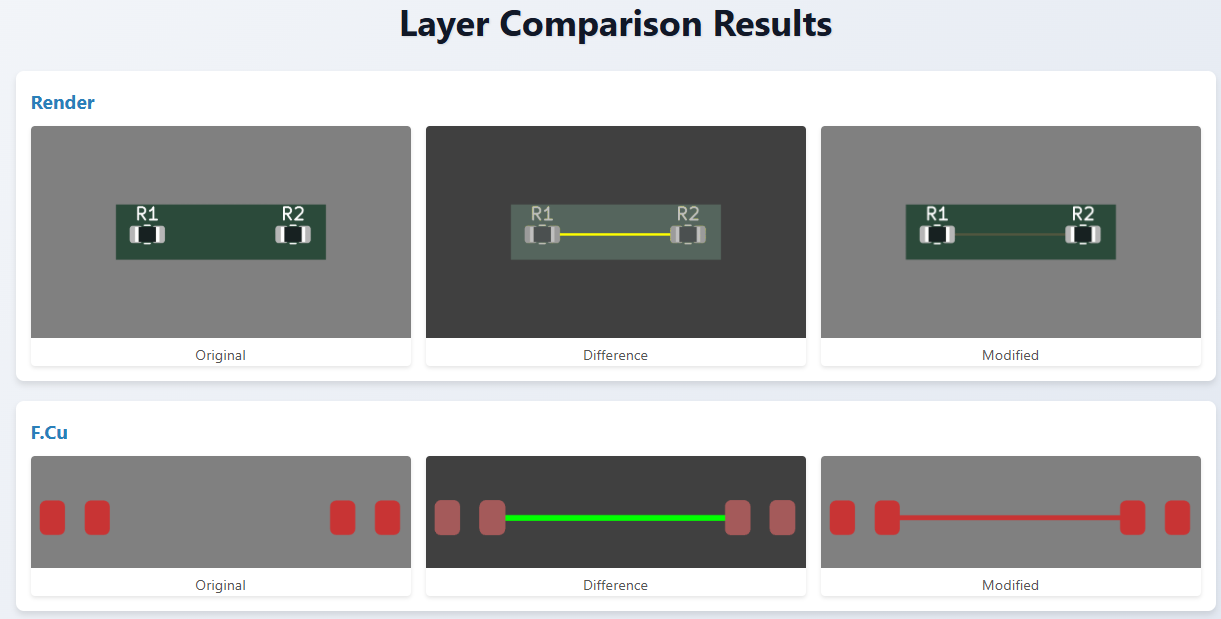
It will create a render and highlight modifications in yellow and for each layer it will show additions in green and deletions in red.
## git Integration
It can be integrated into `git` to show you the differences between the current version and the last committed version.
## Getting Started
### Prerequisites
- KiCAD v9.0.1 or later
- git
### Installation
Run the following command in a terminal:
```npm i -g @typecad/typecad-gitdiff```
This will install the package globally.
## Usage
For comparing two KiCAD PCB files, use the following command:
```typecad-gitdiff <original.kicad_pcb> <modified.kicad_pcb>```
### git
To use with `git`, use the following command:
```git difftool <modified.kicad_pcb> --extcmd 'typecad-gitdiff'```
This will use `git` to extract the last committed version of the PCB file and compare it to the current version.