@type-r/mixture
Version:
React-style mixins, Backbone-style events, logging router.
356 lines (236 loc) • 13.9 kB
Markdown
# Mixins, events, logging
## Overview
Type-R Mixture is the toolkit combining React-style mixins, Backbone-style events, and minimal set of Underscore-style object manipulation functions.
`Events` is an object with pub-sub events API which can be mixed into your classes manually or with `@mixins` decorator.
Alternatively, you can extend `Messenger` class having `Events` pre-mixed. Or, you can use `Messenger` as a mixin with `@mixins` decorator. `@mixins` can mix both plain objects and classes.
`log` is a small function triggering the log event on `logger` object. Then, you can easily attach your custom loggers from anywhere subscribing for log events. And it you don't, there's a default log listener writing everything to the console.
Written in TypeScript, works with ES5 and ES6.
### Installation
`npm install @type-r/mixture`
### Features
- `Mixable`, React-style mixins.
- Fine-grained control over member merge rules.
- Can mix both classes and plain objects.
- Works with and without ES6 class decorators.
- `Messenger`, synchronous events.
- Can be used as mixin and as a base class.
- 100% backward API compatibility with [Backbone Events](http://backbonejs.org/#Events) (passes Backbone 1.2.x unit test)
- Much faster than Backbone events.
- `Logger`, thin but powerful logging abstraction build on top of `Messenger`. Defaults to the `console`.
- Minimal set of speed-optimized underscore-style object manipulation tools (`assign`, `defaults`, `mapObject`, etc).
## Mixins
Both plain JS object and class constructor may be used as mixins. In the case of the class constructor, missing static members will copied over as well.
You need to import `mixins` decorator to use mixins:
```javascript
import { mixins } from '@type-r/mixture'
...
@mixins( plainObject, MyClass, ... )
class X {
...
}
```
### Merge Rules and React Compatibility
Mixture implements _configurable_ merge rules, which allows to add standard React mixins functionality to the ES6 React Components.
```javascript
import React from 'react'
import { Mixable } from '@type-r/mixture'
// Make React.Component mixable...
Mixable.mixTo( React.Component );
// Define lifecycle methods merge rules...
React.Component.mixinRules({
componentWillMount : 'reverse',
componentDidMount : 'reverse',
componentWillReceiveProps : 'reverse',
shouldComponentUpdate : 'some',
componentWillUpdate : 'reverse',
componentDidUpdate : 'reverse',
componentWillUnmount : 'sequence',
});
```
Mixin merge rules can be extented in any subclass using the `@mixinRules({ attr : rule })` class decorator. Rule is the string from the following list.
- *merge* - assume property to be an object, which members taken from mixins must be merged.
- *pipe* - property is the function `( x : T ) => T` transforming the value. Multiple functions joined in pipe.
- *sequence* - property is the function. Multiple functions will be called in sequence.
- *reverse* - same as *sequence*, but functions called in reverse sequence.
- *mergeSequence* - merge the object returned by functions, executing them in sequence.
- *every* - property is the function `( ...args : any[] ) => boolean`. Resulting method will return true if every single function returns true.
- *some* - same as previous, but method will return true when at least one function returns true.
If merge rule is an object, the corresponding member is expected to be an object and the rule defines the merge rules for its members.
### Usage Example
Here we adding [Events](http://backbonejs.org/#Events) support (on, off, trigger, listenTo, etc.):
```javascript
import React from 'react'
import { mixins, Events } from '@type-r/mixture'
const UnsubscribeMixin = {
componentWillUnmount(){
this.off();
this.stopListening();
}
}
@mixins( Events, UnsubscribeMixin )
class EventedComponent extends React.Component {
// ...
}
```
## `mixin` Events
Type-R uses an efficient synchronous events implementation which is backward compatible with [Backbone Events API](http://backbonejs.org/#Events) but is about twice faster in all major browsers. It comes in form of `Events` mixin and the `Messenger` base class.
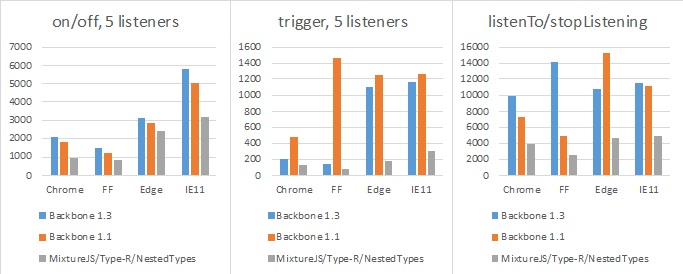
The complete semantic if Backbone v1.1.x Events is supported with the following exceptions:
- `source.trigger( 'ev1 ev2 ev3' )` is not supported. Use `source.trigger( 'ev1' ).trigger( 'ev2' ).trigger( 'ev3' )` instead.
- `source.trigger( 'ev', a, b, ... )` doesn't support more than 5 event parameters.
- `source.on( 'ev', callback )` - callback will _not_ be called in the context of `source` by default.
`Events` is a [mixin](#mixins) giving the object the ability to bind and trigger custom named events.
```javascript
import { mixins, Events } from 'type-r'
@mixins( Events )
class EventfulClass {
...
doSomething(){
...
this.trigger( 'doneSomething', here, are, results );
}
}
const ec = new EventfulClass();
ec.on( 'doneSomething', ( here, are, results ) => console.log( 'unbelievable' ) );
```
<aside class="notice">There's the <code>Messenger</code> abstract base class with Events mixed in.</aside>
### source.trigger(event, arg1, arg2, ... )
Trigger callbacks for the given event, or space-delimited list of events. Subsequent arguments to trigger will be passed along to the event callbacks.
### listener.listenTo(source, event, callback)
Tell an object to listen to a particular event on an other object. The advantage of using this form, instead of other.on(event, callback, object), is that listenTo allows the object to keep track of the events, and they can be removed all at once later on. The callback will always be called with object as context.
```javascript
view.listenTo(model, 'change', view.render );
```
<aside class="success">Subscriptions made with <code>listenTo()</code> will be stopped automatically if an object is properly disposed (<code>dispose()</code> method is called).</aside>
### listener.stopListening([source], [event], [callback])
Tell an object to stop listening to events. Either call stopListening with no arguments to have the object remove all of its registered callbacks ... or be more precise by telling it to remove just the events it's listening to on a specific object, or a specific event, or just a specific callback.
```javascript
view.stopListening(); // Unsubscribe from all events
view.stopListening(model); // Unsubscribe from all events from the model
```
<aside class="notice">Messenger, Model, Collection, and Store execute <code>this.stopListening()</code> from their <code>dispose()</code> method. You don't have to unsubscribe from events explicitly if you are using <code>listenTo()</code> method and disposing your objects properly.</aside>
### listener.listenToOnce(source, event, callback)
Just like `listenTo()`, but causes the bound callback to fire only once before being automatically removed.
### source.on(event, callback, [context])
Bind a callback function to an object. The callback will be invoked whenever the event is fired. If you have a large number of different events on a page, the convention is to use colons to namespace them: `poll:start`, or `change:selection`. The event string may also be a space-delimited list of several events...
```javascript
book.on("change:title change:author", ...);
```
Callbacks bound to the special "all" event will be triggered when any event occurs, and are passed the name of the event as the first argument. For example, to proxy all events from one object to another:
```javascript
proxy.on("all", function(eventName) {
object.trigger(eventName);
});
```
All event methods also support an event map syntax, as an alternative to positional arguments:
```javascript
book.on({
"change:author": authorPane.update,
"change:title change:subtitle": titleView.update,
"destroy": bookView.remove
});
```
To supply a context value for this when the callback is invoked, pass the optional last argument: `model.on('change', this.render, this)` or `model.on({change: this.render}, this)`.
<aside class="warning">Event subscription with <code>source.on()</code> may create memory leaks if it's not stopped properly with <code>source.off()</code></aside>
### source.off([event], [callback], [context])
Remove a previously bound callback function from an object. If no context is specified, all of the versions of the callback with different contexts will be removed. If no callback is specified, all callbacks for the event will be removed. If no event is specified, callbacks for all events will be removed.
```javascript
// Removes just the `onChange` callback.
object.off("change", onChange);
// Removes all "change" callbacks.
object.off("change");
// Removes the `onChange` callback for all events.
object.off(null, onChange);
// Removes all callbacks for `context` for all events.
object.off(null, null, context);
// Removes all callbacks on `object`.
object.off();
```
Note that calling `model.off()`, for example, will indeed remove all events on the model — including events that Backbone uses for internal bookkeeping.
### source.once(event, callback, [context])
Just like `on()`, but causes the bound callback to fire only once before being removed. Handy for saying "the next time that X happens, do this". When multiple events are passed in using the space separated syntax, the event will fire once for every event you passed in, not once for a combination of all events
### Type-R events list
All Type-R objects implement Events mixin and use events to notify listeners on changes.
Model and Store change events:
Event name | Handler arguments | When triggered
-------|-------------------|------------
change | (model, options) | At the end of any changes.
change:attrName | (model, value, options) | The model's attribute has been changed.
Collection change events:
Event name | Handler arguments | When triggered
-------|-------------------|------------
changes | (collection, options) | At the end of any changes.
reset | (collection, options) | `reset()` method was called.
update | (collection, options) | Any models added or removed.
sort | (collection, options) | Order of models is changed.
add | (model, collection, options) | The model is added to a collection.
remove | (model, collection, options) | The model is removed from a collection.
change | (model, options) | The model is changed inside of collection.
## `class` Messenger
Messenger is an abstract base class implementing Events mixin and some convenience methods.
```javascript
import { define, Messenger } from 'type-r'
class MyMessenger extends Messenger {
}
```
### Events mixin methods (7)
Messenger implements [Events](#events-mixin) mixin.
### messenger.cid
Unique run-time only messenger instance id (string).
### `callback` messenger.initialize()
Callback which is called at the end of the constructor.
### messenger.dispose()
Executes `messenger.stopListening()` and `messenger.off()`.
Objects must be disposed to prevent memory leaks caused by subscribing for events from singletons.
## Logging
Logging in Type-R is done through Events. `Logger` doesn't compete with your logging libraries, it helps you to utilize them.
### log( level, topic, message, context? )
Write to the log. Arguments:
- `level` is a string corresponding to the `console` log methods: 'error', 'warn', 'info', 'log', 'debug'.
- `topic` is an arbitrary string reflecting the feature area.
- `message` is a log message.
- `context` is an optional JS object with additional information on the context of logging event.
```javascript
import { log } from '@type-r/mixture'
...
log( 'info', 'feature:and:topic', textMessage, { someRelatedData, someOtherData, ... });
```
### `singleton` logger
Singlton acting as a router for log events.
What really happens when the `log` is called is an event being sent. There could be many listeners to the log events, and the one which is listening by default is the console listener, so you get pretty standard logging out of box.
However, here's the list of things you can do which you can't do with a standard console logging:
- When you're writing the unit test,
- you can easily turn console errors and warnings into exceptions, or
- you can turn on log event counter to be used in asserts.
- You can selectively turn logging off removing the listeners for the specific log levels. `Logger` does it by default muting all events except `error` and `warn` in production build, but you can override that.
- You can add as many custom log event listeners as you want, which simplifies replacement of the logging library.
### Turning off the default logger
```javascript
import { logger } from "@type-r/mixture"
logger.off(); // Mute it completely
logger.off( 'warn' ); // Mute warn (log levels correspons to the console[level]( msg ))
```
### Selectively turn on logging
```javascript
import { logger } from "@type-r/mixture"
logger.off().logToConsole( 'error' ).logToConsole( 'warn', /^myfeature:/ );
```
### Throw exceptions on log messages
```javascript
import { logger } from "@type-r/mixture"
logger.off().throwOn( 'error' ).throwOn( 'warn', /^myfeature:/ );
```
### Count specific log messages by level
```javascript
import { logger } from "@type-r/mixture"
logger.off().count( 'error' ).throwOn( 'warn', /^myfeature:/ );;
....
assert( !logger.counter.errors && !logger.counter.warn)
```
### Add a new log event listener
```javascript
import { logger } from "@type-r/mixture"
logger.on( 'error', ( subject, message, data ) => {
console.log( 'There was an error, you know?' );
});
```