@transifex/react
Version:
i18n React framework using Transifex Native
449 lines (341 loc) • 11.7 kB
Markdown
<p align="center">
<a href="https://www.transifex.com">
<img src="https://raw.githubusercontent.com/transifex/transifex-javascript/master/media/transifex.png" height="60">
</a>
</p>
<p align="center">
<i>Transifex Native is a full end-to-end, cloud-based localization stack for moderns apps.</i>
</p>
<p align="center">
<img src="https://github.com/transifex/transifex-javascript/actions/workflows/npm-publish.yml/badge.svg">
<a href="https://www.npmjs.com/package/@transifex/react">
<img src="https://img.shields.io/npm/v/@transifex/react.svg">
</a>
<a href="https://developers.transifex.com/docs/native">
<img src="https://img.shields.io/badge/docs-transifex.com-blue">
</a>
</p>
# Transifex Native SDK: React i18n
React component for localizing React application using
[Transifex Native](https://www.transifex.com/native/).
Related packages:
- [@transifex/native](https://www.npmjs.com/package/@transifex/native)
- [@transifex/cli](https://www.npmjs.com/package/@transifex/cli)
Learn more about Transifex Native in the [Transifex Developer Hub](https://developers.transifex.com/docs/native).
# How it works
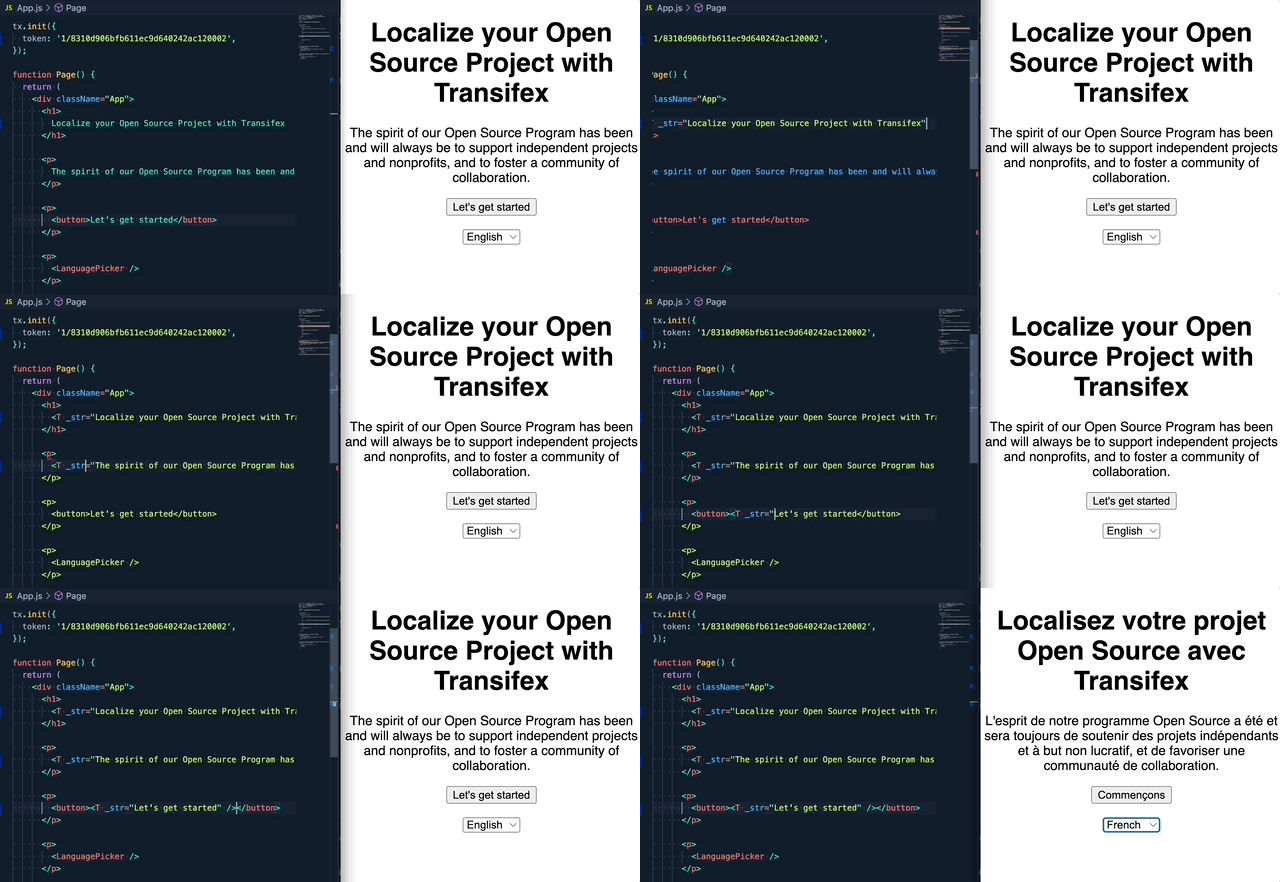
**Step1**: Create a Transifex Native project in [Transifex](https://www.transifex.com).
**Step2**: Grab credentials.
**Step3**: Internationalize the code using the SDK.
**Step4**: Push source phrases using the `@transifex/cli` tool.
**Step5**: Translate the app using over-the-air updates.
No translation files required.
# Upgrade to v2
If you are upgrading from the `1.x.x` version, please read this [migration guide](https://github.com/transifex/transifex-javascript/blob/HEAD/UPGRADE_TO_V2.md), as there are breaking changes in place.
# Install
Install the library and its dependencies using:
```sh
npm install @transifex/native @transifex/react --save
```
# Usage
## `T` Component
```javascript
import React from 'react';
import { T } from '@transifex/react';
function Example() {
return (
<div>
<T _str="Hello world" />
<T _str="Hello {username}" username={user} />
</div>
);
}
```
Available optional props:
| Prop | Type | Description |
|------------|--------|---------------------------------------------|
| _context | String | String context, affects key generation |
| _key | String | Custom string key |
| _comment | String | Developer comment |
| _charlimit | Number | Character limit instruction for translators |
| _tags | String | Comma separated list of tags |
The T-component can accept React elements as properties and they will be
rendered properly, ie this would be possible:
```javascript
<T
_str="A {button} and a {bold} walk into a bar"
button={<button><T _str="button" /></button>}
bold={<b><T _str="bold" /></b>} />
```
This will render like this in English:
```html
A <button>button</button> and a <b>bold</b> walk into a bar
```
And like this in Greek:
```html
Ένα <button>κουμπί</button> και ένα <b>βαρύ</b> μπαίνουν σε ένα μπαρ
```
Assuming the translations look like this:
| source | translation |
|-----------------------------------------|--------------------------------------------------|
| A {button} and a {bold} walk into a bar | Ένα {button} και ένα {bold} μπαίνουν σε ένα μπαρ |
| button | κουμπί |
| bold | βαρύ |
The main thing to keep in mind is that the `_str` property to the T-component
must **always** be a valid ICU messageformat template.
## `UT` Component
```javascript
import React from 'react';
import { UT } from '@transifex/react';
function Example () {
return (
<div>
<UT _str="Hello <b>{username}</b>" username={user} />
<p>
<UT _str="Hello <b>{username}</b>" _inline username={user} />
</p>
</div>
)
}
```
`UT` has the same behaviour as `T`, but renders source string as HTML inside a
`div` tag.
Available optional props: All the options of `T` plus:
| Prop | Type | Description |
|---------|---------|-------------------------------------------------|
| _inline | Boolean | Wrap translation in `span` |
_Note: If you supply React elements as properties to the `UT` component, it
will misbehave by rendering `[object Object]`. Only use React elements as
properties with the `T` component._
## `useT` hook
Makes the current component re-render when a language change is detected and
returns a t-function you can use to translate strings programmatically.
You will most likely prefer to use the `T` or `UT` components over this, unless
for some reason you want to have the translation output in a variable for
manipulation.
```javascript
import React from 'react';
import { useT } from '@transifex/react';
function Capitalized() {
const t = useT();
const message = t('Hello world');
return <span>{message.toUpperCase()}</span>;
}
```
Optionally `useT` can take as param a custom Native Instance:
```javascript
import { useT } from '@transifex/react';
import { createNativeInstance } from '@transifex/native';
const customTX = createNativeInstance({
token: 'token',
secret: 'secret',
});
function Component() {
const t = useT(customTX);
// ...
}
```
## `useLanguages` hook
Returns a state variable that will eventually hold the supported languages of
the application. Makes an asynchronous call to the CDS.
```jsx
import React from 'react';
import { useLanguages } from '@transifex/react';
function LanguageList () {
const languages = useLanguages();
return (
<ul>
{languages.map(({ code, name }) => (
<li key={code}>
<strong>{code}</strong>: {name}
</li>
))}
</ul>
);
}
```
Optionally `useLanguages` can take as param a custom Native Instance:
```javascript
import { useT } from '@transifex/react';
import { createNativeInstance } from '@transifex/native';
const customTX = createNativeInstance({
token: 'token',
secret: 'secret',
});
function Component() {
const languages = useLanguages(customTX);
// ...
}
```
## `useLocale` hook
Returns a state variable with the currently selected locale.
```jsx
import React from 'react';
import { useLocale } from '@transifex/react';
function DisplayLocale () {
const locale = useLocale();
return (
<p>Currently selected locale is {locale}</p>
);
}
```
Optionally `useLocale` can take as param a custom Native Instance:
```javascript
import { useT } from '@transifex/react';
import { createNativeInstance } from '@transifex/native';
const customTX = createNativeInstance({
token: 'token',
secret: 'secret',
});
function Component() {
const locale = useLocale(customTX);
// ...
}
```
## `useTX` hook
Returns a state variable with the Native instance.
```jsx
import React from 'react';
import { useTX } from '@transifex/react';
function SetLocale () {
const tx = useTX();
return (
<button onClick={() => tx.setCurrentLocale('el')}>
Set to Greek
</button>
);
}
```
## `LanguagePicker` component
Renders a `<select>` tag that displays supported languages and switches the
application's selected language on change.
Uses `useLanguages` and `useLocale` internally.
```jsx
import React from 'react';
import { T, LanguagePicker } from '@transifex/react';
function App () {
return (
<div>
<T _str="This is a translatable message" />
<LanguagePicker />
</div>
);
}
```
Accepts properties:
- `className`: The CSS class that will be applied to the `<select>` tag
If you want something different than a `<select>`, it should be easy to write
your own language picker using `useLanguages`:
```jsx
import React from 'react';
import { tx } from '@transifex/native';
import { useLanguages, useLocale } from '@transifex/react';
function MyLanguagePicker () {
const languages = useLanguages();
const locale = useLocale();
return (
<>
{languages.map(({ code, name }) => (
<button key={code} onClick={() => tx.setCurrentLocale(code)}>
{name} {locale === code ? '(selected)' : ''}
</button>
))}
</>
);
}
```
## `useTranslations` hook - aka Lazy Loading
Fetches translations tagged with a specific combination of tags when a
component first renders. This way, you can pull translations from the CDS in
batches and only when needed:
```jsx
tx.init({ token: ..., filterTags: 'home' });
export default function App() {
return (
<>
<T _str="This will be translated as soon as possible" _tags="home" />
{someCondition() && <Inner />}
</>
);
}
function Inner() {
useTranslations('inner');
return <T
_str="This will be translated when the inner component is rendered"
_tags="inner" />;
}
```
The hook returns a boolean state variable called `ready` that you can use to
handle a loading state:
```jsx
function Inner() {
const { ready } = useTranslations('inner');
if (!ready) { return 'Loading...'; }
return <T
_str="This will be translated when the inner component is rendered"
_tags="inner" />;
}
```
_If you don't handle the loading state, the source string will be rendered
first and then replaced with the translation when it becomes available._
You can also use the hook in parent components that don't need the tagged
translations themselves. This will make the translations available sooner for
child components that may potentially need them:
```jsx
tx.init({ token: ..., filterTags: 'home' });
export default function App() {
const { ready: innerReady } = useTranslations('inner');
return (
<>
<T _str="This will be translated as soon as possible" _tags="home" />
{someCondition() && <Inner ready={innerReady} />}
</>
);
}
function Inner({ ready }) {
if (!ready) { return 'Loading...'; }
return <T
_str="This will be translated when the inner component is rendered"
_tags="inner" />;
}
```
Optionally `useTranslations` can take as a second param a custom Native Instance:
```javascript
import { useT } from '@transifex/react';
import { createNativeInstance } from '@transifex/native';
const customTX = createNativeInstance({
token: 'token',
secret: 'secret',
});
function Component() {
const { ready } = useTranslations('inner', customTX);
// ...
}
```
## `TXProvider` provider
If you need to use more than one Transifex Native instances - like for example if you have a component library - you can use this provider to pass the desired instance to the children components.
```js
import { tx, createNativeInstance } from '@transifex/native';
import { TXProvider, LanguagePicker, T } from '@transifex/react';
const myOtherTXInstance = createNativeInstance();
myOtherTXInstance.init({ token: 'othertoken' })
tx.init({
token: 'token',
});
// Make tx aware of the other instances so they can be synced when changing
// language
tx.controllerOf(myOtherTXInstance);
export default function App() {
return (
<>
<LanguagePicker />
<TXProvider instance={myOtherTXInstance}>
<T _str="Hello {username}" username="John" />
</TXProvider>
<T _str="Hello World" />
</>
);
}
```
# License
Licensed under Apache License 2.0, see [LICENSE](https://github.com/transifex/transifex-javascript/blob/HEAD/LICENSE) file.