@transferwise/approve-api-action-helpers
Version:
An http client that handles SCA protected requests gracefully
51 lines (29 loc) • 2.2 kB
Markdown
# Approve api action helpers
A tiny library that lets you handle Strong Customer Authentication (SCA) required calls easily.
Read more from our [API documentation](https://api-docs.wise.com/#strong-customer-authentication-authorization-code-access-tokens).
## Example

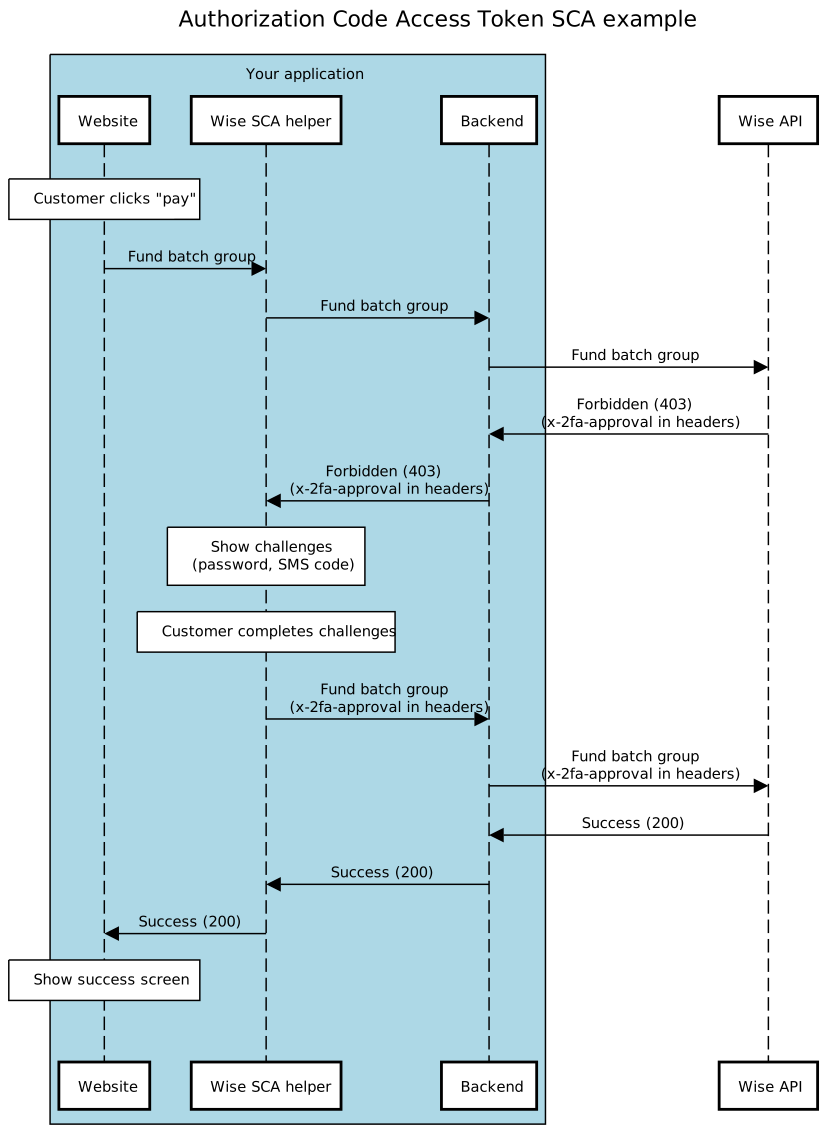
## Sequence diagram of the flow
## Usage
### Installation
Using npm:
- `npm install @transferwise/approve-api-action-helpers`
Using CDN and script tags:
- `<script src="https://unpkg.com/@transferwise/approve-api-action-helpers@latest/dist/main.js"></script>`
> Note that to use this library with Internet Explorer (11) `fetch` and `Promise` must be polyfilled. For example: https://polyfill-fastly.io/v3/polyfill.min.js?features=fetch%2CPromise. Comment out the script in the demo (`demo/src/inex.html`) to see it in action.
### Consuming
This library exports a `create` function for SCA protected requests. It returns a request wrapper that can be used like a regular [fetch](https://developer.mozilla.org/en-US/docs/Web/API/Fetch_API/Using_Fetch) request. Use it as follows:
```javascript
import { create, Mode } from '@transferwise/approve-api-action-helpers';
const request = create({ mode: Mode.PRODUCTION });
const res = await request('https://my-backend-api.com/sca-protected-call', { method: 'GET', ... });
```
When the backend returns that SCA is required, it will run the user through an SCA flow and retry that request. Also, it will throw an error if you get a `4xx` or `5xx` response.
**NB! make sure that your backend proxies 'x-2fa-approval' response header to the frontend and forwards it back to Wise when this library passes it back. Also please reflect the response status (403) back to the frontend.**
#### Configuration options
| key | optional | default | alternatives |
|------|----------|----------------------|--------------|
| mode | yes | Mode.PRODUCTION | Mode.SANDBOX |
## Demo
In /demo directory you'll find a simple demo of the flow.