@toast-ui/editor-plugin-code-syntax-highlight
Version:
TOAST UI Editor : Code Syntax Highlight Plugin
311 lines (233 loc) • 9.38 kB
Markdown
# TOAST UI Editor : Code Syntax Highlight Plugin
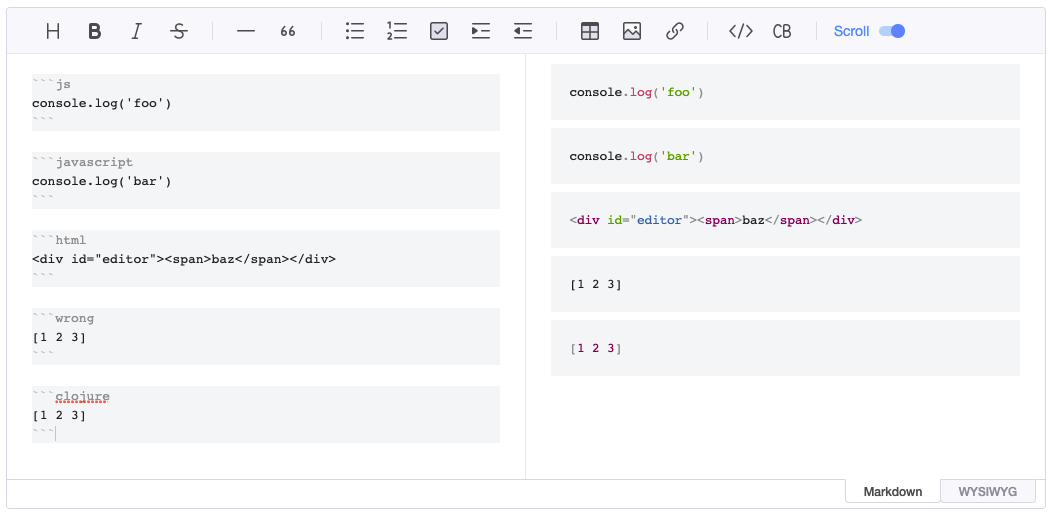
> This is a plugin of [TOAST UI Editor](https://github.com/nhn/tui.editor/tree/master/apps/editor) to highlight code syntax.
[](https://www.npmjs.com/package/@toast-ui/editor-plugin-code-syntax-highlight)
## 🚩 Table of Contents
- [Bundle File Structure](#-bundle-file-structure)
- [Usage npm](#-usage-npm)
- [Usage CDN](#-usage-cdn)
## 📁 Bundle File Structure
### Serve with npm
### Files Distributed on npm
```
- node_modules/
- @toast-ui/
- editor-plugin-code-syntax-highlight/
- dist/
- toastui-editor-plugin-code-syntax-highlight-all.js
- toastui-editor-plugin-code-syntax-highlight.js
- toastui-editor-plugin-code-syntax-highlight.css
```
### Files Distributed on CDN
```
- uicdn.toast.com/
- editor-plugin-code-syntax-highlight/
- latest/
- toastui-editor-plugin-code-syntax-highlight.js
- toastui-editor-plugin-code-syntax-highlight.min.js
- toastui-editor-plugin-code-syntax-highlight-all.js
- toastui-editor-plugin-code-syntax-highlight-all.min.js
- toastui-editor-plugin-code-syntax-highlight.css
- toastui-editor-plugin-code-syntax-highlight.min.css
```
## 📦 Usage npm
To use the plugin, [`@toast-ui/editor`](https://github.com/nhn/tui.editor/tree/master/apps/editor) must be installed.
> Ref. [Getting Started](https://github.com/nhn/tui.editor/blob/master/docs/en/getting-started.md)
### Install
```sh
$ npm install @toast-ui/editor-plugin-code-syntax-highlight
```
### Import Plugin
Along with the plugin, the plugin's dependency style must be imported.
The `code-syntax-highlight` plugin has [`prismjs`](https://prismjs.com/) as a dependency, and you need to add a CSS file of `prismjs`.
#### ES Modules
```js
import 'prismjs/themes/prism.css';
import '@toast-ui/editor-plugin-code-syntax-highlight/dist/toastui-editor-plugin-code-syntax-highlight.css';
import codeSyntaxHighlight from '@toast-ui/editor-plugin-code-syntax-highlight';
```
#### CommonJS
```js
require('prismjs/themes/prism.css');
require('@toast-ui/editor-plugin-code-syntax-highlight/dist/toastui-editor-plugin-code-syntax-highlight.css');
const codeSyntaxHighlight = require('@toast-ui/editor-plugin-code-syntax-highlight');
```
### Create Instance
When you set up a plugin function, you must set it with an option. The option has `highlighter`, and you need to import [`prismjs`](https://www.npmjs.com/package/prismjs) before creating an instance and set it to the value of that option.
The main bundle file of `prismjs` contains just several language pack it supports. So we provides the bundle file(`toastui-editor-plugin-code-syntax-highlight-all.js`) to import all languages you need in `prismjs`.
#### Basic
##### Import All Languages
```js
// ...
import 'prismjs/themes/prism.css';
import '@toast-ui/editor-plugin-code-syntax-highlight/dist/toastui-editor-plugin-code-syntax-highlight.css';
import Editor from '@toast-ui/editor';
import codeSyntaxHighlight from '@toast-ui/editor-plugin-code-syntax-highlight/dist/toastui-editor-plugin-code-syntax-highlight-all.js';
const editor = new Editor({
// ...
plugins: [codeSyntaxHighlight]
});
```
##### Import Only Languages You Need
You need to import the language files you want to use in the code block and register them in the `prismjs` object. A list of available language files can be found [here](https://github.com/PrismJS/prism/tree/master/components).
```js
// ...
import 'prismjs/themes/prism.css';
import '@toast-ui/editor-plugin-code-syntax-highlight/dist/toastui-editor-plugin-code-syntax-highlight.css';
// Step 1. Import prismjs
import Prism from 'prismjs';
// Step 2. Import language files of prismjs that you need
import 'prismjs/components/prism-clojure.js';
import Editor from '@toast-ui/editor';
import codeSyntaxHighlight from '@toast-ui/editor-plugin-code-syntax-highlight';
const editor = new Editor({
// ...
plugins: [[codeSyntaxHighlight, { highlighter: Prism }]]
});
```
#### With Viewer
As with creating an editor instance, you need to import `prismjs` and pass it to the `highlighter` option.
```js
// ...
import 'prismjs/themes/prism.css';
import '@toast-ui/editor-plugin-code-syntax-highlight/dist/toastui-editor-plugin-code-syntax-highlight.css';
// Import prismjs
import Prism from 'prismjs';
import Viewer from '@toast-ui/editor/dist/toastui-editor-viewer';
import codeSyntaxHighlight from '@toast-ui/editor-plugin-code-syntax-highlight';
const viewer = new Viewer({
// ...
plugins: [[codeSyntaxHighlight, { highlighter: Prism }]]
});
```
or
```js
// ...
import 'prismjs/themes/prism.css';
import '@toast-ui/editor-plugin-code-syntax-highlight/dist/toastui-editor-plugin-code-syntax-highlight.css';
// Import prismjs
import Prism from 'prismjs';
import Editor from '@toast-ui/editor';
import codeSyntaxHighlight from '@toast-ui/editor-plugin-code-syntax-highlight';
const viewer = Editor.factory({
// ...
viewer: true,
plugins: [[codeSyntaxHighlight, { highlighter: Prism }]]
});
```
## 🗂 Usage CDN
### Include Files
To use the plugin, the CDN files(CSS, Script) of `@toast-ui/editor` must be included.
### Create Instance
#### Basic
First, include the editor file. And include the plugin file as needed. If you want to include all language files provided by `prismjs`, see the first title(_Include All Languages_). If you want to register and use only the languages you need, see the second title(_Include Only Languages You Need_).
##### Include All Languages
By including the **all** version of the plugin, all languages of `prismjs` are available in the code block.
```html
...
<head>
...
<link
rel="stylesheet"
href="https://cdnjs.cloudflare.com/ajax/libs/prism/1.23.0/themes/prism.min.css"
/>
<link
rel="stylesheet"
href="https://uicdn.toast.com/editor-plugin-code-syntax-highlight/latest/toastui-editor-plugin-code-syntax-highlight.min.css"
/>
...
</head>
<body>
...
<!-- Editor -->
<script src="https://uicdn.toast.com/editor/latest/toastui-editor-all.min.js"></script>
<!-- Editor's Plugin -->
<script src="https://uicdn.toast.com/editor-plugin-code-syntax-highlight/latest/toastui-editor-plugin-code-syntax-highlight-all.min.js"></script>
...
</body>
...
```
```js
const { Editor } = toastui;
const { codeSyntaxHighlight } = Editor.plugin;
const instance = new Editor({
// ...
plugins: [codeSyntaxHighlight]
});
```
##### Include Only Languages You Need
If you include the **normal** version of the plugin, only the languages you need are available. At this time, you should also include the language files of `prismjs`, and if you only include it, the languages available to the plugin are registered.
> Note : The CDN provided by `prismjs` contains several language files. If you want to add other language files, you can use [cdnjs](https://cdnjs.com/libraries/prism) to add each language file or upload a file containing only the language you need on [this page](https://prismjs.com/download.html).
```html
...
<head>
...
<link
rel="stylesheet"
href="https://cdnjs.cloudflare.com/ajax/libs/prism/1.23.0/themes/prism.min.css"
/>
<link
rel="stylesheet"
href="https://uicdn.toast.com/editor-plugin-code-syntax-highlight/latest/toastui-editor-plugin-code-syntax-highlight.min.css"
/>
...
</head>
<body>
...
<!-- Editor -->
<script src="https://uicdn.toast.com/editor/latest/toastui-editor-all.min.js"></script>
<!-- prismjs Languages -->
<script src="https://cdnjs.cloudflare.com/ajax/libs/prism/1.23.0/prism.min.js"></script>
<script src="https://cdnjs.cloudflare.com/ajax/libs/prism/1.23.0/components/prism-clojure.min.js"></script>
<!-- Editor's Plugin -->
<script src="https://uicdn.toast.com/editor-plugin-code-syntax-highlight/latest/toastui-editor-plugin-code-syntax-highlight.min.js"></script>
...
</body>
...
```
#### With Viewer
The way to include the plugin and the language files of `prismjs` is the same as above.
##### Use Option of Editor
```js
const { Editor } = tosatui;
const { codeSyntaxHighlight } = Editor.plugin;
const editor = Editor.factory({
// ...
plugins: [codeSyntaxHighlight],
viewer: true
});
```
##### Use Viewer
Include the Viewer file instead of the Editor.
```html
...
<head>
...
<link
rel="stylesheet"
href="https://cdnjs.cloudflare.com/ajax/libs/prism/1.23.0/themes/prism.min.css"
/>
<link
rel="stylesheet"
href="https://uicdn.toast.com/editor-plugin-code-syntax-highlight/latest/toastui-editor-plugin-code-syntax-highlight.min.css"
/>
...
</head>
<body>
...
<!-- Viewer -->
<script src="https://uicdn.toast.com/editor/latest/toastui-editor-viewer.min.js"></script>
<!-- Viewer's Plugin -->
<script src="https://uicdn.toast.com/editor-plugin-code-syntax-highlight/latest/toastui-editor-plugin-code-syntax-highlight-all.min.js"></script>
...
</body>
...
```
```js
const Viewer = toastui.Editor;
const { codeSyntaxHighlight } = Viewer.plugin;
const viewer = new Viewer({
// ...
plugins: [codeSyntaxHighlight]
});
```