@tizentv/wits
Version:
Instant live reload tool for Tizen Web Application development
158 lines (95 loc) • 5.58 kB
Markdown
# WITs
WITs 是一个非常有效的开发工具,很容易帮助开发属于你的 Tizen web 项目,并支持**2017+ Samsung tv**的机型。
它可以非常快地将你开发期间的实时代码推送到电视机上。每次您想查看项目如何在设备上运行时,都无需经历再次构建,打包和重新安装应用程序。我们称为 `实时开发`。
**WITs 对于你的开发内容有持续性帮助。**
<img src="https://user-images.githubusercontent.com/11974693/73414912-a2267f80-4353-11ea-9685-fefb09d8e6b5.jpg" width="100%" title="Wits">
## 介绍
- [ENGLISH](/README.md)
- [正體中文](/doc/README_zh_HANT.md)
## 安装与配置WITs
### 开发者请使用npm
#### 1. 全局安装 WITs
```sh
$ npm install -g @tizentv/wits
```
### 开发者们请使用git repository
#### 1. 克隆对应项目
```sh
$ git clone https://github.com/Samsung/Wits.git
```
#### 2. 安装WITs依赖
```sh
$ cd ~/{path-to}/Wits
$ npm install -g
```
#### 3. 在 Wits 的目录下更改 .witsconfig.json。
Tizen Studio的证书路径(profiles.xml)是在 **.witsconfig.json** 的 `path` 上配置,
在mac与Windows系统上默认路径 `path` 都是 `tizen-studio-data/profile/profiles.xml` 。
## **系统要求**
WITs 需要进一步地在你本地开发机器上配置对应的的步骤。
#### 1. 打开 **`Terminal(终端器)` on MacOS / Linux** or **`CMD (命令提示符)` / `PowerShell` on Windows**
#### 2. 安装 Node.js 和 Git (推荐 v7.10.1 ~)
我们不能很好告诉你这些安装步骤,因为有太多方法与开发者各有自己的性能配置,但我们推荐你使用一些,例如 `nvm` 或 `asdf` 等的项目管理器去管理不同的Node.js 版本去控制你的代码项目。
#### 3. 安装最新的 [Samsung Tizen Studio](http://developer.samsung.com/tv).
#### 4. 打开你的Samsung电视上的开发者模式:
- 1 使用你的三星遥控器,按 `Home` 的按键。
- 2 移动所选到 `Apps` 的按键并按 `Enter/OK`。
- 3 如当前显示`Apps` 屏幕,依次在遥控器上按`1` `2` `3` `4` `5`并同时弹出`开发模式对话框`,如果不成功或不出现,再一次尝试。
- 4 当开发者对话框出现, 切换并点击按钮 `On` 和 输入你的开发机器所对应的IP地址。
## WITs 细节
### WITs所使用的项目结构
.witsconfig.json, .witsignore 只需这两个文件增加到你的tizen web项目。
### WITs 命令选项
#### 1. `wits`
显示当前可供你选择的那些命令
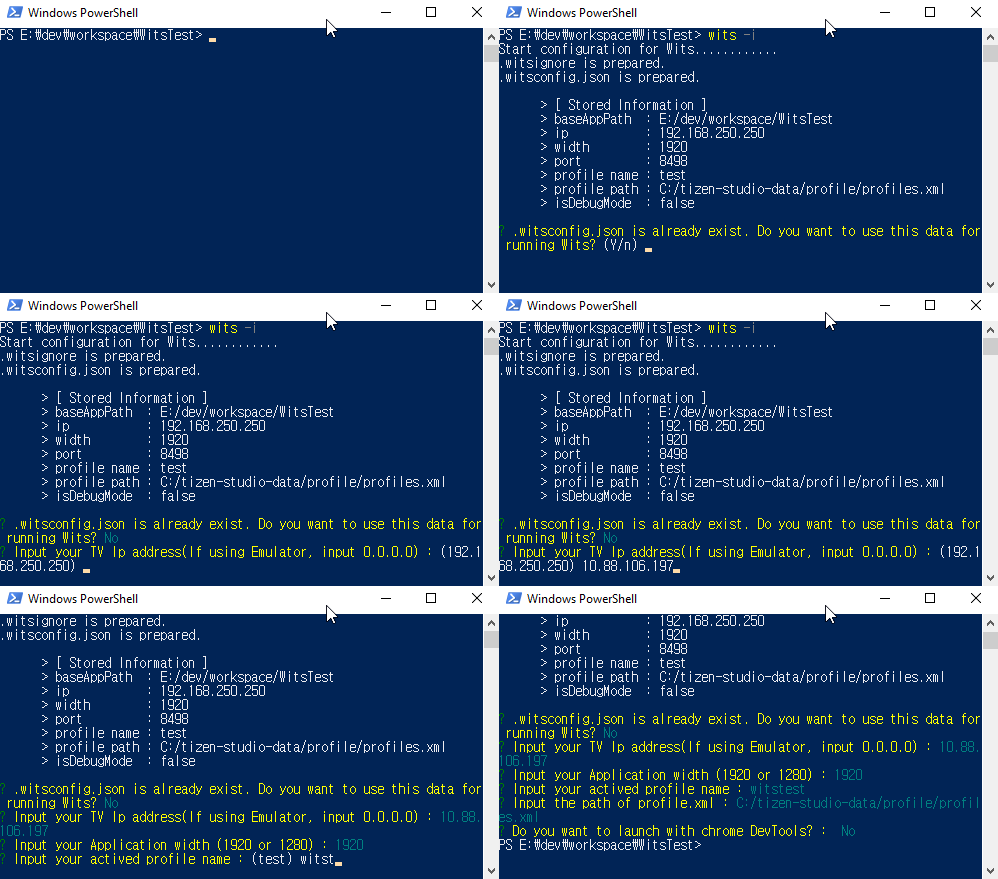
#### 2. `wits -i` / `wits --init`
对于正在配置的 WITs
请留意及注意,只需第一次运行在你的 tizen项目即可。
.witsconfig.json 和 .witsignore会同时生成并增加到你的 tizen项目。
你可以稍后修改对这些文件的配置。
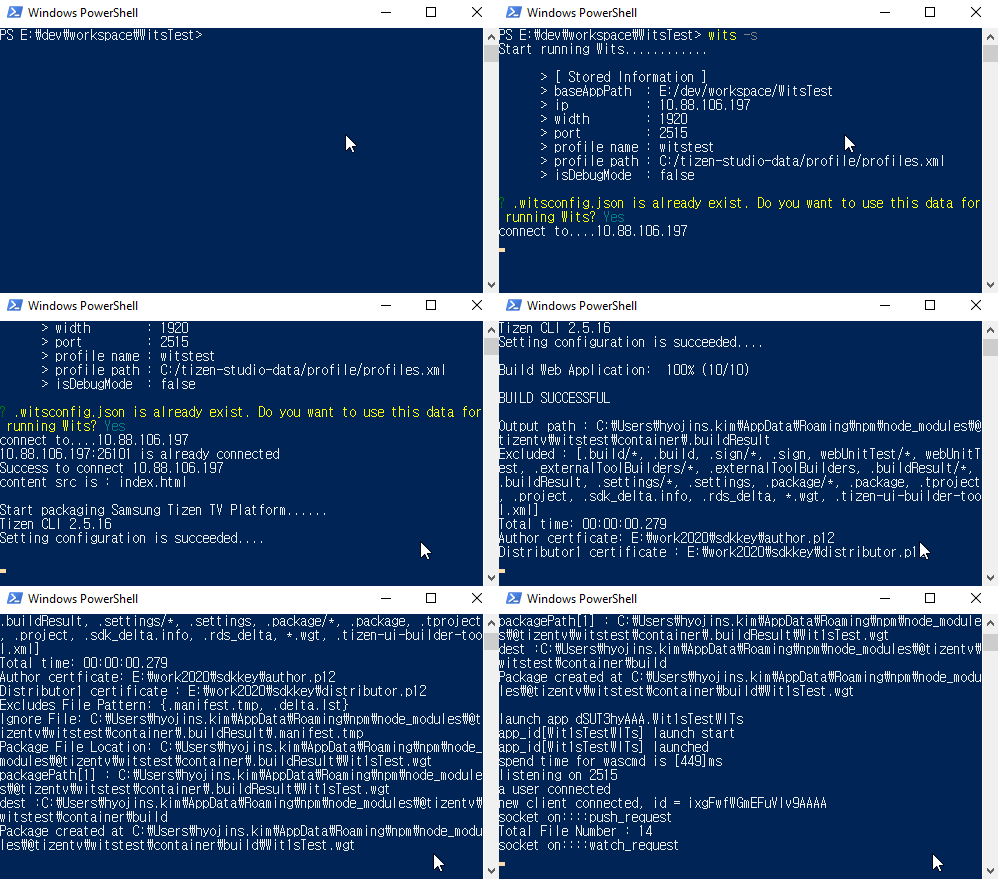
#### 3. `wits -s` / `wits --start`
这命令是所有都一样,对于连接,安装及运行在TV都是使用实时加载。如`wits -i` 没有在此之前运行,这个是不允许的。
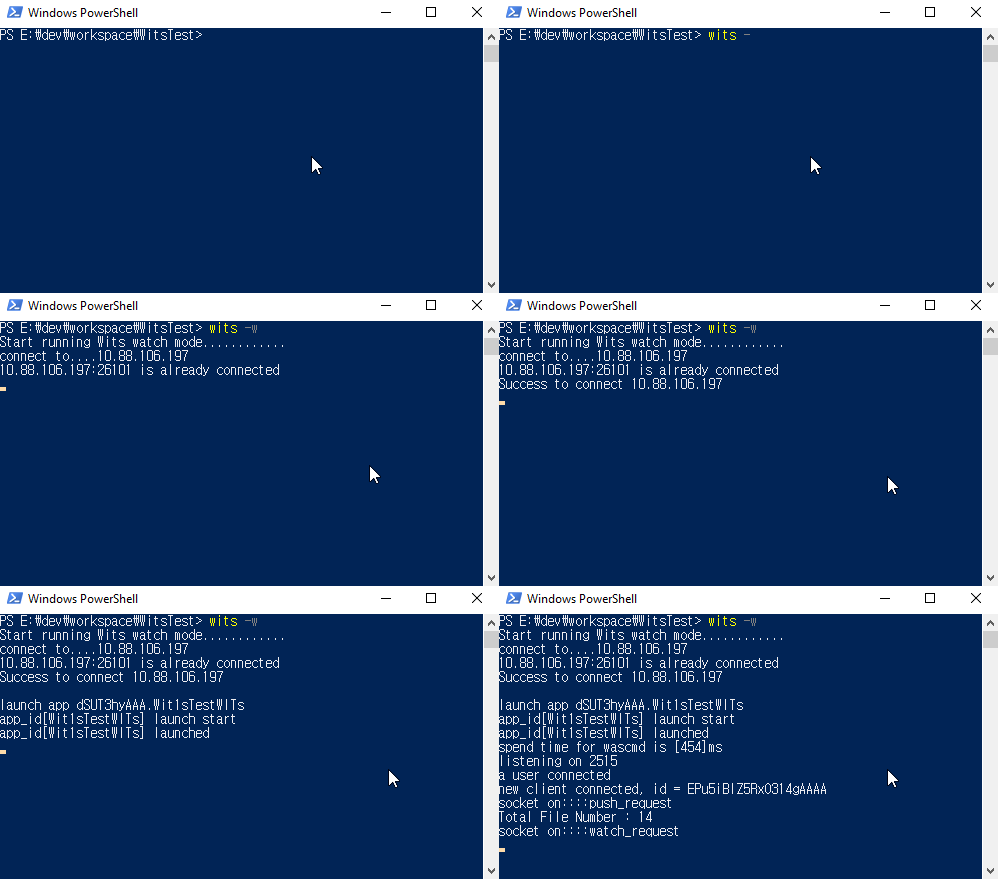
#### 4. `wits -w` / `wits --watch`
对于连接TV时使用是实时加载。
在连接之后,每次你在 `你的tizen app项目`的改动文件都会即时反应同步你的电视设备。
### .witsconfig.json of WITs
细节: [关于.witsconfig.json的范例](https://github.com/Samsung/Wits/wiki/Set-Wits-Environment#data-structure-of-witsconfigjson)
无论在`Windows` 和 `MacOS`上,都必须认识到路径的唯一符号是分隔符 (**`/`**)。
- **connectionInfo** (必选)
- deviceIp [string] : 设备(TV) Ip 地址 (如是调试器,请填写 0.0.0.0)
- hostIp [string] : Host(PC) Ip 地址
- socketPort [integer] : TV 端口. 他是由WITs随机生成的。
- width [string] : 分辨率宽度
- isDebugMode [boolean] : 如设置为true, chrome调试器会打开并自动运行。如设置为false, 默认无动作。
- **profileInfo** (必选)
- path [string] : Tizen Studio 证书路径。
- **optionalInfo** (可选)
- proxyServer [string] : 如你使用代理,例如:http://255.255.255.255:8080
### WITs的.witsignore:
有时候如果你不想将你的一些文件,例如`.git` 或 `node_modules`这类文件推送到电视或设备, 你可以通过填写 .witsignore 文件规定这类文件格式,下次你就发现这些文件不会推送到调试的设备之上。
实现道理与`.gitignore` 一样。
`.witsignore`的范例:
```text
node_modules
.git
deprecated
stglib
```
## 运行你的APP
如果你想一步一步按以下设置。
请关注: [Running Your App using WITs](https://github.com/Samsung/Wits/wiki/Running-Your-App-using-Wits)
### wits -i
### wits -s
### wits -w
## FAQ
- [WITs FAQ](https://github.com/Samsung/Wits/wiki/Frequently-Asked-Questions)
- [怎样使用Chrome inspector的开发模式](https://github.com/Samsung/Wits/wiki/Frequently-Asked-Questions#answer-1)
- [使用proxy之后](https://github.com/Samsung/Wits/wiki/Frequently-Asked-Questions#question-6)
- [怎么去获取你的电视或设备IP](https://github.com/Samsung/Wits/wiki/Frequently-Asked-Questions#question-7)
## 支持的设备
- 2017 Samsung Smart TV (Tizen 3.0)
- 2018 Samsung Smart TV (Tizen 4.0)
- 2019 Samsung Smart TV (Tizen 5.0)