@thetsf/geofirex
Version:
Realtime Firestore GeoQueries with RxJS
236 lines (143 loc) • 7 kB
Markdown
Forked and updated to work with Firebase 8.
# GeoFireX
Realtime Geolocation with Firestore & RxJS. Query geographic points within a radius on the web or Node.js.
- :point_right: [Live Demo](https://geo-test-c92e4.firebaseapp.com)
- :tv: [Video Tutorial](https://angularfirebase.com/lessons/geolocation-query-in-firestore-realtime/)
## :zap: QuickStart
```shell
npm install geofirex rxjs firebase
```
### Initialize
The library is a lightweight extension for the Firebase Web and Admin JavaScript SDKs to provide tools for wrangling geolocation data in Firestore.
Web:
```js
// Init Firebase
import firebase from 'firebase/app';
firebase.initializeApp(yourConfig);
// Init GeoFireX
import geofirex from 'geofirex';
const geo = geofirex.init(firebase);
```
Node.js with the Firebase Admin SDK:
```js
const admin = require('firebase-admin');
admin.initializeApp();
const geo = require('geofirex').init(admin);
```
With Typescript:
```ts
import * as geofirex from 'geofirex';
const geo = geofirex.init(firebase);
```
### Write Geolocation Data
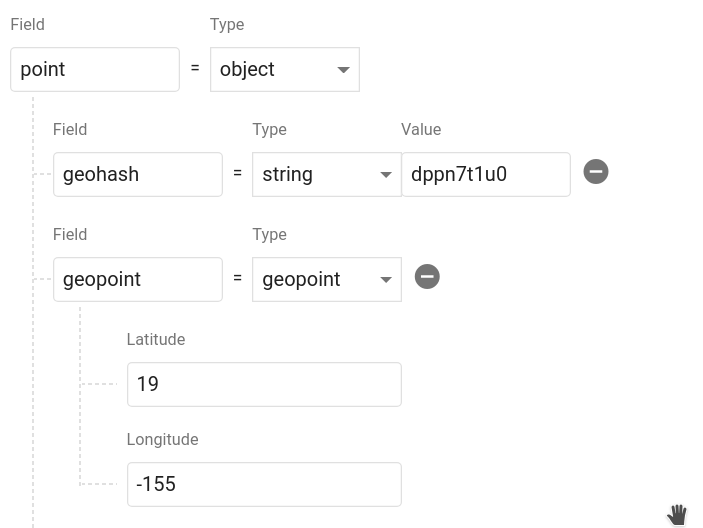
Next, add some geolocation data in your database using the main Firebase SDK. You can add multiple points to a single doc. Calling `geo.point(lat, lng)` creates an object with a [geohash string](https://www.movable-type.co.uk/scripts/geohash.html) and a [Firestore GeoPoint](https://firebase.google.com/docs/reference/android/com/google/firebase/firestore/GeoPoint). Data must be saved in this format to be queried.
```ts
const cities = firestore().collection('cities');
const position = geo.point(40, -119);
cities.add({ name: 'Phoenix', position });
```
### Query Geo Data
Query Firestore for _cities.position within 100km radius of a centerpoint_.
```ts
const center = geo.point(40.1, -119.1);
const radius = 100;
const field = 'position';
const query = geo.query(cities).within(center, radius, field);
```
Each hit returns a realtime Observable of the document data, plus some useful `hitMetadata` like _distance_ and _bearing_ from the query centerpoint.
```ts
query.subscribe(console.log);
// [{ ...documentData, hitMetadata: { distance: 1.23232, bearing: 230.23 } }]
```
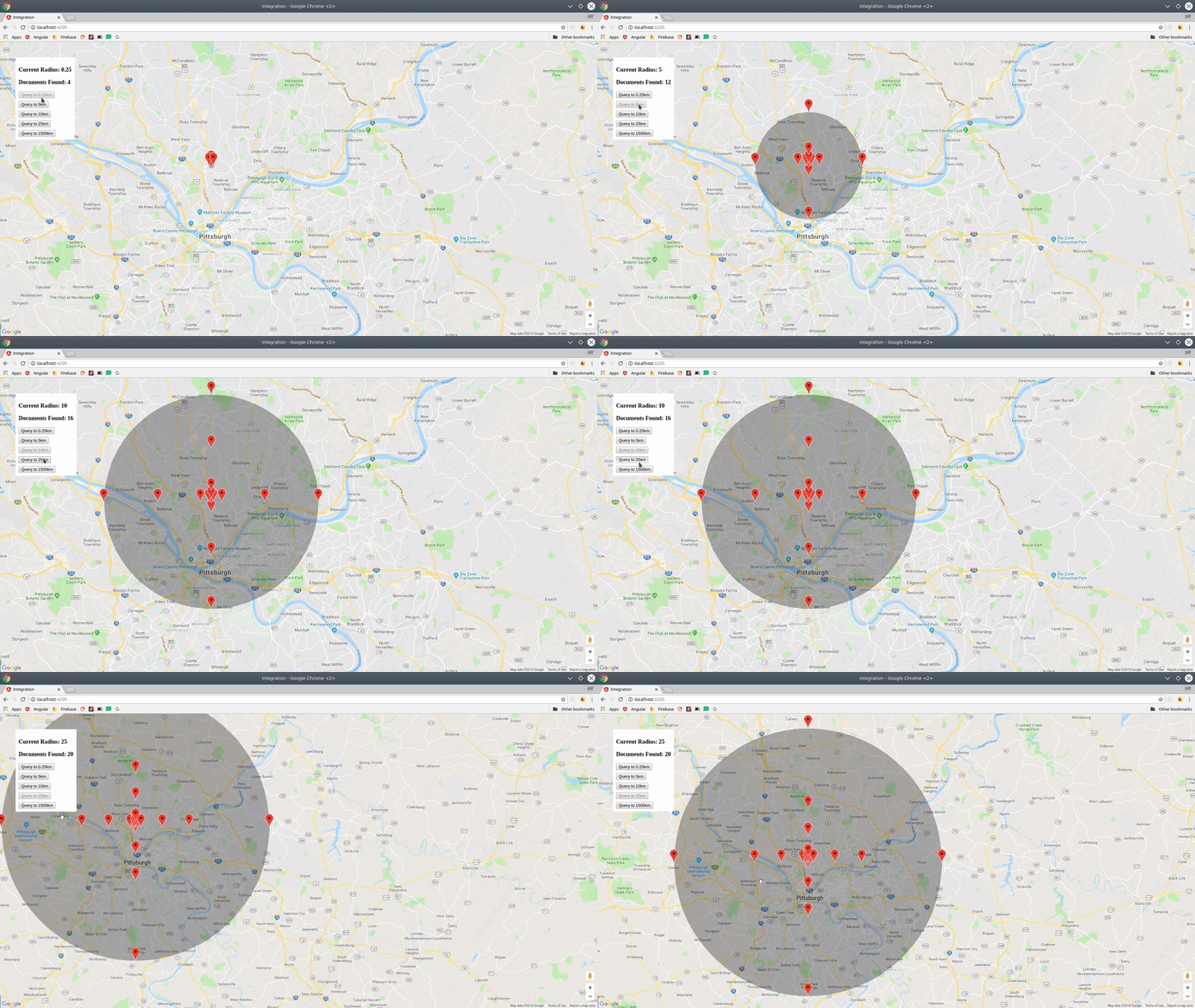
You now have a realtime stream of data to visualize on a map.
## :notebook: API
### `query<T>(ref: CollectionReference | Query | string): GeoFireQuery<T>`
Creates reference to a Firestore collection or query that can be used to make geo-queries.
Example:
```ts
const geoRef = geo.query('cities');
// OR make a geoquery on top of a firestore query
const firestoreRef = firestore().collection('cities').where('name', '==', 'Phoenix');
const geoRef = geo.query(firestoreRef);
```
#### `within(center: FirePoint, radius: number, field: string): Observable<T[]>`
```js
const query = geoRef.within(center: FirePoint, radius: number, field: string)
query.subscribe(hits => console.log(hits))
// OR fetch as a promise
import { get } from 'geofirex';
const hits = await get(query);
```
Query the parent Firestore collection by geographic distance. It will return documents that exist within X kilometers of the centerpoint.
Each doc also contains returns _distance_ and _bearing_ calculated on the query on the `hitMetadata` property.
### `point(latitude: number, longitude: number): FirePoint`
Returns an object with the required geohash format to save to Firestore.
Example: `const point = geo.point(38, -119)`
A point is a plain JS object with two properties.
- `point.geohash` Returns a geohash string at precision 9
- `point.geopoint` Returns a Firestore GeoPoint
## Additional Features
The goal of this package is to facilitate rapid feature development with tools like MapBox, Google Maps, and D3.js. If you have an idea for a useful feature, open an issue.
### Logging
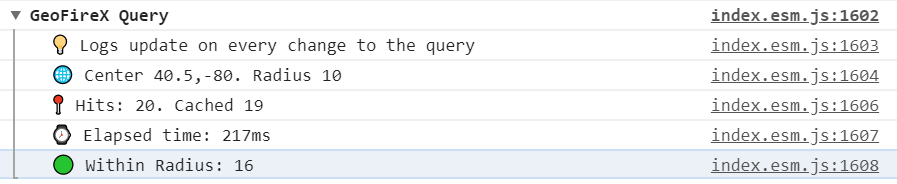
Each query runs on a set of geohash squares, so you may read more documents than actually exist inside the radius. Use the `log` option to examine the total query size and latency.
```js
query.within(center, radius, field, { log: true })
```
### Geo Calculations
Convenience methods for calculating distance and bearing.
- `geo.distance(geo.point(38, -118), geo.point(40, -115))` Haversine distance
- `geo.bearing(to, from)` Haversine bearing
### `toGeoJSON` Operator
A custom RxJS operator that transforms a collection into a [GeoJSON FeatureCollection](https://macwright.org/2015/03/23/geojson-second-bite.html#featurecollection). Very useful for tools like [MapBox](https://blog.mapbox.com/real-time-maps-for-live-events-fad0b334e4e) that can use GeoJSON to update a realtime data source.
```ts
import { toGeoJSON } from 'geofirex';
const query = geo.query('cars').within(...)
query.pipe( toGeoJSON() )
// Emits a single object typed as a FeatureCollection<Geometry>
{
"type": "FeatureCollection",
"features": [...]
}
```
#### Promises with `get`
Don't need a realtime stream? Convert any query observable to a promise by wrapping it with `get`.
```ts
import { get } from 'geofirex';
async function getCars {
const query = geo.query('cars').within(...)
const cars = await get(query)
}
```
## Tips
### Compound Queries
The only well-supported type of compound query is `where`. A geoquery combines multiple smaller queries into a unified radius, so `limit` and pagination operators will not provide predictable results - a better approach is to search a smaller radius and do your sorting client-side.
Example:
```ts
// Make a query like you normally would
const users = firestore().collection('users').where('status', '==', 'online');
const nearbyOnlineUsers = geo.query(users).within(center, radius, field);
```
Note: This query requires a composite index, which you will be prompted to create with an error from Firestore on the first request.
### Usage with RxJS < 6.2, or Ionic v3
This package requires RxJS 6.2, but you can still use it with older versions without blowing up your app by installing rxjs-compat.
Example:
```shell
npm i rxjs@latest rxjs-compat
```
### Make Dynamic Queries the RxJS Way
```ts
const radius = new BehaviorSubject(1);
const cities = geo.query('cities');
const points = this.radius.pipe(
switchMap(rad => {
return cities.within(center, rad, 'point');
})
);
// Now update your query
radius.next(23);
```
### Always Order by `[Latitude, Longitude]`
The GeoJSON spec formats coords as `[Longitude, Latitude]` to represent an X/Y plane. However, the Firebase GeoPoint uses `[Latitude, Longitude]`. For consistency, this library always requires to use the latter Firebase-style format.