@stevekaplanai/google-ai-mcp
Version:
Model Context Protocol server for Google AI services (VEO 3, Imagen 4, Gemini, Lyria 2)
337 lines (252 loc) • 10.8 kB
Markdown
# Google AI MCP Server
[](https://modelcontextprotocol.io)
[](https://www.typescriptlang.org/)
[](https://opensource.org/licenses/MIT)
[](https://smithery.ai/mcp/google-ai-mcp)
[](https://www.npmjs.com/package/@stevekaplanai/google-ai-mcp)
A comprehensive Model Context Protocol (MCP) server that integrates Google's cutting-edge AI services (VEO 3, Imagen 4, Gemini, and Lyria 2) with Anthropic's Claude Desktop application.
## 🌟 Features
- **🎬 VEO 3 Video Generation**: Create high-quality videos with native audio (5-8 seconds)
- **🎨 Imagen 4 Image Generation**: Generate photorealistic images with style control
- **💬 Gemini Text Generation**: Access Google's latest LLMs (1.5 Pro, Flash, 2.0 Flash)
- **🎵 Lyria 2 Music Generation**: Create studio-quality music (up to 60 seconds)
- **⚡ Batch Processing**: Process multiple generations in parallel
- **💰 Cost Estimation**: Know costs before making API calls
- **🛡️ Quota Management**: Smart rate limiting and usage tracking
- **💾 Smart Caching**: Reduce costs with intelligent response caching
## 📋 Prerequisites
- Node.js 18 or higher
- Google Cloud Project with billing enabled
- Vertex AI API enabled
- Service account with appropriate permissions
- VEO 3 allowlist access (request through [Google Form](https://forms.gle/your-form))
## 🚀 Quick Start
### Option 1: Install via Smithery (Coming Soon)
Once approved on [Smithery](https://smithery.ai):
```bash
npx @smithery/cli install --client claude @stevekaplanai/google-ai-mcp
```
### Option 2: Install via npm
```bash
# Install globally
npm install -g @stevekaplanai/google-ai-mcp
# Or use directly with npx
npx @stevekaplanai/google-ai-mcp
```
### Option 3: Build from source
```bash
# Clone and build from source
git clone https://github.com/Stevekaplanai/google-ai-mcp-server.git
cd google-ai-mcp-server
npm install
npm run build
```
### 2. Google Cloud Setup
For testing with Steve's project (starry-center-464218-r3):
```bash
# Set your project
gcloud config set project starry-center-464218-r3
# Enable required APIs
gcloud services enable aiplatform.googleapis.com
# Create service account (if not already done)
gcloud iam service-accounts create mcp-vertex-ai \
--display-name="MCP Vertex AI Service Account"
# Grant necessary permissions
gcloud projects add-iam-policy-binding starry-center-464218-r3 \
--member="serviceAccount:mcp-vertex-ai@starry-center-464218-r3.iam.gserviceaccount.com" \
--role="roles/aiplatform.user"
# Generate key
gcloud iam service-accounts keys create credentials.json \
--iam-account=mcp-vertex-ai@starry-center-464218-r3.iam.gserviceaccount.com
```
For general setup:
```bash
# Create service account
gcloud iam service-accounts create mcp-vertex-ai \
--display-name="MCP Vertex AI Service Account"
# Grant necessary permissions
gcloud projects add-iam-policy-binding YOUR_PROJECT_ID \
--member="serviceAccount:mcp-vertex-ai@YOUR_PROJECT_ID.iam.gserviceaccount.com" \
--role="roles/aiplatform.user"
# Download key
gcloud iam service-accounts keys create key.json \
--iam-account=mcp-vertex-ai@YOUR_PROJECT_ID.iam.gserviceaccount.com
```
### 3. Configuration
Set environment variables:
```bash
export GOOGLE_CLOUD_PROJECT="your-project-id"
export GOOGLE_CLOUD_LOCATION="us-central1"
export GOOGLE_APPLICATION_CREDENTIALS_JSON='{"type":"service_account",...}'
```
Or create a `.env` file:
```env
GOOGLE_CLOUD_PROJECT=your-project-id
GOOGLE_CLOUD_LOCATION=us-central1
GOOGLE_APPLICATION_CREDENTIALS_JSON='{"type":"service_account",...}'
```
### 4. Claude Desktop Integration
Add to your Claude Desktop configuration:
**macOS**: `~/Library/Application Support/Claude/claude_desktop_config.json`
**Windows**: `%APPDATA%\Claude\claude_desktop_config.json`
```json
{
"mcpServers": {
"google-ai": {
"command": "npx",
"args": ["@stevekaplanai/google-ai-mcp"],
"env": {
"GOOGLE_CLOUD_PROJECT": "your-project-id",
"GOOGLE_CLOUD_LOCATION": "us-central1",
"GOOGLE_APPLICATION_CREDENTIALS_JSON": "{...}"
}
}
}
}
```
For testing with mock mode:
```json
{
"mcpServers": {
"google-ai": {
"command": "npx",
"args": ["@stevekaplanai/google-ai-mcp"],
"env": {
"USE_MOCK": "true"
}
}
}
}
```
## 🛠️ Available Tools
### `veo_generate_video`
Generate videos using Google VEO 3.
**Parameters:**
- `prompt` (string): Text description of the video
- `duration` (number): Length in seconds (5-8)
- `aspectRatio` (string): Video aspect ratio (16:9, 9:16, 1:1)
- `imageBase64` (string, optional): Base64 image for image-to-video
- `sampleCount` (number): Number of videos to generate (1-4)
- `negativePrompt` (string, optional): What to avoid in generation
- `outputStorageUri` (string, optional): GCS bucket for output
**Example:**
```javascript
{
"prompt": "A serene sunrise over mountains with mist",
"duration": 8,
"aspectRatio": "16:9"
}```
### `imagen_generate_image`
Generate images using Google Imagen 4.
**Parameters:**
- `prompt` (string): Text description of the image
- `sampleCount` (number): Number of images (1-8)
- `aspectRatio` (string): Image aspect ratio
- `negativePrompt` (string, optional): What to avoid
- `language` (string): Prompt language (default: 'en')
### `gemini_generate_text`
Generate text using Gemini models.
**Parameters:**
- `prompt` (string): Input text prompt
- `model` (string): Model to use (gemini-1.5-pro, gemini-1.5-flash, gemini-2.0-flash-exp)
- `temperature` (number): Controls randomness (0-2)
- `maxTokens` (number): Maximum tokens to generate
- `topP` (number): Nucleus sampling parameter
- `topK` (number): Top-K sampling parameter
### `lyria_generate_music`
Generate music using Lyria 2.
**Parameters:**
- `prompt` (string): Music description- `duration` (number): Length in seconds (5-60)
- `genre` (string, optional): Music genre
- `mood` (string, optional): Music mood
- `instruments` (array, optional): Instruments to include
### `check_operation_status`
Check the status of long-running operations.
**Parameters:**
- `operationName` (string): Operation ID from generation request
- `modelType` (string): Type of model (veo, imagen, lyria)
## 📚 Resources
The server provides access to these resources:
- `google-ai://models` - Information about available models and capabilities
- `google-ai://pricing` - Current pricing information for each service
## 💡 Usage Examples
### In Claude Desktop
```
Use veo_generate_video to create a 5-second video of "A futuristic city at sunset with flying cars"
Generate 4 product photos of "A modern minimalist watch on white background" using imagen_generate_image
Write a blog post about sustainable energy using gemini_generate_text with model gemini-1.5-pro
Create 30 seconds of upbeat electronic music using lyria_generate_music
```
## 🔧 Advanced Features
### Batch Processing
Process multiple generations in parallel:
```javascript
// Coming soon: Batch API support
```
### Cost Estimation
Get cost estimates before generation:
```javascript
// Integrated cost calculation based on current pricing
```
### Quota Management
Built-in rate limiting to prevent API overages:
- VEO: 5 requests/minute
- Imagen: 20 requests/minute
- Gemini: 60 requests/minute
- Lyria: 3 requests/minute
## 🐛 Troubleshooting
### "Permission denied" error
Ensure your service account has the `roles/aiplatform.user` role:
```bash
gcloud projects add-iam-policy-binding YOUR_PROJECT_ID \
--member="serviceAccount:YOUR_SERVICE_ACCOUNT@YOUR_PROJECT_ID.iam.gserviceaccount.com" \
--role="roles/aiplatform.user"
```
### "VEO 3 not available" error
VEO 3 requires allowlist access. Request access through the [Google Form](https://forms.gle/your-form).
### "Invalid location" error
Not all models are available in all regions. Try `us-central1` or check [available regions](https://cloud.google.com/vertex-ai/docs/general/locations).
## 📈 Roadmap
- [ ] Batch processing API
- [ ] Streaming responses
- [ ] Multi-modal prompts for Gemini
- [ ] Advanced video editing (VEO)
- [ ] Image editing capabilities (Imagen)
- [ ] Custom model fine-tuning
- [ ] Webhook notifications
- [ ] Usage analytics dashboard
## 🚀 Available on Smithery
**⚠️ Note: Smithery deployment is currently experiencing technical issues. Please use the manual installation method in the Quickstart section above or see [ALTERNATIVE_DEPLOYMENT.md](ALTERNATIVE_DEPLOYMENT.md) for other options.**
This MCP server is available on [Smithery](https://smithery.ai/mcp/google-ai-mcp), the MCP server registry:
### Quick Install via Smithery CLI
```bash
npx @smithery/cli install google-ai-mcp
```
### Features on Smithery
- ✅ One-click installation
- ✅ Automatic Claude Desktop configuration
- ✅ Managed updates
- ✅ Community support
- ✅ Usage analytics
Visit our [Smithery page](https://smithery.ai/mcp/google-ai-mcp) for more information.
## 🤝 Contributing
Contributions are welcome! Please:
1. Fork the repository
2. Create a feature branch (`git checkout -b feature/amazing-feature`)
3. Commit your changes (`git commit -m 'Add amazing feature'`)
4. Push to the branch (`git push origin feature/amazing-feature`)
5. Open a Pull Request
## 📄 License
This project is licensed under the MIT License - see the [LICENSE](LICENSE) file for details.
## 🙏 Acknowledgments
- Built with the [Model Context Protocol SDK](https://github.com/modelcontextprotocol/typescript-sdk)- Google Cloud Platform and Vertex AI teams
- Anthropic for creating the MCP protocol
- The open source community
## 📞 Support
- **Issues**: [GitHub Issues](https://github.com/Stevekaplanai/google-ai-mcp-server/issues)
- **Discussions**: [GitHub Discussions](https://github.com/Stevekaplanai/google-ai-mcp-server/discussions)
- **Email**: steve@stevekaplan.ai
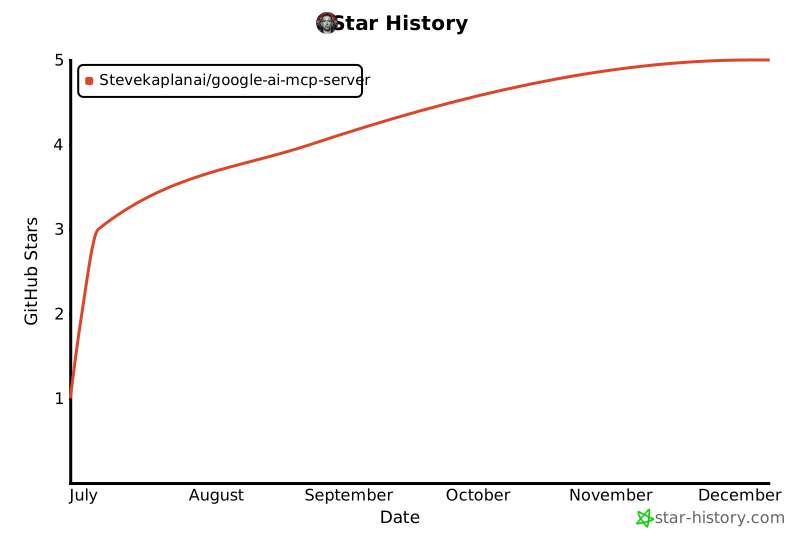
## 🌟 Star History
[](https://star-history.com/#Stevekaplanai/google-ai-mcp-server&Date)
---
Made with ❤️ by [Steve Kaplan](https://github.com/Stevekaplanai)