@slackero/bootstrap-show-password-toggle
Version:
A show password as text toggle for Bootstrap
70 lines (45 loc) • 3.14 kB
Markdown
[](https://raw.githubusercontent.com/slackero/bootstrap-show-password-toggle/master/LICENSE)
[](https://www.npmjs.com/package/@slackero/bootstrap-show-password-toggle)
# Bootstrap Show Password Toggle
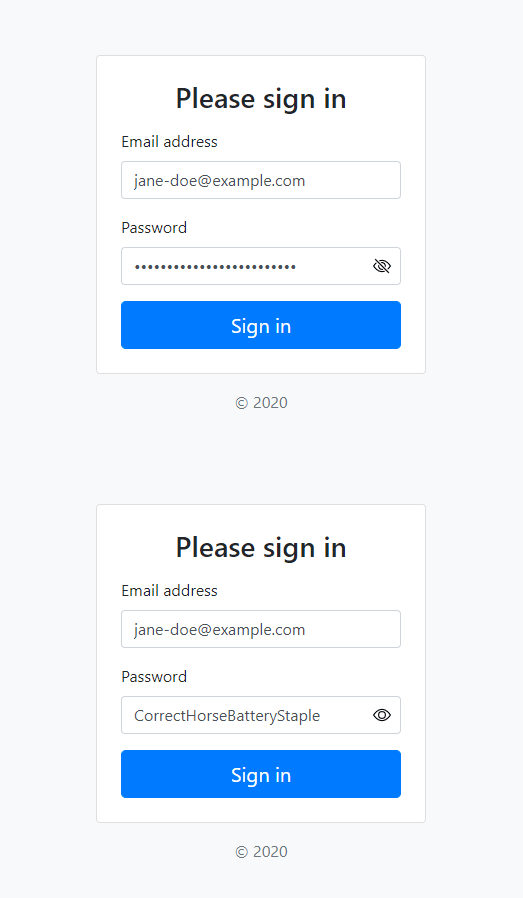
A show password as text toggle for Bootstrap forms
- Native-looking UI
- Vanilla JavaScript with no dependencies
- Base64 encoded SVG icons (no external images or fonts required)
- Graceful fallback for browsers with JavaScript disabled
- Works with Bootstrap 4 and 5
- Only 1KB gzipped
## Quick Start
- [Download the latest release](https://github.com/slackero/bootstrap-show-password-toggle/releases)
- Clone the repo `git clone https://github.com/slackero/bootstrap-show-password-toggle.git`
- Install with [npm](https://www.npmjs.com/package/@slackero/bootstrap-show-password-toggle) `npm i @slackero/bootstrap-show-password-toggle`
## Usage
1. Include the `show-password-toggle.css` in your CSS
2. Wrap the password input in an `input-group` div as follows:
```html
<div class="input-group">
<input type="password"
class="form-control rounded"
required
data-show="Show password as plain text."
data-hide="Hide password."
>
</div>
```
3. Load the `show-password-toggle.min.js` after the form
I highly recommend adding the attributes: `spellcheck="false"` and `autocapitalize="off"` to the password input so that when the password is displayed in plain text the input is not auto-corrected, capitalized or spellchecked (to avoid red squiggly line underneath).
You should also add `id="current-password"` and `autocomplete="current-password"` to help browsers autocomplete the form.
## Demo
- [Bootstrap 4 Demo](https://slackero.github.io/bootstrap-show-password-toggle/tests/bootstrap4-sign-in/)
- [Bootstrap 4 Demo with jQuery](https://slackero.github.io/bootstrap-show-password-toggle/tests/bootstrap4-jquery-sign-in/)
- [Bootstrap 5 Demo](https://slackero.github.io/bootstrap-show-password-toggle/tests/bootstrap5-sign-in/)
## Browser Support
Works well with all the browsers [supported by Bootstrap](https://getbootstrap.com/docs/4.6/getting-started/browsers-devices/#supported-browsers)
## FAQS
Q. **Can I change the show password icon?**
A. You could change the icon displayed by replacing the `.input-password[type="password"]` [Base64 encoded](https://yoksel.github.io/url-encoder/) background image. SVG is recommended.
## Known Issues
- For browsers without [Element.after()](https://developer.mozilla.org/en-US/docs/Web/API/Element/after#browser_compatibility) load `show-password-toggle-jquery.min.js` instead. jQuery or Cash needs to be loaded before.
## Credits and Thanks
- MDO and Bootstrap team for the [icons](https://icons.getbootstrap.com/icons/eye-slash/)
- Sam Dutton at Google for the idea and initial JavaScript from the '[Sign-in form Best Practises](https://web.dev/sign-in-form-best-practices/)' article