@silexlabs/silex
Version:
Free and easy website builder for everyone.
124 lines (80 loc) • 3.97 kB
Markdown
## Silex core library
Core library of Silex — Node.js server, visual editor, npx CLI and Docker image. Powers the online editor, the desktop app and all Silex integrations.
Useful links
* [Documentation for developers](https://docs.silex.me/en/dev/run)
* [npm package for this repo](https://www.npmjs.com/package/@silexlabs/silex)
* [Docker image for this repo](https://hub.docker.com/r/silexlabs/silex)
* [Official website](https://www.silex.me/)
* [Road map (please help defining tasks and prioritising)](https://roadmap.silex.me)
* [Bug report in Github issues](https://github.com/silexlabs/Silex/issues)
* [Forums in Github discussions](https://community.silex.me)
* [Silex meta package with more source code](https://github.com/silexlabs/Silex)
Help make Silex sustainable by being [part of the community](https://community.silex.me/), [contributing documentation](https://docs.silex.me/), [making a financial contribution](https://opencollective.com/silex), [report bugs](https://github.com/silexlabs/Silex/issues).
## Getting Started
### Online Version
The easiest way to start using Silex is by using the online version provided by [Silex Labs foundation](https://www.silexlabs.org). Simply visit [v3.silex.me](https://v3.silex.me) and start building your website right away.
### Desktop App (beta)
There is a desktop application that you can install on your computer which may be faster since it uses your local files and it works offline. You can download the desktop app from the [Silex desktop repository](https://github.com/silexlabs/silex-desktop/releases/latest).
### Local or Server Installation
You can also run Silex locally or on your server using `npx`, `npm`, or `Docker`.
Check the [developer docs](https://docs.silex.me/en/dev) for configuration options and integration with your js projects.
#### Using npx
```bash
npx @silexlabs/silex
```
This command will run Silex with default config.
#### Using Docker
```bash
docker run -p 6805:6805 silexlabs/silex
```
This command will run Silex in a Docker container.
#### Using npm
First, install Silex as a dev dependency in your project:
```bash
npm install --save-dev @silexlabs/silex
```
Then, you can run Silex with the `silex` command in your `package.json` scripts:
```json
{
"scripts": {
"start": "silex"
}
}
```
## Configuration
You can configure Silex using environment variables and command-line options. All available options can be found in the [developer docs](https://docs.silex.me/en/dev) as well as in the code: [`src/ts/server/cli.ts`](./src/ts/server/cli.ts).
Check the example config files - which are the same as plugins in Silex, in the [`examples/`](./examples/) folder. To test these configs, start Silex locally like this:
```sh
$ npx silex --client-config=./examples/client-config-transformers.js --server-config=`pwd`/examples/server-config-plugins.js
```
Or like this:
```sh
$ SILEX_CLIENT_CONFIG=./examples/client-config-transformers.js SILEX_SERVER_CONFIG=`pwd`/examples/server-config-plugins.js npm run start:debug
```
## Development
To contribute to this project:
1. **Clone the Repository**:
```bash
git clone https://github.com/silexlabs/silex-lib.git
cd silex-lib
```
2. **Install Dependencies**:
```bash
npm install
```
3. **Build the Project**:
```bash
npm run build
```
4. **Start Development Server**:
```bash
npm run start:debug
```
## Contributing
Contributions are welcome! Please read our [contributing guidelines](CONTRIBUTING.md) for details on how to contribute to Silex.
## License
Silex is free and open-source software licensed under the [GPL-3.0](LICENSE.md).
## Dependencies
The upstream projects we use in Silex are all listed in [Silex meta package](https://github.com/silexlabs/Silex)
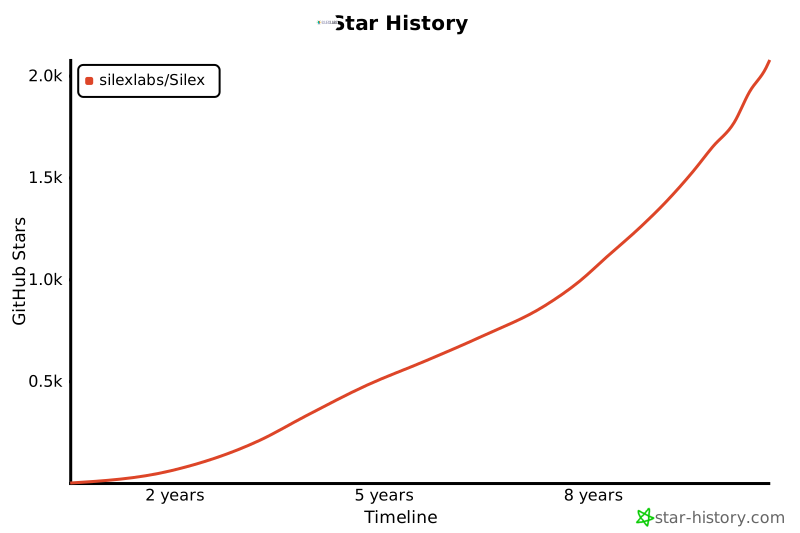
## Github stars history
[](https://star-history.com/#silexlabs/Silex&Timeline)