@silexlabs/grapesjs-symbols
Version:
Symbols for GrapesJS
209 lines (153 loc) • 6.15 kB
Markdown
[](https://github.com/silexlabs/grapesjs-symbols/actions/workflows/test.yml)
This plugin adds feature to GrapesJS editor, for users to be able to reuse elements in a website and accross pages
> This code is part of a bigger project: [Silex v3](https://www.silex.me/) which aims to be a free/libre alternative to webflow
Links
* [DEMO on Codepen](https://codepen.io/lexoyo/full/xxJGEwo)
* [Npm package](https://www.npmjs.com/package/@silexlabs/grapesjs-symbols)
* [Discussion about this plugins and Symbols, bug report etc](https://github.com/artf/grapesjs/discussions/4317)
* [Discussion about ongoing developments](https://github.com/silexlabs/grapesjs-symbols/issues/1)
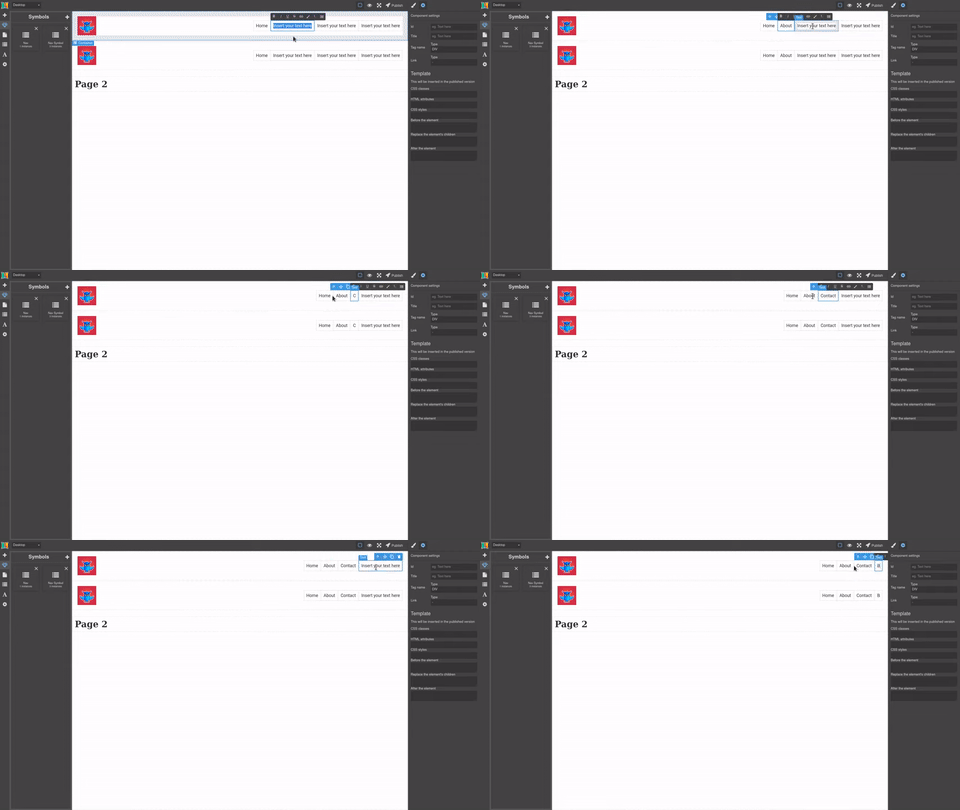
Features
* Create a symbol from an element
* Create symbol instances
* Sync instances: when one instance is modified, update all other instances
* Temporary pause sync
* Unlink an instance so that is stops syncing
* Symbol have a name and an icon
* View symbol icon for all instances in the layer manager
* Optional list of symbols which support draging symbols to the stage
* Support for symbols in symbols
* Support sync accross grapesjs pages
```html
<link href="https://unpkg.com/grapesjs/dist/css/grapes.min.css" rel="stylesheet">
<script src="https://unpkg.com/grapesjs"></script>
<script src="https://unpkg.com/@silexlabs/grapesjs-symbols"></script>
<div id="gjs"></div>
```
When loaded in an HTML page with the above code, the plugin will be available as `GrapesJSSymbols` in the global scope
When loaded as a module, the plugin will be available as a standard import: `import GrapesJSSymbols from '@silexlabs/grapesjs-symbols'`
```js
import grapesjs from 'grapesjs' // unless you load it from a CDN, then omit this line
import GrapesJSSymbols from '@silexlabs/grapesjs-symbols' // unless you load it from a CDN, then omit this line
const editor = grapesjs.init({
container: '#gjs',
height: '100%',
fromElement: true,
storageManager: false,
plugins: [GrapesJSSymbols],
pluginsOpts: {
[]: {
appendTo: '.gjs-pn-views-container',
},
},
})
```
```css
body, html {
margin: 0;
height: 100%;
}
```
Add a button to create a new symbol
```html
<div id='basic-actions' class="panel__basic-actions" style="z-index: 9; background: red; position: absolute; min-height: 500px"></div>
```
And the JS for the button
```js
var idx = 0
editor.on('load', () => {
editor.Panels.addPanel({
id: 'basic-actions',
el: '.panel__basic-actions',
buttons: [
{
id: 'alert-button',
className: 'btn-alert-button',
label: 'Create symbol pink',
command(editor) {
var label = prompt('Label', 'Symbol ' + ++idx)
var icon = prompt('Icon', 'fa-list')
editor.runCommand('symbols:add', { label, icon })
}
},
]
})
})
```
Add some content programmatically if you need to
```js
editor.addComponents(`
<div class="main">
<h1 class="title">Test title</h1>
<p class="content">Test content text lorem ipsum</p>
</div>
`)
```
Select a component on the stage, click on "Create symbol", then duplicate the component or drag and drop the symbol on the stage
Finally change the content of the compoenent or add/remove classes or attributes for all the instances to be updated as well
> TBD
* Plugin name: `@silexlabs/grapesjs-symbols`
* Components
* `component-id-1`
* `component-id-2`
* ...
* Blocks
* `block-id-1`
* `block-id-2`
* ...
A **symbol** is a structure holding the symbol data, see [the comment in the Symbol module](./src/model/Symbol.ts)
A **symbol model** is a grapesjs Component which is not attached to the DOM and is used to create instances of a symbol
An **instance** is a grapesjs Component which is in sync with a Symbol, it is a root component with child components which are also synced between symbols
These are the IDs we need in models attributes
* Each Symbol has `symbolId`
* Each instance (the root component) has `symbolId` set to its symbol cid, this is used to find the symbol associated to this instance
* Each model also has the `symbolId` set to its symbol cid
* Each child of an instance has `symbolChildId` set to the same ID in all the symbols, this is used to sync the symbol instances children
Notes
* `symbolChildId` attributes are not synced between symbol instances (the root of a symbol instance) since it can be different when an instance is in two different other symbols
* In a collection of Symbol, you can get the symbol with `.get(symbolId)` since the symbols have their cid set to their initial `symbolId` - see [the initialize method in Symbol.ts](./src/model/Symbol.ts)
## Options
> TBD
| Option | Description | Default |
|-|-|-|
| `appendTo` | CSS selector to choose where to attach the list of symbols. | `#symbols` |
| `emptyText` | A text to be displayed when there is no symbols in the list. | `No symbol yet.` |
| `primaryColor` | Color for the UI (list of symbols and traits in the property manager) | `#b9a5a6` |
| `secondaryColor` | Color for the UI (list of symbols and traits in the property manager) | `#463a3c` |
| `highlightColor` | Color for the UI (list of symbols and traits in the property manager) | `#d97aa6` |
## Download
* CDN
* `https://unpkg.com/@silexlabs/grapesjs-symbols` (will make the plugin available to the global scope as `GrapesJSSymbols`)
* NPM
* `npm i @silexlabs/grapesjs-symbols`
* GIT
* `git clone https://github.com/silexlabs/grapesjs-symbols.git`
## Development
Clone the repository
```sh
$ git clone https://github.com/silexlabs/grapesjs-symbols.git
$ cd grapesjs-symbols
```
Install dependencies
```sh
$ npm i
```
Start the dev server
```sh
$ npm start
```
Build the source
```sh
$ npm run build
```
## License
AGPL-v3