@silexlabs/grapesjs-data-source
Version:
Grapesjs Data Source
427 lines (319 loc) • 16.6 kB
Markdown
# GrapesJs Data Source plugin
This GrapesJS plugin integrates various APIs into the editor.
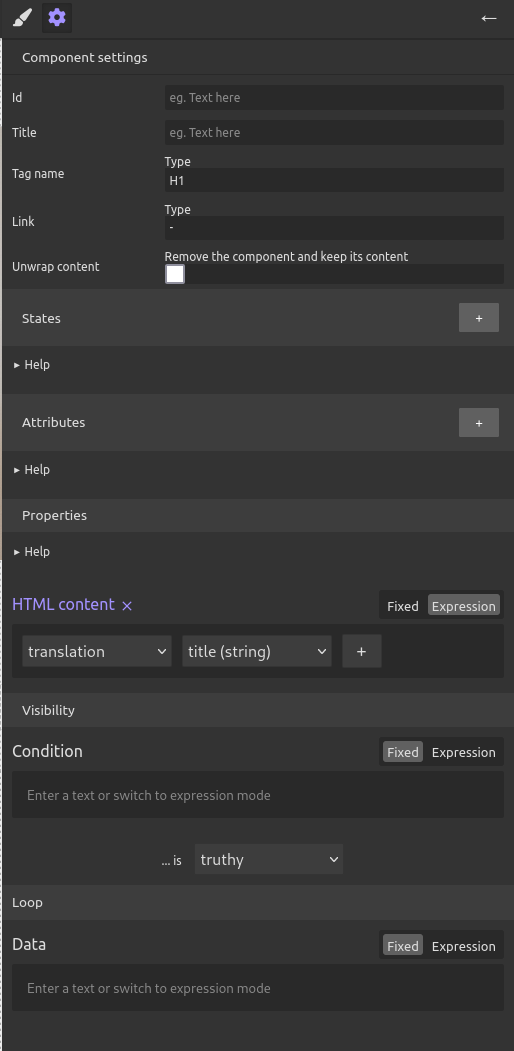
It makes a new [expressions UI](#expressions-ui) available to the user so that she can manage custom states on components, linking them to data from a CMS or a data base or an API.
The plugin also has data management feature needed to manage components states, expressions made of tokens, build a query from the component states.
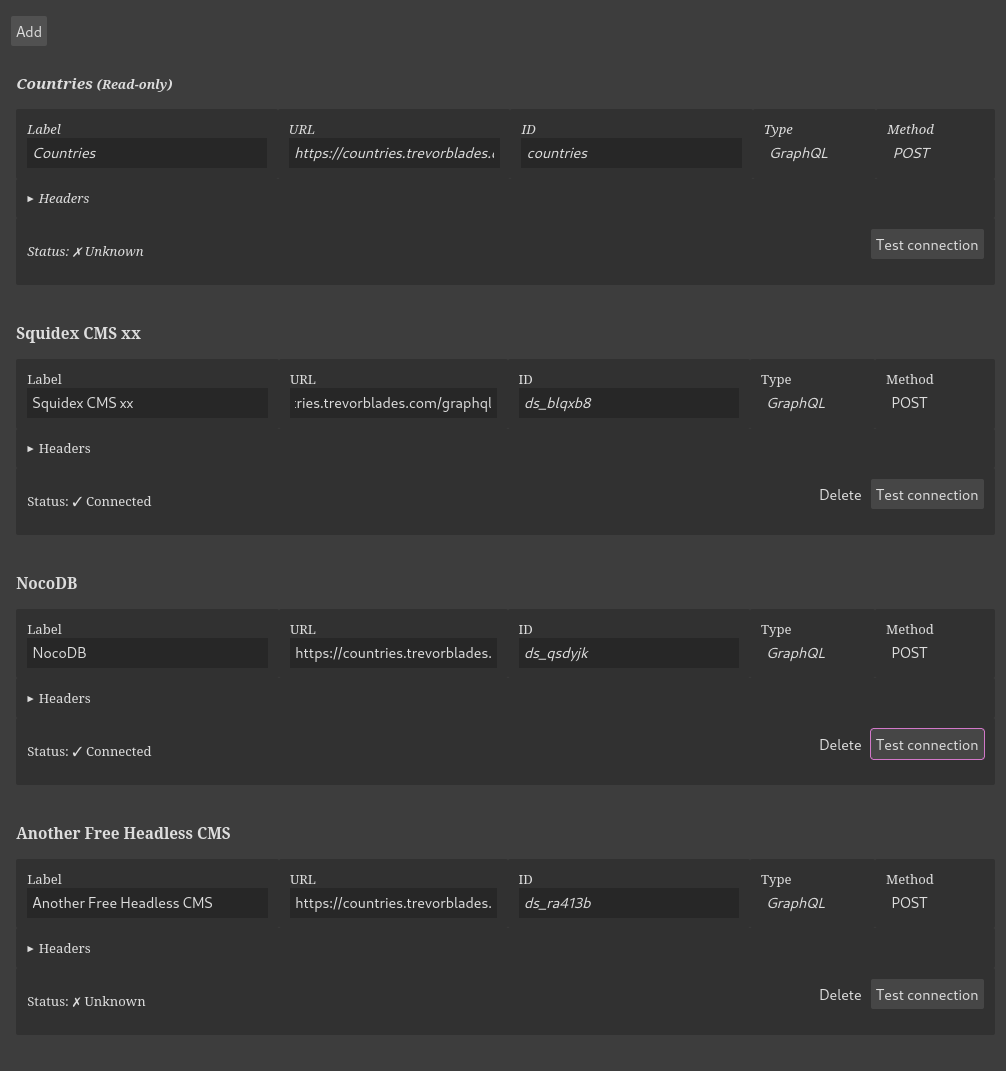
Finally there is a [settings dialog](#settings-dialog) to manage the data sources and save them with the website.
> This code is part of a larger project: [about Silex v3](https://www.silexlabs.org/silex-v3-kickoff/)
[DEMO](https://codepen.io/lexoyo/full/xxMbxeB)
Discussions, bug reports in [Silex community forums](https://community.silex.me/) or [GitHub issues](https://github.com/silexlabs/grapesjs-data-source/issues)
Features
* [x] Import data from data source (GraphQL APIs) in the editor
* [x] Configure data sources from config
* [x] Dialog to configure data sources from the editor
* [x] Edit component attributes, and dynamic properties (loop, visibility, innerHTML)
* [x] Use states and liquid filters in expressions
* [x] Generate GraphQL query from component states
* [x] Save data sources with the website data
* [x] Compatible with [GrapesJS notifications plugin](https://github.com/silexlabs/grapesjs-notifications)
* [x] Events and API to manage the data, the completion of exrpessions, and the GraphQL query
* [x] Web component to display the expressions and edit them
* [ ] GrapesJs commands to handle data sources instead of a programmatic API (WIP in stc/commands.ts)
* [ ] Add more liquid filters
* [ ] Add more data sources (REST, Open API)
## Supported CMS and APIs
This plugin suports only GraphQL for now, contribution are welcome for support of other REST specific APIs or more generic Open API
Here is [a list of GraphQL APIs you can use](https://github.com/graphql-kit/graphql-apis), it includes fake data and demo public APIs. Also consider these open source self hostable services:
* [Strapi headless CMS](https://strapi.io/)
* [Directus headless CMS](https://directus.io/)
* [Supabase database (a Firebase alternative)](https://supabase.com/)
* [Tina markdown files to GraphQL tool](https://tina.io/docs/graphql/overview/)
* Drupal, WordPress... All have GraphQL support
Contributions welcome for documenting the use of these data sources
## Definitions
**Expressions** are made of tokens, which are the building blocks of the expressions. Tokens are the properties of the data source, like `post.data.attributes.title` or `post.data.attributes.content`.
**States** belong to a component, they are expressions which are not output in the final website, they are made to be included in other expressions. Also they are used in the generated GraphQL query.
**Attributes** are the HTML attributes of a component, like `src` or `href` or any other attribute. Special attributes are `class` and `style` which if you put several of them will not override each other but will be merged.
**Properties** are the dynamic properties of a component which include the HTML content (innerHTML), the visibility (a condition to show or hide the component), a loop property (to repeat the component for each item in a list).
**Data source** is a service which provides the data to the editor. For now it has to be a GraphQL API, maybe I'll add open API later.
## Included UI elements
### Expressions UI
This UI is used to manage the states, attributes and dynamic properties of the components. It is a panel which shows the expressions of the selected component and allows the user to add, edit, and remove them.
### Settings dialog
This dialog is used to manage the data sources. It allows the user to add, edit, and remove data sources. It also allows the user to test the data sources and (comming in v2) see the data they provide.
## Usage
The output of this plugin is component states which are stored on the components. This data then needs to be used by other plugins or your application. For example you can implement a "publish" feature to generate pages and data files for a static site generator or CMSs. Or you can make a vue app generator with it, by implementing a "renderer" which takes the states and adds the vue code to the generated website.
Here is how your application can use the data generated by the user with this plugin:
1. Components states
```js
import { getStateIds, getState } from './state'
// ...
const component = editor.getSelected()
// Get one specific state
console.log('innerHTML state:', getState(component, 'innerHTML'))
// Display all states of the component
const stateIds = getStateIds(component)
console.log('Alls states:', stateIds.map(stateId => getState(component, stateId)))
// Detect state changes
editor.on('component:state:changed', ({state, component}) => {
console.log('State changed:', {state, component})
})
```
Here is an example output:
```
innerHTML state: {"expression":[{"type":"property","propType":"field","fieldId":"post","label":"post","typeIds":["PostEntityResponse"],"dataSourceId":"strapi","kind":"object","options":{"id":"1"}},{"type":"property","propType":"field","fieldId":"data","label":"data","typeIds":["PostEntity"],"dataSourceId":"strapi","kind":"object"},{"type":"property","propType":"field","fieldId":"attributes","label":"attributes","typeIds":["Post"],"dataSourceId":"strapi","kind":"object"},{"type":"property","propType":"field","fieldId":"title","label":"title","typeIds":["String"],"dataSourceId":"strapi","kind":"scalar"}]}
All states: [{"expression":[{"type":"property","propType":"field","fieldId":"post","label":"post","typeIds":["PostEntityResponse"],"dataSourceId":"strapi","kind":"object","options":{"id":"1"}},{"type":"property","propType":"field","fieldId":"data","label":"data","typeIds":["PostEntity"],"dataSourceId":"strapi","kind":"object"},{"type":"property","propType":"field","fieldId":"attributes","label":"attributes","typeIds":["Post"],"dataSourceId":"strapi","kind":"object"},{"type":"property","propType":"field","fieldId":"title","label":"title","typeIds":["String"],"dataSourceId":"strapi","kind":"scalar"}]}]
```
1. GraphQL query to get the data needed for the current page in functino of the data used in the states
```js
// Get the current page
var page = editor.Pages.getSelected()
// Get the GraphQL query
const query = editor.DataSourceManager.getPageQuery(page)
console.log(query)
```
Here is an example output:
```json
{
"strapi": "posts {\n data {\n attributes {\n title\n content\n}\n}\n}"
}
```
Use the Backbone collection `editor.DataSourceManager` to manage the data sources. This collection holds the different available data sources and their settings (type, url, auth...). This data is provided by the config.
To get the data tree, use the method `getDataTree()`, then use its methods to get GraphQL types, queries, and data. You probably want to use the `getPageQuery()` method to get the GraphQL query for the current page.
```js
const dataSourceManager = editor.DataSourceManager
const dataTree = dataSourceManager.getDataTree()
const pageQuery = dataTree.getPageQuery(page)
```
## Available commands
The plugin adds a command to refresh the data sources. This command is used to update the data in the editor when the data sources are changed.
```js
editor.runCommand('data-source:refresh')
```
Your app can provide different command names, see the options below.
## Available events
The plugin emits events to notify the application of changes in the data sources, states, and expressions. Here are some of the events you can listen to:
* `data-source:refresh`: Emitted when the data sources are refreshed.
* `data-source:changed`: Emitted when a data source is changed.
* `data-source:error`: Emitted when there is an error with a data source.
* `component:state:changed`: Emitted when a component state is changed.
These events are emitted on the editor instance, so you can listen to them like this:
```js
editor.on('data-source:refresh', () => {
console.log('Data sources refreshed')
})
editor.on('data-source:changed', (dataSource) => {
console.log('Data source changed:', dataSource)
})
editor.on('data-source:error', (error) => {
console.error('Data source error:', error)
})
editor.on('component:state:changed', ({state, component}) => {
console.log('State changed:', {state, component})
})
```
## Configuration
Here is a simple example of how to use the plugin in your application
### HTML
```html
<link href="https://unpkg.com/grapesjs/dist/css/grapes.min.css" rel="stylesheet">
<script src="https://unpkg.com/grapesjs"></script>
<script src="https://unpkg.com/@silexlabs/grapesjs-data-source"></script>
<div id="gjs"></div>
```
### JS
```js
const editor = grapesjs.init({
container: '#gjs',
height: '100%',
fromElement: true,
storageManager: false,
plugins: ['/grapesjs-data-source'],
pluginsOpts: {
'/grapesjs-data-source': {
dataSources: [{
id: 'countries',
type: 'graphql',
label: 'Countries',
url: 'https://countries.trevorblades.com/graphql',
method: 'POST',
headers: {},
}],
properties: {
el: () => editor.Panels.getPanel('views-container').view.el,
button: () => editor.Panels.getPanel('views').get('buttons').get('open-tm'),
},
filters: 'liquid',
}
}
});
```
### CSS
```css
body, html {
margin: 0;
height: 100%;
}
```
## Local tests and development
Use a local strapi to test GraphQL data source
```sh
$ cd strapi
$ yarn develop
```
Strapi admin
* `http://localhost:1337/admin/`
* Login: `alex.com`
* Password: `test_TEST1`
Strapi GraphQL:
* `http://localhost:1337/graphql`
* `Bearer 456fe45a764921a26a81abd857bf987cd1735fbdbe58951ff5fc45a1c0ed2c52ab920cc0498b17411cd03954da7bb3e62e6bae612024360fb89717bd2274493ce190f3be14cdf47fccd33182fd795a67e48624e37f7276d9f84e98b2ec6945926d7a150e8c5deafa272aa9d9d97ee89e227c1edb1d6740ffd37a16b2298b3cc8`
Use this as a data source in the plugin options:
```js
grapesjs.init({
// ...
// Your config here
// ...
plugins: ['/grapesjs-data-source'],
pluginsOpts: {
'/grapesjs-data-source': {
dataSources: [
{
id: 'strapi',
type: 'graphql',
name: 'Strapi',
url: 'http://localhost:1337/graphql',
method: 'POST',
headers: {
'Authorization': 'Bearer 79c9e74b3cf4a9f5ce2836b81fd8aaf8a986b5696769456d3646a3213f5d7228634a1a15a8bbad4e87c09ab864c501499c6f8955cf350e49b89311764009aee68589a4b78f22c06b7e09835b48cd6f21fb84311ce873cd5672bd4652fde3f5f0db6afb258dfe7b93371b7632b551ecdd969256ffc076ab8f735b5d8c7d228825',
'Content-Type': 'application/json',
},
},
],
properties: {
el: () => editor.Panels.getPanel('views-container').view.el,
button: () => editor.Panels.getPanel('views').get('buttons').get('open-tm'),
},
filters: 'liquid',
}
}
});
```
## Configuration examples
You can find examples in [Silex CMS documentation](https://docs.silex.me/en/user/cms)
Here are examples of APIs I tested:
Strapi
```
{
id: 'strapi',
type: 'graphql',
name: 'Strapi',
url: 'http://localhost:1337/graphql',
method: 'POST',
headers: {
'Authorization': 'Bearer 456fe45a764921a2...6b2298b3cc8',
'Content-Type': 'application/json',
},
}
```
Supabase (I had a CORS problem, let's discuss this in an issue if you want to give it a try)
```
{
id: 'supabase',
type: 'graphql',
name: 'Supabase',
url: `https://api.supabase.io/platform/projects/jpslgeqihfj/api/graphql`,
method: 'POST',
headers: {
'Authorization': 'Bearer eyjhbgcioijiuz...tww8imndplsfm',
'Content-Type': 'application/json',
'Access-Control-Allow-Origin': '*',
'Access-Control-Allow-Headers': 'authorization, x-client-info, apikey, content-type',
},
}
```
## Options
| Option | Description | Default |
|-|-|-
| `dataSources` | List of data sources, see config examples and the plugin code for docs ([data source options](./src/index.ts) and [GraphQL data source options](./src/datasources/GraphQL.ts)) | `[]` |
| `filters` | The string 'liquidjs' for LiquidJs filters or a list of filters (JS objects like the ones in `src/filters/liquid.ts`) | `[]` |
| `view` | Options for the UIs included with this plugin | N/A |
| `view.el` | UI element to attach [the expressions UI](#expressions-ui) | `.gjs-pn-panel.gjs-pn-views-container` |
| `view.button` | Optional GrapesJs button or a function which returns a button. This button will show/hide [the expressions UI](#expressions-ui), it's just a helper to save you from doing it yourself. | `undefined` which means no button |
| `view.settingsEl` | UI element to attach the [settings dialog](#settings-dialog). You can provide a string (css selector), a function which returns a DOM element, or a DOM element directly. | `.gjs-pn-views` |
| `view.styles` | CSS styles which are applied to the UI (inserted in a style tag) | See the file `src/view/defaultStyles.ts` |
| `view.optionsStyles` | CSS styles which are applied to each "expression selector" UI (inserted in a style tag) | See the file `src/view/defaultStyles.ts` |
| `view.defaultFixed` | If true, the UI shows fixed by default or if false it shows expression by default | `false` |
| `commands` | List of GrapesJs commands added to the editor. You can use this to change the names of the commands. | N/A |
| `commands.refresh` | Name of the command to refresh the data sources | `data-source:refresh` |
## Download
* CDN
* `https://unpkg.com/@silexlabs/grapesjs-data-source`
* NPM
* `npm i /grapesjs-data-source`
* GIT
* `git clone https://github.com/silexlabs/grapesjs-data-source.git`
## Usage
Directly in the browser
```html
<link href="https://unpkg.com/grapesjs/dist/css/grapes.min.css" rel="stylesheet"/>
<script src="https://unpkg.com/grapesjs"></script>
<script src="path/to/grapesjs-data-source.min.js"></script>
<div id="gjs"></div>
<script type="text/javascript">
var editor = grapesjs.init({
container: '#gjs',
// ...
plugins: ['/grapesjs-data-source'],
pluginsOpts: {
'/grapesjs-data-source': { /* options */ }
}
});
</script>
```
Modern javascript
```js
import grapesjs from 'grapesjs';
import plugin from '/grapesjs-data-source';
import 'grapesjs/dist/css/grapes.min.css';
const editor = grapesjs.init({
container : '#gjs',
// ...
plugins: [plugin],
pluginsOpts: {
[plugin]: { /* options */ }
}
// or
plugins: [
editor => plugin(editor, { /* options */ }),
],
});
```
## Development
Clone the repository
```sh
$ git clone https://github.com/silexlabs/grapesjs-data-source.git
$ cd grapesjs-data-source
```
Install dependencies
```sh
$ npm i
```
Start the dev server
```sh
$ npm start
```
Build the source
```sh
$ npm run build
```
### Developement notes
Here are the key parts of the plugin:
1. **editor.DataSourceManager**: A Backbone collection to manage the APIs. This collection holds the different available data sources and their settings (type, url, auth...). This data is provided by the config. The main API of this class is `getDataTree()` to get the data tree
1. **DataTree**: A class to manage component states and generate queries to APIs. Component states are used to build the query needed for the current page, and they can be used to create other states in child components or override a component's attributes or style. This collection is generated from the components attributes, it is not stored with the site data.
1. **DataSource**: An interface for classes managing an API, abstracting the calls and queries. It includes methods like `getData(query)` and `getTypes()`.
The components with "Loop Template" also have a `current` state, similar to dynamic pages.
The plugin's architecture is designed to provide a flexible and efficient way to manage data and rendering in the editor, supporting dynamic content and static site generation. It abstracts the complexities of working with different APIs and provides a unified way to manage component states, templates, and dynamic content.
## License
MIT